操作系统(Linux)

@

补充

第四周

vfork

  1. 系统调用
    vfork和它创建的子进程和父进程共享地址空间
    fork创建独立的地址空间
  2. pid_t vfork(void)
    共享包括栈空间

  3. ![在这里插入图片描述]( https://img-blog.csdnimg.cn/20200508121133535.png?x-oss-process=image/watermark ,type_ZmFuZ3poZW5naGVpdGk,shadow_10,text_aHR0cHM6Ly9ibG9nLmNzZG4ubmV0L3FxXzQzNzU5Njk0,size_16,color_FFFFFF,t_70)
    例2:栈错误,内存错误
    ![在这里插入图片描述]( https://img-blog.csdnimg.cn/2020050812134428.png?x-oss-process=image/watermark ,type_ZmFuZ3poZW5naGVpdGk,shadow_10,text_aHR0cHM6Ly9ibG9nLmNzZG4ubmV0L3FxXzQzNzU5Njk0,size_16,color_FFFFFF,t_70)
    ![在这里插入图片描述]( https://img-blog.csdnimg.cn/20200508121701890.png?x-oss-process=image/watermark ,type_ZmFuZ3poZW5naGVpdGk,shadow_10,text_aHR0cHM6Ly9ibG9nLmNzZG4ubmV0L3FxXzQzNzU5Njk0,size_16,color_FFFFFF,t_70)
    exit(0); 终止进程,不返回

在进程当中运行新代码

  1. 替换进程映像
    exec()
    ![在这里插入图片描述]( https://img-blog.csdnimg.cn/20200508122106678.png?x-oss-process=image/watermark ,type_ZmFuZ3poZW5naGVpdGk,shadow_10,text_aHR0cHM6Ly9ibG9nLmNzZG4ubmV0L3FxXzQzNzU5Njk0,size_16,color_FFFFFF,t_70)

  2. ![3.]( https://img-blog.csdnimg.cn/20200508122137110.png?x-oss-process=image/watermark ,type_ZmFuZ3poZW5naGVpdGk,shadow_10,text_aHR0cHM6Ly9ibG9nLmNzZG4ubmV0L3FxXzQzNzU5Njk0,size_16,color_FFFFFF,t_70)
    ![在这里插入图片描述]( https://img-blog.csdnimg.cn/20200508122332953.png?x-oss-process=image/watermark ,type_ZmFuZ3poZW5naGVpdGk,shadow_10,text_aHR0cHM6Ly9ibG9nLmNzZG4ubmV0L3FxXzQzNzU5Njk0,size_16,color_FFFFFF,t_70)
    ![在这里插入图片描述]( https://img-blog.csdnimg.cn/20200508122404553.png?x-oss-process=image/watermark ,type_ZmFuZ3poZW5naGVpdGk,shadow_10,text_aHR0cHM6Ly9ibG9nLmNzZG4ubmV0L3FxXzQzNzU5Njk0,size_16,color_FFFFFF,t_70)
  3. system()函数
    ![在这里插入图片描述]( https://img-blog.csdnimg.cn/20200508122513561.png?x-oss-process=image/watermark ,type_ZmFuZ3poZW5naGVpdGk,shadow_10,text_aHR0cHM6Ly9ibG9nLmNzZG4ubmV0L3FxXzQzNzU5Njk0,size_16,color_FFFFFF,t_70)
  4. 如果使用新映像完全取代,使用exec

  5. ‘新建进程system
    ![在这里插入图片描述]( https://img-blog.csdnimg.cn/20200508122739230.png?x-oss-process=image/watermark ,type_ZmFuZ3poZW5naGVpdGk,shadow_10,text_aHR0cHM6Ly9ibG9nLmNzZG4ubmV0L3FxXzQzNzU5Njk0,size_16,color_FFFFFF,t_70)
    ![在这里插入图片描述]( https://img-blog.csdnimg.cn/20200508122850897.png?x-oss-process=image/watermark ,type_ZmFuZ3poZW5naGVpdGk,shadow_10,text_aHR0cHM6Ly9ibG9nLmNzZG4ubmV0L3FxXzQzNzU5Njk0,size_16,color_FFFFFF,t_70)
    加&变为后台进程
    ![在这里插入图片描述]( https://img-blog.csdnimg.cn/20200508123046931.png?x-oss-process=image/watermark ,type_ZmFuZ3poZW5naGVpdGk,shadow_10,text_aHR0cHM6Ly9ibG9nLmNzZG4ubmV0L3FxXzQzNzU5Njk0,size_16,color_FFFFFF,t_70)
    ps:查看进程信息
    在这里插入图片描述
  6. 用exec执行命令
    ![在这里插入图片描述]( https://img-blog.csdnimg.cn/20200508123456380.png?x-oss-process=image/watermark ,type_ZmFuZ3poZW5naGVpdGk,shadow_10,text_aHR0cHM6Ly9ibG9nLmNzZG4ubmV0L3FxXzQzNzU5Njk0,size_16,color_FFFFFF,t_70)
    down没有被打印,本进程被已经被替换掉。

回收进程资源

  1. 两部分资源
    ![在这里插入图片描述]( https://img-blog.csdnimg.cn/20200508145601406.png?x-oss-process=image/watermark ,type_ZmFuZ3poZW5naGVpdGk,shadow_10,text_aHR0cHM6Ly9ibG9nLmNzZG4ubmV0L3FxXzQzNzU5Njk0,size_16,color_FFFFFF,t_70)
  2. 回收用户空间资源
    ![在这里插入图片描述]( https://img-blog.csdnimg.cn/2020050814565726.png?x-oss-process=image/watermark ,type_ZmFuZ3poZW5naGVpdGk,shadow_10,text_aHR0cHM6Ly9ibG9nLmNzZG4ubmV0L3FxXzQzNzU5Njk0,size_16,color_FFFFFF,t_70)
  3. return 和 exit区别
    ![在这里插入图片描述]( https://img-blog.csdnimg.cn/20200508145814261.png?x-oss-process=image/watermark ,type_ZmFuZ3poZW5naGVpdGk,shadow_10,text_aHR0cHM6Ly9ibG9nLmNzZG4ubmV0L3FxXzQzNzU5Njk0,size_16,color_FFFFFF,t_70)
    在这里插入图片描述
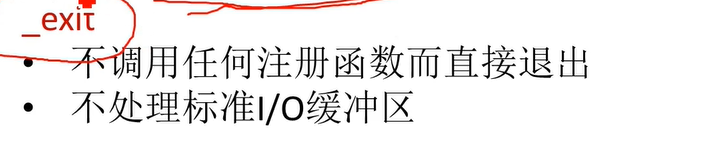
  4. exit 和 _exit区别
    ![在这里插入图片描述]( https://img-blog.csdnimg.cn/20200508150054374.png?x-oss-process=image/watermark ,type_ZmFuZ3poZW5naGVpdGk,shadow_10,text_aHR0cHM6Ly9ibG9nLmNzZG4ubmV0L3FxXzQzNzU5Njk0,size_16,color_FFFFFF,t_70)

  5. ![在这里插入图片描述]( https://img-blog.csdnimg.cn/20200508150124757.png?x-oss-process=image/watermark ,type_ZmFuZ3poZW5naGVpdGk,shadow_10,text_aHR0cHM6Ly9ibG9nLmNzZG4ubmV0L3FxXzQzNzU5Njk0,size_16,color_FFFFFF,t_70)
    用return返回,循环会一直进行。
    用exit返回,会终止当前进程
  6. 例2
    在这里插入图片描述
    在这里插入图片描述
    exit刷新文件缓冲区
    _exit不刷新文件缓冲区
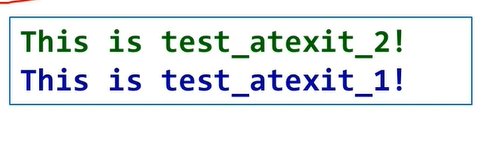
  7. 注册退出函数
    int atexit (void (*function)(void))
    (1)先进后出:先注册的后执行
    (2)等到exit(0)执行时执行才退出函数
    (3)_exit不执行退出函数,return执行。
    ![在这里插入图片描述]( https://img-blog.csdnimg.cn/20200508150747141.png?x-oss-process=image/watermark ,type_ZmFuZ3poZW5naGVpdGk,shadow_10,text_aHR0cHM6Ly9ibG9nLmNzZG4ubmV0L3FxXzQzNzU5Njk0,size_16,color_FFFFFF,t_70)
    在这里插入图片描述
  8. 回收内核空间资源
    ![在这里插入图片描述]( https://img-blog.csdnimg.cn/20200508151044135.png?x-oss-process=image/watermark ,type_ZmFuZ3poZW5naGVpdGk,shadow_10,text_aHR0cHM6Ly9ibG9nLmNzZG4ubmV0L3FxXzQzNzU5Njk0,size_16,color_FFFFFF,t_70)
    waitpid:
    ![在这里插入图片描述]( https://img-blog.csdnimg.cn/20200508151240848.png?x-oss-process=image/watermark ,type_ZmFuZ3poZW5naGVpdGk,shadow_10,text_aHR0cHM6Ly9ibG9nLmNzZG4ubmV0L3FxXzQzNzU5Njk0,size_16,color_FFFFFF,t_70)
    ![在这里插入图片描述]( https://img-blog.csdnimg.cn/20200508151339919.png?x-oss-process=image/watermark ,type_ZmFuZ3poZW5naGVpdGk,shadow_10,text_aHR0cHM6Ly9ibG9nLmNzZG4ubmV0L3FxXzQzNzU5Njk0,size_16,color_FFFFFF,t_70)

第五周

同步机制--锁

  1. 同步互斥方法
    ![在这里插入图片描述]( https://img-blog.csdnimg.cn/20200508163002637.png?x-oss-process=image/watermark ,type_ZmFuZ3poZW5naGVpdGk,shadow_10,text_aHR0cHM6Ly9ibG9nLmNzZG4ubmV0L3FxXzQzNzU5Njk0,size_16,color_FFFFFF,t_70)
  2. 关锁 lock 和开锁 unlock
    ![在这里插入图片描述]( https://img-blog.csdnimg.cn/20200508163109973.png?x-oss-process=image/watermark ,type_ZmFuZ3poZW5naGVpdGk,shadow_10,text_aHR0cHM6Ly9ibG9nLmNzZG4ubmV0L3FxXzQzNzU5Njk0,size_16,color_FFFFFF,t_70)
    关锁时忙等待,开销大。
    非忙等(让权等待) -等待队列、阻塞-唤醒
    饥饿、死锁

第七周

无名管道1

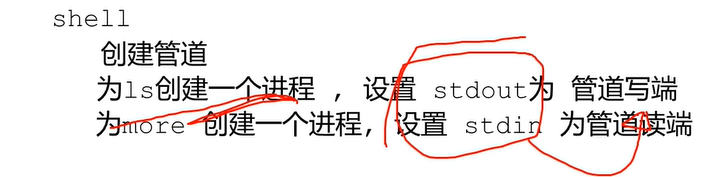
  1. 无名管道PIPE
    “ | ” 为 管道
    ![在这里插入图片描述]( https://img-blog.csdnimg.cn/20200508154027153.png?x-oss-process=image/watermark ,type_ZmFuZ3poZW5naGVpdGk,shadow_10,text_aHR0cHM6Ly9ibG9nLmNzZG4ubmV0L3FxXzQzNzU5Njk0,size_16,color_FFFFFF,t_70)
    ![在这里插入图片描述]( https://img-blog.csdnimg.cn/20200508154153584.png?x-oss-process=image/watermark ,type_ZmFuZ3poZW5naGVpdGk,shadow_10,text_aHR0cHM6Ly9ibG9nLmNzZG4ubmV0L3FxXzQzNzU5Njk0,size_16,color_FFFFFF,t_70)
    在这里插入图片描述
    无亲缘关系不能使用无名管道
  2. 管道为内核中的一段特殊的内存空间
    以文件的方式进行操作
    ![在这里插入图片描述]( https://img-blog.csdnimg.cn/20200508154437819.png?x-oss-process=image/watermark ,type_ZmFuZ3poZW5naGVpdGk,shadow_10,text_aHR0cHM6Ly9ibG9nLmNzZG4ubmV0L3FxXzQzNzU5Njk0,size_16,color_FFFFFF,t_70)
  3. 管道和文件的区别
    (1)无名管道的内核资源在通信两进程退出后会自动释放
    (2)大小有限制,不能像文件那样存储大量常规信息
    (3)不能使用lseek函数修改当前读写位置
  4. 创建无名管道
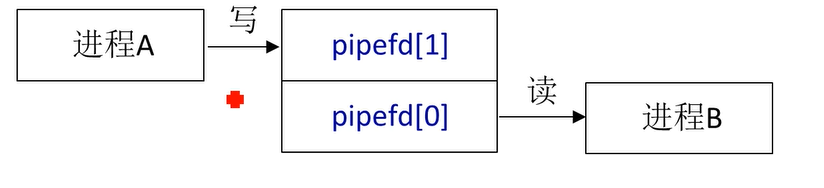
    int pipe (int pipefd[2]);
    单项操作
    在这里插入图片描述
  5. 测试无名管道的大小
    ![在这里插入图片描述]( https://img-blog.csdnimg.cn/20200508155021286.png?x-oss-process=image/watermark ,type_ZmFuZ3poZW5naGVpdGk,shadow_10,text_aHR0cHM6Ly9ibG9nLmNzZG4ubmV0L3FxXzQzNzU5Njk0,size_16,color_FFFFFF,t_70)
  6. 无名管道的读写
    在这里插入图片描述
    ![在这里插入图片描述]( https://img-blog.csdnimg.cn/20200508155205537.png?x-oss-process=image/watermark ,type_ZmFuZ3poZW5naGVpdGk,shadow_10,text_aHR0cHM6Ly9ibG9nLmNzZG4ubmV0L3FxXzQzNzU5Njk0,size_16,color_FFFFFF,t_70)
  7. 父子进程管道通信
    ![在这里插入图片描述]( https://img-blog.csdnimg.cn/20200508155323992.png?x-oss-process=image/watermark ,type_ZmFuZ3poZW5naGVpdGk,shadow_10,text_aHR0cHM6Ly9ibG9nLmNzZG4ubmV0L3FxXzQzNzU5Njk0,size_16,color_FFFFFF,t_70)
    ![在这里插入图片描述]( https://img-blog.csdnimg.cn/20200508155404191.png?x-oss-process=image/watermark ,type_ZmFuZ3poZW5naGVpdGk,shadow_10,text_aHR0cHM6Ly9ibG9nLmNzZG4ubmV0L3FxXzQzNzU5Njk0,size_16,color_FFFFFF,t_70)
    Q:子进程关闭了读端,为什么还可以读写?
    子进程继承父进程的所有资源,所以父子进程拥有各自独立的读写端。互不影响。

无名管道2

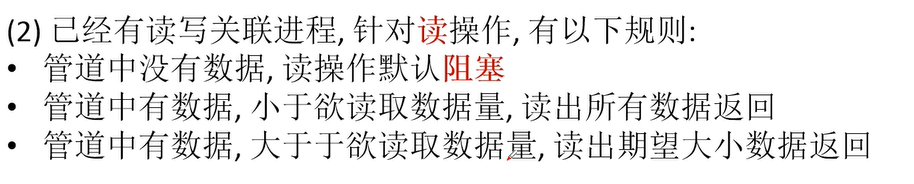
  1. 以阻塞的方式读无名管道,如果当前没有一个进程和写端关联,读操作立即返回,按如下操作
    无论管道有无数据:

    在这里插入图片描述
  2. 如果写端有关联,管道无数据,读进程会阻塞
    在这里插入图片描述
    ![在这里插入图片描述]( https://img-blog.csdnimg.cn/20200508161027914.png?x-oss-process=image/watermark ,type_ZmFuZ3poZW5naGVpdGk,shadow_10,text_aHR0cHM6Ly9ibG9nLmNzZG4ubmV0L3FxXzQzNzU5Njk0,size_16,color_FFFFFF,t_70)
  3. 以阻塞的方式写无名管道
    在这里插入图片描述
    signal :注册信号
    ![在这里插入图片描述]( https://img-blog.csdnimg.cn/2020050816144814.png?x-oss-process=image/watermark ,type_ZmFuZ3poZW5naGVpdGk,shadow_10,text_aHR0cHM6Ly9ibG9nLmNzZG4ubmV0L3FxXzQzNzU5Njk0,size_16,color_FFFFFF,t_70)
    执行结果
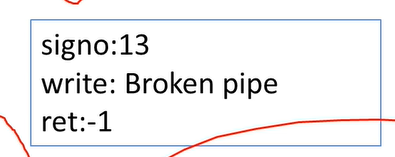
    没有进程读管道
    ![在这里插入图片描述]( https://img-blog.csdnimg.cn/20200508161639639.png?x-oss-process=image/watermark ,type_ZmFuZ3poZW5naGVpdGk,shadow_10,text_aHR0cHM6Ly9ibG9nLmNzZG4ubmV0L3FxXzQzNzU5Njk0,size_16,color_FFFFFF,t_70)
    ![在这里插入图片描述]( https://img-blog.csdnimg.cn/20200508161723525.png?x-oss-process=image/watermark ,type_ZmFuZ3poZW5naGVpdGk,shadow_10,text_aHR0cHM6Ly9ibG9nLmNzZG4ubmV0L3FxXzQzNzU5Njk0,size_16,color_FFFFFF,t_70)
    ![在这里插入图片描述]( https://img-blog.csdnimg.cn/20200508161759410.png?x-oss-process=image/watermark ,type_ZmFuZ3poZW5naGVpdGk,shadow_10,text_aHR0cHM6Ly9ibG9nLmNzZG4ubmV0L3FxXzQzNzU5Njk0,size_16,color_FFFFFF,t_70)
  4. 以非阻塞的方式读写管道
    在这里插入图片描述
    ![在这里插入图片描述]( https://img-blog.csdnimg.cn/20200508162215761.png?x-oss-process=image/watermark ,type_ZmFuZ3poZW5naGVpdGk,shadow_10,text_aHR0cHM6Ly9ibG9nLmNzZG4ubmV0L3FxXzQzNzU5Njk0,size_16,color_FFFFFF,t_70)
    写操作
    ![在这里插入图片描述]( https://img-blog.csdnimg.cn/2020050816225580.png?x-oss-process=image/watermark ,type_ZmFuZ3poZW5naGVpdGk,shadow_10,text_aHR0cHM6Ly9ibG9nLmNzZG4ubmV0L3FxXzQzNzU5Njk0,size_16,color_FFFFFF,t_70)
    灰色有数据,白色无数据
    ![在这里插入图片描述]( https://img-blog.csdnimg.cn/20200508162326222.png?x-oss-process=image/watermark ,type_ZmFuZ3poZW5naGVpdGk,shadow_10,text_aHR0cHM6Ly9ibG9nLmNzZG4ubmV0L3FxXzQzNzU5Njk0,size_16,color_FFFFFF,t_70)
    ![在这里插入图片描述]( https://img-blog.csdnimg.cn/20200508162441256.png?x-oss-process=image/watermark ,type_ZmFuZ3poZW5naGVpdGk,shadow_10,text_aHR0cHM6Ly9ibG9nLmNzZG4ubmV0L3FxXzQzNzU5Njk0,size_16,color_FFFFFF,t_70)
    ![在这里插入图片描述]( https://img-blog.csdnimg.cn/2020050816262048.png?x-oss-process=image/watermark ,type_ZmFuZ3poZW5naGVpdGk,shadow_10,text_aHR0cHM6Ly9ibG9nLmNzZG4ubmV0L3FxXzQzNzU5Njk0,size_16,color_FFFFFF,t_70)

有名管道 FIFO

  1. 有名管道,命名管道 ![在这里插入图片描述]( https://img-blog.csdnimg.cn/20200508171320897.png?x-oss-process=image/watermark ,type_ZmFuZ3poZW5naGVpdGk,shadow_10,text_aHR0cHM6Ly9ibG9nLmNzZG4ubmV0L3FxXzQzNzU5Njk0,size_16,color_FFFFFF,t_70)
  2. 创建文件节点 mknod pipetest p
    cat test.txt > pipetest&
  3. 创建有名管道
    在这里插入图片描述
    pathname :必须系统中不存在
    mode_t mod :权限
    ![在这里插入图片描述]( https://img-blog.csdnimg.cn/2020050817172070.png?x-oss-process=image/watermark ,type_ZmFuZ3poZW5naGVpdGk,shadow_10,text_aHR0cHM6Ly9ibG9nLmNzZG4ubmV0L3FxXzQzNzU5Njk0,size_16,color_FFFFFF,t_70)
    在这里插入图片描述
    -l F后面多出红色 “ | ”,表示有名管道
    在这里插入图片描述
    echo:写入
    在这里插入图片描述
    cat:读出
  4. 读写有名管道
    在这里插入图片描述
    在这里插入图片描述
    读写进程
    在这里插入图片描述
    在这里插入图片描述
    在这里插入图片描述
    ![在这里插入图片描述]( https://img-blog.csdnimg.cn/20200508172300494.png?x-oss-process=image/watermark ,type_ZmFuZ3poZW5naGVpdGk,shadow_10,text_aHR0cHM6Ly9ibG9nLmNzZG4ubmV0L3FxXzQzNzU5Njk0,size_16,color_FFFFFF,t_70)
  5. 非亲缘关系进程使用有名管道通信
    ![在这里插入图片描述]( https://img-blog.csdnimg.cn/20200508172538131.png?x-oss-process=image/watermark ,type_ZmFuZ3poZW5naGVpdGk,shadow_10,text_aHR0cHM6Ly9ibG9nLmNzZG4ubmV0L3FxXzQzNzU5Njk0,size_16,color_FFFFFF,t_70)
    ![在这里插入图片描述]( https://img-blog.csdnimg.cn/20200508172552589.png?x-oss-process=image/watermark ,type_ZmFuZ3poZW5naGVpdGk,shadow_10,text_aHR0cHM6Ly9ibG9nLmNzZG4ubmV0L3FxXzQzNzU5Njk0,size_16,color_FFFFFF,t_70)
    示例
    ![在这里插入图片描述]( https://img-blog.csdnimg.cn/20200508172721847.png?x-oss-process=image/watermark ,type_ZmFuZ3poZW5naGVpdGk,shadow_10,text_aHR0cHM6Ly9ibG9nLmNzZG4ubmV0L3FxXzQzNzU5Njk0,size_16,color_FFFFFF,t_70)
    ![在这里插入图片描述]( https://img-blog.csdnimg.cn/20200508172730199.png?x-oss-process=image/watermark ,type_ZmFuZ3poZW5naGVpdGk,shadow_10,text_aHR0cHM6Ly9ibG9nLmNzZG4ubmV0L3FxXzQzNzU5Njk0,size_16,color_FFFFFF,t_70)
  6. 管道的进本特点
    ![在这里插入图片描述]( https://img-blog.csdnimg.cn/20200508172812103.png?x-oss-process=image/watermark ,type_ZmFuZ3poZW5naGVpdGk,shadow_10,text_aHR0cHM6Ly9ibG9nLmNzZG4ubmV0L3FxXzQzNzU5Njk0,size_16,color_FFFFFF,t_70)

双重模式

内核模式 用户模式

Linux

对已经释放的函数栈空间的访问,是非法的 访问,是不允许的。

系统调用

系统调用的 实现 --软中断,可编程中断![在这里插入图片描述]( https://img-blog.csdnimg.cn/20200319232842879.png?x-oss-process=image/watermark ,type_ZmFuZ3poZW5naGVpdGk,shadow_10,text_aHR0cHM6Ly9ibG9nLmNzZG4ubmV0L3FxXzQzNzU5Njk0,size_16,color_FFFFFF,t_70)
中断Interrupts
– 外部中断 External (hardware generated) interrupts 串口、硬盘、网卡、时钟、…
软件产生的中断 Software generated interrupts int 0x80指令,用于系统调用
• 异常Exceptions – 程序错误 – 软件产生的异常 – 机器检查出的异常

程序访问 – 通过高层次的API接口 – 而不是直接进行系统调用
• 三种最常用的应用程序编程接口
API
Win32 API 用于 Windows – POSIX API 用于 POSIX-based systems (包括UNIX LINUX,Mac OS X 的所有版本) – Java API 用于JAVA虚拟机(JVM)*

Linux 可执行文件结构

  1. BSS段: 全局或静态未初始化的变量
  2. 数据段: 全局或静态已初始化的变量
  3. 代码段指令代码操作码,操作数),常量, const声明的变量, 字符串常量

第八周

Linux 异步信号处理机制

  1. 软中断、异步机制

  2. kill -l 查看所有信号值

  3. 向某一进程发送信号值
    在这里插入图片描述

  4. kill 进程 结束进程

  5. 信号的基本概念
    (1)发送信号
    在这里插入图片描述
    (2)安装信号
    在这里插入图片描述
    (3)递送信号
    在这里插入图片描述
    (4)捕获信号
    在这里插入图片描述
    (5)屏蔽信号
    在这里插入图片描述
    (6)忽略信号
    在这里插入图片描述
    (7)未决信号
    在这里插入图片描述
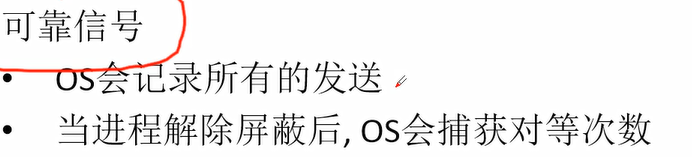
    (8)可靠信号 不可靠信号
    ![在这里插入图片描述]( https://img-blog.csdnimg.cn/20200722084354565.png?x-oss-process=image/watermark ,type_ZmFuZ3poZW5naGVpdGk,shadow_10,text_aHR0cHM6Ly9ibG9nLmNzZG4ubmV0L3FxXzQzNzU5Njk0,size_16,color_FFFFFF,t_70)
    在这里插入图片描述

  6. 未决信号
    存储在PCB中,存储在pending队列中
    ![在这里插入图片描述]( https://img-blog.csdnimg.cn/20200722084630882.png?x-oss-process=image/watermark ,type_ZmFuZ3poZW5naGVpdGk,shadow_10,text_aHR0cHM6Ly9ibG9nLmNzZG4ubmV0L3FxXzQzNzU5Njk0,size_16,color_FFFFFF,t_70)

  7. 信号的生命周期
    在这里插入图片描述
    (2)信号被某个进程产生
    在这里插入图片描述
    kill 进程间
    raise 自己发给自己
    alarm 定时信号

在这里插入图片描述
在这里插入图片描述
在这里插入图片描述

信号的系统调用

  1. 发送信号
    ![在这里插入图片描述]( https://img-blog.csdnimg.cn/20200722085151480.png?x-oss-process=image/watermark ,type_ZmFuZ3poZW5naGVpdGk,shadow_10,text_aHR0cHM6Ly9ibG9nLmNzZG4ubmV0L3FxXzQzNzU5Njk0,size_16,color_FFFFFF,t_70)
    终端:CTRL C -- SIGINT
    Shell 命令:kill -信号 pid
    用户进程 -- 进程
    内核 -- 进程
  2. kill 发送一个信号
    在这里插入图片描述
    向一个指定的进程发送信号,成功返回0,否则返回-1
    ![在这里插入图片描述]( https://img-blog.csdnimg.cn/20200722085539677.png?x-oss-process=image/watermark ,type_ZmFuZ3poZW5naGVpdGk,shadow_10,text_aHR0cHM6Ly9ibG9nLmNzZG4ubmV0L3FxXzQzNzU5Njk0,size_16,color_FFFFFF,t_70)
  3. raise 自举一个信号
    在这里插入图片描述
  4. alarm定时器
    在这里插入图片描述
    在这里插入图片描述
    传参为0:取消之前的定时器

在这里插入图片描述
功能:
在usecs微秒后,将SIGALRM信号发送给进程,并且之后每隔interval微秒再发送一次SIGALRM信号。如果不对SIGALRM信号进程处理,默认操作是终止进程
延迟可能会因任何系统活动、处理调用所花费的时间或系统计时器的粒度而略微延长
参数:
usecs:第一次触发SIGALRM信号的时间
interval:第一次触发SIGALRM信号之后每隔interval微秒再触发一次SIGALRM信号,以微秒为单位

4.安装信号
![在这里插入图片描述]( https://img-blog.csdnimg.cn/20200722090151763.png?x-oss-process=image/watermark ,type_ZmFuZ3poZW5naGVpdGk,shadow_10,text_aHR0cHM6Ly9ibG9nLmNzZG4ubmV0L3FxXzQzNzU5Njk0,size_16,color_FFFFFF,t_70)
sighandler_t signal(int signum, sighandler_t handler);
函数来说
signum 是信号的编号
handler 是中断函数的指针。信号处理函数的函数名

5.例1
![在这里插入图片描述]( https://img-blog.csdnimg.cn/2020072209053969.png?x-oss-process=image/watermark ,type_ZmFuZ3poZW5naGVpdGk,shadow_10,text_aHR0cHM6Ly9ibG9nLmNzZG4ubmV0L3FxXzQzNzU5Njk0,size_16,color_FFFFFF,t_70)
例2
![在这里插入图片描述]( https://img-blog.csdnimg.cn/20200722090743208.png?x-oss-process=image/watermark ,type_ZmFuZ3poZW5naGVpdGk,shadow_10,text_aHR0cHM6Ly9ibG9nLmNzZG4ubmV0L3FxXzQzNzU5Njk0,size_16,color_FFFFFF,t_70)
例3
![在这里插入图片描述]( https://img-blog.csdnimg.cn/20200722090941351.png?x-oss-process=image/watermark ,type_ZmFuZ3poZW5naGVpdGk,shadow_10,text_aHR0cHM6Ly9ibG9nLmNzZG4ubmV0L3FxXzQzNzU5Njk0,size_16,color_FFFFFF,t_70)
pause(); 暂停执行,等待一个信号
![在这里插入图片描述]( https://img-blog.csdnimg.cn/20200722091050178.png?x-oss-process=image/watermark ,type_ZmFuZ3poZW5naGVpdGk,shadow_10,text_aHR0cHM6Ly9ibG9nLmNzZG4ubmV0L3FxXzQzNzU5Njk0,size_16,color_FFFFFF,t_70)
等待信号
![在这里插入图片描述]( https://img-blog.csdnimg.cn/20200722091227591.png?x-oss-process=image/watermark ,type_ZmFuZ3poZW5naGVpdGk,shadow_10,text_aHR0cHM6Ly9ibG9nLmNzZG4ubmV0L3FxXzQzNzU5Njk0,size_16,color_FFFFFF,t_70)

第九周

消息队列

  1. 消息队列的结构
    ![在这里插入图片描述]( https://img-blog.csdnimg.cn/2020072211425749.png?x-oss-process=image/watermark ,type_ZmFuZ3poZW5naGVpdGk,shadow_10,text_aHR0cHM6Ly9ibG9nLmNzZG4ubmV0L3FxXzQzNzU5Njk0,size_16,color_FFFFFF,t_70)
    ![在这里插入图片描述]( https://img-blog.csdnimg.cn/2020072211443315.png?x-oss-process=image/watermark ,type_ZmFuZ3poZW5naGVpdGk,shadow_10,text_aHR0cHM6Ly9ibG9nLmNzZG4ubmV0L3FxXzQzNzU5Njk0,size_16,color_FFFFFF,t_70)

消息队列的管理

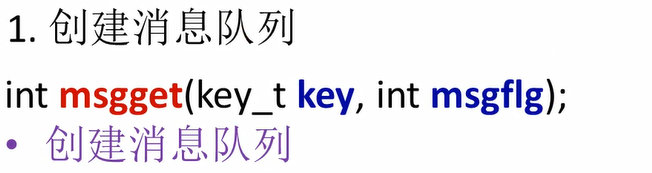
  1. 创建队列
    在这里插入图片描述
    key 通信各方拥有相同key值
    msgflag
    ![在这里插入图片描述]( https://img-blog.csdnimg.cn/2020072211485914.png?x-oss-process=image/watermark ,type_ZmFuZ3poZW5naGVpdGk,shadow_10,text_aHR0cHM6Ly9ibG9nLmNzZG4ubmV0L3FxXzQzNzU5Njk0,size_16,color_FFFFFF,t_70)
    例:
    通过ftok创建key值 “.”代表当前路径

在这里插入图片描述
![在这里插入图片描述]( https://img-blog.csdnimg.cn/20200722115053501.png?x-oss-process=image/watermark ,type_ZmFuZ3poZW5naGVpdGk,shadow_10,text_aHR0cHM6Ly9ibG9nLmNzZG4ubmV0L3FxXzQzNzU5Njk0,size_16,color_FFFFFF,t_70)

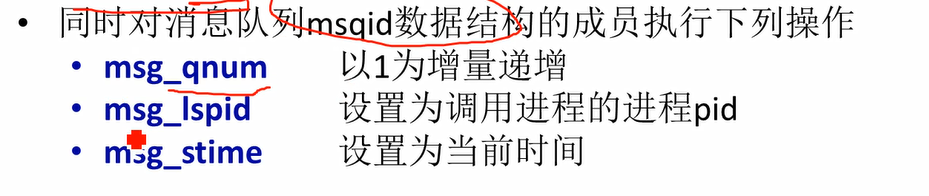
  1. 发送消息
    消息队列ID 消息缓冲区指针 长度 flag在这里插入图片描述
    指针结构
    ![在这里插入图片描述]( https://img-blog.csdnimg.cn/20200722115256859.png?x-oss-process=image/watermark ,type_ZmFuZ3poZW5naGVpdGk,shadow_10,text_aHR0cHM6Ly9ibG9nLmNzZG4ubmV0L3FxXzQzNzU5Njk0,size_16,color_FFFFFF,t_70)
    在这里插入图片描述
    默认:0 阻塞的方式
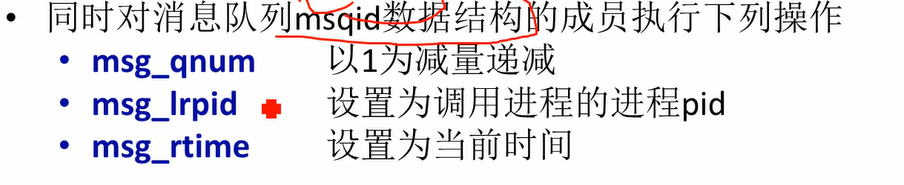
  2. 接收消息
    ![在这里插入图片描述]( https://img-blog.csdnimg.cn/20200722115624376.png?x-oss-process=image/watermark ,type_ZmFuZ3poZW5naGVpdGk,shadow_10,text_aHR0cHM6Ly9ibG9nLmNzZG4ubmV0L3FxXzQzNzU5Njk0,size_16,color_FFFFFF,t_70)
    在这里插入图片描述
    在这里插入图片描述
  3. 发送成功
    在这里插入图片描述
    在这里插入图片描述
  4. 接收消息
    在这里插入图片描述
    在这里插入图片描述
  5. 消息队列属性
    在这里插入图片描述
    cmd
    ![在这里插入图片描述]( https://img-blog.csdnimg.cn/2020072212030365.png?x-oss-process=image/watermark ,type_ZmFuZ3poZW5naGVpdGk,shadow_10,text_aHR0cHM6Ly9ibG9nLmNzZG4ubmV0L3FxXzQzNzU5Njk0,size_16,color_FFFFFF,t_70)

第十三周

页面置换算法--FIFO

  1. 算法过程
    ![在这里插入图片描述]( https://img-blog.csdnimg.cn/20200614194406976.png?x-oss-process=image/watermark ,type_ZmFuZ3poZW5naGVpdGk,shadow_10,text_aHR0cHM6Ly9ibG9nLmNzZG4ubmV0L3FxXzQzNzU5Njk0,size_16,color_FFFFFF,t_70)
    增加物理块(物理块增多,缺页次数增加情况--异常Belady's Anomaly)
    ![在这里插入图片描述]( https://img-blog.csdnimg.cn/20200614194643521.png?x-oss-process=image/watermark ,type_ZmFuZ3poZW5naGVpdGk,shadow_10,text_aHR0cHM6Ly9ibG9nLmNzZG4ubmV0L3FxXzQzNzU5Njk0,size_16,color_FFFFFF,t_70)
    异常原因:
    在这里插入图片描述

最近最久未使用算法--LRU

  1. 算法过程
    ![在这里插入图片描述]( https://img-blog.csdnimg.cn/20200614195018577.png?x-oss-process=image/watermark ,type_ZmFuZ3poZW5naGVpdGk,shadow_10,text_aHR0cHM6Ly9ibG9nLmNzZG4ubmV0L3FxXzQzNzU5Njk0,size_16,color_FFFFFF,t_70)
  2. LRU算法的可能实现方法
    ![在这里插入图片描述]( https://img-blog.csdnimg.cn/20200614195105760.png?x-oss-process=image/watermark ,type_ZmFuZ3poZW5naGVpdGk,shadow_10,text_aHR0cHM6Ly9ibG9nLmNzZG4ubmV0L3FxXzQzNzU5Njk0,size_16,color_FFFFFF,t_70)
    ![在这里插入图片描述]( https://img-blog.csdnimg.cn/20200614195202548.png?x-oss-process=image/watermark ,type_ZmFuZ3poZW5naGVpdGk,shadow_10,text_aHR0cHM6Ly9ibG9nLmNzZG4ubmV0L3FxXzQzNzU5Njk0,size_16,color_FFFFFF,t_70)
    ![在这里插入图片描述]( https://img-blog.csdnimg.cn/20200614195313819.png?x-oss-process=image/watermark ,type_ZmFuZ3poZW5naGVpdGk,shadow_10,text_aHR0cHM6Ly9ibG9nLmNzZG4ubmV0L3FxXzQzNzU5Njk0,size_16,color_FFFFFF,t_70)
  3. 活动页面栈
    ![在这里插入图片描述]( https://img-blog.csdnimg.cn/20200614195424240.png?x-oss-process=image/watermark ,type_ZmFuZ3poZW5naGVpdGk,shadow_10,text_aHR0cHM6Ly9ibG9nLmNzZG4ubmV0L3FxXzQzNzU5Njk0,size_16,color_FFFFFF,t_70)
    7被抽出,栈底为将要被淘汰的
    ![在这里插入图片描述]( https://img-blog.csdnimg.cn/20200614195549494.png?x-oss-process=image/watermark ,type_ZmFuZ3poZW5naGVpdGk,shadow_10,text_aHR0cHM6Ly9ibG9nLmNzZG4ubmV0L3FxXzQzNzU5Njk0,size_16,color_FFFFFF,t_70)
posted @ 2021-06-08 14:26  剪水行舟  阅读(125)  评论(0)    收藏  举报