Django 1.11.6 DEMO学习和开发
PART 1:
python manage.py runserver 0:8080
ALLOWED_HOSTS = [u'10.227.67.210']
- 项目(mysite)包含应用(polls)
- 一个项目是特定网站的配置和应用程序的集合。
- 一个项目可以包含多个应用。
- 一个应用可以运用到多个项目中去。
- Regex: 正则表达式匹配模式,不搜索GET和POSET参数或者域名,如
-
- https://www.example.com/myapp/?page=3的请求中,URLconf仍将查找myapp/
- View:路由对应的视图函数
- Kwargs: 任意关键词参数可以在字典中传递到目标视图
- Name: 命名你的URL可让你从Django其他地方明确地引用它,特别是在模板中。 这个强大的功能允许你在仅接触单个文件的情况下对项目的URL模式进行全局更改
urlpatterns = [
url(r'^admin/', admin.site.urls),
url(r'^polls/', include('polls.urls')),
]
urlpatterns = [
url(r'^$', views.default_page, name='default_page'),
]
def default_page(request):
return HttpResponse("Welcome, default page of APP polls")
PART2:
- 修改你的模型(在models.py文件中)。
- 运行python manage.py makemigrations polls,为这些修改创建迁移文件
- 运行python manage.py migrate ,将这些改变更新到数据库中。
- Urls.py: 路由定义
- Views.py:视图定义
- Models.py: 模型(数据)定义,决定数据库和界面操作
- Apps.py: 定义PollsConfig,用于注册到setting.py中的INSTALL_APPS中
- Admin.py: 定义和admin的注册关系,即admin登录后可以通过界面操作APP中定义的数据模型
- migrations:此目录存放数据库操作关系
PART3:
app_name = 'polls'urlpatterns = [url(r'^$', views.default_page, name='default_page'),url(r'^index/', views.index, name='index'),url(r'^(?P<question_id>[0-9]+)/detail/$', views.detail, name='detail'),url(r'^(?P<question_id>[0-9]+)/results/$', views.results, name='results'),url(r'^(?P<question_id>[0-9]+)/vote/$', views.vote, name='vote'),]
- 当使用 https://${domain}/polls/34/result 访问时
- 首先在根url文件mysite/urls.py中匹配,匹配到polls之后,将剩余的文本 34/result 发送到polls/urls.py中继续匹配
- 此时匹配到^(?P<question_id>[0-9]+)/results/$,从而调用views.results执行
调用模板的好处是可以将视图层的数据和显示效果进行解耦分离
模板的读取规则:尝试在INSTALL_APP中的所有注册APP目录下寻找templates目录,然后在目录下寻找视图中调用的模板,直到找到第一个匹配。
这样可能会产生一个问题,就是如果APP1和APP2都定义了index.html,并且将它放在在自己APP中的templates目录,那么就可能出现错误的调用。
为了避免这个问题,引用模板时最好像引用头文件那样,加一个相对路径进行区分,如:
def index(request):
latest_question_list = Question.objects.order_by('-pub_date')[:5]
context = {'latest_question_list': latest_question_list}
return render(request, 'polls/index.html', context)
这意味着,polls应用的模板存放路径最终应该为:
mysite/polls/templates/polls/index.html
def detail(request, question_id):
question = get_object_or_404(Question, pk=question_id)
return render(request, 'polls/detail.html', {'question': question})
{% for question in latest_question_list %}<li><a href="{% url 'polls:detail' question.id %}">{{ question.question_text }}</a></li>{% endfor %}<li><a href="{% url 'polls:detail' 999 %}">{{ "404-Page" }}</a></li>
PART4:
<h1>{{ question.question_text }}</h1>## 表单提交后对应的视图处理函数,以及数据的方法,一般为POST<form action="{% url 'polls:vote' question.id %}" method="post">## 防止跨站点请求伪造{% csrf_token %}## 创建表单选择数据{% for choice in question.choice_set.all %}<input type="radio" name="choice" id="choice{{ forloop.counter }}" value="{{ choice.id }}" /><label for="choice{{ forloop.counter }}">{{ choice.choice_text }}</label><br />{% endfor %}## 创建表单提交数据<input type="submit" value="Vote" /></form>## 如果提交失败,视图处理函数可能重新载入这个页面,并且发送错误消息## 这里处理这个错误消息,回显给用户{% if error_message %}<p><strong>{{ error_message }}</strong></p>{% endif %}
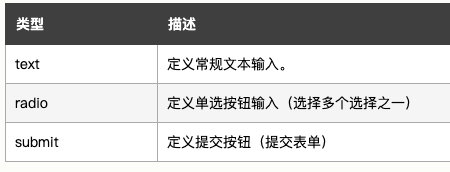
def vote(request, question_id):question = get_object_or_404(Question, pk=question_id)try:selected_choice = question.choice_set.get(pk=request.POST['choice'])except (KeyError, Choice.DoesNotExist):return render(request, 'polls/detail.html', {'question': question, 'error_message': "You didn't select a choice.", })else:selected_choice.votes += 1selected_choice.save()return HttpResponseRedirect(reverse('polls:results', args=(question.id, )))
- 根据URL中的参数从数据库中获取数据
- 载入模板文件
- 返回使用数据渲染后的模板
- 显示一个对象列表 generic.ListView
- 显示一个特定类型对象的详细信息 generic.DetailView
url(r'^index/', views.IndexView.as_view(), name='index'),url(r'^(?P<pk>[0-9]+)/detail/$', views.DetailView.as_view(), name='detail'),url(r'^(?P<pk>[0-9]+)/results/$', views.ResultsView.as_view(), name='results'),
## 显示一个对象列表继承ListView,需要定义传递给模板的context变量名,并根据函数get_queryset获取这个变量的值
class IndexView(generic.ListView):
context_object_name = 'latest_question_list'
template_name = 'polls/index.html'
def get_queryset(self):
return Question.objects.order_by('-pub_date')[:5]
## 显示一个具体对象的详细信息继承DetailView,默认传递给模板的context变量名为question
class DetailView(generic.DetailView):
model = Question
template_name = 'polls/detail.html'
class ResultsView(generic.DetailView):
model = Question
template_name = 'polls/results.html'
PART6:
{% load static %}<link rel="stylesheet" type="text/css" href="{% static 'polls/css/style.css' %}" /><img src="{% static "polls/images/Django-test.png" %}" alt="PICTURES" />
PART7:
from django.contrib import admin
from .models import Choice, Question
class ChoiceInline(admin.StackedInline):
model = Choice
extra = 3
class QuestionAdmin(admin.ModelAdmin):
fieldsets = [
(Question information, {'fields': ['question_text']}), // 信息的分类显示
('Date information', {'fields': ['pub_date'], 'classes': ['collapse']}), // classes控制折叠
]
inlines = [ChoiceInline] // 增加choice的显示
admin.site.register(Question, QuestionAdmin) // 注册表单设置
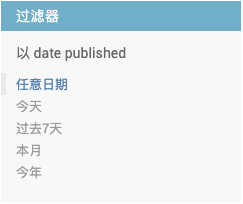
was_published_recently.admin_order_field = 'pub_date'
was_published_recently.boolean = True
was_published_recently.short_description = 'Published recently?'

'DIRS': [os.path.join(BASE_DIR, 'templates')],'APP_DIRS': True, // 默认从各个APP下搜索模板
这里把django/contrib/admin/templates/admin/base_site.html下的模板拷贝到:mysite/templates下,然后进行修改,作为项目模板加载
## 查看django的安装位置
python -c "import django; print(django.__path__)"
posted on 2020-08-21 11:31 jueshiwuming 阅读(230) 评论(0) 收藏 举报


 浙公网安备 33010602011771号