
ik分词器和rest风格
ik分词器
中国人默认会吧拆分成中,国,人,显然这不是我们想要的,所以要用中文分词器,ik
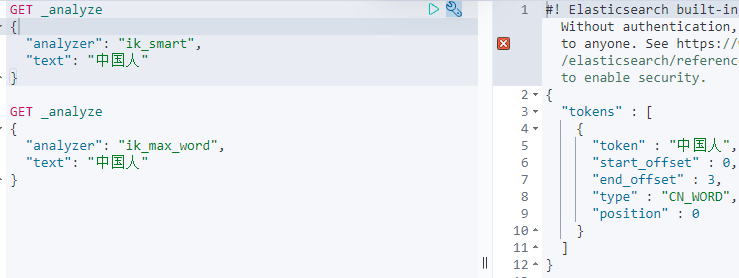
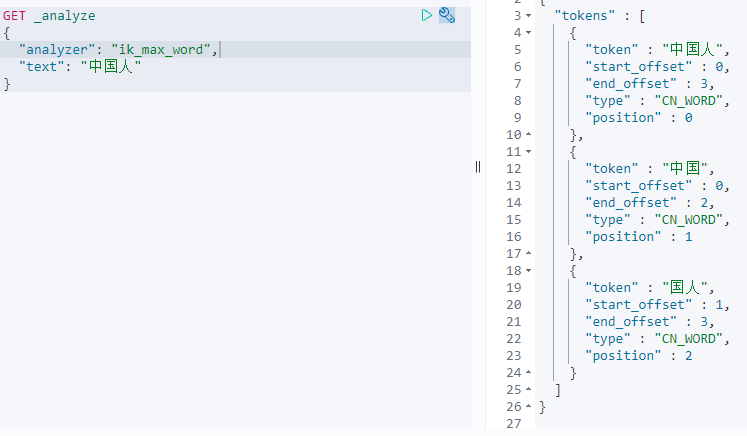
ik分词器提供了两个分词算法:id_mart和ik_max_word,其中ik_smart为最粗粒度拆分,ik_max_word为最细粒度拆分
-
下载:https://github.com/medcl/elasticsearch-analysis-ik/releases/tag/v7.15.1 必须和es版本一致
-
解压到es目录下的plugins文件夹下
-
重启es
-
查看加载进来插件
elasticsearch-7.15.1\bin>elasticsearch-plugin list
-
使用kibana测试
- ik_smart
- ik_max_word
自定义词典
有些词,比如自己的名字,不在默认词典中,此时就会把它每个字都拆分,分词。可以自定义词典
分词器配置在ik中config/IKAnalyzer.cfg.xml
<?xml version="1.0" encoding="UTF-8"?>
<!DOCTYPE properties SYSTEM "http://java.sun.com/dtd/properties.dtd">
<properties>
	<comment>IK Analyzer 扩展配置</comment>
	<!--用户可以在这里配置自己的扩展字典 -->
	<entry key="ext_dict">mydic.dic</entry>
	 <!--用户可以在这里配置自己的扩展停止词字典-->
	<entry key="ext_stopwords"></entry>
	<!--用户可以在这里配置远程扩展字典 -->
	<!-- <entry key="remote_ext_dict">words_location</entry> -->
	<!--用户可以在这里配置远程扩展停止词字典-->
	<!-- <entry key="remote_ext_stopwords">words_location</entry> -->
</properties>
- 在ik的config文件夹中自定义词典mydic.dic
- 在xml中配置自己的词典
- 重启es和kibana
Rest风格
| method | url地址 | 描述 |
|---|---|---|
| PUT | localhost:9200/索引名称/类型名称/文档id | 创建文档(指定文档id) |
| POST | localhost:9200/索引名称/类型名称 | 创建文档(随机文档id) |
| POST | localhost:9200/索引名称/类型名称/文档id/_update | 修改文档 |
| DELETE | localhost:9200/索引名称/类型名称/文档id | 删除文档 |
| GET | localhost:9200/索引名称/类型名称/文档id | 通过文档id查询文档 |
| POST | localhost:9200/索引名称/类型名称/_search | 查询所有的数据 |
基础测试
字段类型
如果不设置文档字段类型,es会自动给默认类型
- 字符串:text keyword
- 数值:long integer short byte double float half float scaled float
- 日期:date
- 布尔:boolean
- 二进制:binary

 浙公网安备 33010602011771号