
dom4j解析xml字符串实例
DOM4J
与利用DOM、SAX、JAXP机制来解析xml相比,DOM4J 表现更优秀,具有性能优异、功能强大和极端易用使用的特点,只要懂得DOM基本概念,就可以通过dom4j的api文档来解析xml。dom4j是一套开源的api。实际项目中,往往选择dom4j来作为解析xml的利器。
先来看看dom4j中对应XML的DOM树建立的继承关系
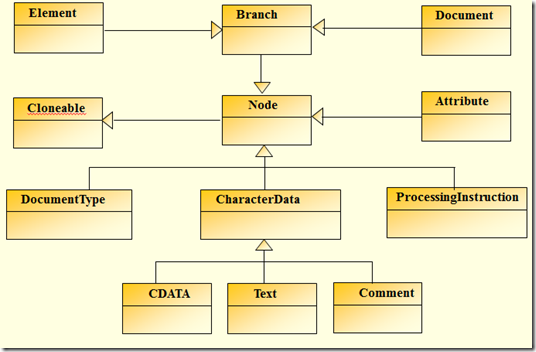
针对于XML标准定义,对应于图2-1列出的内容,dom4j提供了以下实现:
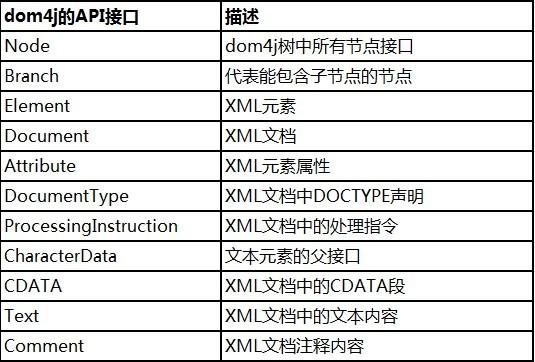
同时,dom4j的NodeType枚举实现了XML规范中定义的node类型。如此可以在遍历xml文档的时候通过常量来判断节点类型了。
常用API
class org.dom4j.io.SAXReader
- read 提供多种读取xml文件的方式,返回一个Domcument对象
interface org.dom4j.Document
- iterator 使用此法获取node
- getRootElement 获取根节点
interface org.dom4j.Node
- getName 获取node名字,例如获取根节点名称为bookstore
- getNodeType 获取node类型常量值,例如获取到bookstore类型为1——Element
- getNodeTypeName 获取node类型名称,例如获取到的bookstore类型名称为Element
interface org.dom4j.Element
- attributes 返回该元素的属性列表
- attributeValue 根据传入的属性名获取属性值
- elementIterator 返回包含子元素的迭代器
- elements 返回包含子元素的列表
interface org.dom4j.Attribute
- getName 获取属性名
- getValue 获取属性值
interface org.dom4j.Text
- getText 获取Text节点值
interface org.dom4j.CDATA
- getText 获取CDATA Section值
interface org.dom4j.Comment
- getText 获取注释
实例一:

//先加入dom4j.jar包 import java.util.HashMap; import java.util.Iterator; import java.util.Map;import org.dom4j.Document;
import org.dom4j.DocumentException;
import org.dom4j.DocumentHelper;
import org.dom4j.Element;/**
@Title: TestDom4j.java
@Package
@Description: 解析xml字符串
@author 无处不在
@date 2012-11-20 下午05:14:05
@version V1.0
*/
public class TestDom4j {public void readStringXml(String xml) {
Document doc = null;
try {// 读取并解析XML文档
// SAXReader就是一个管道,用一个流的方式,把xml文件读出来
//
// SAXReader reader = new SAXReader(); //User.hbm.xml表示你要解析的xml文档
// Document document = reader.read(new File("User.hbm.xml"));
// 下面的是通过解析xml字符串的
doc = DocumentHelper.parseText(xml); // 将字符串转为XML
Element rootElt = doc.getRootElement(); // 获取根节点
System.out.println("根节点:" + rootElt.getName()); // 拿到根节点的名称
Iterator iter = rootElt.elementIterator("head"); // 获取根节点下的子节点head// 遍历head节点
while (iter.hasNext()) {Element recordEle = (Element) iter.next();
String title = recordEle.elementTextTrim("title"); // 拿到head节点下的子节点title值
System.out.println("title:" + title);Iterator iters = recordEle.elementIterator("script"); // 获取子节点head下的子节点script
// 遍历Header节点下的Response节点
while (iters.hasNext()) {Element itemEle = (Element) iters.next();
String username = itemEle.elementTextTrim("username"); // 拿到head下的子节点script下的字节点username的值
String password = itemEle.elementTextTrim("password");System.out.println("username:" + username);
System.out.println("password:" + password);
}
}
Iterator iterss = rootElt.elementIterator("body"); ///获取根节点下的子节点body
// 遍历body节点
while (iterss.hasNext()) {Element recordEless = (Element) iterss.next();
String result = recordEless.elementTextTrim("result"); // 拿到body节点下的子节点result值
System.out.println("result:" + result);Iterator itersElIterator = recordEless.elementIterator("form"); // 获取子节点body下的子节点form
// 遍历Header节点下的Response节点
while (itersElIterator.hasNext()) {Element itemEle = (Element) itersElIterator.next();
String banlce = itemEle.elementTextTrim("banlce"); // 拿到body下的子节点form下的字节点banlce的值
String subID = itemEle.elementTextTrim("subID");System.out.println("banlce:" + banlce);
System.out.println("subID:" + subID);
}
}
} catch (DocumentException e) {
e.printStackTrace();} catch (Exception e) {
e.printStackTrace();}
}/**
@description 将xml字符串转换成map
@param xml
@return Map
*/
public static Map readStringXmlOut(String xml) {
Map map = new HashMap();
Document doc = null;
try {
// 将字符串转为XML
doc = DocumentHelper.parseText(xml);
// 获取根节点
Element rootElt = doc.getRootElement();
// 拿到根节点的名称
System.out.println("根节点:" + rootElt.getName());// 获取根节点下的子节点head
Iterator iter = rootElt.elementIterator("head");
// 遍历head节点
while (iter.hasNext()) {Element recordEle = (Element) iter.next();
// 拿到head节点下的子节点title值
String title = recordEle.elementTextTrim("title");
System.out.println("title:" + title);
map.put("title", title);
// 获取子节点head下的子节点script
Iterator iters = recordEle.elementIterator("script");
// 遍历Header节点下的Response节点
while (iters.hasNext()) {
Element itemEle = (Element) iters.next();
// 拿到head下的子节点script下的字节点username的值
String username = itemEle.elementTextTrim("username");
String password = itemEle.elementTextTrim("password");System.out.println("username:" + username);
System.out.println("password:" + password);
map.put("username", username);
map.put("password", password);
}
}//获取根节点下的子节点body
Iterator iterss = rootElt.elementIterator("body");
// 遍历body节点
while (iterss.hasNext()) {
Element recordEless = (Element) iterss.next();
// 拿到body节点下的子节点result值
String result = recordEless.elementTextTrim("result");
System.out.println("result:" + result);
// 获取子节点body下的子节点form
Iterator itersElIterator = recordEless.elementIterator("form");
// 遍历Header节点下的Response节点
while (itersElIterator.hasNext()) {
Element itemEle = (Element) itersElIterator.next();
// 拿到body下的子节点form下的字节点banlce的值
String banlce = itemEle.elementTextTrim("banlce");
String subID = itemEle.elementTextTrim("subID");System.out.println("banlce:" + banlce);
System.out.println("subID:" + subID);
map.put("result", result);
map.put("banlce", banlce);
map.put("subID", subID);
}
}
} catch (DocumentException e) {
e.printStackTrace();
} catch (Exception e) {
e.printStackTrace();
}
return map;
}public static void main(String[] args) {
// 下面是需要解析的xml字符串例子
String xmlString = "<html>" + "<head>" + "<title>dom4j解析一个例子</title>"
+ "<script>" + "<username>yangrong</username>"
+ "<password>123456</password>" + "</script>" + "</head>"
+ "<body>" + "<result>0</result>" + "<form>"
+ "<banlce>1000</banlce>" + "<subID>36242519880716</subID>"
+ "</form>" + "</body>" + "</html>";/
* Test2 test = new Test2(); test.readStringXml(xmlString);
/
Map map = readStringXmlOut(xmlString);
Iterator iters = map.keySet().iterator();
while (iters.hasNext()) {
String key = iters.next().toString(); // 拿到键
String val = map.get(key).toString(); // 拿到值
System.out.println(key + "=" + val);
}
}}
实例二:
/**
 * 解析包含有DB连接信息的XML文件
 * 格式必须符合如下规范:
 * 1. 最多三级,每级的node名称自定义;
 * 2. 二级节点支持节点属性,属性将被视作子节点;
 * 3. CDATA必须包含在节点中,不能单独出现。
 *
 * 示例1——三级显示:
 * <db-connections>
 *         <connection>
 *            <name>DBTest</name>
 *            <jndi></jndi>
 *            <url>
 *                <![CDATA[jdbc:mysql://localhost:3306/db_test?useUnicode=true&characterEncoding=UTF8]]>
 *             </url>
 *            <driver>org.gjt.mm.mysql.Driver</driver>
 *             <user>test</user>
 *            <password>test2012</password>
 *            <max-active>10</max-active>
 *            <max-idle>10</max-idle>
 *            <min-idle>2</min-idle>
 *            <max-wait>10</max-wait>
 *            <validation-query>SELECT 1+1</validation-query>
 *         </connection>
 * </db-connections>
 *
 * 示例2——节点属性:
 * <bookstore>
 *         <book category="cooking">
 *            <title lang="en">Everyday Italian</title>
 *            <author>Giada De Laurentiis</author>
 *            <year>2005</year>
 *            <price>30.00</price>
 *         </book>
 *
 *         <book category="children" title="Harry Potter" author="J K. Rowling" year="2005" price="$29.9"/>
 * </bookstore>
* * @param configFile * @return * @throws Exception */ public static List<Map<String, String>> parseDBXML(String configFile) throws Exception { List<Map<String, String>> dbConnections = new ArrayList<Map<String, String>>(); InputStream is = Parser.class.getResourceAsStream(configFile); SAXReader saxReader = new SAXReader(); Document document = saxReader.read(is); Element connections = document.getRootElement();Iterator<Element> rootIter = connections.elementIterator();
while (rootIter.hasNext()) {
Element connection = rootIter.next();
Iterator<Element> childIter = connection.elementIterator();
Map<String, String> connectionInfo = new HashMap<String, String>();
List<Attribute> attributes = connection.attributes();
for (int i = 0; i < attributes.size(); ++i) { // 添加节点属性
connectionInfo.put(attributes.get(i).getName(), attributes.get(i).getValue());
}
while (childIter.hasNext()) { // 添加子节点
Element attr = childIter.next();
connectionInfo.put(attr.getName().trim(), attr.getText().trim());
}
dbConnections.add(connectionInfo);
}return dbConnections;
}

 浙公网安备 33010602011771号