
Springboot+shiro配置笔记+错误小结(转)
软件152 尹以操
springboot不像springmvc,它没有xml配置文件,那该如何配置shiro呢,其实也不难,用java代码+注解来解决这个问题。仅以此篇记录我对shiro的学习,如有对过客造成不便,实在抱歉!
一、加入jar包
既然要用到shiro,当然要加入它的jar包咯,在pom.xml中jar包依赖中加入:
        <dependency>

            <groupId>org.apache.shiro</groupId>

            <artifactId>shiro-spring</artifactId>

            <version>1.2.2</version>

        </dependency>
二、写实体类
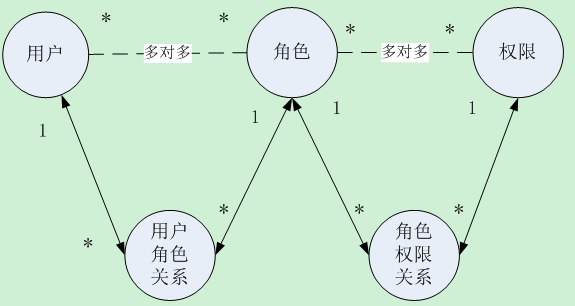
这需要三个实体类,hibernate自动生成5个表
User实体(用户):

package com.cy.coo.bean;import java.util.List;
import javax.persistence.Column;
import javax.persistence.Entity;
import javax.persistence.FetchType;
import javax.persistence.GeneratedValue;
import javax.persistence.Id;
import javax.persistence.JoinColumn;
import javax.persistence.JoinTable;
import javax.persistence.ManyToMany;import com.fasterxml.jackson.annotation.JsonBackReference;
@Entity
public class User {@Id
@GeneratedValue
private Integer user_id;//用户序号
@Column(unique=true)
private String name;//账户
private String password;//密码private String salt;//盐
private Integer state;//用户状态
private String createtime;//创建时间
@ManyToMany(fetch=FetchType.EAGER)//立即从数据库中进行加载数据;
@JoinTable(name="User_Role",joinColumns={@JoinColumn(name="user_id")},
inverseJoinColumns={@JoinColumn(name="role_id")})
private List<Role> roleList;@JsonBackReference
public List<Role> getRoleList(){
return roleList;
}
public void setRoleList(List<Role> roleList){
this.roleList=roleList;
}
注:其它getter和setter省略
}
关于为什么要在getRolelist这个方法上加上@JsonBackReference注解,可以查看这篇文章http://blog.csdn.net/maxu12345/article/details/45538157
Role实体(角色):
package com.cy.coo.bean;
import java.io.Serializable;
import java.util.ArrayList;
import java.util.List;import javax.persistence.Entity;
import javax.persistence.FetchType;
import javax.persistence.GeneratedValue;
import javax.persistence.Id;
import javax.persistence.JoinColumn;
import javax.persistence.JoinTable;
import javax.persistence.ManyToMany;import com.fasterxml.jackson.annotation.JsonBackReference;
@Entity
public class Role implements Serializable {
private static final long serialVersionUID = 1L;@Id
@GeneratedValue
private Integer role_id;//角色序号private String role_name;//角色名称
private String role_description;//角色描述
@ManyToMany
@JoinTable(name = "User_Role", joinColumns = { @JoinColumn(name = "role_id") }, inverseJoinColumns = {
@JoinColumn(name = "user_id") })
private List<User> userList=new ArrayList<>();@ManyToMany(fetch=FetchType.EAGER)
@JoinTable(name="Role_Function",joinColumns={@JoinColumn(name="role_id")},inverseJoinColumns={
@JoinColumn(name="function_id")})
private List<Function> functionList=new ArrayList<>();@JsonBackReference
public List<Function> getFunctionList(){
return functionList;
}
public void setFunctionList(List<Function> functionList){
this.functionList=functionList;
}@JsonBackReference
public List<User> getUserList() {
return userList;
}public void setUserList(List<User> userList) {
this.userList = userList;
}public Integer getRole_id() {
return role_id;
}public void setRole_id(Integer role_id) {
this.role_id = role_id;
}public String getRole_name() {
return role_name;
}public void setRole_name(String role_name) {
this.role_name = role_name;
}public String getRole_description() {
return role_description;
}public void setRole_description(String role_description) {
this.role_description = role_description;
}}
Function实体(权限):
package com.cy.coo.bean;
import java.util.List;
import javax.persistence.Entity;
import javax.persistence.GeneratedValue;
import javax.persistence.Id;
import javax.persistence.JoinColumn;
import javax.persistence.JoinTable;
import javax.persistence.ManyToMany;@Entity
public class Function {
@Id
@GeneratedValue
private Integer function_id;//功能序号private String permission;//权限字符串
@ManyToMany
@JoinTable(name = "Role_Function", joinColumns = { @JoinColumn(name = "function_id") }, inverseJoinColumns = {
@JoinColumn(name = "role_id") })
private List<Role> roleList;public List<Role> getRoleList() {
return roleList;
}public void setRoleList(List<Role> roleList) {
this.roleList = roleList;
}public Integer getFunction_id() {
return function_id;
}public void setFunction_id(Integer function_id) {
this.function_id = function_id;
}public String getPermission() {
return permission;
}public void setPermission(String permission) {
this.permission = permission;
}}
这几个实体类的具体关系如下图,也完美的解释了为什么会生成5张表:
三、写一个与前端交互的controller方法,service层的具体逻辑的方法
    @PostMapping(value = "/logon")

    public Object logon(@RequestBody Login user) {


return userService.login(user);


}
这个方法就是将前端传来的username和password封装到Login类中,Login类也只有这两个属性,然后调用Service层的login方法来处理。下面是service的login方法:
/**
* 用户登录 create by yyc 2017年5月12日下午4:31:26
*/
@Override
public Object login(Login user) {
String username = user.getUsername().trim();
String password = user.getPassword().trim();
// 检查空值
if (!CheckObjectField.CheckField(user)) {
throw new ResultException(CheckObjectField.FieldName + "为空!");
}// 检查用户状态
Integer userState = userRepository.findUserState(username);
if (new Integer("1").equals(userState)) {
throw new ResultException("该用户已锁定");
}// 1、获取Subject实例对象
Subject currentUser = SecurityUtils.getSubject();// 2、判断当前用户是否登录
if (currentUser.isAuthenticated() == false) {
// 3、将用户名和密码封装到UsernamePasswordToken
UsernamePasswordToken token = new UsernamePasswordToken(username, password);// 4、认证
try {
currentUser.login(token);// 传到MyAuthorizingRealm类中的方法进行认证
Session session = currentUser.getSession();
session.setAttribute("username", username);
} catch (AuthenticationException e) {
throw new ResultException("密码或用户名错误");
}
}
// 根据用户名查询角色信息
List<String> RoleNames = roleService.findRoleName(username);return new LoginReturn(username, RoleNames);
}
service中主要是将用户名和密码封装到shiro的UsernamePasswordToken中,然后将token对象放到SecurityUtils.getSubject()的login方法中,以便shiro认证登录使用。认证失败就会抛出AuthenticationException这个异常,就对异常进行相应的操作,这里的处理是抛出一个自定义异常ResultException。
四、写我认为的shiro的核心类
package com.cy.coo.shiro;import org.apache.shiro.authc.AuthenticationException;
import org.apache.shiro.authc.AuthenticationInfo;
import org.apache.shiro.authc.AuthenticationToken;
import org.apache.shiro.authc.SimpleAuthenticationInfo;
import org.apache.shiro.authc.UsernamePasswordToken;
import org.apache.shiro.authz.AuthorizationInfo;
import org.apache.shiro.authz.SimpleAuthorizationInfo;
import org.apache.shiro.realm.AuthorizingRealm;
import org.apache.shiro.subject.PrincipalCollection;
import org.apache.shiro.util.ByteSource;
import org.slf4j.Logger;
import org.slf4j.LoggerFactory;
import org.springframework.beans.factory.annotation.Autowired;import com.cy.coo.bean.Function;
import com.cy.coo.bean.Role;
import com.cy.coo.bean.User;
import com.cy.coo.service.UserService;/**
*
*
- @author E-mail:34782655@qq.com
- @version 创建时间:2017年5月8日 上午10:50:50
- 类说明:
- --
*/
public class MyAuthorizingRealm extends AuthorizingRealm {private final static Logger logger=LoggerFactory.getLogger(MyAuthorizingRealm.class);
@Autowired
private UserService userService;
//shiro的权限配置方法
@Override
protected AuthorizationInfo doGetAuthorizationInfo(PrincipalCollection principals) {logger.info("权限配置-->doGetAuthorizationInfo");
SimpleAuthorizationInfo authorizationInfo = new SimpleAuthorizationInfo();
logger.info("----------------------------->"+principals.getPrimaryPrincipal());
User user=(User) principals.getPrimaryPrincipal();
for(Role role:user.getRoleList()){
authorizationInfo.addRole(role.getRole_name());
for(Function function:role.getFunctionList()){
authorizationInfo.addStringPermission(function.getPermission());
}
}logger.info("用户"+user.getName()+"具有的角色:"+authorizationInfo.getRoles());
logger.info("用户"+user.getName()+"具有的权限:"+authorizationInfo.getStringPermissions());return authorizationInfo;
}//shiro的身份验证方法
@Override
protected AuthenticationInfo doGetAuthenticationInfo(AuthenticationToken token) throws AuthenticationException {logger.info("正在验证身份...");
SimpleAuthenticationInfo info=null;//将token转换成UsernamePasswordToken
UsernamePasswordToken upToken = (UsernamePasswordToken) token;
//从转换后的token中获取用户名
String username= upToken.getUsername();
logger.info("----->"+username);//查询数据库,得到用户
User user=userService.findByName(username);
if(user==null){
return null;
}//得到加密密码的盐值
ByteSource salt = ByteSource.Util.bytes(user.getSalt());
// logger.info("加密密码的盐:"+salt);
// //得到盐值加密后的密码:只用于方便数据库测试,后期不会用到。
// Object md = new SimpleHash("MD5",upToken.getPassword(),salt,1024);
// logger.info("盐值加密后的密码:"+md);
info = new SimpleAuthenticationInfo(
user, //用户名
user.getPassword(), //密码
salt, //加密的盐值
getName() //realm name
);
return info;
}}
这个类继承shiro的AuthorizingRealm ,主要有两个方法,一个是权限配置,一个是身份认证,权限配置:当我们要用到权限时shiro会回调doGetAuthorizationInfo这个方法,对当前的用户分配权限,这个方法中的嵌套for循环是怎么回事呢,其实就是将数据库中的对应角色、权限放进shiro中,让他来管理,这需要实体类User中有getRoleList()、getRole_name()和getFunctionList()、getPermission这几个方法,这几个个方法就是设计数据库和实体类时的东西了,关于shiro权限相关的实体类在前面已经给出了。身份认证:在用户登录认证的时候回调,认证失败就抛出AuthenticationException。
五、shiro配置类
package com.cy.coo.shiro;
import java.util.LinkedHashMap;
import java.util.Map;import org.apache.shiro.authc.credential.HashedCredentialsMatcher;
import org.apache.shiro.cache.ehcache.EhCacheManager;
import org.apache.shiro.mgt.SecurityManager;
import org.apache.shiro.spring.security.interceptor.AuthorizationAttributeSourceAdvisor;
import org.apache.shiro.spring.web.ShiroFilterFactoryBean;
import org.apache.shiro.web.mgt.CookieRememberMeManager;
import org.apache.shiro.web.mgt.DefaultWebSecurityManager;
import org.apache.shiro.web.servlet.SimpleCookie;
import org.slf4j.Logger;
import org.slf4j.LoggerFactory;
import org.springframework.beans.factory.annotation.Qualifier;
import org.springframework.cache.ehcache.EhCacheManagerFactoryBean;
import org.springframework.context.annotation.Bean;
import org.springframework.context.annotation.Configuration;
import org.springframework.core.io.ClassPathResource;@Configuration // 等价于beans
public class ShiroConfig {private static final Logger log = LoggerFactory.getLogger(ShiroFilterFactoryBean.class);
@Bean(name = "securityManager")
public SecurityManager securityManager(@Qualifier("authRealm") MyAuthorizingRealm authRealm,
@Qualifier("cookieRememberMeManager") CookieRememberMeManager cookieRememberMeManager) {
log.info("securityManager()");
DefaultWebSecurityManager securityManager = new DefaultWebSecurityManager();
// 设置realm.
securityManager.setRealm(authRealm);// 设置rememberMe管理器
securityManager.setRememberMeManager(cookieRememberMeManager);return securityManager;
}/**
* realm
*
* @return
*/
@Bean(name = "authRealm")
public MyAuthorizingRealm myAuthRealm(
@Qualifier("hashedCredentialsMatcher") HashedCredentialsMatcher matcher,
@Qualifier("ehCacheManager") EhCacheManager ehCacheManager) {
log.info("myShiroRealm()");
MyAuthorizingRealm myAuthorizingRealm = new MyAuthorizingRealm();
// 设置密码凭证匹配器
myAuthorizingRealm.setCredentialsMatcher(matcher); // myShiroRealm.setCredentialsMatcher(hashedCredentialsMatcher());
// 设置缓存管理器
myAuthorizingRealm.setCacheManager(ehCacheManager);return myAuthorizingRealm;
}/**
* 缓存管理器
* @return
*/
@Bean(value="ehCacheManager")
public EhCacheManager ehCacheManager(@Qualifier("ehCacheManagerFactoryBean") EhCacheManagerFactoryBean bean) {
log.info("ehCacheManager()");
EhCacheManager cacheManager = new EhCacheManager();
cacheManager.setCacheManagerConfigFile("classpath:ehcache-shiro.xml");
return cacheManager;
}/**
* cookie对象;
*
* @return
*/
@Bean
public SimpleCookie rememberMeCookie() {
log.info("rememberMeCookie()");
// 这个参数是cookie的名称,对应前端的checkbox 的name = rememberMe
SimpleCookie simpleCookie = new SimpleCookie("rememberMe");
// <!-- 记住我cookie生效时间30天(259200) ,单位秒;-->
simpleCookie.setMaxAge(259200);
return simpleCookie;
}/**
* 记住我管理器 cookie管理对象;
*
* @return
*/
@Bean(name = "cookieRememberMeManager")
public CookieRememberMeManager rememberMeManager() {
System.out.println("rememberMeManager()");
CookieRememberMeManager cookieRememberMeManager = new CookieRememberMeManager();
cookieRememberMeManager.setCookie(rememberMeCookie());
return cookieRememberMeManager;
}/**
* 密码匹配凭证管理器
*
* @return
*/
@Bean(name = "hashedCredentialsMatcher")
public HashedCredentialsMatcher hashedCredentialsMatcher() {
log.info("hashedCredentialsMatcher()");
HashedCredentialsMatcher hashedCredentialsMatcher = new HashedCredentialsMatcher();hashedCredentialsMatcher.setHashAlgorithmName("MD5");// 散列算法:这里使用MD5算法;
hashedCredentialsMatcher.setHashIterations(1024);// 散列的次数,比如散列两次,相当于
// md5(md5(""));return hashedCredentialsMatcher;
}/**
* 开启shiro aop注解支持. 使用代理方式;所以需要开启代码支持; Controller才能使用@RequiresPermissions
*
* @param securityManager
* @return
*/
@Bean
public AuthorizationAttributeSourceAdvisor authorizationAttributeSourceAdvisor(
@Qualifier("securityManager") SecurityManager securityManager) {
log.info("authorizationAttributeSourceAdvisor()");
AuthorizationAttributeSourceAdvisor authorizationAttributeSourceAdvisor = new AuthorizationAttributeSourceAdvisor();
authorizationAttributeSourceAdvisor.setSecurityManager(securityManager);
return authorizationAttributeSourceAdvisor;
}@Bean
public ShiroFilterFactoryBean shiroFilter(@Qualifier("securityManager") SecurityManager securityManager) {
log.info("shirFilter()");
ShiroFilterFactoryBean shiroFilterFactoryBean = new ShiroFilterFactoryBean();// 必须设置 SecurityManager
shiroFilterFactoryBean.setSecurityManager(securityManager);// 拦截器.
Map<String, String> map = new LinkedHashMap<String, String>();map.put("/logout", "logout");
map.put("/login", "anon");
map.put("/logon", "anon");map.put("/**", "authc");
// 如果不设置默认会自动寻找Web工程根目录下的"/login.jsp"页面
shiroFilterFactoryBean.setLoginUrl("/login");
// 登录成功后要跳转的链接
shiroFilterFactoryBean.setSuccessUrl("/index");
// 未授权界面;
shiroFilterFactoryBean.setUnauthorizedUrl("/unauthorized");shiroFilterFactoryBean.setFilterChainDefinitionMap(map);
return shiroFilterFactoryBean;
}
}
这个没什么好说的,最后一个类是shiro的过滤器配置。可以看到我在每个方法上面加了一个@Bean(name="..."),其实这是spring的注解,将这个类放到spring容器中管理,在方法形参中使用@Qualifier(...)来使用它,以致于我们在方法体中调用某个方法时就方面多了。
在这里,关于shiro在springboot中的基础配置就完成了。下面是期间遇到的错误解决方案:
@Configuration
public class HibernateConfig {

           @Bean

           public FilterRegistrationBean registerOpenEntityManagerInViewFilterBean() {

               FilterRegistrationBean registrationBean = new FilterRegistrationBean();

               OpenEntityManagerInViewFilter filter = new OpenEntityManagerInViewFilter();

               registrationBean.setFilter(filter);

               registrationBean.setOrder(5);

               return registrationBean;

           }

}
参考文章:
错误二:这个在前面也提到过了,返回json数据出现Could not write JSON document: Infinite recursion(无法编写JSON文档:无限递归 );
在后面的使用中发现这个错误也是这样解决的,java.lang.IllegalStateException: Cannot call sendError() after the response has been committed,错误页面到最后就是这样,如图:

解决方法:



 浙公网安备 33010602011771号