
eureka多实例,模拟多台机器
本文只有一个eureka server项目,运行在不同的端口,模拟两台eureka服务。开发使用eclipse 4.8
先说pom.xml文件,如果出现问题,首先考虑springboot和其他包版本冲突

<?xml version="1.0" encoding="UTF-8"?> <project xmlns="http://maven.apache.org/POM/4.0.0" xmlns:xsi="http://www.w3.org/2001/XMLSchema-instance" xsi:schemaLocation="http://maven.apache.org/POM/4.0.0 http://maven.apache.org/xsd/maven-4.0.0.xsd"> <modelVersion>4.0.0</modelVersion><groupId>com.xing</groupId>
<artifactId>springboot-eureka</artifactId>
<version>1.0.0-SNAPSHOT</version>
<packaging>jar</packaging><parent>
<groupId>org.springframework.boot</groupId>
<artifactId>spring-boot-starter-parent</artifactId>
<version>1.4.0.RELEASE</version>
<relativePath/> <!-- lookup parent from repository -->
</parent><properties>
<project.build.sourceEncoding>UTF-8</project.build.sourceEncoding>
<project.reporting.outputEncoding>UTF-8</project.reporting.outputEncoding>
<java.version>1.8</java.version>
</properties><dependencyManagement>
<dependencies>
<dependency>
<groupId>org.springframework.cloud</groupId>
<artifactId>spring-cloud-dependencies</artifactId>
<version>Camden.SR3</version><!--Edgware.SR4 Finchley.RELEASE -->
<type>pom</type>
<scope>import</scope>
</dependency>
</dependencies>
</dependencyManagement><dependencies>
<dependency>
<groupId>org.springframework.cloud</groupId>
<artifactId>spring-cloud-starter-eureka-server</artifactId>
</dependency>
<!-- 健康检查 -->
<dependency>
<groupId>org.springframework.boot</groupId>
<artifactId>spring-boot-starter-actuator</artifactId>
</dependency>
</dependencies>
<build>
<plugins>
<plugin>
<groupId>org.springframework.boot</groupId>
<artifactId>spring-boot-maven-plugin</artifactId>
</plugin>
</plugins>
</build>
<!-- 仓库管理 -->
<repositories>
<repository>
<id>spring-milestones</id>
<name>Spring Milestones</name>
<url>https://repo.spring.io/milestone</url>
<snapshots>
<enabled>false</enabled>
</snapshots>
</repository>
</repositories>
<!-- 指定profiles -->
<profiles>
<profile>
<id>first</id>
<activation>
<!-- 默认激活 -->
<activeByDefault>true</activeByDefault>
</activation>
<properties>
<spring.profiles.active>first</spring.profiles.active>
</properties>
</profile>
<profile>
<id>second</id>
<properties>
<spring.profiles.active>second</spring.profiles.active>
</properties>
</profile>
</profiles>
</project>
因为是使用eclipse,想要多个实例好像只能采用多个yml或properties配置文件
application.ym如下:
spring:
  profiles:
    active: first
application-first.yml如下:
spring: application: name: xing-eurekaServer #指定服务名 prifiles: first server: port: 8090 #服务端口eureka:
client:
registerWithEureka: true #是否将自己注册到Eureka服务中,本身就是所有无需注册
fetchRegistry: true #是否从Eureka中获取注册信息
serviceUrl: #Eureka客户端与Eureka服务端进行交互的地址
defaultZone: http://xing-eurekaServer:8091/eureka/
instance:
prefer-ip-address: true #将自己的ip地址注册到Eureka服务中
ip-address: 127.0.0.1
instance-id: xing-eurekaServer:8090 #指定实例id
hostname: 127.0.0.1
server:
enable-self-preservation: false #禁用自我保护模式
eviction-interval-timer-in-ms: 60000 #清理间隔(单位毫秒,默认是60*1000)
application-second.yml如下:
spring: application: name: xing-eurekaServer #指定服务名 prifiles: second server: port: 8091 #服务端口eureka:
client:
registerWithEureka: true #是否将自己注册到Eureka服务中,本身就是所有无需注册
fetchRegistry: true #是否从Eureka中获取注册信息
serviceUrl: #Eureka客户端与Eureka服务端进行交互的地址
defaultZone: http://xing-eurekaServer:8090/eureka/
instance:
prefer-ip-address: true #将自己的ip地址注册到Eureka服务中
ip-address: 127.0.0.1
instance-id: xing-eurekaServer:8091 #指定实例id
hostname: 127.0.0.1
server:
enable-self-preservation: false #禁用自我保护模式
eviction-interval-timer-in-ms: 60000 #清理间隔(单位毫秒,默认是60*1000)
其中后面两个yml文件中的
serviceUrl:
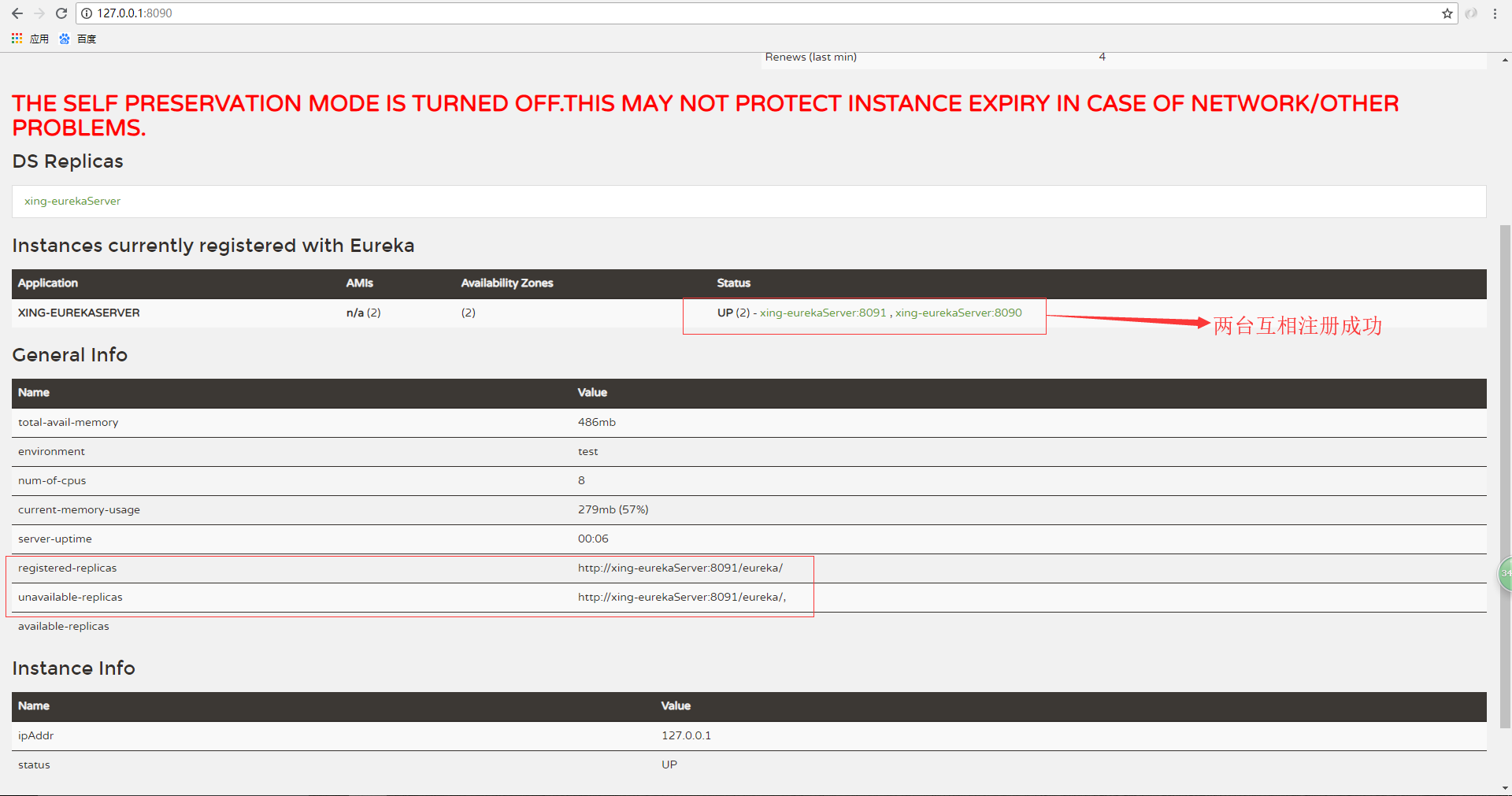
      defaultZone: http://xing-eurekaServer:8090/eureka/要使用xing-eurekaServer之类的域名,通过host映射到127.0.0.1,此处不讲如何配置c盘的host文件,如果不采用域名的话可能刚启动服务的时候是有两个服务,但是后面刷新着就只剩一个服务了,此时查看后台日志会
发现eureka在cancle服务,并且页面上的registered-replicas为空,推荐配置host。
![]()

从上面的两个yml中可以看出来,first向second中注册,second向first中注册。这样相互注册,当你其他的服务想往这两台eureka server服务器中注册服务时,只需要向其中一台注册,两台eureka中都会有你注册的服务,实现了高可用性。

启动类SpringDemoApplication 如下:
package com.xing.springboot;import org.springframework.boot.SpringApplication;
import org.springframework.boot.autoconfigure.SpringBootApplication;
import org.springframework.cloud.netflix.eureka.server.EnableEurekaServer;@SpringBootApplication
@EnableEurekaServer
public class SpringDemoApplication {public static void main(String[] args) {
SpringApplication.run(SpringDemoApplication.class, args);
}
}
启动项目配置如下:
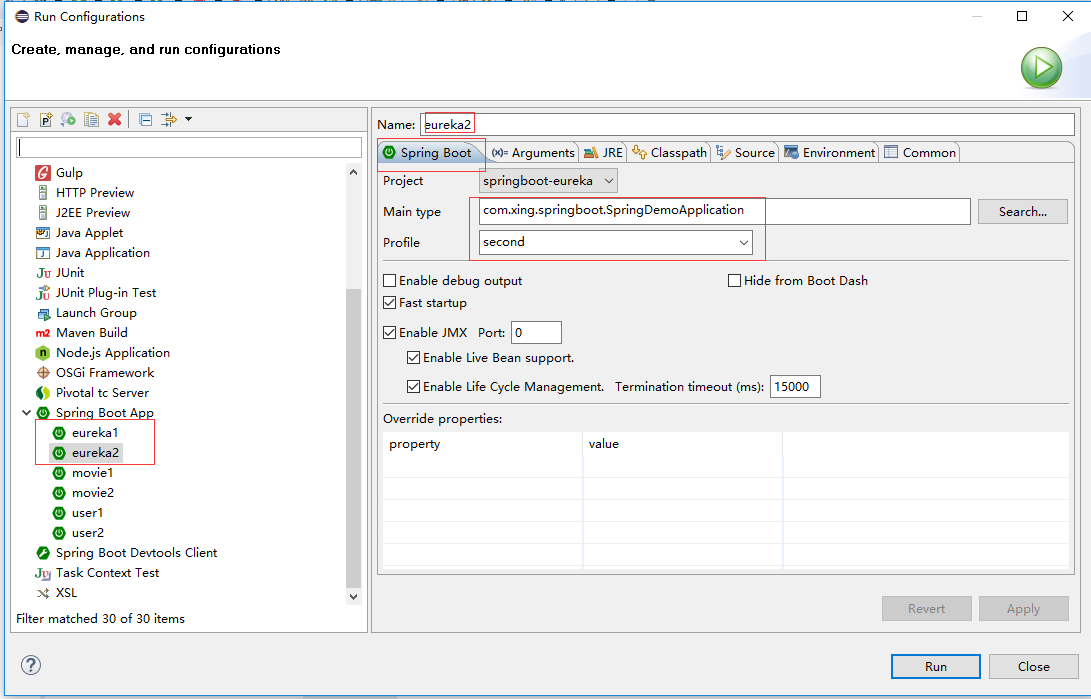
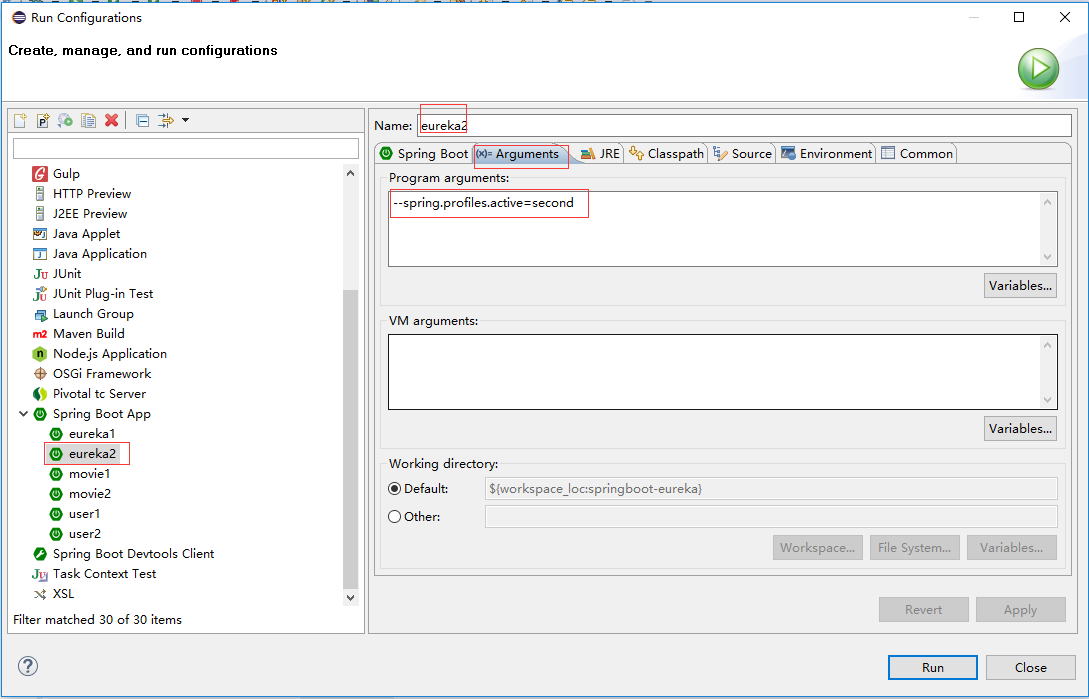
启动之后访问http://127.0.0.1:8090/可以看到如下页面,页面上部分的红字是因为单机状态,eureka给的警告,可以不用管
源码地址:https://github.com/OnlyXingxing/SpringCloud

 浙公网安备 33010602011771号