
IDEA多线程下多个线程切换断点运行调试的技巧
多线程调试设置可以参考:http://www.cnblogs.com/leodaxin/p/7710630.html
1 断点设置如图:

2 测试代码,然后进行debug

package com.daxin;import java.util.HashMap;
/**
Created by Daxin on 2017/10/22.
*/
public class HashMapInfiniteLoop {
private static HashMap<Integer, Integer> map = new HashMap<Integer, Integer>(2, 0.75f);public static void main(String[] args) throws InterruptedException {
map.put(5, 55);new Thread("Thread1-Name") {
public void run() {
System.out.println("Thread1-Name Start");
try {
Thread.sleep(5000);
} catch (InterruptedException e) {
e.printStackTrace();
}
map.put(7, 77);//断点位置 1
System.out.println(map);
}}.start();
new Thread("Thread2-Name") {public void run() {
try {
System.out.println("Thread2-Name Start");
Thread.sleep(5000);
} catch (InterruptedException e) {
e.printStackTrace();
}
map.put(3, 33);// 断点位置2
System.out.println(map);
}}.start();
// 断点位置 3
System.out.println("Thread-Main-Name Start");
System.out.println("Thread-Main-Name Start");
System.out.println("Thread-Main-Name Start");Thread.sleep(500000);
}
}
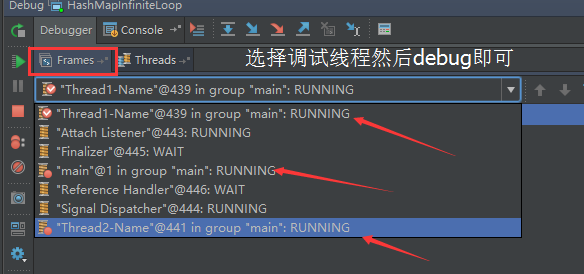
3:启动debug,我们可以在Threads Tab选项双击需要进行单步调试的线程

然后选择Frames Tab选项中调试的线程进行快捷键调试即可。

 浙公网安备 33010602011771号