
Elasticsearch学习笔记——安装、数据导入和查询
到elasticsearch网站下载最新版本的elasticsearch 6.2.1
1 | https://www.elastic.co/downloads/elasticsearch |
中文文档请参考
1 | https://www.elastic.co/guide/cn/elasticsearch/guide/current/index.html |
英文文档及其Java API使用方法请参考,官方文档比任何博客都可信
1 | https://www.elastic.co/guide/en/elasticsearch/client/java-api/current/index.html |
Python API使用方法
1 | http://elasticsearch-py.readthedocs.io/en/master/ |
下载tar包,然后解压到/usr/local目录下,修改一下用户和组之后可以使用非root用户启动,启动命令
1 | ./bin/elasticsearch |
然后访问http://127.0.0.1:9200/

如果需要让外网访问Elasticsearch的9200端口的话,需要将es的host绑定到外网
修改 /configs/elasticsearch.yml文件,添加如下
1 2 | network.host: 0.0.0.0http.port: 9200 |
然后重启,如果遇到下面问题的话
1 2 3 4 | [2018-01-28T23:51:35,204][INFO ][o.e.b.BootstrapChecks ] [qR5cyzh] bound or publishing to a non-loopback address, enforcing bootstrap checksERROR: [2] bootstrap checks failed[1]: max file descriptors [4096] for elasticsearch process is too low, increase to at least [65536][2]: max virtual memory areas vm.max_map_count [65530] is too low, increase to at least [262144] |
解决方法
在root用户下执行
1 | sysctl -w vm.max_map_count=262144 |
接下来导入json格式的数据,数据内容如下
1 2 3 4 | {"index":{"_id":"1"}}{"title":"许宝江","url":"7254863","chineseName":"许宝江","sex":"男","occupation":" 滦县农业局局长","nationality":"中国"}{"index":{"_id":"2"}}{"title":"鲍志成","url":"2074015","chineseName":"鲍志成","occupation":"医师","nationality":"中国","birthDate":"1901年","deathDate":"1973年","graduatedFrom":"香港大学"} |
需要注意的是{"index":{"_id":"1"}}和文件末尾另起一行换行是不可少的
其中的id可以从0开始,甚至是abc等等
否则会出现400状态,错误提示分别为
1 | Malformed action/metadata line [1], expected START_OBJECT or END_OBJECT but found [VALUE_STRING] |
1 | The bulk request must be terminated by a newline [\n]" |
使用下面命令来导入json文件
其中的people.json为文件的路径,可以是/home/common/下载/xxx.json
其中的es是index,people是type,在elasticsearch中的index和type可以理解成关系数据库中的database和table,两者都是必不可少的
1 | curl -H "Content-Type: application/json" -XPOST 'localhost:9200/es/people/_bulk?pretty&refresh' --data-binary "@people.json" |
成功后的返回值是200,比如
1 2 3 4 5 6 7 8 9 10 11 12 13 14 15 16 17 18 19 20 21 22 23 24 25 26 27 28 29 30 31 32 33 34 35 36 37 38 39 40 41 42 | { "took" : 233, "errors" : false, "items" : [ { "index" : { "_index" : "es", "_type" : "people", "_id" : "1", "_version" : 1, "result" : "created", "forced_refresh" : true, "_shards" : { "total" : 2, "successful" : 1, "failed" : 0 }, "_seq_no" : 0, "_primary_term" : 1, "status" : 201 } }, { "index" : { "_index" : "es", "_type" : "people", "_id" : "2", "_version" : 1, "result" : "created", "forced_refresh" : true, "_shards" : { "total" : 2, "successful" : 1, "failed" : 0 }, "_seq_no" : 0, "_primary_term" : 1, "status" : 201 } } ]} |
<0>查看字段的mapping
1 | http://localhost:9200/es/people/_mapping |
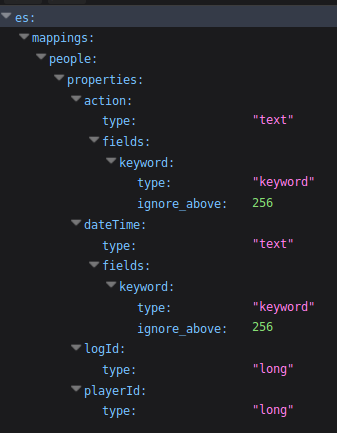
接下来可以使用对应的查询语句对数据进行查询
<1>按id来查询
1 | http://localhost:9200/es/people/1 |
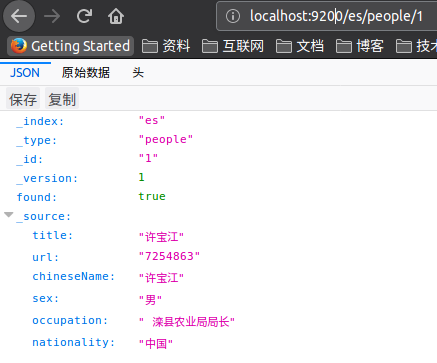
<2>简单的匹配查询,查询某个字段中包含某个关键字的数据(GET)
1 | http://localhost:9200/es/people/_search?q=_id:1 |
1 | http://localhost:9200/es/people/_search?q=title:许 |

<3>多字段查询,在多个字段中查询包含某个关键字的数据(POST)
可以使用Firefox中的RESTer插件来构造一个POST请求,在升级到Firefox quantum之后,原来使用的Poster插件挂了
在title和sex字段中查询包含 许 字的数据
1 2 3 4 5 6 7 8 | { "query": { "multi_match" : { "query" : "许", "fields": ["title", "sex"] } }} |


还可以额外指定返回值
size指定返回的数量
from指定返回的id起始值
_source指定返回的字段
highlight指定语法高亮
1 2 3 4 5 6 7 8 9 10 11 12 13 14 15 16 | { "query": { "multi_match" : { "query" : "中国", "fields": ["nationality", "sex"] } }, "size": 2, "from": 0, "_source": [ "title", "sex", "nationality" ], "highlight": { "fields" : { "title" : {} } }} |
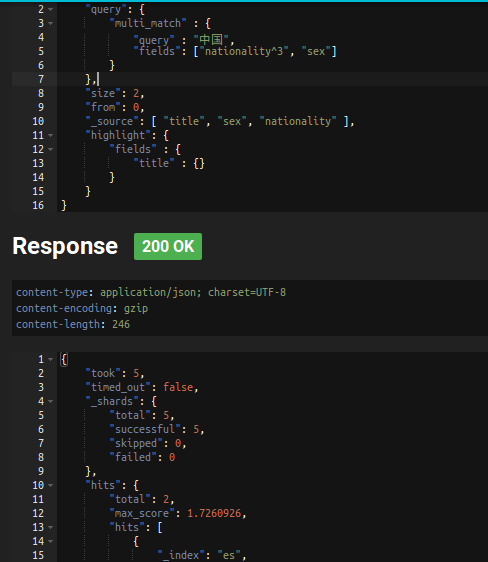
<4>Boosting
用于提升字段的权重,可以将max_score的分数乘以一个系数
1 2 3 4 5 6 7 8 9 10 11 12 13 14 15 16 | { "query": { "multi_match" : { "query" : "中国", "fields": ["nationality^3", "sex"] } }, "size": 2, "from": 0, "_source": [ "title", "sex", "nationality" ], "highlight": { "fields" : { "title" : {} } }} |
<5>组合查询,可以实现一些比较复杂的查询
AND -> must
NOT -> must not
OR -> should
1 2 3 4 5 6 7 8 9 10 11 12 13 14 15 | { "query": { "bool": { "must": { "bool" : { "should": [ { "match": { "title": "鲍" }}, { "match": { "title": "许" }} ], "must": { "match": {"nationality": "中国" }} } }, "must_not": { "match": {"sex": "女" }} } }} |
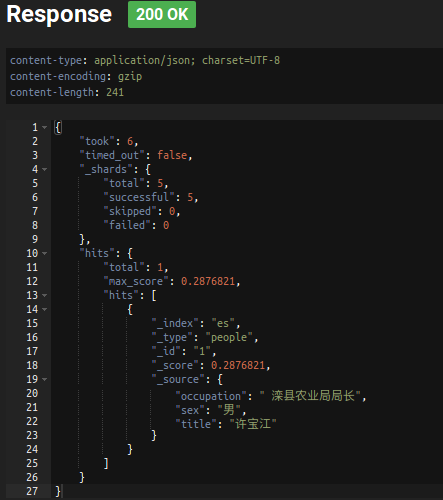
<6>模糊(Fuzzy)查询(POST)
1 2 3 4 5 6 7 8 9 10 11 | { "query": { "multi_match" : { "query" : "厂长", "fields": ["title", "sex","occupation"], "fuzziness": "AUTO" } }, "_source": ["title", "sex", "occupation"], "size": 1} |
通过模糊匹配将 厂长 和 局长 匹配上
AUTO的时候,当query的长度大于5的时候,模糊值指定为2
<7>通配符(Wildcard)查询(POST)
? 匹配任何字符
* 匹配零个或多个字
1 2 3 4 5 6 7 8 9 | { "query": { "wildcard" : { "title" : "*宝" } }, "_source": ["title", "sex", "occupation"], "size": 1} |
<8>正则(Regexp)查询(POST)
1 2 3 4 5 6 7 8 9 | { "query": { "regexp" : { "authors" : "t[a-z]*y" } }, "_source": ["title", "sex", "occupation"], "size": 3} |
<9>短语匹配(Match Phrase)查询(POST)
短语匹配查询 要求在请求字符串中的所有查询项必须都在文档中存在,文中顺序也得和请求字符串一致,且彼此相连。
默认情况下,查询项之间必须紧密相连,但可以设置 slop 值来指定查询项之间可以分隔多远的距离,结果仍将被当作一次成功的匹配。
1 2 3 4 5 6 7 8 9 10 11 | { "query": { "multi_match" : { "query" : "许长江", "fields": ["title", "sex","occupation"], "type": "phrase" } }, "_source": ["title", "sex", "occupation"], "size": 3} |
注意使用slop的时候距离是累加的,滦农局 和 滦县农业局 差了2个距离
1 2 3 4 5 6 7 8 9 10 11 12 | { "query": { "multi_match" : { "query" : "滦农局", "fields": ["title", "sex","occupation"], "type": "phrase", "slop":2 } }, "_source": ["title", "sex", "occupation"], "size": 3} |
<10>短语前缀(Match Phrase Prefix)查询(POST)

 浙公网安备 33010602011771号