

day04:checkBox粗体斜体
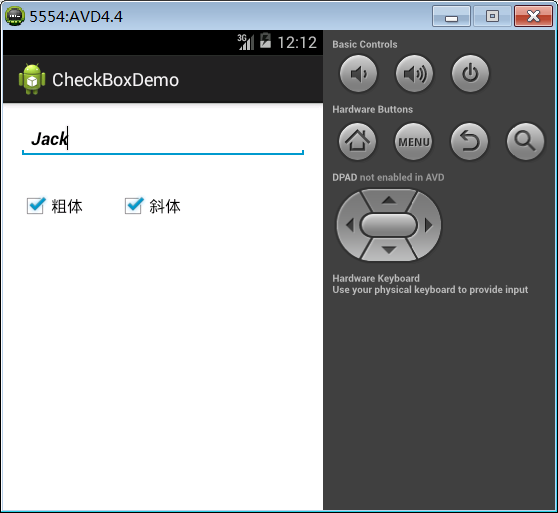
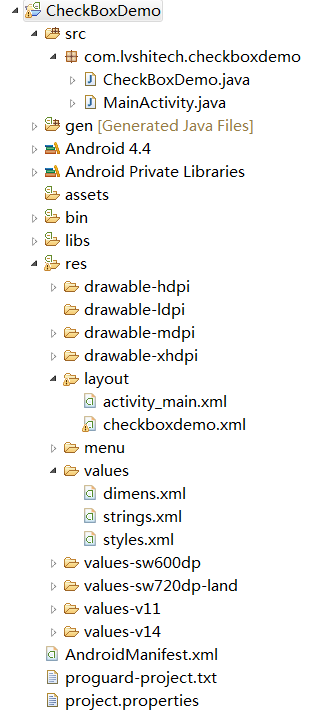
AndroidManifest.xml
<?xml version="1.0" encoding="utf-8"?>
<manifest xmlns:android="http://schemas.android.com/apk/res/android"
    package="com.lvshitech.checkboxdemo"
    android:versionCode="1"
    android:versionName="1.0" >

    <uses-sdk
        android:minSdkVersion="8"
        android:targetSdkVersion="18" />

    <application
        android:allowBackup="true"
        android:icon="@drawable/ic_launcher"
        android:label="@string/app_name"
        android:theme="@style/AppTheme" >
        <activity
            android:name="com.lvshitech.checkboxdemo.CheckBoxDemo"
            android:label="@string/app_name" >
            <intent-filter>
                <action android:name="android.intent.action.MAIN" />

                <category android:name="android.intent.category.LAUNCHER" />
            </intent-filter>
        </activity>
    </application>

</manifest>
CheckBoxDemo.java
package com.lvshitech.checkboxdemo;

import android.app.Activity;
import android.graphics.Typeface;
import android.os.Bundle;
import android.widget.CheckBox;
import android.widget.CompoundButton;
import android.widget.EditText;

public class CheckBoxDemo extends Activity {

	// 页面控件
	EditText etContent;
	CheckBox chkB, chkI;

	int style = 0;

	@Override
	protected void onCreate(Bundle savedInstanceState) {
		super.onCreate(savedInstanceState);

		// 设定布局
		setContentView(R.layout.checkboxdemo);

		// 关联XML
		etContent = (EditText) findViewById(R.id.etContent);

		chkB = (CheckBox) findViewById(R.id.chkBold);
		chkI = (CheckBox) findViewById(R.id.chkItalic);

		// 设置监听:因为chkB和chkI两个监听的动作类似,所以把他们放到一个类中一起实现,这样可以让代码简洁,不用写两遍(内部类实现)
		CheckedChange listener = new CheckedChange();
		chkB.setOnCheckedChangeListener(listener);
		chkI.setOnCheckedChangeListener(listener);
	}

	// 设置监听
	class CheckedChange implements CompoundButton.OnCheckedChangeListener {
		@Override
		public void onCheckedChanged(CompoundButton buttonView, boolean isChecked) {
			switch(buttonView.getId()) {
				case R.id.chkBold:		// 粗体
					if(isChecked) {
						style += Typeface.BOLD;
					} else {
						style -= Typeface.BOLD;
					}
					break;
				case R.id.chkItalic:	// 斜体
					if(isChecked) {
						style += Typeface.ITALIC;
					} else {
						style -= Typeface.ITALIC;
					}
					break;
			}
			etContent.setTypeface(Typeface.DEFAULT, style);
		}
	}

}
checkboxdemo.xml
<RelativeLayout xmlns:android="http://schemas.android.com/apk/res/android"
    xmlns:tools="http://schemas.android.com/tools"
    android:layout_width="match_parent"
    android:layout_height="match_parent"
    android:paddingBottom="@dimen/activity_vertical_margin"
    android:paddingLeft="@dimen/activity_horizontal_margin"
    android:paddingRight="@dimen/activity_horizontal_margin"
    android:paddingTop="@dimen/activity_vertical_margin"
    tools:context=".MainActivity" >

    <EditText
        android:id="@+id/etContent"
        android:layout_width="match_parent"
        android:layout_height="wrap_content"
        android:layout_alignParentLeft="true"
        android:layout_alignParentTop="true"
        android:ems="10" >

        <requestFocus />
    </EditText>

    <CheckBox
        android:id="@+id/chkBold"
        android:layout_width="wrap_content"
        android:layout_height="wrap_content"
        android:layout_alignLeft="@+id/etContent"
        android:layout_below="@+id/etContent"
        android:layout_marginTop="32dp"
        android:text="@string/bold" />

    <CheckBox
        android:id="@+id/chkItalic"
        android:layout_width="wrap_content"
        android:layout_height="wrap_content"
        android:layout_alignBaseline="@+id/chkBold"
        android:layout_alignBottom="@+id/chkBold"
        android:layout_marginLeft="34dp"
        android:layout_toRightOf="@+id/chkBold"
        android:text="@string/italic" />

</RelativeLayout>
strings.xml
<?xml version="1.0" encoding="utf-8"?>
<resources>

    <string name="app_name">CheckBoxDemo</string>
    <string name="action_settings">Settings</string>
    <string name="hello_world">Hello world!</string>
    <string name="bold">粗体</string>
    <string name="italic">斜体</string>

</resources>

 浙公网安备 33010602011771号