
[汽车电子/CAN] BLF 文件
概述 : BLF 文件
ASC Log 与 BLF 文件
- ASC Log (ASCII Log) 及 BLF (Binary Logging Format) 文件,是 Vector 公司制订的一种日志文件格式,其支持描述:CAN / ETH(以太网/SOMEIP等) / FlexRay / LIN 等网络总线数据。
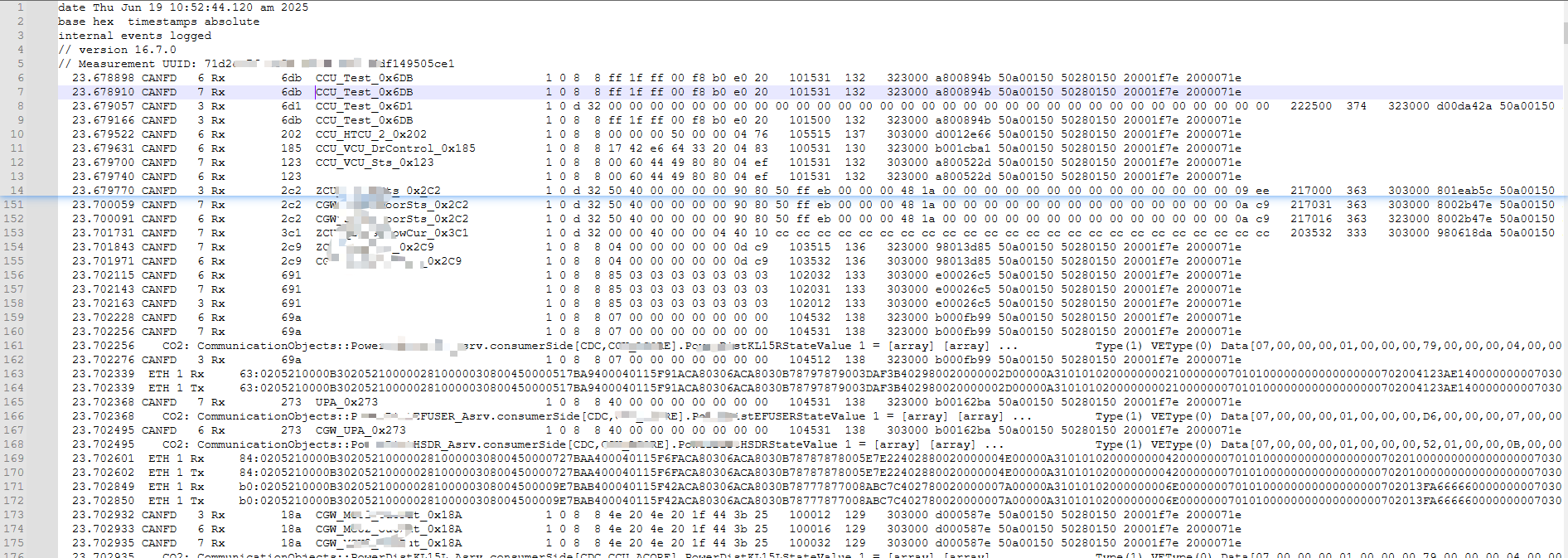
图:混合了 CAN 和 以太网 的 ASC LOG 文件
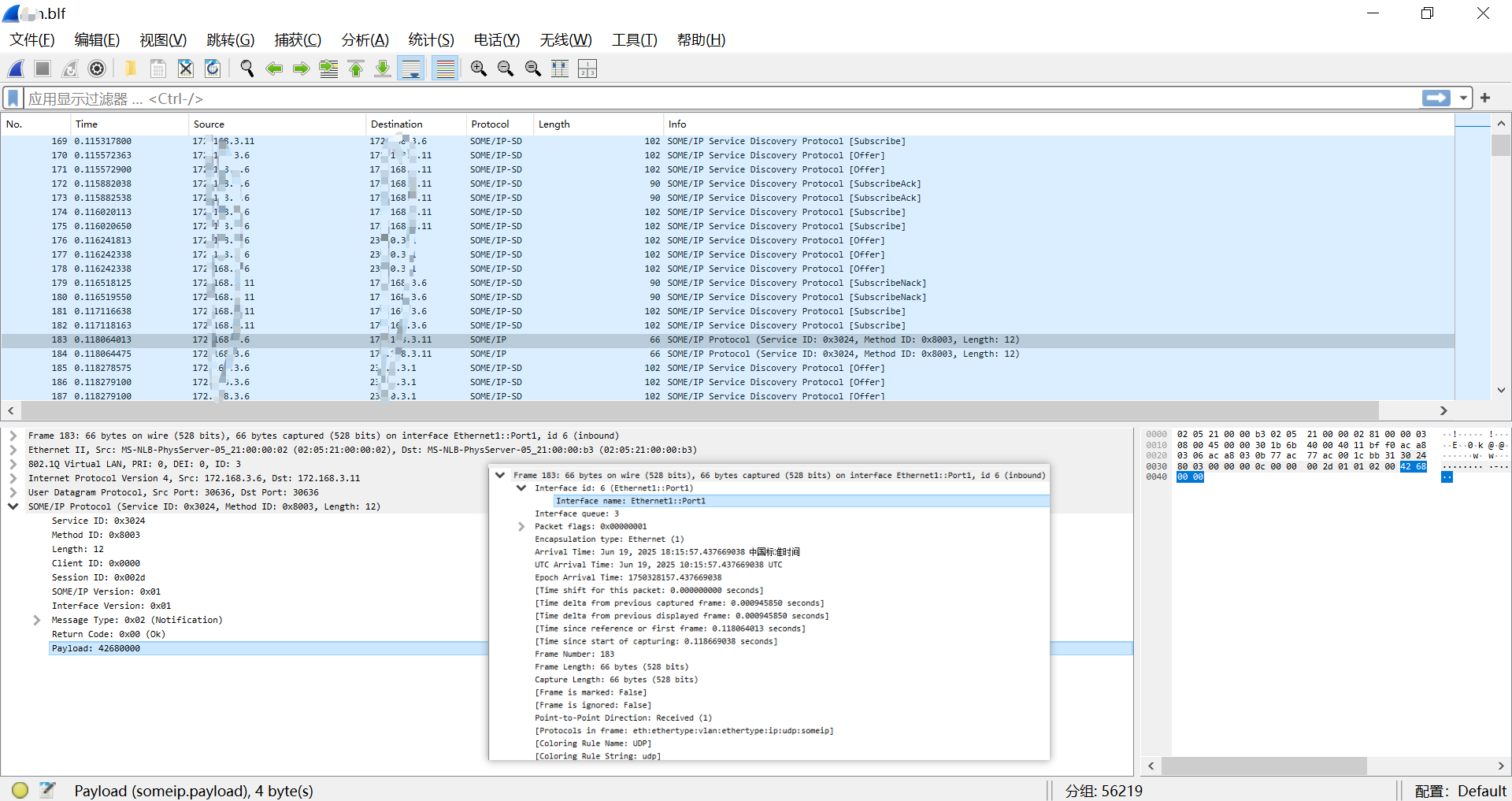
图:使用 WireShark 打开 BLF文件格式的 以太网 SOME/IP 报文
- Vector 提供的规范文件: (如有需要可找笔者领取)
- CAN_and_General_BLF_Format.pdf
- Ethernet_BLF_Format.pdf
- FlexRay_BLF_Format.pdf
- LIN_BLF_Format.pdf
- MOST_BLF_Format.pdf
- TPDiag_BLF_Format.pdf
- Vector工具录制的数据,一般有ASC和BLF两种格式。
BLF 定义 := Binary Logging Format
BLF(binary logging format)即二进制日志数据文件。
BLF 查看
- 因其是二进制文件,且又做了数据压缩,已经无法直接看到物理数值。
- 需要在 Vector / ZLG / TSMaster 等辅助软件工具中回放。
BLF组成
- 安装完
Vector软件后,可以在Doc\LoggingFormat_BLF目录下看到《CAN_and_General_BLF_Format.pdf》(回复"BLF文档"获取)。
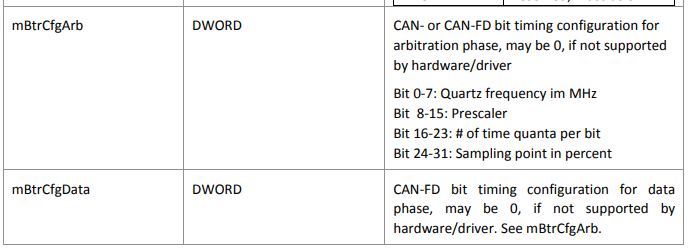
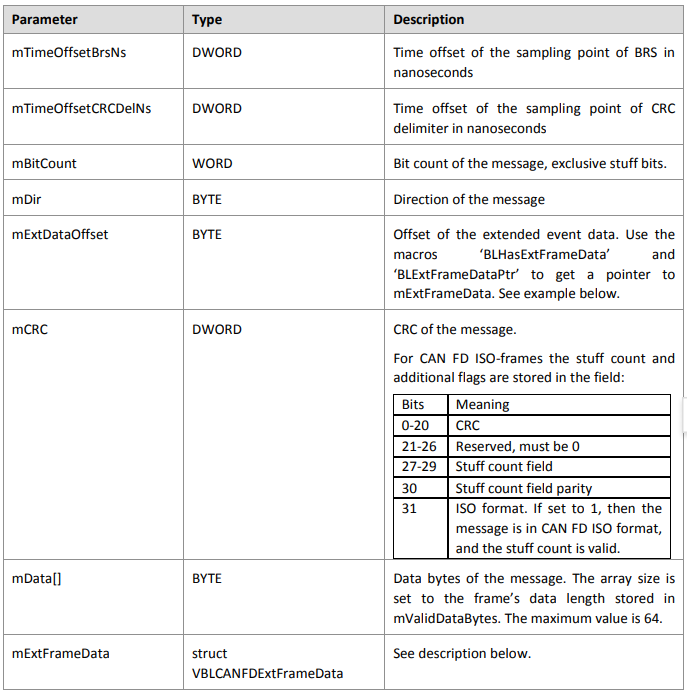
此文档详细说明了BLF内容。BLF内由一系列数据块组成。介绍几个常用的:
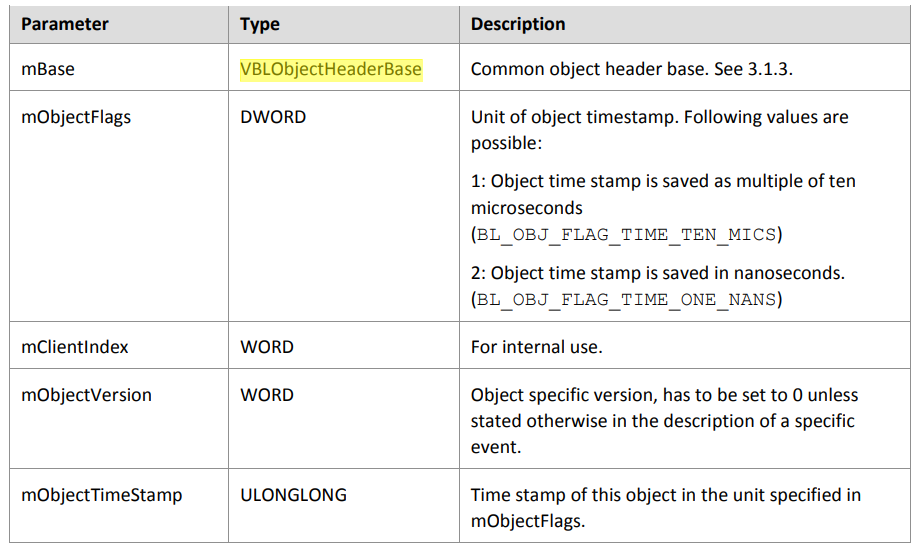
VBLObjectHeaderBase
描述/Description: Object header base structure/对象Header基础结构
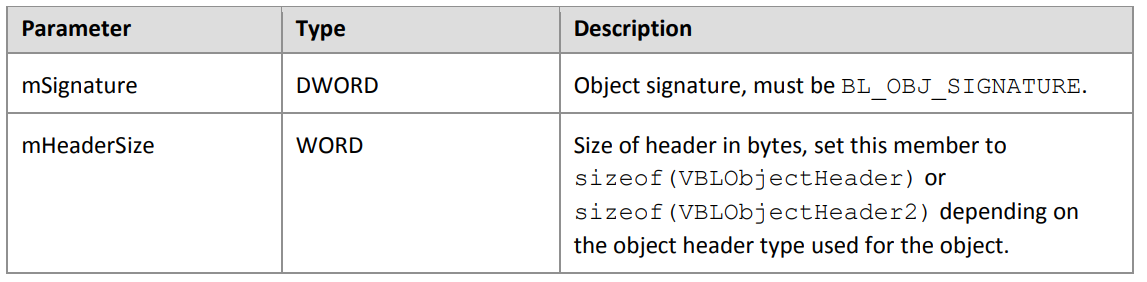
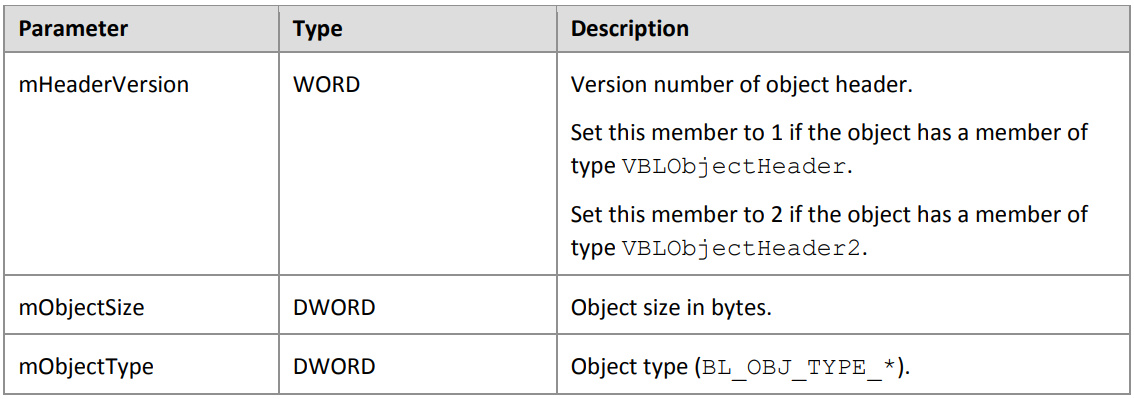
VBLObjectHeader
Description: Object header. Version 1.
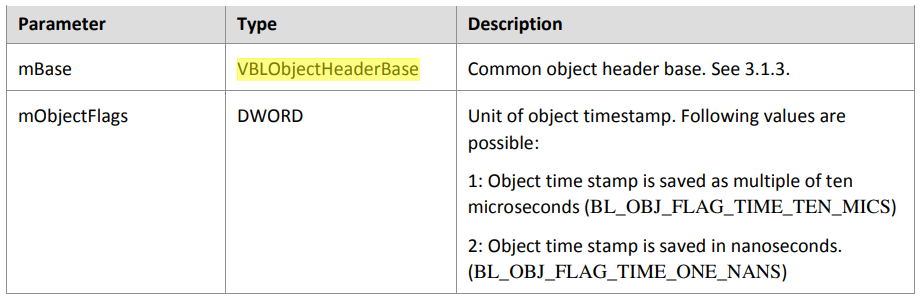
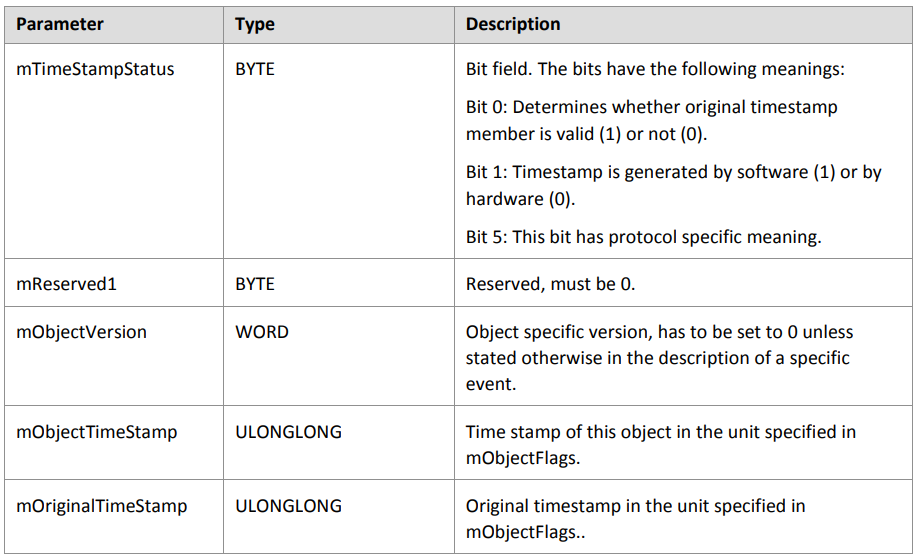
VBLObjectHeader2
Description: Object header. Version 2.
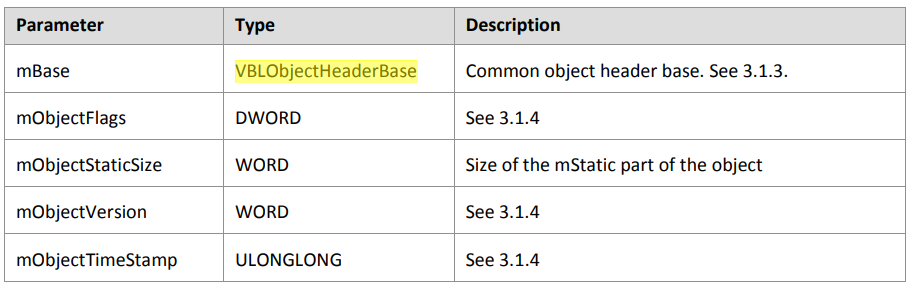
VBLVarObjectHeader
- Description: Extendible variable length object header
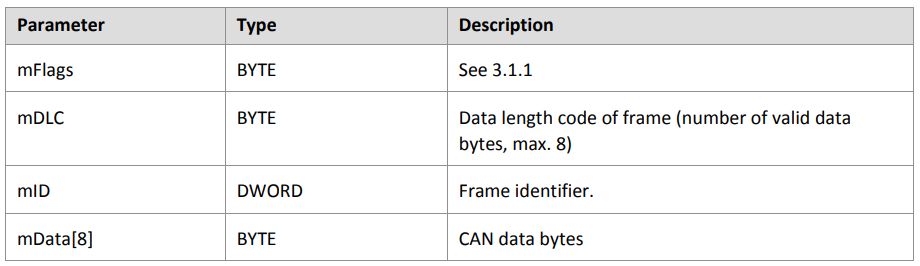
VBLCANMessage
- Description: CAN data or CAN remote frame received or transmitted on a CAN channel.
- Corresponding object type: BL_OBJ_TYPE_CAN_MESSAGE
Obsolete object. Used up to CANoe/CANalyzer version 7.2
Hint: This object is also used in later CANoe/CANalyzer versions when the following flag is set in the CAN.INI file.
[CAN]
BLFFormat_Compatible_with_7_2_and_ealier = 1

VBLCANMessage2
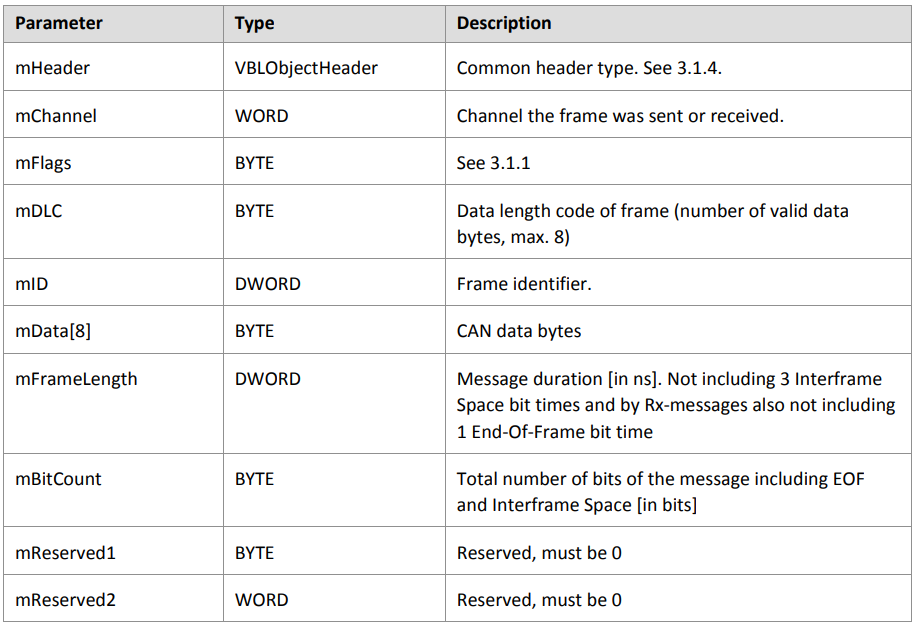
- Description: CAN data or CAN remote frame received or transmitted on a CAN channel.
- Corresponding object type: BL_OBJ_TYPE_CAN_MESSAGE2
Object available starting from CANoe/CANalyzer version 7.5
Hint: This object is used only when the following flag is NOT set in the CAN.INI file, otherwise the object
VBLCANMessage is used.
[CAN]
BLFFormat_Compatible_with_7_2_and_ealier = 0
VBLCANFDMessage64
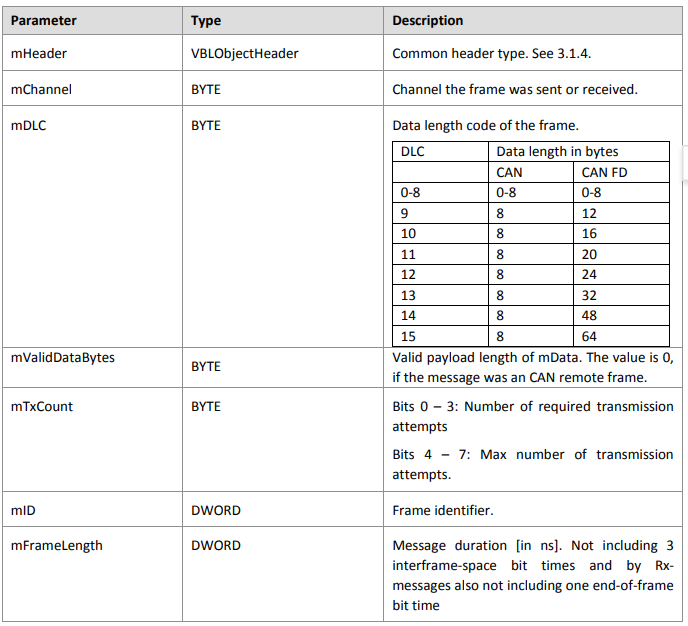
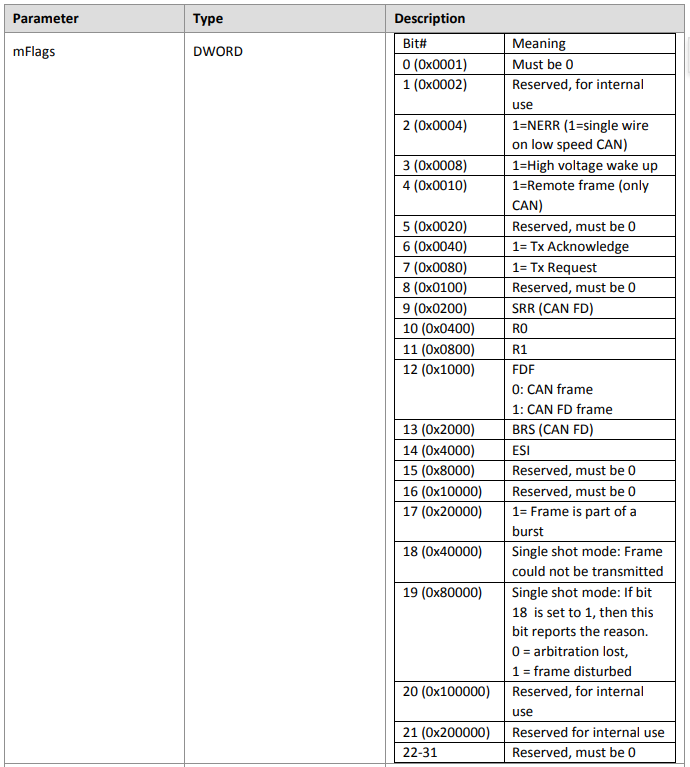
- Description: CAN FD data frame, or CAN data- or remote frame on a CAN FD channel.
- Corresponding object type: BL_OBJ_TYPE_CAN_FD_MESSAGE_64
- Object available starting from CANoe/CANalyzer version 8.1
BLF解析
- 因
BLF的保密性,无法直接读到值,需要使用Vector提供的binlog.dll
相关的例子可以参考《C:\Users\Public\Documents\Vector\CANoe\9.0 (x64)\CANoe Sample Configurations\Programming\BLF_Logging》
下面介绍《bl.c》的函数read_test。
int read_test( LPCTSTR pFileName, LPDWORD pRead)
{
HANDLE hFile;
VBLObjectHeaderBase base;
VBLCANMessage message;
VBLEnvironmentVariable variable;
VBLEthernetFrame ethframe;
VBLAppText appText;
VBLFileStatisticsEx statistics = { sizeof( statistics)};
BOOL bSuccess;
if ( NULL == pRead)
{
return -1;
}
*pRead = 0;
/* open file */
hFile = BLCreateFile( pFileName, GENERIC_READ);
if ( INVALID_HANDLE_VALUE == hFile)
{
return -1;
}
BLGetFileStatisticsEx( hFile, &statistics);
bSuccess = TRUE;
/* read base object header from file */
while ( bSuccess && BLPeekObject( hFile, &base))
{
switch ( base.mObjectType)
{
case BL_OBJ_TYPE_CAN_MESSAGE:
/* read CAN message */
message.mHeader.mBase = base;
bSuccess = BLReadObjectSecure( hFile, &message.mHeader.mBase, sizeof(message) );
/* free memory for the CAN message */
if( bSuccess) {
BLFreeObject( hFile, &message.mHeader.mBase);
}
break;
case BL_OBJ_TYPE_ENV_INTEGER:
case BL_OBJ_TYPE_ENV_DOUBLE:
case BL_OBJ_TYPE_ENV_STRING:
case BL_OBJ_TYPE_ENV_DATA:
/* read environment variable */
variable.mHeader.mBase = base;
bSuccess = BLReadObjectSecure( hFile, &variable.mHeader.mBase, sizeof(variable) );
/* free memory for the environment variable */
if( bSuccess) {
BLFreeObject( hFile, &variable.mHeader.mBase);
}
break;
case BL_OBJ_TYPE_ETHERNET_FRAME:
/* read ethernet frame */
ethframe.mHeader.mBase = base;
bSuccess = BLReadObjectSecure( hFile, ðframe.mHeader.mBase, sizeof(ethframe) );
/* free memory for the frame */
if( bSuccess) {
BLFreeObject( hFile, ðframe.mHeader.mBase);
}
break;
case BL_OBJ_TYPE_APP_TEXT:
/* read text */
appText.mHeader.mBase = base;
bSuccess = BLReadObjectSecure( hFile, &appText.mHeader.mBase, sizeof(appText) );
if ( NULL != appText.mText)
{
printf( "%s\n", appText.mText );
}
/* free memory for the text */
if( bSuccess) {
BLFreeObject( hFile, &appText.mHeader.mBase);
}
break;
default:
/* skip all other objects */
bSuccess = BLSkipObject( hFile, &base);
break;
}
if ( bSuccess)
{
*pRead += 1;
}
}
/* close file */
if ( !BLCloseHandle( hFile))
{
return -1;
}
return bSuccess ? 0 : -1;
}
- 1) hFile = BLCreateFile( pFileName, GENERIC_READ);
以读取的方式,打开BLF文件
- 2)BLGetFileStatisticsEx( hFile, &statistics);
读取文件统计信息
- 3)while( bSuccess && BLPeekObject( hFile, &base))
读取文件object
-
4)switch ( base.mObjectType)
-
5)bSuccess = BLReadObjectSecure( hFile, &message.mHeader.mBase, sizeof(message));
读取CAN message
- 6)bSuccess = BLSkipObject( hFile, &base);
跳过其他object
- 7) if( !BLCloseHandle( hFile))
开发步骤
需要c/c++基础
- 1)新建vc++项目
- 2)引入头文件:
binlog.h和binlog_objects.h - 3)引入库文件:
binlog.dll和binlog.lib - 4)参考
bl.c开发
Y 推荐文献
- [智能网联汽车/CAN/ASCLOG/BLF] CAN ASC Log文件 - 博客园/千千寰宇
- [Python/Struct] Struct 模块: struct 将字节串解读为打包的二进制数据 - 博客园/千千寰宇
CASE 解析 BLF Header Struct
- CAN_and_General_BLF_Format.pdf
- Ethernet_BLF_Format.pdf
- FlexRay_BLF_Format.pdf
- LIN_BLF_Format.pdf
- MOST_BLF_Format.pdf
- TPDiag_BLF_Format.pdf
- Vector BLF
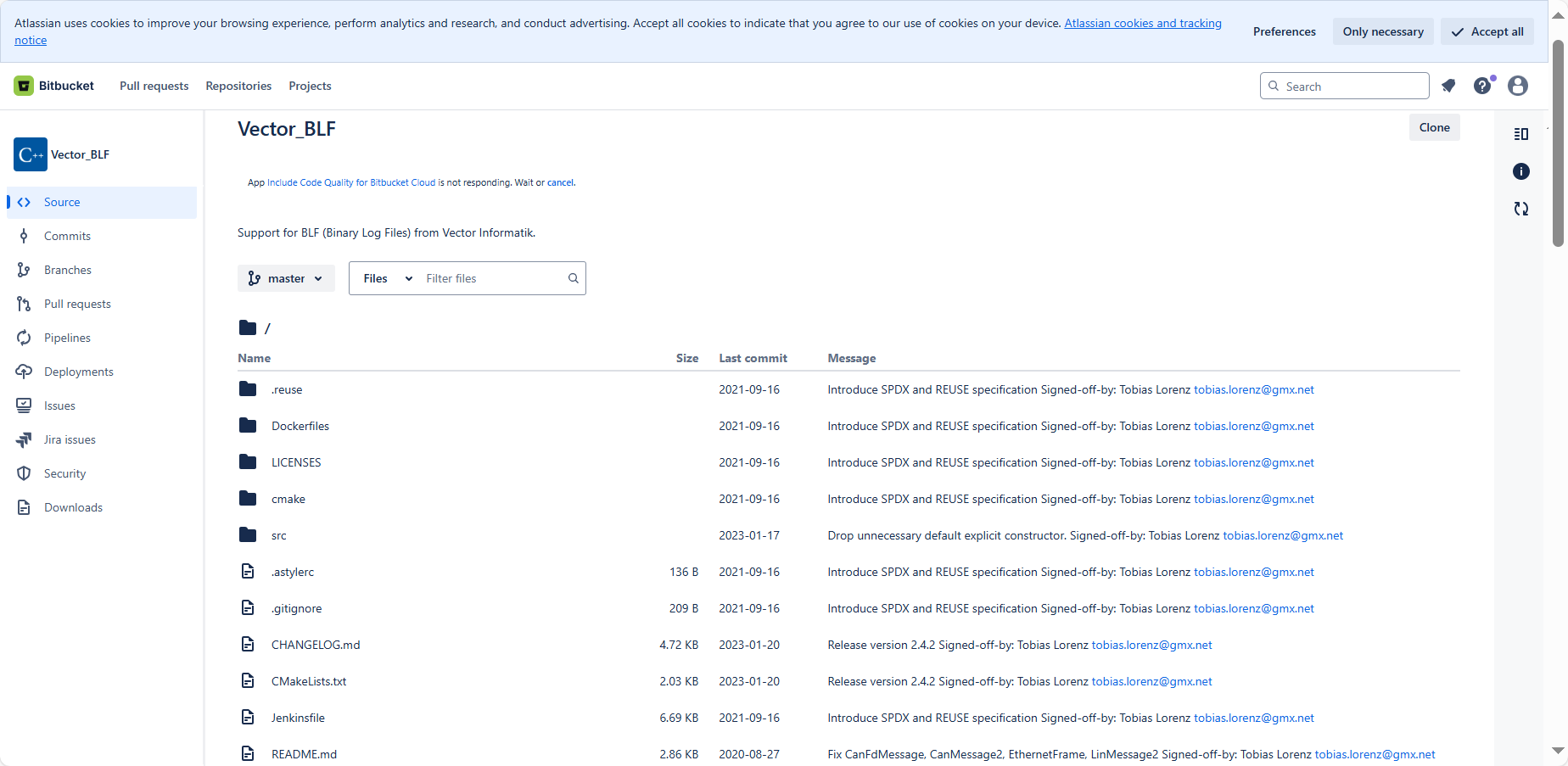
BLF 解析 开源代码 : https://bitbucket.org/tobylorenz/vector_blf/src/master/
- python-can
- github other projects
https://blog.csdn.net/gitblog_09710/article/details/142945395
https://gitcode.com/open-source-toolkit/dbf3a/blob/main/read and write BLF logging files.rar
Vector 提供了binlog.dll动态链接库和CAN_and_General_BLF_Format文档,用来写如和读取blf文件
CAN_and_General_BLF_Format.pdf
Ethernet_BLF_Format.pdf
FlexRay_BLF_Format.pdf
...
X 参考文献
with can.io.blf.BLFReader("/home/ranjeet/Downloads/CAN/BLF_Files/input.blf") as can_log
J 待阅读文献
Python:使用python-can库,支持多种总线接口,广泛用于数据分析和机器学习。
C++:使用canutils库,性能高,适合系统级应用。
Java:可以使用第三方库如jCAN,用于开发跨平台的应用程序。
python : canmatrix / blfparse 库
libsocket-can-java:libsocket-can-java

本文链接: https://www.cnblogs.com/johnnyzen
关于博文:评论和私信会在第一时间回复,或直接私信我。
版权声明:本博客所有文章除特别声明外,均采用 BY-NC-SA 许可协议。转载请注明出处!
日常交流:大数据与软件开发-QQ交流群: 774386015 【入群二维码】参见左下角。您的支持、鼓励是博主技术写作的重要动力!

 浙公网安备 33010602011771号