
[汽车电子/网络/CAN/Python] CAN 报文 的 ASC LOG 与 BLF 文件转换工具
需求描述
- CAN 报文 ASC 文件 与 BLF 的相互转换。
代码实现
- python 3.10
前置依赖
requirements.txt (第三方开源库)
can
python-can
cantools
注:getopt / os / sys / time 均是python内置模块
DatetimeUtils.py
CanLogFormatConverter.py
#!/usr/bin/python3

import os
import sys
import time
import getopt
import can
import cantools

#from can import ASCReader
#from can import ASCWriter
#from can import BLFReader # 使用方式: ascLog = can.BLFReader(blfFile)

import DatetimeUtils

"""
CAN 报文日志 的 ASC LOG 与 BLF 文件格式转换器
@updateTime 2025-07-16 20:21
@installation
    pip install requirements.txt
@usage
    python CanLogFormatConverter.py -i "inputfile.blf" -o "outputfile.asc"
@help
    python CanLogFormatConverter.py -h
@reference-doc
  [1] Python将CAN数据.asc文件转化为.blf文件 - CSDN - https://blog.csdn.net/PlutoZuo/article/details/137821984
  [2] CAN数据格式-BLF - Zhihu - https://zhuanlan.zhihu.com/p/37318040
  [3] cantools - github - https://github.com/aheit/cantools
  [4] Caone转换asc格式到blf格式 - CSDN - https://blog.csdn.net/weixin_47649405/article/details/129276760
  [5] Blf2asc Demo - github - https://github.com/informagico/blf2asc
"""

def asc2blf(sourceAscLogFile, sinkBlfFile):
    with open(sourceAscLogFile, 'r') as inF:
        inFile = can.io.ASCReader(inF)
        with open(sinkBlfFile, 'wb') as outF:
            outFile = can.io.BLFWriter(outF)
            for msg in inFile:
                outFile.on_message_received(msg)
            outFile.stop()
    print('well done! ')
    # input() # 等待用户输入

def asc2blf(sourceAscLogFile, sinkBlfFile):
    with open(sourceAscLogFile, 'r') as inF:
        ascReader = can.ASCReader(inF) # can.io.ASCReader(inF)
        stopTimestamp = 0;
        with open(sinkBlfFile, 'wb') as outF:
            blfWriter = can.io.BLFWriter(outF)
            #blfWrite = can.BLFWriter(outF)
            for msg in ascReader:
                blfWriter.on_message_received(msg)
                stopTimestamp = msg.timestamp * 1000; # 1. 不断更新停止时间; 2. ASC 文件中 CAN 帧的时间戳单位是【秒】,故须乘以 1000,达到毫秒级

            # 获取起始时间戳(毫秒级) : 1. ascReader.date 的样例值: 'May 8 08:21:23.576 pm 2025'; 2. 注意,只有等待开始 for 循环读取 Message 时或之后, ASCReader.date 才会被解析到值 (坑点)
            startTimestamp = DatetimeUtils.datetimeStrToTimestamp(ascReader.date)

            stopTimestamp = startTimestamp + stopTimestamp;
            blfWriter.start_timestamp = startTimestamp/1000; # 不主动设置时,默认为 0 (1970-01-01) eg: 1746706883.576
            blfWriter.stop_timestamp = stopTimestamp/1000; # 不主动设置时,默认为 0 (1970-01-01) eg: 1746706883.585
            #blfWriter.object_count = None; # 此字段无需设置, blfWriter 会在真正写入文件中自动计算
            blfWriter.stop()
    print(f"Well done! sourceAscLogFile:{sourceAscLogFile}, sinkBlfFile:{sinkBlfFile}")

def blf2asc(sourceBlfFile, sinkAscLogFile):
    with open(sourceBlfFile, 'r') as inF:
        inFile = can.io.BLFReader(inF)
        with open(sinkAscLogFile, 'wb') as outF:
            outFile = can.io.ASCWriter(outF)
            for msg in inFile:
                outFile.on_message_received(msg)
            outFile.stop()
    print(f"Well done! sourceBlfFile:{sourceBlfFile}, sinkAscLogFile:{sinkAscLogFile}")
    # input() # 等待用户输入


"""
BLF 转 ASC LOG 的实现方式2

def blf2asc(sourceBlfFile, sinkAscLogFile):
    # convert the file
    reader = can.BLFReader(sourceBlfFile)
    ascLog = list(reader)

    outFile = open(sinkAscLogFile, "w")

    for msg in ascLog:
        msg = str(msg)
        msg = msg[0:30] + msg[30:100].upper() + msg[100:]

        outFile.write(msg + "\n")

    outFile.close()
"""

def main(argv):
    # [1] get command line arguments
    sourceFile = "" #'can-1.asc'
    outFile = "" # 'can-1.blf'
    try:
        opts, args = getopt.getopt(argv, "hi:o:", ["inFile=", "outFile="])
    except getopt.GetoptError:
        print("CanLogFormatConverter.py -i <sourceFile> -o <outFile>")
        sys.exit(2)
    for opt, arg in opts:
        if opt == "-h":
            print("CanLogFormatConverter.py -i <sourceFile> -o <outFile>")
            sys.exit()
        elif opt in ("-i", "--inFile"):
            sourceFile = arg
        elif opt in ("-o", "--outFile"):
            outFile = arg

    print()
    if sourceFile.lower().endswith(".asc"): # asc => blf
       print(f'Asc Log File(Source):{sourceFile}, Blf File(Sink):{outFile}')
       asc2blf(sourceFile, outFile)
    else: # blf => asc
       print(f'Blf File(Source):{sourceFile}, Asc Log File(Sink):{outFile}')
       blf2asc(sourceFile, outFile)


# -i "dataset/can-1.asc" -o "dataset/can-1.blf"
if __name__ == "__main__":
    main(sys.argv[1:])
- 效果图
用 CANoe 打开 blf 或 asc log 文件 (时间单位: 秒,例如: 1.000000)
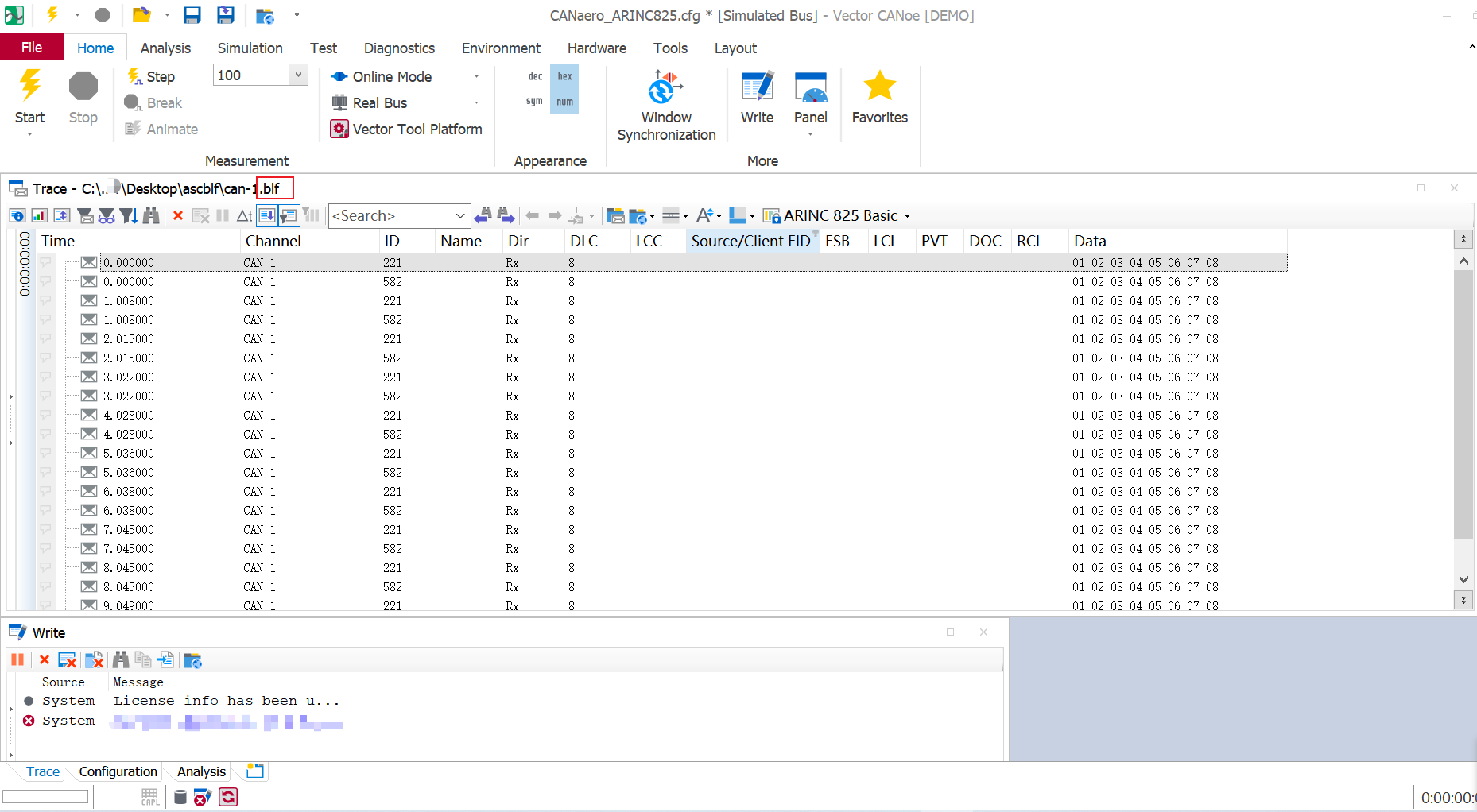
运行效果
CASE : ASC 转 BLF
ASC 源文件
- 要点
- 12小时值
错误示范:
Thu May 8 20:21:23.576 pm 2025
正确示范:Thu May 8 08:21:23.576 pm 2025
date Thu May 8 08:21:23.576 pm 2025
base hex timestamps absolute
no internal events logged
// version 18.3.0
  0.000000 1 221        Rx d 8 01 02 03 04 05 06 07 08
  0.000000 1 582        Rx d 8 01 02 03 04 05 06 07 08
  1.008000 1 221        Rx d 8 01 02 03 04 05 06 07 08
  1.008000 1 582        Rx d 8 01 02 03 04 05 06 07 08
  2.015000 1 221        Rx d 8 01 02 03 04 05 06 07 08
  2.015000 1 582        Rx d 8 01 02 03 04 05 06 07 08
  3.022000 1 221        Rx d 8 01 02 03 04 05 06 07 08
  3.022000 1 582        Rx d 8 01 02 03 04 05 06 07 08
  4.028000 1 221        Rx d 8 01 02 03 04 05 06 07 08
  4.028000 1 582        Rx d 8 01 02 03 04 05 06 07 08
  5.036000 1 221        Rx d 8 01 02 03 04 05 06 07 08
  5.036000 1 582        Rx d 8 01 02 03 04 05 06 07 08
  6.038000 1 221        Rx d 8 01 02 03 04 05 06 07 08
  6.038000 1 582        Rx d 8 01 02 03 04 05 06 07 08
  7.045000 1 221        Rx d 8 01 02 03 04 05 06 07 08
  7.045000 1 582        Rx d 8 01 02 03 04 05 06 07 08
  8.045000 1 221        Rx d 8 01 02 03 04 05 06 07 08
  8.045000 1 582        Rx d 8 01 02 03 04 05 06 07 08
  9.049000 1 221        Rx d 8 01 02 03 04 05 06 07 08
  9.049000 1 582        Rx d 8 01 02 03 04 05 06 07 08
ReadBlfFileDemo.py : 读取转换后的 BLF 文件
#!/usr/bin/python3

# -*- coding: utf-8 -*-
#####
"""
# author:vehicle_ma, 2023/2/10
"""
######

import can
import cantools
import time
import datetime
import pytz

baseDir = "D:\\Workspace\\CodeRepositories\\xxx\\dataset\\"
sourceBlfFile = baseDir + "can-1.blf";

filename = sourceBlfFile
blfReader = can.BLFReader(filename)      #blf对象

print(f"file:{blfReader.file}, fileSize:{blfReader.file_size}, uncompressedSize:{blfReader.uncompressed_size}")
print(f"objectCount:{blfReader.object_count}")

timeZone = 'Asia/Shanghai';
startTimestamp=blfReader.start_timestamp*1000 # eg: 1746706883576
startTime=datetime.datetime.fromtimestamp(startTimestamp/1000, pytz.timezone(timeZone)) # 毫秒级时间戳 转 时间字符串(指定时区:UTC+8)
endTimestamp=blfReader.stop_timestamp*1000 # eg: 1746706892625
endTime=datetime.datetime.fromtimestamp(endTimestamp/1000, pytz.timezone(timeZone))
print(f"startTime:{startTime}|{startTimestamp}ms, stopTime:{endTime}|{endTimestamp}ms")

messageIdSet=set() # 存放去重后的所有的 MessageId
messageCount=0;
for msg in blfReader:
    messageId = msg.arbitration_id             # message id
    messageTimestamp = msg.timestamp           # blf包中保存的报文时间戳
    messageData = msg.data                     # blf包中保存的数据,直接打印是加密的数字字符码
    messageDlc = msg.dlc                       # blf包中保存的报文长度,如8,64
    #dict_data = db.decode_message(msg.arbitration_id, msg.data)    #对数据进行解码

    if(messageCount >= 10): # 展示前 N 个 Message
        break;
    else:
        print(f"message:{msg}")
        # print(f"messageId:{messageId}, messageTimestamp:{messageTimestamp},dlc:{messageDlc}, originData:{messageData}")
        #print('message data     ', dict_data)

    messageIdSet.add(messageId)
    messageCount += 1;

print(f"messageCount:{messageCount}, messageIdSet.length:{ len(messageIdSet)}");
对读取/验证转换后的BLF文件:
file:<_io.BufferedReader name='D:\\Workspace\\CodeRepositories\\xxxx\\can-1.blf'>, fileSize:326, uncompressedSize:1136
objectCount:20
startTime:2025-05-08 20:21:23.576000+08:00|1746706883576.0ms, stopTime:2025-05-08 20:21:32.625000+08:00|1746706892625.0ms
message:Timestamp: 1746706883.576000    ID:      221    S Rx                DL:  8    01 02 03 04 05 06 07 08     Channel: 0
message:Timestamp: 1746706883.576000    ID:      582    S Rx                DL:  8    01 02 03 04 05 06 07 08     Channel: 0
message:Timestamp: 1746706884.584000    ID:      221    S Rx                DL:  8    01 02 03 04 05 06 07 08     Channel: 0
message:Timestamp: 1746706884.584000    ID:      582    S Rx                DL:  8    01 02 03 04 05 06 07 08     Channel: 0
message:Timestamp: 1746706885.591000    ID:      221    S Rx                DL:  8    01 02 03 04 05 06 07 08     Channel: 0
message:Timestamp: 1746706885.591000    ID:      582    S Rx                DL:  8    01 02 03 04 05 06 07 08     Channel: 0
message:Timestamp: 1746706886.598000    ID:      221    S Rx                DL:  8    01 02 03 04 05 06 07 08     Channel: 0
message:Timestamp: 1746706886.598000    ID:      582    S Rx                DL:  8    01 02 03 04 05 06 07 08     Channel: 0
message:Timestamp: 1746706887.604000    ID:      221    S Rx                DL:  8    01 02 03 04 05 06 07 08     Channel: 0
message:Timestamp: 1746706887.604000    ID:      582    S Rx                DL:  8    01 02 03 04 05 06 07 08     Channel: 0
messageCount:10, messageIdSet.length:2
X 参考文献
- Python将CAN数据
.asc文件转化为.blf文件 - CSDN - CAN数据格式-BLF - Zhihu
- cantools - github
- Caone转换asc格式到blf格式 - CSDN
- Blf2asc Demo - github
blf2asc/blf2asc.py
打开caone,选择tools工具栏,选择logging file conversation
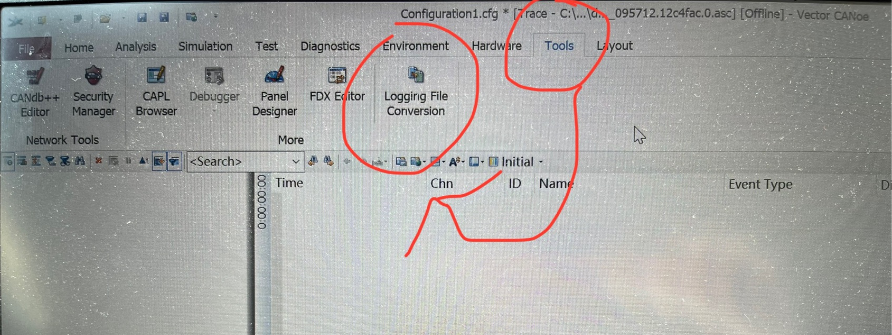
pip install python-can
import can
log = can.BLFReader(blf)
Python处理CAN总线的库主要有python-can和cantools。这里我的CAN总线数据保存为asc格式,database保存为dbc格式。
pip install cantools python-can
dbc = cantools.db.load_file(dbc_file)
log_data = can.BLFReader(f)
dec = dbc.decode_message(msg.arbitration_id, msg.data)

本文作者:
千千寰宇
本文链接: https://www.cnblogs.com/johnnyzen
关于博文:评论和私信会在第一时间回复,或直接私信我。
版权声明:本博客所有文章除特别声明外,均采用 BY-NC-SA 许可协议。转载请注明出处!
日常交流:大数据与软件开发-QQ交流群: 774386015 【入群二维码】参见左下角。您的支持、鼓励是博主技术写作的重要动力!
本文链接: https://www.cnblogs.com/johnnyzen
关于博文:评论和私信会在第一时间回复,或直接私信我。
版权声明:本博客所有文章除特别声明外,均采用 BY-NC-SA 许可协议。转载请注明出处!
日常交流:大数据与软件开发-QQ交流群: 774386015 【入群二维码】参见左下角。您的支持、鼓励是博主技术写作的重要动力!

 浙公网安备 33010602011771号