(转)High-Performance Timer in C#
2010-12-06 22:36 Johnny Qian 阅读(748) 评论(0) 收藏 举报Introduction
In some applications exact time measurement methods are very important. The often used Windows API method GetTickCount() retrieves the number of milliseconds that have elapsed since the system was started, but the GetTickCount() function only archieve resolutions of 1ms and on the other side they are very imprecise.
So, for exact time measurement we should find another method.
High resolution timing is supported in Win32 by the QueryPerformanceCounter() and QueryPerformanceFrequency() API methods. This timer functions has much better resolution than the "standard" millisecond-based timer calls, like the GetTickCount() method. On the other side there is also a little bit overhead when calling this "unmanaged" API methods from C#, but it's better than using the very imprecise GetTickCount() API function.
The first call, QueryPerformanceCounter(), queries the actual value of the high-resolution performance counter at any point. The second function, QueryPerformanceFrequency(), will return the number of counts per second that the high-resolution counter performs. To retrieve the elapsed time of a code section you have to get the actual value of the high-resolution performance counter immediately before and immediately after the section of code to be timed. The difference of these values would indicate the counts that elapsed while the code executed.
The elapsed time can be computed then, by dividing this difference by the number of counts per second that the high-resolution counter performs (the frequency of the high-resolution timer).
duration = (stop - start) / frequency
For more information about QueryPerformanceCounter and QueryPerformanceFrequency, read the documentation on MSDN.
Code
The following class implements the functionality of the QueryPerformanceCounter() and QueryPerformanceFrequency() API methods.
using System.Runtime.InteropServices;
using System.ComponentModel;
using System.Threading;
namespace Win32
{
internal class HiPerfTimer
{
[DllImport("Kernel32.dll")]
private static extern bool QueryPerformanceCounter(
out long lpPerformanceCount);
[DllImport("Kernel32.dll")]
private static extern bool QueryPerformanceFrequency(
out long lpFrequency);
private long startTime, stopTime;
private long freq;
// Constructor
public HiPerfTimer()
{
startTime = 0;
stopTime = 0;
if (QueryPerformanceFrequency(out freq) == false)
{
// high-performance counter not supported
throw new Win32Exception();
}
}
// Start the timer
public void Start()
{
// lets do the waiting threads there work
Thread.Sleep(0);
QueryPerformanceCounter(out startTime);
}
// Stop the timer
public void Stop()
{
QueryPerformanceCounter(out stopTime);
}
// Returns the duration of the timer (in seconds)
public double Duration
{
get
{
return (double)(stopTime - startTime) / (double) freq;
}
}
}
}
This class is very simple to use. Just create an instance of HiPerfTimer, call Start() to start timing and call Stop() to stop timing. To retrieve the elapsed time, just call the Duration() function and you will get the elapsed time.
The following sample should explain that.
pt.Start(); // start the timer
Console.WriteLine("Test\n"); // the code to be timed
pt.Stop(); // stop the timer
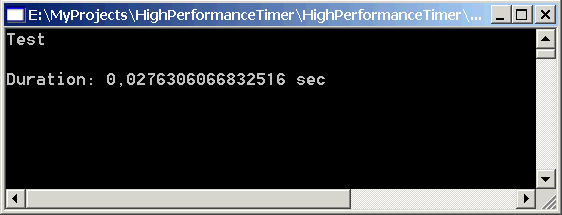
Console.WriteLine("Duration: {0} sec\n", pt.Duration); // print the duration of the timed code
The following image shows the output of this sample on my system.
本文基于知识共享署名 2.5 中国大陆许可协议发布,欢迎转载、演绎或用于商业目的,但是必须保留本文的署名Johnny Qian和链接。

 浙公网安备 33010602011771号