
esxi下给Centos硬盘扩充空间
最近进行了测试系统的数据备份,结果备份文件超级大,超过了40G,把对应的/根目录给撑满了。
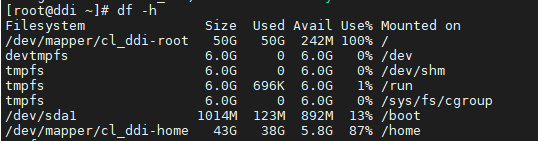
没办法,就想着给虚拟机进行磁盘扩容。
1、首先呢,当然是添加一个新磁盘,磁盘未添加的时候,只有/dev/sda
添加完新磁盘后,会出现/dev/sdb1
2、对新添加的sbd1进行如下操作
fdisk /dev/sdb
Welcome to fdisk (util-linux 2.23.2).
Changes will remain in memory only, until you decide to write them.
Be careful before using the write command.
Device does not contain a recognized partition table
Building a new DOS disklabel with disk identifier 0x9ae5f58f.
Command (m for help): p
Disk /dev/sdb: 161.1 GB, 161061273600 bytes, 314572800 sectors
Units = sectors of 1 * 512 = 512 bytes
Sector size (logical/physical): 512 bytes / 512 bytes
I/O size (minimum/optimal): 512 bytes / 512 bytes
Disk label type: dos
Disk identifier: 0x9ae5f58f
Device Boot Start End Blocks Id System
Command (m for help): n
Partition type:
p primary (0 primary, 0 extended, 4 free)
e extended
Select (default p):
Using default response p
Partition number (1-4, default 1):
First sector (2048-314572799, default 2048):
Using default value 2048
Last sector, +sectors or +size{K,M,G} (2048-314572799, default 314572799):
Using default value 314572799
Partition 1 of type Linux and of size 150 GiB is set
Command (m for help): t
Selected partition 1
Hex code (type L to list all codes): 8e
Changed type of partition 'Linux' to 'Linux LVM'
Command (m for help): p
Disk /dev/sdb: 161.1 GB, 161061273600 bytes, 314572800 sectors
Units = sectors of 1 * 512 = 512 bytes
Sector size (logical/physical): 512 bytes / 512 bytes
I/O size (minimum/optimal): 512 bytes / 512 bytes
Disk label type: dos
Disk identifier: 0x9ae5f58f
Device Boot Start End Blocks Id System
/dev/sdb1 2048 314572799 157285376 8e Linux LVM
Command (m for help): w
The partition table has been altered!
Calling ioctl() to re-read partition table.
Syncing disks.
3、然后进行pvdisplay查看,只有你原始磁盘的数据(/dev/sda)
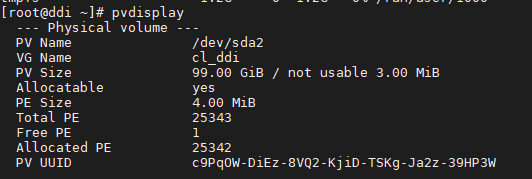
[root@ddi ~]# pvcreate /dev/sdb1
Physical volume "/dev/sdb1" successfully created.
再次进行pvdisplay查看,新加的磁盘就显示出来了。
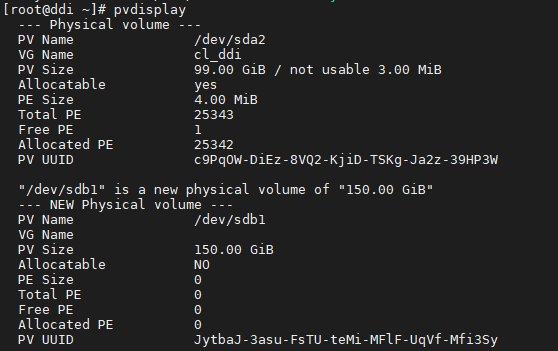
4、将新加的磁盘添加到原始组中vgdisplay,此时查看到的是原有的磁盘大小100G,并且VG Name : cl_ddi
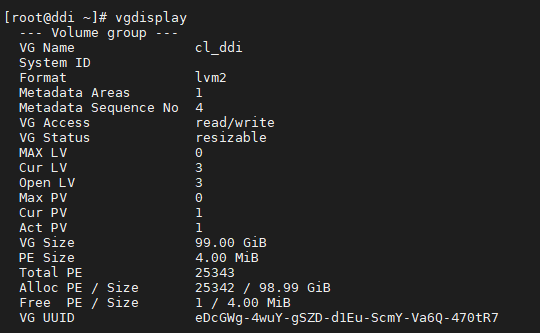
将/dev/sdb1添加到该组中vgextend cl_ddi /dev/sdb1

之后就可以对原来的/进行扩容了lvresize -L +150G /dev/cl_ddi/root

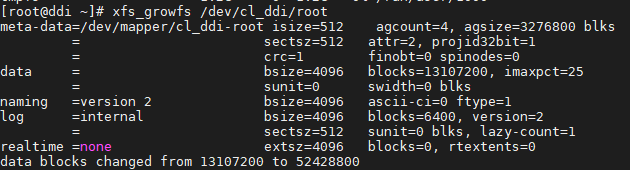
5、扩容之后需要重新读取一下磁盘数据xfs_growfs /dev/cl_ddi/root
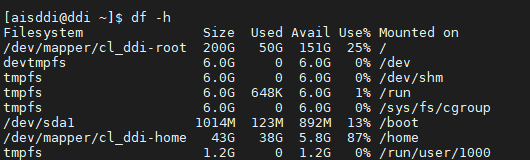
最后我们就发现,磁盘已经扩容成功 df -h

 浙公网安备 33010602011771号