
Flink sql.client简单使用
数据源设置kafka,配置单独yaml:
- 文件名:sql.yaml
#==============================================================================
# Table Sources
#==============================================================================

# Define table sources and sinks here.

tables: # empty list
# A typical table source definition looks like:
 - name: testTable # 表名称
   type: source   # 表类型,可配置 ‘source’ or ‘sink’
   update-mode: append  #  表中数据更新方式, append/update(update只能写入支持更新的外部存储,如MySQL、HBase)
   connector:  # 连接器
      property-version: 1
      type: kafka  # 连接kafka
      version: 0.11  # 0.11以上版本选择 universal
      topic: orderSQL  # 消费的topic
      startup-mode: earliest-offset # 消费方式 earliest-offset从头消费,latest-offset从最新消费
      properties:  # zk、kafka端口及ip地址
      - key: zookeeper.connect
        value: localhost:2181
      - key: bootstrap.servers
        value: localhost:9092
      - key: group.id
        value: test-consumer-group
   format:  # 解析数据格式化
      property-version: 1
      type: json
      schema: "ROW(order_id LONG, shop_id VARCHAR, member_id LONG, trade_amt DOUBLE, pay_time TIMESTAMP)"
   schema:
      - name: order_id
        type: LONG
      - name: shop_id
        type: VARCHAR
      - name: member_id
        type: LONG
      - name: trade_amt
        type: DOUBLE
      - name: payment_time  # 输出字段由pay_time变更为 payment_time
        type: TIMESTAMP
        rowtime:
          timestamps:
            type: "from-field"  # 时间戳字段获取方式:来自源表字段
            from: "pay_time"  # 时间戳字段:源表的时间戳字段
          watermarks:  # 水印
            type: "periodic-bounded"  # 定义周期性水印
            delay: "60000"  # 最大延迟

#==============================================================================
# User-defined functions
#==============================================================================

# Define scalar, aggregate, or table functions here.

functions: [] # empty list
# A typical function definition looks like:
# - name: ...
#   from: class
#   class: ...
#   constructor: ...

#==============================================================================
# Execution properties
#==============================================================================

# Execution properties allow for changing the behavior of a table program.

execution:
  # 'batch' or 'streaming' execution
  type: streaming
  # allow 'event-time' or only 'processing-time' in sources
  time-characteristic: event-time
  # interval in ms for emitting periodic watermarks
  periodic-watermarks-interval: 200
  # 'changelog' or 'table' presentation of results
  result-mode: table
  # maximum number of maintained rows in 'table' presentation of results
  max-table-result-rows: 1000000
  # parallelism of the program
  parallelism: 1
  # maximum parallelism
  max-parallelism: 128
  # minimum idle state retention in ms
  min-idle-state-retention: 3600000
  # maximum idle state retention in ms
  max-idle-state-retention: 7200000

#==============================================================================
# Deployment properties
#==============================================================================

# Deployment properties allow for describing the cluster to which table
# programs are submitted to.

deployment:
  # general cluster communication timeout in ms
  response-timeout: 5000
  # (optional) address from cluster to gateway
  gateway-address: ""
  # (optional) port from cluster to gateway
  gateway-port: 0
-
添加依赖包:
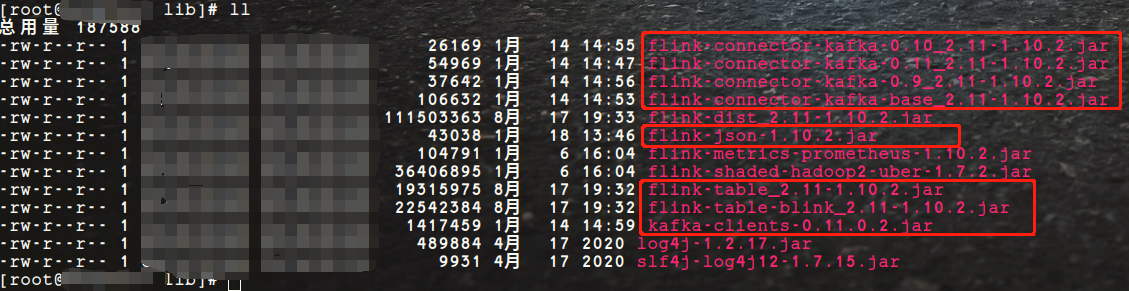
flink集群lib目录下都得有这些jar包。
执行sql-client.sh
[root@rdx flink]# pwd
/opt/rdx/flink
[root@rdx flink]# bin/sql-client.sh embedded -d conf/sql.yaml -l lib/

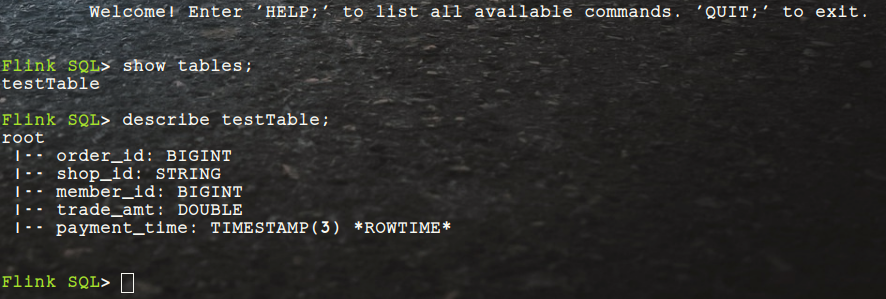
看到松鼠图案就代表跑起来了!
运行SQL语句:
- 在运行之前往配置文件中设置的topic里输入几条数据
{"order_id": "1","shop_id": "AF18","member_id": "3410211","trade_amt": "100.00","pay_time": "2021-01-18T16:57:00Z"}
{"order_id": "2","shop_id": "AF20","member_id": "3410213","trade_amt": "130.00","pay_time": "2021-01-18T16:58:00Z"}
{"order_id": "3","shop_id": "AF18","member_id": "3410212","trade_amt": "120.00","pay_time": "2021-01-18T16:58:35Z"}
{"order_id": "4","shop_id": "AF19","member_id": "3410212","trade_amt": "100.00","pay_time": "2021-01-18T16:59:00Z"}
{"order_id": "5","shop_id": "AF18","member_id": "3410211","trade_amt": "150.00","pay_time": "2021-01-18T16:59:30Z"}
{"order_id": "6","shop_id": "AF18","member_id": "3410211","trade_amt": "110.00","pay_time": "2021-01-18T17:00:12Z"}
{"order_id": "7","shop_id": "AF19","member_id": "3410213","trade_amt": "110.00","pay_time": "2021-01-18T17:01:00Z"}
{"order_id": "8","shop_id": "AF20","member_id": "3410211","trade_amt": "100.00","pay_time": "2021-01-18T17:01:44Z"}
{"order_id": "9","shop_id": "AF17","member_id": "3410212","trade_amt": "110.00","pay_time": "2021-01-18T17:02:15Z"}
{"order_id": "10","shop_id": "AF20","member_id": "3410212","trade_amt": "110.00","pay_time": "2021-01-18T17:03:15Z"}
{"order_id": "11","shop_id": "AF19","member_id": "3410212","trade_amt": "110.00","pay_time": "2021-01-18T17:03:33Z"}
{"order_id": "12","shop_id": "AF17","member_id": "3410212","trade_amt": "110.00","pay_time": "2021-01-18T17:04:15Z"}
- 执行简单查询sql
Flink SQL> select * from testTable;

- 一分钟固定窗口计算
SELECT
  shop_id
  , TUMBLE_START(payment_time, INTERVAL '1' MINUTE) AS tumble_start
  , TUMBLE_END(payment_time, INTERVAL '1' MINUTE)   AS tumble_end
  , sum(trade_amt)                             AS amt
FROM testTable
GROUP BY shop_id, TUMBLE(payment_time, INTERVAL '1' MINUTE);

一生不喜欢与人抢,该得到的也不会让

 浙公网安备 33010602011771号