
Java-JSP(2)
JSP
九大内置对象以及作用域
- PageCOntext
- Request
- Response
- Session
- Application
- config
- out
- page
- expection
我们可以用${}来输出值
用内置对象来设置值
<%@ page contentType="text/html;charset=UTF-8" language="java" %>
<html>
<head>
    <title>js02</title>
</head>
<body>
<%
  request.setAttribute("name1","jinnice1");
  pageContext.setAttribute("name2","jinnice2");
  session.setAttribute("name3","jinnice3");
  application.setAttribute("name4","jinnice4");
%>
<%
  String name1 = (String) pageContext.getAttribute("name1");
  String name2 = (String) pageContext.getAttribute("name2");
  String name3 = (String) pageContext.getAttribute("name3");
  String name4 = (String) pageContext.getAttribute("name4");
  String name5 = (String) pageContext.getAttribute("name5");
%>
<%--我们可以用EL${}来输出值--%>
<h1>输出:</h1>
<h3>${name1}</h3>
<h3>${name2}</h3>
<h3>${name3}</h3>
<h3>${name4}</h3>
<h3>${name5}</h3>
</body>
</html>
jsp内置对象的作用域
<%
  request.setAttribute("name1","jinnice1");//在一次请求中保存数据,一次请求后消失
  pageContext.setAttribute("name2","jinnice2");//在一个页面中保存数据,只在当前页面显示
  session.setAttribute("name3","jinnice3");//在一次会话中保存数据,浏览器关闭消失
  application.setAttribute("name4","jinnice4");//将信息保存在服务器中,服务器关闭信息才消失
%>
我们在js1中设置这些对象的值,然后在js2中取出结果如下:
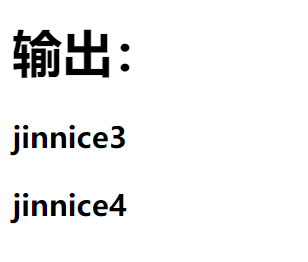
因为在js1中经行了一次请求并且在使用js2跳转了页面所以只输出jinnice3、4。
代码如下:
js1
<%--
  Created by IntelliJ IDEA.
  User: Lenovo
  Date: 31/8/2022
  Time: 上午10:13
  To change this template use File | Settings | File Templates.
--%>
<%@ page contentType="text/html;charset=UTF-8" language="java" %>
<html>
<head>
    <title>js01</title>
</head>
<body>
<%
  request.setAttribute("name1","jinnice1");//在一次请求中保存数据,一次请求后消失
  pageContext.setAttribute("name2","jinnice2");//在一个页面中保存数据,只在当前页面显示
  session.setAttribute("name3","jinnice3");//在一次会话中保存数据,浏览器关闭消失
  application.setAttribute("name4","jinnice4");//将信息保存在服务器中,服务器关闭信息才消失
%>
<%
  String name1 = (String) pageContext.getAttribute("name1");
  String name2 = (String) pageContext.getAttribute("name2");
  String name3 = (String) pageContext.getAttribute("name3");
  String name4 = (String) pageContext.getAttribute("name4");
  String name5 = (String) pageContext.getAttribute("name5");
%>
<%--我们可以用EL${}来输出值--%>
<h1>输出:</h1>
<h3>${name1}</h3>
<h3>${name2}</h3>
<h3>${name3}</h3>
<h3>${name4}</h3>
<h3>${name5}</h3>
</body>
</html>
js2
<%@ page contentType="text/html;charset=UTF-8" language="java" %>
<html>
<head>
    <title>js03</title>
</head>
<body>
<%
    String name1 = (String) pageContext.getAttribute("name1");
    String name2 = (String) pageContext.getAttribute("name2");
    String name3 = (String) pageContext.getAttribute("name3");
    String name4 = (String) pageContext.getAttribute("name4");
    String name5 = (String) pageContext.getAttribute("name5");
%>
<h1>输出:</h1>
<h3>${name1}</h3>
<h3>${name2}</h3>
<h3>${name3}</h3>
<h3>${name4}</h3>
<h3>${name5}</h3>
</body>
</html>
页面转发
pageContext.forward("js03.jsp");
得到jinnice1、3、4
因为page只在一个页面中生效
JSP标签、JSTL标签、EL标签
导包
<!-- https://mvnrepository.com/artifact/javax.servlet.jsp.jstl/jstl-api -->
        <dependency>
            <groupId>javax.servlet.jsp.jstl</groupId>
            <artifactId>jstl-api</artifactId>
            <version>1.2</version>
        </dependency>
        <!-- https://mvnrepository.com/artifact/taglibs/standard -->
        <dependency>
            <groupId>taglibs</groupId>
            <artifactId>standard</artifactId>
            <version>1.1.2</version>
        </dependency>
EL表达式
${}
- 获取数据
- 执行运算
- 获取web开发的常用对象
JSP标签
<%@ page contentType="text/html;charset=UTF-8" language="java" %>
<html>
<head>
    <title>jsp01</title>
</head>
<body>
<jsp:forward page="jso02.jsp">
  <jsp:param name="name" value="jinnice"/>
</jsp:forward>
</body>
</html>
JSTL表达式
JSTL标签是为了弥补HTML的不足,JSTL里有大量标签
引入jstl核心库的头文件
<%@ taglib prefix="c" uri="http://java.sun.com/jsp/jstl/core" %>

 浙公网安备 33010602011771号