


通过nfs-ganesha实现nfs客户端挂载glusterfs虚拟卷
server端
首先创建一个虚拟卷
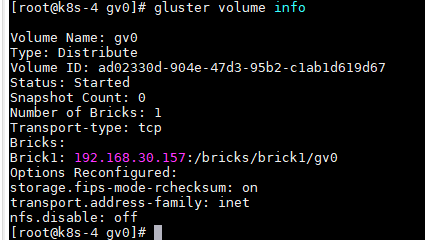
chmod 777 /bricks -R
安装nfs-ganesha
yum -y install centos-release-gluster6
yum -y install nfs-ganesha nfs-ganesha-gluster
修改nfs-ganesha配置文件cat /etc/ganesha/ganesha.conf#都是注释直接在后面添
EXPORT_DEFAULTS {
        Access_Type = RW;
}
EXPORT

{
        Export_Id = 1 ;
        Path = "/gv0";
        Pseudo = "/gv0";
        Disable_ACL = True;
        Protocols = "3","4";
        Access_Type = RW;
        Squash = No_root_squash;
        Sectype = "sys";
        Transports = "UDP","TCP";

        FSAL {
                Name = "GLUSTER";
                Hostname = "192.168.30.157";
                Volume = "gv0";
        }
}
LOG {
        Default_Log_Leve1 = WARN;
}
启动nfs-ganesha
systemctl start nfs-ganesha
systemctl enable nfs-ganesha
systemctl status nfs-ganesha

启动nfs-ganesha会和nfs端口冲突需要先停掉nfs

查看日志
tail -f /var/log/ganesha/ganesha.log
检查挂载

Client端
linux
安装nfs服务
yum install nfs-utils
mount -t nfs 192.168.30.157:/gv0 /mnt

 浙公网安备 33010602011771号