android.os.NetworkOnMainThreadException异常的处理
在android 4.0上运行时报android.os.NetworkOnMainThreadException异常,在4.0中,访问网络不能在主程序中进行,有三个方法可以解决,
第一种是在主程序中增加:
//安卓2.3以后访问网络增加内容,忽略
public void onCreate(Bundle savedInstanceState) {
        StrictMode.setThreadPolicy(new StrictMode.ThreadPolicy.Builder()
            .detectDiskReads()
            .detectDiskWrites()
            .detectNetwork()
            .penaltyLog()
            .build());
        StrictMode.setVmPolicy(new StrictMode.VmPolicy.Builder()
            .detectLeakedSqlLiteObjects()
            .detectLeakedClosableObjects()
            .penaltyLog()
            .penaltyDeath()
            .build());
        super.onCreate(savedInstanceState);
        setContentView(R.layout.main);
        //获取输入框
        editText = (EditText) this.findViewById(R.id.imagepath);
        //获取图像域
        imageView = (ImageView) this.findViewById(R.id.imageView);
        //获取按钮
        Button button = (Button) this.findViewById(R.id.button);
        //为按钮添加点击事件
        button.setOnClickListener(new ButtonClickListner());
    }
第二种采用异步方式:
private static final int COMPLETED = 0;
    private EditText editText;
    private ImageView imageView;
    private Bitmap bm;

    private Handler handler = new Handler() {
        @Override
        public void handleMessage(Message msg) {
            if (msg.what == COMPLETED) {
                //显示图片
                imageView.setImageBitmap(bm);
            }else{
                Toast.makeText(getApplicationContext(), R.string.nonimageurl, 1).show();
            }
        }
    };

    @Override
    public void onCreate(Bundle savedInstanceState) {
        super.onCreate(savedInstanceState);
        setContentView(R.layout.main);
        //获取输入框
        editText = (EditText) this.findViewById(R.id.imagepath);
        //获取图像域
        imageView = (ImageView) this.findViewById(R.id.imageView);
        //获取按钮
        Button button = (Button) this.findViewById(R.id.button);
        //为按钮添加点击事件
        button.setOnClickListener(new ButtonClickListner());
    }

    private class ButtonClickListner implements View.OnClickListener{
        public void onClick(View v) {
            new ImageTask().execute();//开启异步
        }
    }

    private class ImageTask extends AsyncTask<Integer, Integer, Integer>{
        protected Integer doInBackground(Integer... params) {
            String imgurl = editText.getText().toString();//获取图片地址
            if(imgurl!=null&&!"".equals(imgurl)){
                //获取图片数据
                try {
                    byte[] data = ImageService.getImageData(imgurl);
                    //通过图片工厂生成图片
                    bm = BitmapFactory.decodeByteArray(data, 0, data.length);
                    //处理完成后给handler发送消息
                    Message msg = new Message();
                    msg.what = COMPLETED;
                    handler.sendMessage(msg);
                } catch (IOException e) {
                    e.printStackTrace();
                    Toast.makeText(getApplicationContext(), R.string.err, 1).show();
                }
            }else{
                Message msg = new Message();
                msg.what = 1;
                handler.sendMessage(msg);
            }
            return null;
        }

    }
原因在于,Android系统中的视图组件并不是线程安全的,如果要更新视图,必须在主线程中更新,不可以在子线程中执行更新的操作。
既然这样,我们就在子线程中通知主线程,让主线程做更新操作吧。那么,我们如何通知主线程呢?我们需要使用到Handler对象。
通过上面这种方式,我们就可以解决线程安全的问题,把复杂的任务处理工作交给子线程去完成,然后子线程通过handler对象告知主线程,由主线程更新视图,这个过程中消息机制起着重要的作用。
下面,我们就来分析一下Android中的消息机制。
熟悉Windows编程的朋友知道Windows程序是消息驱动的,并且有全局的消息循环系统。Google参考了Windows的消息循环机制,也在Android系统中实现了消息循环机制。Android通过Looper、Handler来实现消息循环机制。Android的消息循环是针对线程的,每个线程都可以有自己的消息队列和消息循环。
Android系统中的Looper负责管理线程的消息队列和消息循环。通过Looper.myLooper()得到当前线程的Looper对象,通过Looper.getMainLooper()得到当前进程的主线程的Looper对象。
前面提到,Android的消息队列和消息循环都是针对具体线程的,一个线程可以存在一个消息队列和消息循环,特定线程的消息只能分发给本线程,不能跨线程和跨进程通讯。但是创建的工作线程默认是没有消息队列和消息循环的,如果想让工作线程具有消息队列和消息循环,就需要在线程中先调用Looper.prepare()来创建消息队列,然后调用Looper.loop()进入消息循环。下面是我们创建的工作线程:
    class WorkThread extends Thread {
          public Handler mHandler;

          public void run() {
              Looper.prepare();

              mHandler = new Handler() {
                  public void handleMessage(Message msg) {
                      // 处理收到的消息
                  }
              };

              Looper.loop();
          }
      }
这样一来,我们创建的工作线程就具有了消息处理机制了。
那么,为什么前边的示例中,我们怎么没有看到Looper.prepare()和Looper.loop()的调用呢?原因在于,我们的Activity是一个UI线程,运行在主线程中,Android系统会在Activity启动时为其创建一个消息队列和消息循环。
前面提到最多的是消息队列(MessageQueue)和消息循环(Looper),但是我们看到每个消息处理的地方都有Handler的存在,它是做什么的呢?Handler的作用是把消息加入特定的Looper所管理的消息队列中,并分发和处理该消息队列中的消息。构造Handler的时候可以指定一个Looper对象,如果不指定则利用当前线程的Looper对象创建。下面是Handler的两个构造方法:
/**
     * Default constructor associates this handler with the queue for the
     * current thread.
     *
     * If there isn't one, this handler won't be able to receive messages.
     */
    public Handler() {
        if (FIND_POTENTIAL_LEAKS) {
            final Class<? extends Handler> klass = getClass();
            if ((klass.isAnonymousClass() || klass.isMemberClass() || klass.isLocalClass()) &&
                    (klass.getModifiers() & Modifier.STATIC) == 0) {
                Log.w(TAG, "The following Handler class should be static or leaks might occur: " +
                    klass.getCanonicalName());
            }
        }

        mLooper = Looper.myLooper();
        if (mLooper == null) {
            throw new RuntimeException(
                "Can't create handler inside thread that has not called Looper.prepare()");
        }
        mQueue = mLooper.mQueue;
        mCallback = null;
    }

/**
     * Use the provided queue instead of the default one.
     */
    public Handler(Looper looper) {
        mLooper = looper;
        mQueue = looper.mQueue;
        mCallback = null;
    }
下面是消息机制中几个重要成员的关系图:
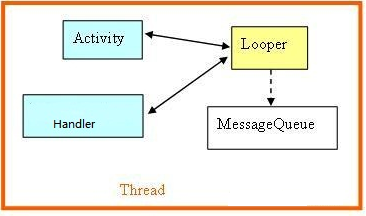

一个Activity中可以创建出多个工作线程,如果这些线程把他们消息放入Activity主线程的消息队列中,那么消息就会在主线程中处理了。因为主线程一般负责视图组件的更新操作,对于不是线程安全的视图组件来说,这种方式能够很好的实现视图的更新。
那么,子线程如何把消息放入主线程的消息队列中呢?只要Handler对象以主线程的Looper创建,那么当调用Handler的sendMessage方法,系统就会把消息主线程的消息队列,并且将会在调用handleMessage方法时处理主线程消息队列中的消息。
对于子线程访问主线程的Handler对象,你可能会问,多个子线程都访问主线程的Handler对象,发送消息和处理消息的过程中会不会出现数据的不一致呢?答案是Handler对象不会出现问题,因为Handler对象管理的Looper对象是线程安全的,不管是添加消息到消息队列还是从消息队列中读取消息都是同步保护的,所以不会出现数据不一致现象。
第三种线程方式
private EditText editText;
    private ImageView imageView;
    private Bitmap bm;
    private Button button;

    private Handler handler = new Handler() {
        @Override
        public void handleMessage(Message msg) {
            if (msg.what == 0) {
                //显示图片
                imageView.setImageBitmap(bm);
            }else{
                Toast.makeText(getApplicationContext(), R.string.nonimageurl, 1).show();
            }
        }
    };

    @Override
    public void onCreate(Bundle savedInstanceState) {
        super.onCreate(savedInstanceState);
        setContentView(R.layout.main);
        //获取输入框
        editText = (EditText) this.findViewById(R.id.imagepath);
        //获取图像域
        imageView = (ImageView) this.findViewById(R.id.imageView);
        //获取按钮
        button = (Button) this.findViewById(R.id.button);
        button.setOnClickListener(new ButtonClickListner());

    }

    Runnable downloadRun = new Runnable(){
        public void run() {
            String imgurl = editText.getText().toString();//获取图片地址
            if(imgurl!=null&&!"".equals(imgurl)){
                //获取图片数据
                try {
                    byte[] data = ImageService.getImageData(imgurl);
                    //通过图片工厂生成图片
                    bm = BitmapFactory.decodeByteArray(data, 0, data.length);
                    //处理完成后给handler发送消息
                    Message msg = new Message();
                    msg.what = 0;
                    handler.sendMessage(msg);
                } catch (IOException e) {
                    e.printStackTrace();
                    Toast.makeText(getApplicationContext(), R.string.err, 1).show();
                }
            }else{
                Message msg = new Message();
                msg.what = 1;
                handler.sendMessage(msg);
            }
        }
    };

    private class ButtonClickListner implements View.OnClickListener{
        public void onClick(View v) {
            new Thread(downloadRun).start();
        }
    }
文章转载源处:http://blog.csdn.net/mars2639/article/details/6625165#

 浙公网安备 33010602011771号