


flutter布局-层叠布局stack
比如放入一个图片,图片上再写一些字或者放入容器:
CircleAvatar组件,经常用来做头像,组件里面的radius属性可以设置图片的弧度。
Stack组件的alignment属性是控制层叠的位置的,在两个内容进行成叠时使用。它有2个值,X轴距离和Y轴距离,值是从0到1,从上层容器的左上角开始算起。
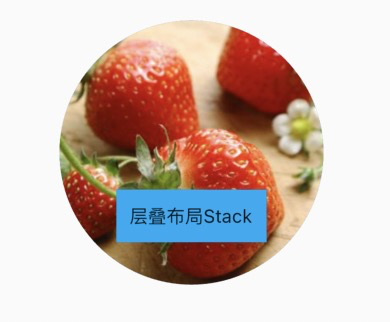


import 'package:flutter/material.dart';

void main() => runApp(MyApp());

class MyApp extends StatelessWidget {
  @override
  Widget build(BuildContext context) {
    var stack = new Stack(
        alignment: const FractionalOffset(0.5, 0.8),
        children: [
            new CircleAvatar(
                backgroundImage: new NetworkImage('https://ss1.bdstatic.com/70cFvXSh_Q1YnxGkpoWK1HF6hhy/it/u=3848402655,92542552&fm=26&gp=0.jpg'),
                radius: 100.0,
            ),
            new Container(
                decoration: new BoxDecoration(
                    color: Colors.lightBlue
                ),
                padding: EdgeInsets.all(10.0),
                child: new Text('层叠布局Stack'),
            )
        ],
    );
    return MaterialApp(
        title: 'flutter demo',
        home: Scaffold(
          appBar: new AppBar(
            title: new Text('层叠布局Stack'),
          ),
          body: Center(child: stack),
        ));
  }
}
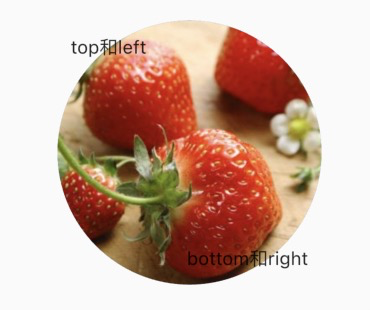
Positioned:
- bottom: 距离层叠组件下边的距离
- left:距离层叠组件左边的距离
- top:距离层叠组件上边的距离
- right:距离层叠组件右边的距离
- width: 层叠定位组件的宽度
- height: 层叠定位组件的高度
import 'package:flutter/material.dart';

void main() => runApp(MyApp());

class MyApp extends StatelessWidget {
  @override
  Widget build(BuildContext context) {
    var stack = new Stack(
        alignment: const FractionalOffset(0.5, 0.8),
        children: [
            new CircleAvatar(
                backgroundImage: new NetworkImage('https://ss1.bdstatic.com/70cFvXSh_Q1YnxGkpoWK1HF6hhy/it/u=3848402655,92542552&fm=26&gp=0.jpg'),
                radius: 100.0,
            ),
            new Positioned(
                top: 10.0,
                left: 10.0,
                child: new Text('top和left'),
            ),
            new Positioned(
                bottom: 10.0,
                right: 10.0,
                child: new Text('bottom和right'),
            )
        ],
    );
    return MaterialApp(
        title: 'flutter demo',
        home: Scaffold(
          appBar: new AppBar(
            title: new Text('层叠布局Stack'),
          ),
          body: Center(child: stack),
        ));
  }
}

 浙公网安备 33010602011771号