


flutter布局-水平布局Row
不灵活水平布局:
根据Row子元素的大小,进行布局。如果子元素不足,它会留有空隙,如果子元素超出,它会警告。
import 'package:flutter/material.dart';

void main() => runApp(MyApp());

class MyApp extends StatelessWidget {
	@override
	Widget build(BuildContext context) {
		return MaterialApp(
			title: 'flutter demo',
			home: Scaffold(
				appBar: new AppBar(
					title: new Text('水平方向布局Row'),
				),
				body: new Row(
					children: [
						new RaisedButton(
							onPressed: (){

							},
							color: Colors.red,
							child: new Text('红色按钮'),
						),
						new RaisedButton(
							onPressed: (){

							},
							color: Colors.green,
							child: new Text('绿色按钮绿色按钮'),
						),
						new RaisedButton(
							onPressed: (){

							},
							color: Colors.blue,
							child: new Text('蓝色按钮'),
						)
					]
				)
			)
		);
	}
}
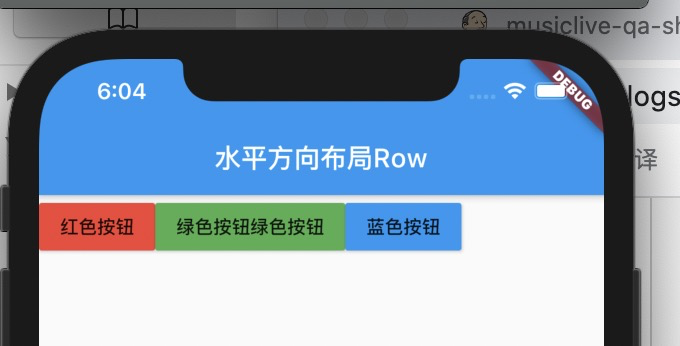
三个按钮并没有充满一行,而是出现了空隙。这就是不灵活横向排列造成的。它根据子元素的大小来进行排列。
灵活水平布局:
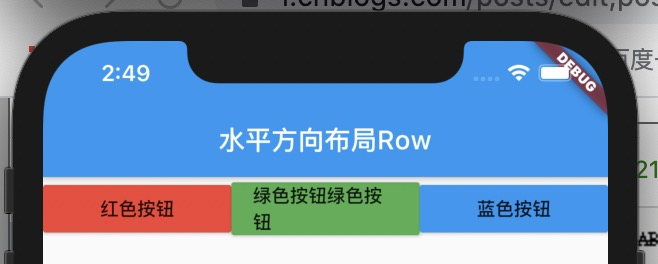
如果想实现三个按钮充满一行的效果,可以使用 Expanded。


import 'package:flutter/material.dart';

void main() => runApp(MyApp());

class MyApp extends StatelessWidget {
    @override
    Widget build(BuildContext context) {
        return MaterialApp(
            title: 'flutter demo',
            home: Scaffold(
                appBar: new AppBar(
                    title: new Text('水平方向布局Row'),
                ),
                body: new Row(
                    children: [
                        Expanded(child: new RaisedButton(
                            onPressed: (){

                            },
                            color: Colors.red,
                            child: new Text('红色按钮'),
                        )),
                        Expanded(child: new RaisedButton(
                            onPressed: (){

                            },
                            color: Colors.green,
                            child: new Text('绿色按钮绿色按钮'),
                        )),
                        Expanded(child: new RaisedButton(
                            onPressed: (){

                            },
                            color: Colors.blue,
                            child: new Text('蓝色按钮'),
                        ))
                    ]
                )
            )
        );
    }
}
灵活和不灵活混用:
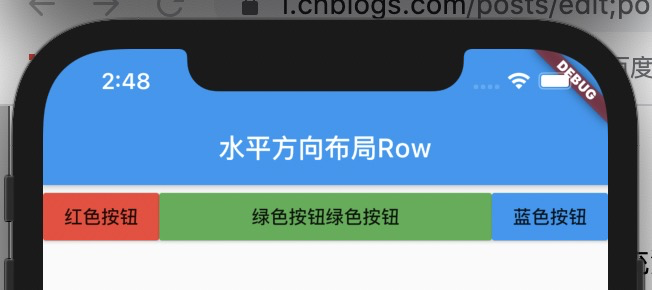
如果想让中间的按钮大,而两边的按钮保持真实大小,就可以不灵活和灵活模式进行混用,实现效果。
import 'package:flutter/material.dart';

void main() => runApp(MyApp());

class MyApp extends StatelessWidget {
    @override
    Widget build(BuildContext context) {
        return MaterialApp(
            title: 'flutter demo',
            home: Scaffold(
                appBar: new AppBar(
                    title: new Text('水平方向布局Row'),
                ),
                body: new Row(
                    children: [
                        new RaisedButton(
                            onPressed: (){

                            },
                            color: Colors.red,
                            child: new Text('红色按钮'),
                        ),
                        Expanded(child: new RaisedButton(
                            onPressed: (){

                            },
                            color: Colors.green,
                            child: new Text('绿色按钮绿色按钮'),
                        )),
                        new RaisedButton(
                            onPressed: (){

                            },
                            color: Colors.blue,
                            child: new Text('蓝色按钮'),
                        )
                    ]
                )
            )
        );
    }
}

 浙公网安备 33010602011771号