


C/C++ 开发环境
Windows
MinG-W64
选最新版本中的 x86_64-posix-seh,然后解压,设置环境变量
https://sourceforge.net/projects/mingw-w64/files & https://github.com/GorvGoyl/MinGW64/releases & https://www.mingw-w64.org/downloads
x86_64-posix-sjlj
x86_64-posix-seh
x86_64-win32-sjlj
x86_64-win32-seh
i686-posix-sjlj
i686-posix-dwarf
i686-win32-sjlj
i686-win32-dwarf
释义 1:
- DWARF:一种带调试信息的包,所以比一般的包尺寸大,仅支持 32 位系统
- SJLJ:跨平台,支持 32、64 位系统。缺点是运行速度稍慢,GCC 不支持
- SEH:调用系统机制处理异常,支持 32、64 位系统。缺点是:GCC 不支持
释义 2:
- x86_64:64位操作系统
- i686:32 位操作系统 (i386的子集)
释义 3:
- posix:启用了 C++ 11 多线程特性
- win32:未启用
MSVC
https://visualstudio.microsoft.com/zh-hans/visual-cpp-build-tools
# 查看帮助
vs_BuildTools.exe -help

# 查询负载
https://learn.microsoft.com/zh-cn/visualstudio/install/workload-component-id-vs-build-tools

# 下载
vs_BuildTools.exe --layout .\vs_BuildTools --add Microsoft.VisualStudio.Workload.VCTools --add  Microsoft.VisualStudio.Workload.MSBuildTools --includeRecommended  --lang zh-CN
# 离线安装
cd vs_BuildTools
vs_BuildTools.exe --noWeb --add Microsoft.VisualStudio.Workload.VCTools --add  Microsoft.VisualStudio.Workload.MSBuildTools --includeRecommended
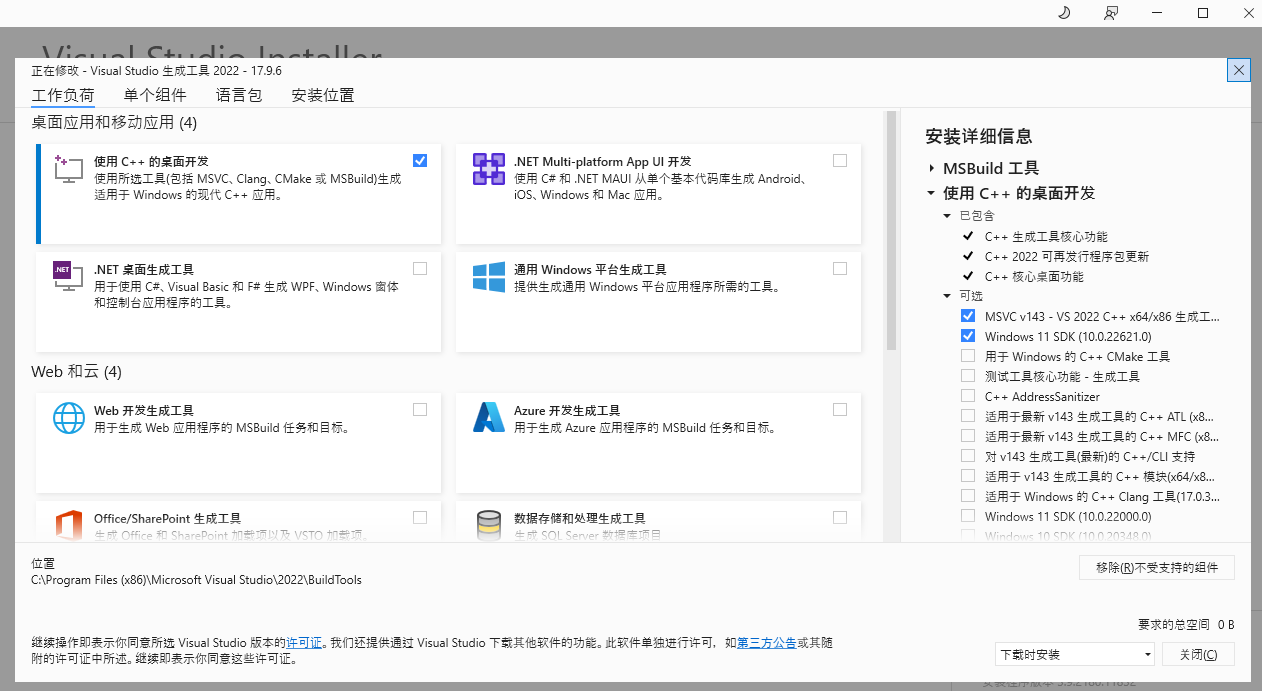
https://learn.microsoft.com/zh-cn/cpp/build/building-on-the-command-line & https://learn.microsoft.com/zh-cn/cpp/build/reference/compiler-command-line-syntax
NMAKE 目前 CLion 不支持,需要下载 GNU Make 编译使用(打开 x64 Native Tools Command Prompt 执行 build_w32.bat,会生成 WinRel 目录,更多详情可以查看 README.W32 文件)
Makefile
Win32:https://blog.csdn.net/dbzhang800/article/details/6358996 & https://blog.csdn.net/witton/article/details/129727907
#pragma comment(lib, "user32.lib")、#pragma comment(lib, "Ws2_32.lib")
main: src/main.c
	cl $< /utf-8 /Zi /Fe:target/$@.exe /link /subsystem:windows /entry:WinMainCRTStartup user32.lib

main: src/main.c
	cl $< /utf-8 /Zi /Fo:target/$@.obj /Fd:target/$@.pdb /Fe:target/$@.exe

.PHONY: clean
clean:
	del /f /s /q target\*
CLion C4819 MSVC 编码问题:https://www.cnblogs.com/Chary/p/13608011.html
cmake_minimum_required(VERSION 3.27)
project(cmake_test)

# 须位于 add_executable 之前
add_compile_options("$<$<C_COMPILER_ID:MSVC>:/utf-8>")
add_compile_options("$<$<CXX_COMPILER_ID:MSVC>:/utf-8>")
# 或
# -D CMAKE_CXX_FLAGS="/utf-8"

# https://cmake.org/cmake/help/latest/prop_tgt/WIN32_EXECUTABLE.html
add_executable(main WIN32 main.c)
删除使用 Visual Studio 打开:del.reg
Windows Registry Editor Version 5.00
[-HKEY_CLASSES_ROOT\Directory\Background\shell\AnyCode]
[-HKEY_CLASSES_ROOT\Directory\shell\AnyCode]
Portable MSVC(不含 MSBuild)
https://gist.github.com/mmozeiko/7f3162ec2988e81e56d5c4e22cde9977 & https://github.com/Data-Oriented-House/PortableBuildTools/releases
提取已安装为便携版:https://github.com/EvineDev/portable-msvc
https://kkocdko.site/post/202303251926
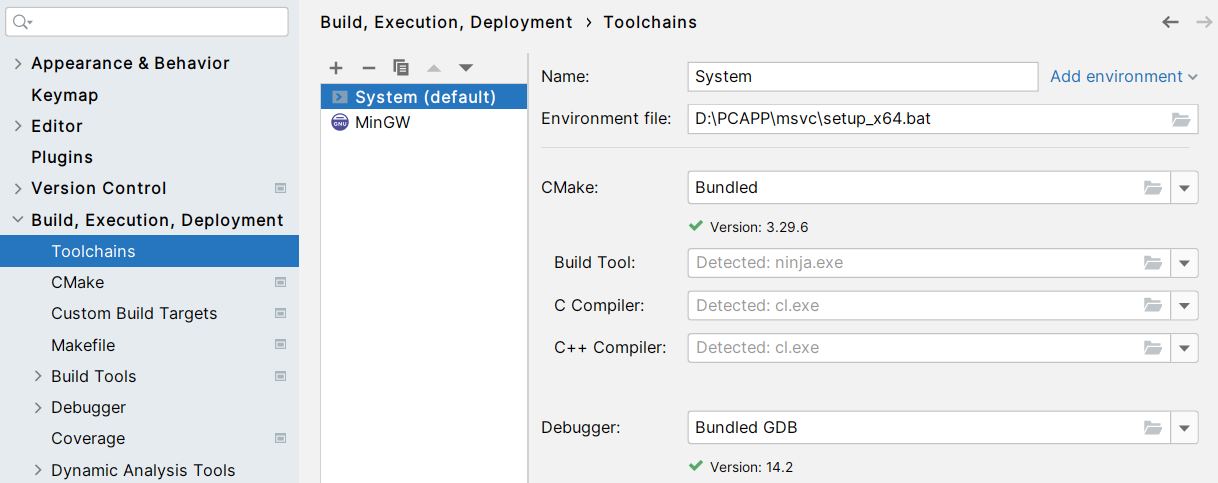
Linux
yum install -y cmake gcc gcc-c++ gdb

# 新版 cmake
# 下载 https://cmake.org/download/
# https://github.com/Kitware/CMake/releases
wget -O /opt/cmake-3.17.3.tar.gz  https://github.com/Kitware/CMake/releases/download/v3.17.3/cmake-3.17.3.tar.gz
cd /opt/
tar -zxf cmake-3.17.3.tar.gz
mv cmake-3.17.3 cmake-3.17.3-src
cd cmake-3.17.3-src/
# 或者 Install an OpenSSL development package
vim CMakeLists.txt
添加 set(CMAKE_USE_OPENSSL OFF)
# 配置安装路径
./bootstrap --prefix=/opt/cmake-3.17.3
# 编译安装
make && make install

# 新版本 gdb
# 下载
curl -o /opt/gdb-8.3.1.tar.gz  https://mirrors.ustc.edu.cn/gnu/gdb/gdb-8.3.1.tar.gz
cd /opt/
tar -zxf gdb-8.3.1.tar.gz
mv gdb-8.3.1 gdb-8.3.1-src
cd gdb-8.3.1-src/
# 配置安装路径
./configure --prefix=/opt/gdb-8.3.1
# 编译安装
make && make install
VsCode 使用
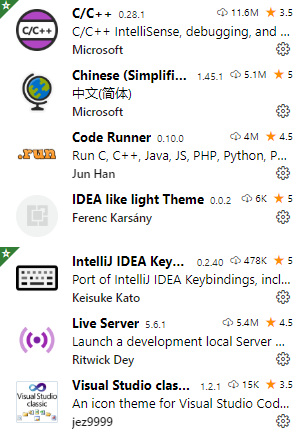
只有 c/c++ 是必须的。
在工作区创建 .vscode 文件夹,用 VsCode 创建,系统自带文件管理无法创建以点开头的文件夹,然后创建下面两个配置文件
修改配置中的路径为自己的 Ming-W64 路径
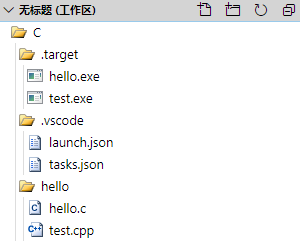
launch.json 用于调试运行
https://code.visualstudio.com/docs/editor/debugging#_launch-configurations
{
    "version": "0.2.0",
    "configurations": [
        {
            "name": "gdb debug", // 配置名称,将会在启动配置的下拉菜单中显示
            "type": "cppdbg", // 配置类型,这里只能为 cppdbg
            "request": "launch", // 请求配置类型,可以为 launch(启动)或 attach(附加)
            "program": "${workspaceFolder}/.target/${fileBasenameNoExtension}.exe", // 将要进行调试的程序的路径
            "args": [], // 程序调试时传递给程序的命令行参数,一般设为空即可
            "stopAtEntry": false, // 设为 true 时程序将暂停在程序入口处,一般设置为 false
            "cwd": "${workspaceFolder}", // 调试程序时的工作目录,一般为 ${workspaceFolder} 即代码所在目录
            "environment": [],
            "externalConsole": false, // 调试时是否显示控制台窗口,一般设置为true显示控制台
            "MIMode": "gdb",
            "miDebuggerPath": "D:/PcAPP/mingw64/bin/gdb.exe", // miDebugger 的路径,注意这里要与 MinGw 的路径对应
            "preLaunchTask": "gcc", // 调试会话开始前执行的任务,一般为编译程序,c++ 为 g++, c 为 gcc
            "setupCommands": [
                {
                    "description": "Enable pretty-printing for gdb",
                    "text": "-enable-pretty-printing",
                    "ignoreFailures": true
                }
            ]
        }
    ]
}
tasks.json 用于调试运行前的编译
https://code.visualstudio.com/docs/editor/tasks#_custom-tasks
{
    "version": "2.0.0",
    "command": "gcc",
    "args": [
        "-g",
        "${file}",
        "-o",
        ".target/${fileBasenameNoExtension}.exe"
    ], // 编译命令参数
    "problemMatcher": {
        "owner": "cpp",
        "fileLocation": [
            "relative",
            "${workspaceFolder}"
        ],
        "pattern": {
            "regexp": "^(.*):(\\d+):(\\d+):\\s+(warning|error):\\s+(.*)$",
            "file": 1,
            "line": 2,
            "column": 3,
            "severity": 4,
            "message": 5
        }
    },
    "presentation": {
        "echo": true,
        "reveal": "always",
        "focus": false,
        "panel": "new", // 这里 shared 表示共享,改成 new 之后每个进程创建新的端口
        "showReuseMessage": true,
        "clear": false
    }
}
测试
#include <math.h>
#include <stdio.h>

void main() {
  double a = pow(2.0, 3.0);
  printf("res = %f.2\n", a);
  printf("hello\n");

  double b = 1.234;
  int c = b;
  printf("%d", c);
}
按 F5 即可调试运行

想直接运行,可以安装 code-runner 插件
附上 VsCode 全部设置 settings.json
{
    "editor.minimap.enabled": false,
    "editor.mouseWheelZoom": true,
    "files.autoSave": "afterDelay",
    "terminal.integrated.shell.windows": "C:\\WINDOWS\\System32\\WindowsPowerShell\\v1.0\\powershell.exe",
    "liveServer.settings.donotShowInfoMsg": true,
    "workbench.startupEditor": "newUntitledFile",
    "code-runner.ignoreSelection": true,
    "code-runner.runInTerminal": true,
    "editor.fontSize": 18,
    "liveServer.settings.multiRootWorkspaceName": "",
    "git.path": "D:/PcAPP/PortableGit/bin/git.exe",
    "git.enabled": false,
    "[c]": {
        "editor.defaultFormatter": "ms-vscode.cpptools"
    },
    "C_Cpp.clang_format_fallbackStyle": "LLVM",
    "C_Cpp.intelliSenseEngine": "Tag Parser",
    "workbench.colorTheme": "IDEA like light Theme",
    "code-runner.executorMap": {
        // windows 默认为 gbk 编码,这里让 VsCode 中默认 shell 为 PowerShell,编译时指定 gbk 编码,避免 code-runner 插件运行 c/c++ 输出中文时乱码
        "c": "cd $dir && gcc -fexec-charset=gbk $fileName -o ..\\.target\\$fileNameWithoutExt.exe && ..\\.target\\$fileNameWithoutExt.exe",
        "cpp": "cd $dir && g++ -fexec-charset=gbk $fileName -o ..\\.target\\$fileNameWithoutExt.exe && ..\\.target\\$fileNameWithoutExt.exe"
    },
    "workbench.iconTheme": "vsclassic-icon-theme",
    "update.showReleaseNotes": false,
    "telemetry.enableTelemetry": false,
}
https://marketplace.visualstudio.com/items?itemName=ms-vscode.cpptools

 浙公网安备 33010602011771号