本期内容概要
- nginx虚拟主机
- 基于多IP的方式
- 基于多端口的方式
- 基于多域名的方式
- nginx日志配置
- nginx访问控制模块
- nginx访问认证模块
- nginx状态监控模块
内容详细
1、nginx虚拟主机
1.基于多IP的方式
	[root@web01 conf.d]# cd /etc/nginx/conf.d
	将当前目录下所有 .conf 配置文件打包
	[root@web01 conf.d]# gzip default.conf game1.conf game.conf
	[root@web01 conf.d]# vim game2.conf
server {
    listen 80;
    server_name 192.168.15.7;
    location / {
	root /opt/Super_Marie;
        index index.html;
    }
}
server {
    listen 80;
    server_name 172.16.1.7;
    location / {
        root /opt/Chinese_chess;
        index index.html;
    }
}
	[root@web01 conf.d]# nginx -t
	[root@web01 conf.d]# systemctl restart nginx

2.基于多端口的方式
	[root@web01 conf.d]# gzip game2.conf
	[root@web01 conf.d]# vim game3.conf
server {
    listen 80;
    server_name 192.168.15.7;
    location / {
        root /opt/Super_Marie;
        index index.html;
    }
}
server {
    listen 81;
    server_name 192.168.15.7;
    location / {
        root /opt/Chinese_chess;
        index index.html;
    }
}
	[root@web01 conf.d]# nginx -t
	[root@web01 conf.d]# systemctl restart nginx

3.基于多域名的方式
	[root@web01 conf.d]# gzip game3.conf
	[root@web01 conf.d]# vim game4.conf
server {
    listen 80;
    server_name game.marie.com;
    location / {
        root /opt/Super_Marie;
        index index.html;
    }
}
server {
    listen 80;
    server_name game.chess.com;
    location / {
        root /opt/Chinese_chess;
        index index.html;
    }
}
	[root@web01 conf.d]# nginx -t
	[root@web01 conf.d]# systemctl restart nginx
2、nginx日志配置
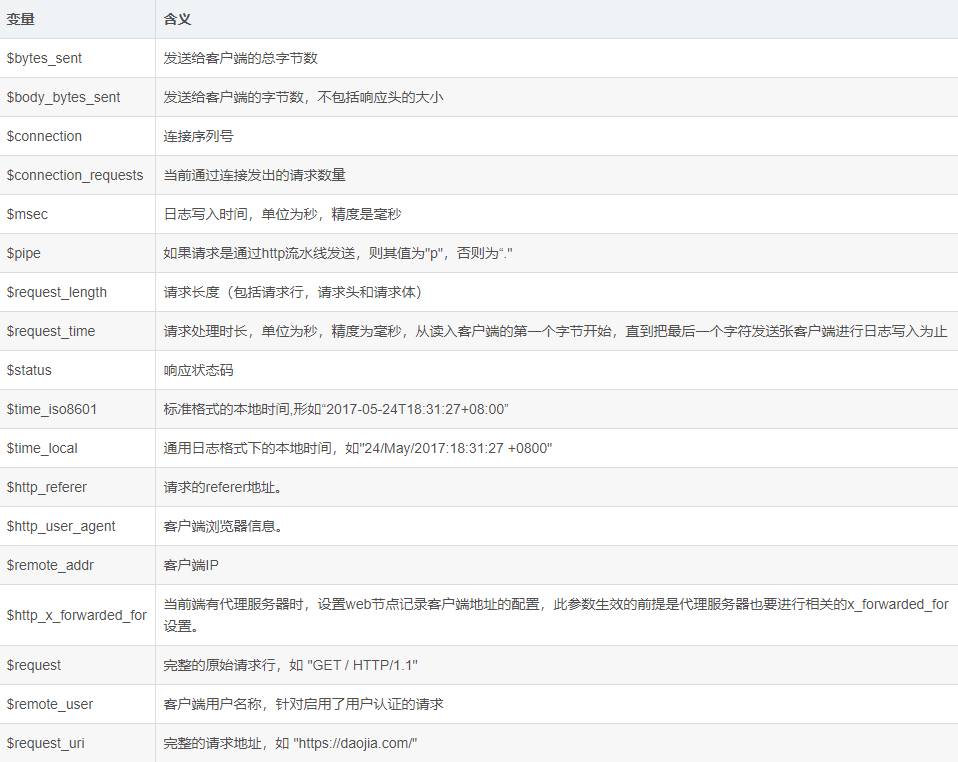
Nginx日志对于统计、系统服务排错很有用

Nginx日志主要分为两种:access_log(访问日志)和error_log(错误日志)

通过访问日志我们可以得到用户的IP地址、浏览器的信息,请求的处理时间等信息

错误日志记录了访问出错的信息,可以帮助我们定位错误的原因

存放路径:/var/log/nginx
![image]()
3、nginx访问控制模块
# 1.ngx_http_access_module模块
	允许或者拒绝某些IP访问
	deny  :	拒绝
	allow :	允许

案例1:允许192.168.15.1访问,不允许其他IP访问
	写在配置文件的server中
	allow 192.168.15.1;
	deny all;

案例2:允许192.168.15.0这个网段访问,不允许其他网段访问
	allow 192.168.15.0/24;
	deny all;

案例3:只允许通过VPN来访问
	allow 172.16.1.81;
	deny all;


# 2.ngx_http_auth_basic_module模块
	访问之前需要登录

	01 安装httpd-tools
	[root@web01 ~]# yum install httpd-tools -y

	02 生成用户名密码文件
	[root@web01 ~]# htpasswd -c /etc/nginx/auth chenyang
	New password: 输入密码
	Re-type new password: 确认密码
	Adding password for user chenyang 成功

	03 将文件路径加入Nginx配置
	[root@web01 ~]# vim /etc/nginx/conf.d/game4.conf
	auth_basic "Welcome To Login";
	auth_basic_user_file /etc/nginx/auth;

	04 重启Nginx
	[root@web01 ~]# nginx -t  测试是否正常
	[root@web01 ~]# systemctl restart nginx


# 3.ngx_http_autoindex_module
	展示目录索引

	[root@web01 ~]# vim /etc/nginx/conf.d/game4.conf
	autoindex on;
	autoindex_exact_size on;
	autoindex_localtime on;
	autoindex_format json;

	[root@web01 ~]# nginx -t  测试是否正常
	[root@web01 ~]# systemctl restart nginx
4、Nginx状态监控模块
监控Nginx运行状态

	[root@web01 ~]# gzip game4.conf
	[root@web01 ~]# vim /etc/nginx/conf.d/game5.conf
server {
    listen 80;
    server_name 192.168.15.7;
    location / {
        stub_status;
    }
}
	[root@web01 ~]# nginx -t  测试是否正常
	[root@web01 ~]# systemctl restart nginx
5、访问连接控制模块
1.控制Nginx连接数
	安装ab测试命令
	[root@web01 ~]# yum install httpd-tools -y
	ab 参数:
		-n : 总共需要访问多少次
		-c : 每次访问多少个

	[root@web01 conf.d]# vim game5.conf
# limit_req_zone $remote_addr zone=one:10m rate=1r/s;
limit_conn_zone $remote_addr zone=addr:10m;
server {
    listen 80;
    server_name 192.168.15.7;
    # limit_req zone=one burst=5;
    limit_conn addr 1;
    location / {
        root /opt/Super_Marie;
	index index.html;
    }
}

	[root@web01 ~]# nginx -t  测试是否正常
	[root@web01 ~]# systemctl restart nginx

2.控制Nginx访问量
	01 连接池
		limit_req_zone $remote_addr zone=one:10m rate=1r/s;
		声明连接池      变量         名称 连接池的大小  速率

	02 限制数
	要求每秒只能有一个访问
	[root@web01 conf.d]# vim game5.conf
limit_req_zone $remote_addr zone=one:10m rate=1r/s;
server {
    listen 80;
    server_name 192.168.15.7;
    limit_req zone=one burst=5;
    location / {
        root /opt/Super_Marie;
	index index.html;
    }
}

	[root@web01 ~]# nginx -t  测试是否正常
	[root@web01 ~]# systemctl restart nginx




 浙公网安备 33010602011771号