
nodejs搭建简易服务器,模拟webSocket 后台主动推送消息给浏览器进行接收。1。
1.先使用npm导入组件 npm i nodejs-websocket -S
2.在与node_modules同一文件夹内新建webSocket-webSocket.js
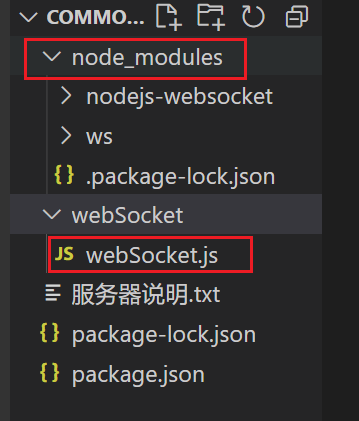
在webSocket.js文件夹内写入:
const ws = require('nodejs-websocket');//引入websocket
const prot = 8082;
const server = ws.createServer(connection => {
connection.on("text", function (str) {
// connection.sendText(str);// !返回给客户端的数据!
server.connections.forEach(function (conn) {
console.log(JSON.parse(str)) //接收到前端传来的数据,可以使用Parse转回对象。
var myVar = setInterval(()=> {
conn.sendText(str+'服务器返回')//返回给所有客户端的数据(相当于公告、通知)
},3000)
setTimeout(() => {
clearInterval(myVar);//推送停止
},10000)
})
})
//监听关闭
connection.on("close", function (code, reason) {
console.log("服务关闭")
})
//监听异常
connection.on("error",(e) => {
console.log(e,'服务异常断开...')
})
}).listen(prot)
3.可另开一个文件夹,其中建一个testOne.html文件。
其中代码:
<!DOCTYPE html>
<html>
<head>
<meta charset="utf-8" />
<meta name="viewport" content="width=device-width, initial-scale=1">
<title></title>
</head>
<body>
<div id="box">
<div class="msg" id="msg"></div>
<div class="bottom">
<button type="button" id="btn">开启服务器推送</button>
</div>
</div>
</body>
<script>
let ws = new WebSocket('ws://localhost:8082');//实例化websocket
let btn = document.getElementById('btn');//推送开启
let msg = document.getElementById('msg');//推送信息展示
//发消息
ws.onopen = function () {
//点击按钮发送消息
btn.onclick = function () {
ws.send(JSON.stringify({id1:1,id2:2})); //发送给服务端数据 需转为字符串
}
};
//ws.onmessage方法一经启用,可被动接收由服务器推送给前端的消息。服务器一推送,便会主动触发其中方法。
ws.onmessage = function (e) {
//e 服务端返回数据
var received_msg = e.data;
console.log(e)
msg.innerHTML += received_msg += '<br>'
};
//连接断开
ws.onclose = function () {
console.log("连接已关闭...");
};
//异常断开
ws.onerror = function () {
console.log('连接异常断开...')
}
function fun() {
console.log(fun)
}
fun()
</script>
</html>
4.开启服务

5.运行html文件在浏览器打开,点击按钮即可查看。

 浙公网安备 33010602011771号