
vue2中组件间的通信
父传子
子传父
通过父组件给子组件传递函数类型的props
//父组件
<template>
  <div id="app">
    <Student :doSomething="doSomething"></Student>
  </div>
</template>

<script>
import Student from './components/student.vue'

export default {
  name: 'App',
  components: {
    Student
  },
  methods: {
    doSomething (name, something) {
      alert('APP知道了学生' + name + '在' + something)
    }
  }
}
</script>

//子组件
<template>
  <div>
    <div>{{ student.name }}--{{ student.age }}</div>
    <button @click="tellApp">tellApp</button>
  </div>
</template>

<script>
export default {
  data () {
    return {
      student: {
        name: '张三',
        age: '18'
      }
    }
  },
  props: ['doSomething'],
  methods: {
    tellApp () {
      this.doSomething(this.student.name, '学习')
    }
  }
}
</script>
通过父组件给子组件绑定自定义事件
子组件标签中绑定自定义事件(v-on绑定)
//父组件
<template>
  <div id="app">
    <Student @doSomething="doSomething"></Student>
  </div>
</template>

<script>
import Student from './components/student.vue'

export default {
  name: 'App',
  components: {
    Student
  },
  methods: {
    doSomething (name, something) {
      alert('APP知道了学生' + name + '在' + something)
    }
  }
}
</script>

//子组件
<template>
  <div>
    <div>{{ student.name }}--{{ student.age }}</div>
    <button @click="tellApp">tellApp</button>
  </div>
</template>

<script>
export default {
  data () {
    return {
      student: {
        name: '张三',
        age: '18'
      }
    }
  },
  methods: {
    tellApp () {
      this.$emit('doSomething', this.student.name, '学习')
    }
  }
}
</script>
通过 $refs 结合 $on 绑定事件 (比v-on更灵活)
//父组件
<template>
  <div id="app">
    <Student ref="student"></Student>
  </div>
</template>

<script>
import Student from './components/student.vue'
console.log(Student)

export default {
  name: 'App',
  components: {
    Student
  },
  mounted () {
    this.$refs.student.$on('knowSomething', this.doSomething) //给student组件绑定自定义事件
	/*
	this.$refs.student.$on('knowSomething', this.doSomething) //doSomething函数中的this指向
	的是父组件App组件

	this.$refs.student.$on('knowSomething', () =>{
	 这里的this指向的是父组件App组件
	})

	this.$refs.student.$on('knowSomething', function(){
	  这里的this指向的是触发knowSomething事件的组件
	})

	*/
    //this.$refs.student.$once('knowSomething', this.doSomething) //绑定自定义事件,
	但是只能触发一次

  },
  methods: {
    doSomething (name, something) {
      alert('APP知道了学生' + name + '在' + something)
    }
  }
}
</script>

//子组件
<template>
  <div>
    <div>{{ student.name }}--{{ student.age }}</div>
    <button @click="tellApp">tellApp</button>
    <button @click="unbind">解绑knowSomething事件</button>

  </div>
</template>

<script>
export default {
  data () {
    return {
      student: {
        name: '张三',
        age: '18'
      }
    }
  },
  methods: {
    tellApp () {
      this.$emit('knowSomething', this.student.name, '学习')
    },
    unbind(){
	this.$off('knowSomething') //解绑knowSomething事件
	/*
	this.$off(['knowSomething','a','b']) //解绑多个事件
	this.$off() //解绑所有事件
	*/
	}
  }
}
</script>
事件总线(任意组件都可以通信)
-
安装事件总线
//main.js import Vue from 'vue' import App from './App.vue' Vue.config.productionTip = false new Vue({ el: '#app', render: function (h) { return h(App) }, beforeCreate() { Vue.prototype.$bus = this //安装事件总线 } }) // -
使用事件总线
- 组件A中通过$on注册自定义事件
methods: { demo (data) {.....} }, mounted () { this.$bus.$on('doDemo',this.demo) }, beforeDestory(){ this.$bus.$off('doDemo') }- 组件B中通过$emit触发自定义事件
 methods: {
   handel(){
    this.$bus.$emit('doDemo',data)
   }
 },
** 注意:**
-
最好再beforeDestory钩子中,用$off解绑当前组件用到的事件
-
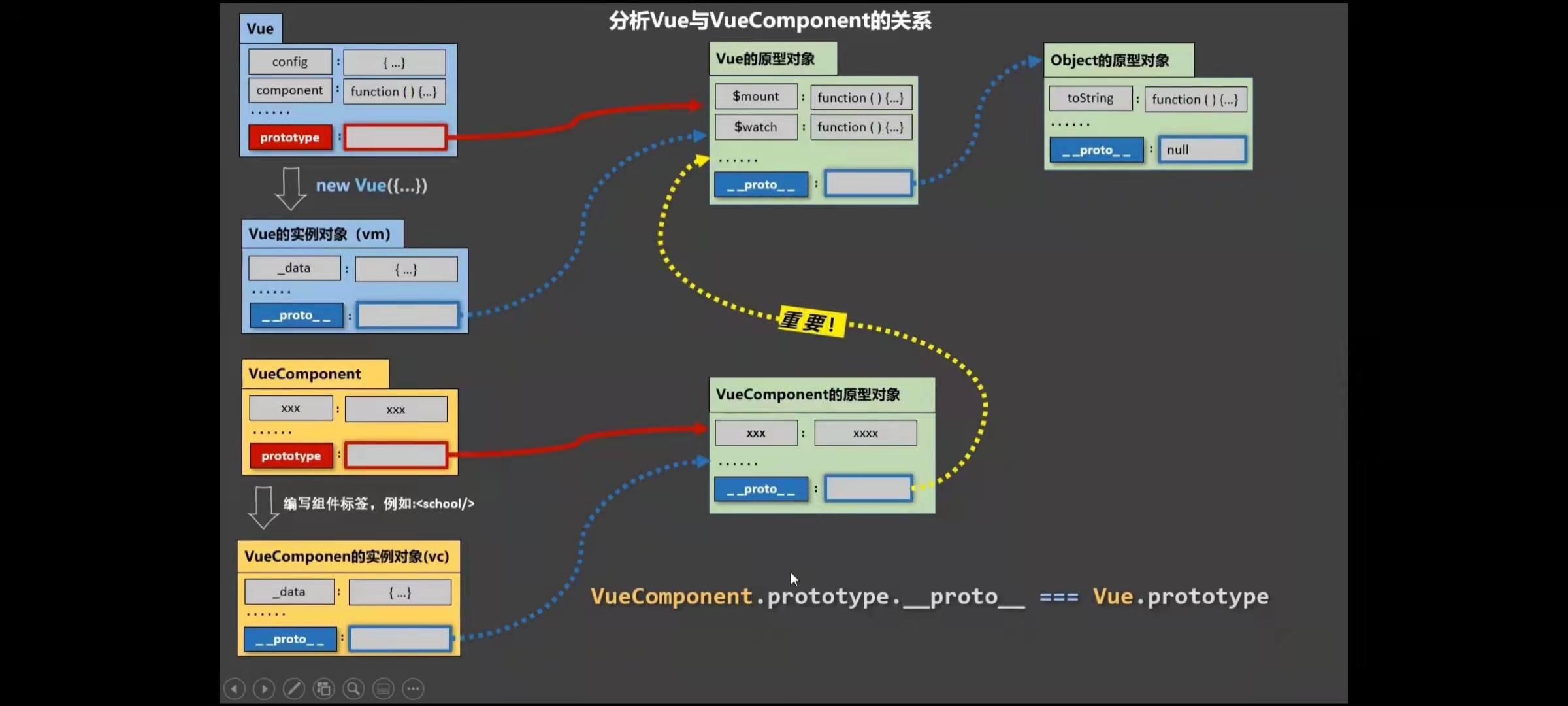
主要原理:VueComponent.prototype.proto === Vue.prototype
消息的发布和订阅
-
借用第三方库,推荐使用 pubsub-js
-
可以实现任意组件间的通信
-
使用
- 组件A中订阅消息(接收数据)
<script> import pubsub from 'pubsub-js' export default { data () { return { pid:"" } }, mounted: { this.kpid = pubsub.subscribe('hello',function(a,b){}) /*这里的回调函数使用箭头函数可以让回调函数中this是当前组件的实例; 或者用pid = pubsub.subscribe('hello',this.methodsName),其中 methodsName是methods配置项的方法;;a接收的是消息的名字(hello), b接收的是真正传过来的数据(666) */ }, beforeDestory(){ pubsub.unsubcribe(this.pid) } } </script>- 组件B中发布消息(提供数据)
<script>
      import pubsub from 'pubsub-js'
 	export default {
 	  data () {
 	    return {
 		}
 	  },
 	  methods: {
 		tellApp () {
 		   pubsub.publish('hello',666)
 		}
 	  }
 	}
</script>

 浙公网安备 33010602011771号