
实验 4:Open vSwitch 实验——Mininet 中使用 OVS 命令
一、实验目的
Mininet 安装之后,会连带安装 Open vSwitch,可以直接通过 Python 脚本调用Open vSwitch 命令,从而直接控制 Open vSwitch,通过实验了解调用控制的方法。
二、实验任务
在本实验中,使用 Mininet 基于 Python 的脚本,调用“ovs-vsctl”命令直接控制Open vSwitch。使用默认的交换机泛洪规则,设置更高的优先级规则进行预先定义 IP 报文的转发。在多个交换机中通过设置不同 TOS 值的数据包将通过不同的方式到达目的地址,验证主机间的连通性及到达目的地址的时间。
三、实验步骤
1. 实验环境
安装了 Ubuntu 16.04.3 Desktop amd64 的虚拟机。
2. 实验要求
在下图拓扑中实现一个 VLAN。

将 h0 和 h2 划分在 VLAN 0 中,h1 和 h3 划分在 VLAN 1 中,由于拓扑没有控制器,并且初始化时删除了交换机中的所有流表,因此除非下发流表,否则主机之间网络无法连通。尝试修改代码,利用 ovs 命令直接下发 VLAN 设置的流表项,最终测试 h0 和 h2 互通,h1 和 h3 互通,其余主机均不通。
3、实现代码
 1 #!/usr/bin/python
 2
 3 from mininet.net import Mininet
 4 from mininet.node import Node
 5 from mininet.link import TCLink
 6 from mininet.log import  setLogLevel, info
 7
 8 def myNet():
 9     "Create network from scratch using Open vSwitch."
10
11     info( "*** Creating nodes\n" )
12     switch0 = Node( 's0', inNamespace=False )
13     switch1 = Node( 's1', inNamespace=False )
14     h0 = Node( 'h0' )
15     h1 = Node( 'h1' )
16     h2 = Node( 'h2' )
17     h3 = Node( 'h3' )
18
19     info( "*** Creating links\n" )
20     linkopts0=dict(bw=100, delay='1ms', loss=0)
21     linkopts1=dict(bw=1, delay='10ms', loss=0)
22     linkopts2=dict(bw=10, delay='50ms', loss=0)
23     TCLink( h0, switch0, **linkopts1)
24     TCLink( h1, switch0, **linkopts2)
25     TCLink( h2, switch1, **linkopts1)
26     TCLink( h3, switch1, **linkopts2)
27     TCLink( switch0, switch1, **linkopts0)
28
29     info( "*** Configuring hosts\n" )
30     h0.setIP( '192.168.123.1/24' )
31     h1.setIP( '192.168.123.2/24' )
32     h2.setIP( '192.168.123.3/24' )
33     h3.setIP( '192.168.123.4/24' )
34     info( str( h0 ) + '\n' )
35     info( str( h1 ) + '\n' )
36     info( str( h2 ) + '\n' )
37     info( str( h3 ) + '\n' )
38
39     info( "*** Starting network using Open vSwitch\n" )
40     switch0.cmd( 'ovs-vsctl del-br dp0' )
41     switch0.cmd( 'ovs-vsctl add-br dp0' )
42     switch1.cmd( 'ovs-vsctl del-br dp1' )
43     switch1.cmd( 'ovs-vsctl add-br dp1' )
44
45     for intf in switch0.intfs.values():
46         print intf
47         print switch0.cmd( 'ovs-vsctl add-port dp0 %s' % intf )
48
49     for intf in switch1.intfs.values():
50         print intf
51         print switch1.cmd( 'ovs-vsctl add-port dp1 %s' % intf )
52
53     print switch0.cmd(r'ovs-ofctl -O OpenFlow13 add-flow dp0 priority=1,in_port=1,actions=push_vlan:0x8100,set_field:4096-\>vlan_vid,output:3' )
54     print switch0.cmd(r'ovs-ofctl -O OpenFlow13 add-flow dp0 priority=1,in_port=2,actions=push_vlan:0x8100,set_field:4097-\>vlan_vid,output:3' )
55     print switch0.cmd(r'ovs-ofctl -O OpenFlow13 add-flow dp0 priority=1,dl_vlan=0,actions=pop_vlan,output:1' )
56     print switch0.cmd(r'ovs-ofctl -O OpenFlow13 add-flow dp0 priority=1,dl_vlan=1,actions=pop_vlan,output:2' )
57
58     print switch1.cmd(r'ovs-ofctl -O OpenFlow13 add-flow dp1 priority=1,in_port=1,actions=push_vlan:0x8100,set_field:4096-\>vlan_vid,output:3' )
59     print switch1.cmd(r'ovs-ofctl -O OpenFlow13 add-flow dp1 priority=1,in_port=2,actions=push_vlan:0x8100,set_field:4097-\>vlan_vid,output:3' )
60     print switch1.cmd(r'ovs-ofctl -O OpenFlow13 add-flow dp1 priority=1,dl_vlan=0,actions=pop_vlan,output:1' )
61     print switch1.cmd(r'ovs-ofctl -O OpenFlow13 add-flow dp1 priority=1,dl_vlan=1,actions=pop_vlan,output:2' )
62
63     #switch0.cmd('tcpdump -i s0-eth0 -U -w aaa &')
64     #h0.cmd('tcpdump -i h0-eth0 -U -w aaa &')
65     info( "*** Running test\n" )
66     h0.cmdPrint( 'ping -Q 0x10 -c 3 ' + h1.IP() )
67     h0.cmdPrint( 'ping -Q 0x20 -c 3 ' + h2.IP() )
68     h0.cmdPrint( 'ping -Q 0x30 -c 3 ' + h3.IP() )
69     h1.cmdPrint( 'ping -Q 0x40 -c 3 ' + h2.IP() )
70     h1.cmdPrint( 'ping -Q 0x50 -c 3 ' + h3.IP() )
71     h2.cmdPrint( 'ping -Q 0x60 -c 3 ' + h3.IP() )
72     #h1.cmdPrint('iperf -s -p 12345 -u &')
73     #h0.cmdPrint('iperf -c ' + h1.IP() +' -u -b 10m -p 12345 -t 10 -i 1')
74
75     info( "*** Stopping network\n" )
76     switch0.cmd( 'ovs-vsctl del-br dp0' )
77     switch0.deleteIntfs()
78     switch1.cmd( 'ovs-vsctl del-br dp1' )
79     switch1.deleteIntfs()
80     info( '\n' )
81
82 if __name__ == '__main__':
83     setLogLevel( 'info' )
84     info( '*** Scratch network demo (kernel datapath)\n' )
85     Mininet.init()
86     myNet()
4. 实验结果
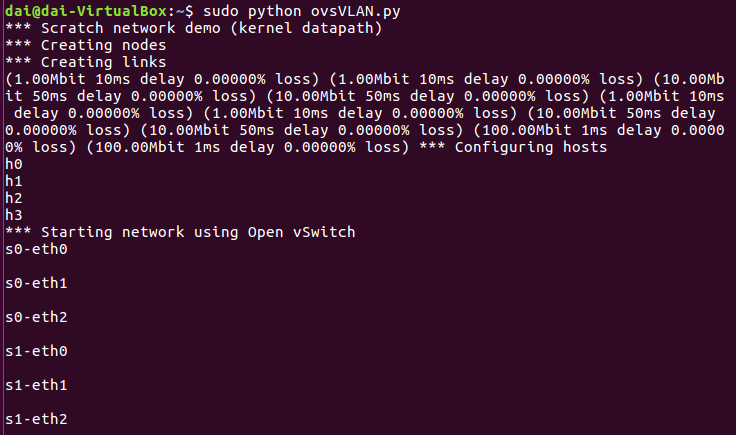
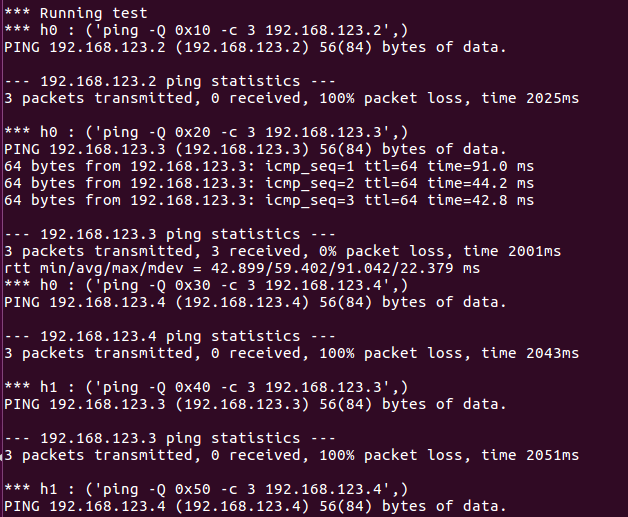
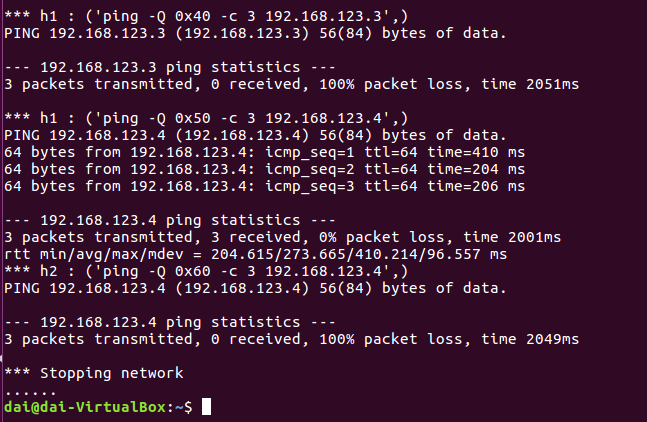
四. 实验心得
对OVS 命令的使用有了初步了解。

 浙公网安备 33010602011771号