
IdentityServer4 实现 OpenID Connect 和 OAuth 2.0

关于 OAuth 2.0 的相关内容,点击查看:ASP.NET WebApi OWIN 实现 OAuth 2.0
OpenID 是一个去中心化的网上身份认证系统。对于支持 OpenID 的网站,用户不需要记住像用户名和密码这样的传统验证标记。取而代之的是,他们只需要预先在一个作为 OpenID 身份提供者(identity provider, IdP)的网站上注册。OpenID 是去中心化的,任何网站都可以使用 OpenID 来作为用户登录的一种方式,任何网站也都可以作为 OpenID 身份提供者。OpenID 既解决了问题而又不需要依赖于中心性的网站来确认数字身份。
OpenID 相关基本术语:
- 最终用户(End User):想要向某个网站表明身份的人。
- 标识(Identifier):最终用户用以标识其身份的 URL 或 XRI。
- 身份提供者(Identity Provider, IdP):提供 OpenID URL 或 XRI 注册和验证服务的服务提供者。
- 依赖方(Relying Party, RP):想要对最终用户的标识进行验证的网站。
以上概念来自:https://zh.wikipedia.org/wiki/OpenID
针对 .NET Core 跨平台,微软官方并没有针对 OAuth 2.0 的实现(Microsoft.AspNetCore.Authentication.OAuth组件,仅限客户端),IdentityServer4 实现了 ASP.NET Core 下的 OpenID Connect 和 OAuth 2.0,IdentityServer4 也是微软基金会成员。
阅读目录:
- OpenID 和 OAuth 的区别
- 客户端模式(Client Credentials)
- 密码模式(resource owner password credentials)
- 简化模式-With OpenID(implicit grant type)
- 简化模式-With OpenID & OAuth(JS 客户端调用)
- 混合模式-With OpenID & OAuth(Hybrid Flow)
- ASP.NET Core Identity and Using EntityFramework Core for configuration data
开源地址:https://github.com/yuezhongxin/IdentityServer4.Demo
1. OpenID 和 OAuth 的区别
简单概括:
- OpenID:authentication(认证),用户是谁?
- OAuth:authorization(授权),用户能做什么?
其实,OAuth 的密码授权模式和 OpenID 有些类似,但也不相同,比如用户登录落网选择微博快捷登录方式,大致的区别:
- OAuth:用户在微博授权页面输入微博的账号和密码,微博验证成功之后,返回 access_token,然后落网拿到 access_token 之后,再去请求微博的用户 API,微博授权中心验证 access_token,如果验证通过,则返回用户 API 的请求数据给落网。
- OpenID:落网可以没有用户的任何实现,落网需要确认一个 URL 标识(可以是多个),然后用户登录的时候,选择一个 URL 进行登录(比如微博),跳转到微博 OpenID 登录页面,用户输入微博的账号和密码,微博验证成功之后,按照用户的选择,返回用户的一些信息。
可以看到,OAuth 首先需要拿到一个授权(access_token),然后再通过这个授权,去资源服务器(具体的 API),获取想要的一些数据,上面示例中,用户 API 只是资源服务器的一种(可以是视频 API、文章 API 等等),在这个过程中,OAuth 最重要的就是获取授权(四种模式),获取到授权之后,你就可以通过这个授权,做授权范围之类的任何事了。
而对于 OpenID 来说,授权和它没任何关系,它只关心的是用户,比如落网,可以不进行用户的任何实现(具体体现就是数据库没有 User 表),然后使用支持 OpenID 的服务(比如微博),通过特定的 URL 标识(可以看作是 OpenID 标识),然后输入提供服务的账号和密码,返回具体的用户信息,对于落网来说,它关心的是用户信息,仅此而已。
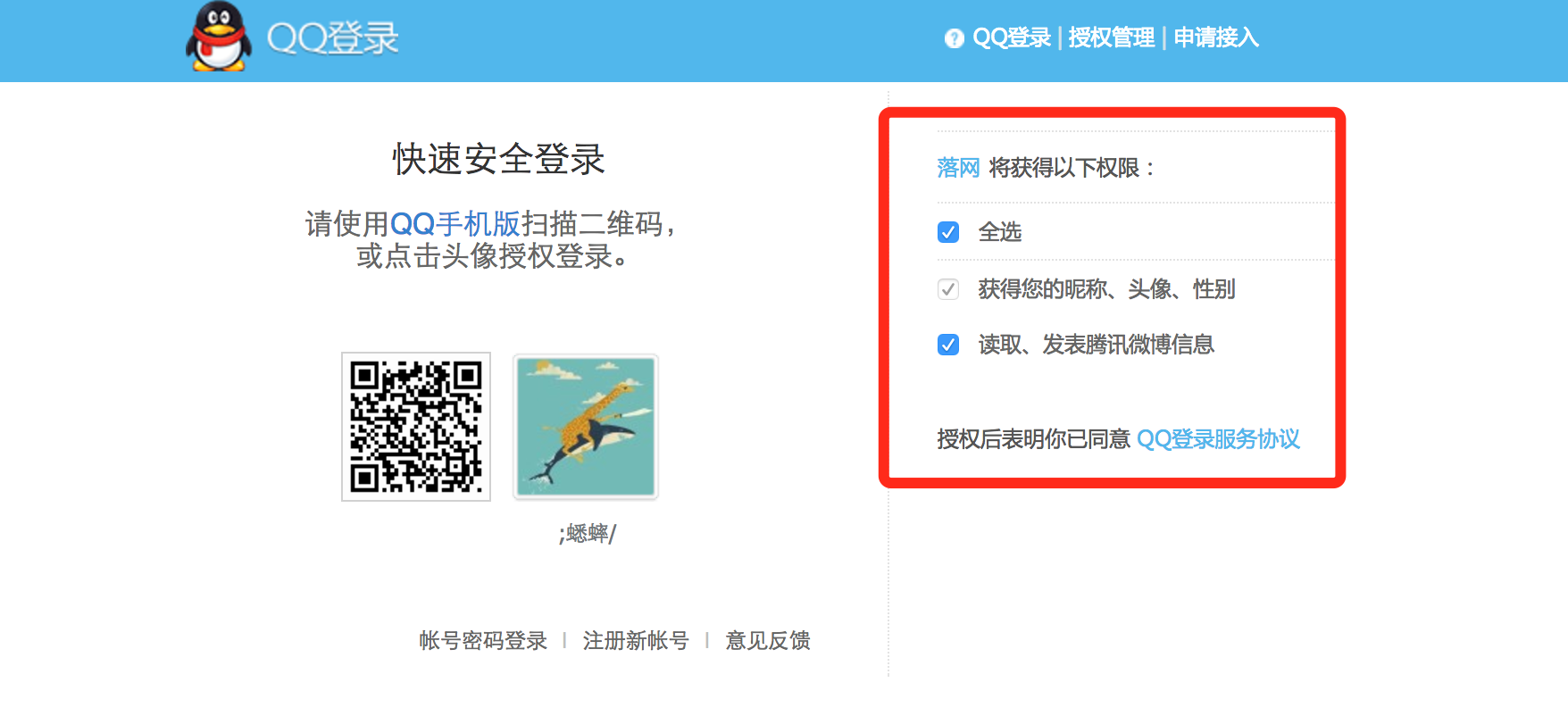
上面其实是 OAuth 的授权,所以会有“获得以下权限”提示,如果是 OpenID 的话,“权限”应该改为“用户信息”。
支持 OpenID 的服务列表:http://openid.net/get-an-openid/
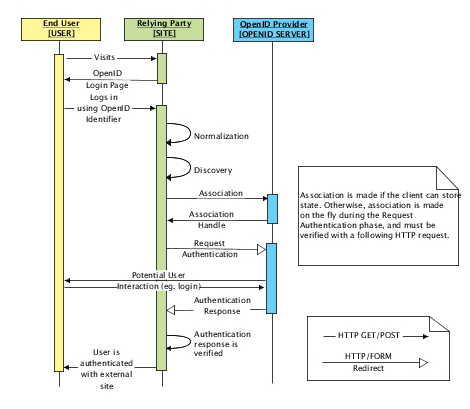
OpenID 流程图(来自 Using OpenID):
2. 客户端模式(Client Credentials)
简单概述:客户端提供 ClientId 和 ClientSecret 给认证授权服务,验证如果成功,返回 access_token,客户端拿到 access_token,访问 API 资源服务。
2.1 认证授权服务配置
创建 ASP.NET Core 站点,Startup 配置修改如下:
public class Startup
{
    public void ConfigureServices(IServiceCollection services)
    {
        // configure identity server with in-memory stores, keys, clients and scopes
        services.AddIdentityServer()
            .AddTemporarySigningCredential()
            .AddInMemoryApiResources(new List<ApiResource>
            {
                new ApiResource("api1", "My API")
            })
            .AddInMemoryClients(new List<Client>
            {
                // client credentials client
                new Client
                {
                    ClientId = "client",
                    AllowedGrantTypes = GrantTypes.ClientCredentials,

                    ClientSecrets =
                    {
                        new Secret("secret".Sha256())
                    },
                    AllowedScopes = { "api1" }
                }
            });
    }

    public void Configure(IApplicationBuilder app, ILoggerFactory loggerFactory)
    {
        loggerFactory.AddConsole(LogLevel.Debug);
        app.UseDeveloperExceptionPage();

        app.UseIdentityServer();
    }
}
IdentityServer4 中AddInMemory的相关配置,都是 Mock 的(代码配置),也可以把这些配置存储在数据库中,这个后面再讲。
AddInMemoryApiResources 增加的 API 资源服务(List 集合),也就此认证授权服务所管辖的 API 资源,比如上面配置的 api1,这个会在客户端调用的时候用到,如果不一致,是不允许访问的,另外,Clinet 中配置的AllowedScopes = { "api1" },表示此种授权模式允许的 API 资源集合(前提是需要添加ApiResource)。
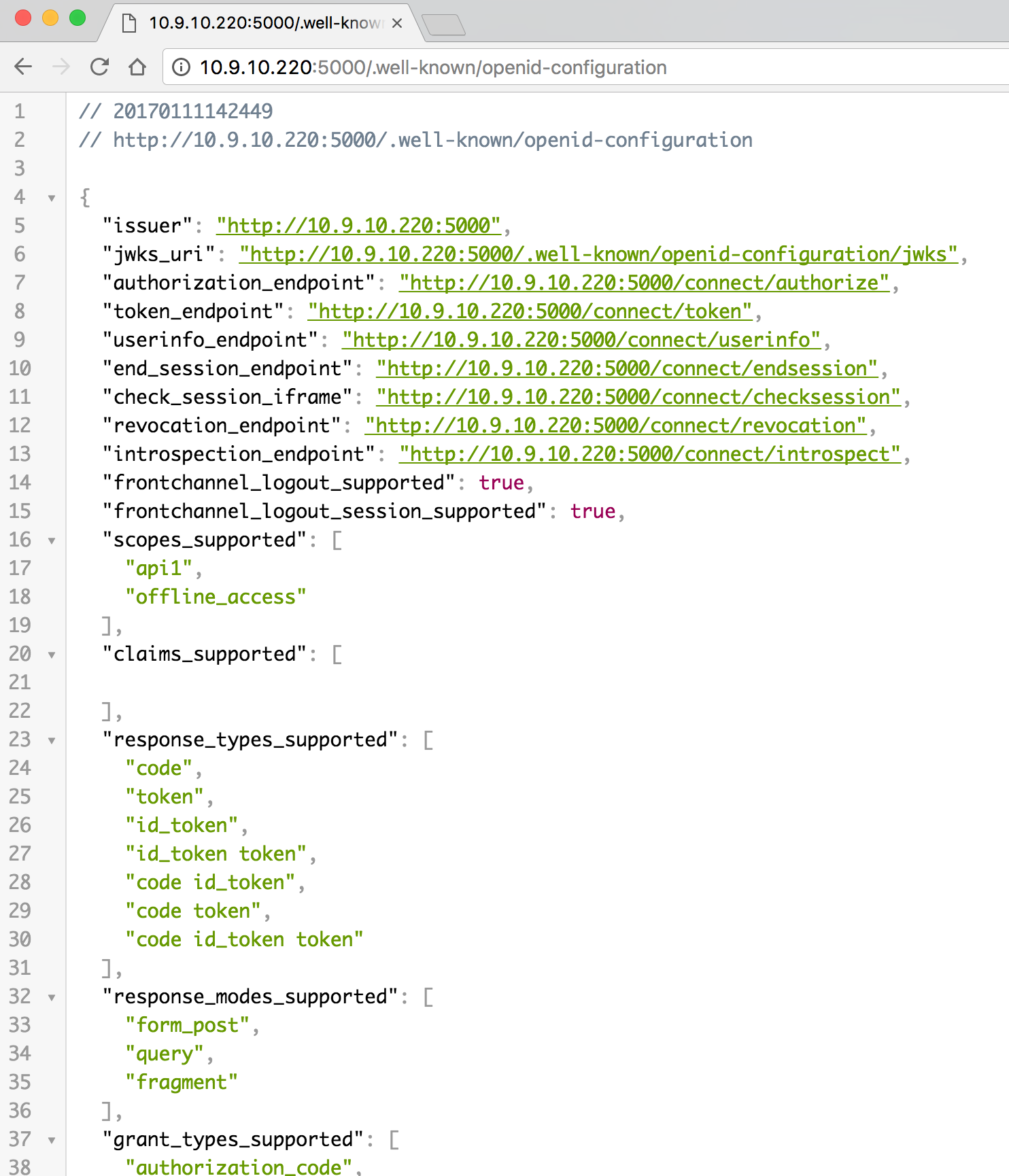
配置很简单,我们也可以访问http://localhost:5000/.well-known/openid-configuration,查看具体的配置信息:
2.2 API 资源服务配置
API 资源服务站点,需要添加程序包:
"IdentityServer4.AccessTokenValidation": "1.0.1"添加一个ValuesController:
[Route("[controller]")]
[Authorize]
public class ValuesController : ControllerBase
{
    [HttpGet]
    public IActionResult Get()
    {
        return Content("hello world");
    }
}
2.3 单元测试
需要添加程序包:
"IdentityModel": "2.0.0"单元测试代码:
[Fact]
public async Task ClientCredentials_Test()
{
    // request token
    var disco = await DiscoveryClient.GetAsync("http://localhost:5000");
    var tokenClient = new TokenClient(disco.TokenEndpoint, "client", "secret");
    var tokenResponse = await tokenClient.RequestClientCredentialsAsync("api1");

    Assert.False(tokenResponse.IsError);
    Console.WriteLine(tokenResponse.Json);

    // call api
    var client = new HttpClient();
    client.SetBearerToken(tokenResponse.AccessToken);

    var response = await client.GetAsync("http://localhost:5010/values");
    Assert.True(response.IsSuccessStatusCode);
    var content = await response.Content.ReadAsStringAsync();
    Console.WriteLine(content);
}
很简单,和我们之前用 ASP.NET WebApi OWIN 实现 OAuth 2.0 一样,只不过配置和调用简化了很多,因为 IdentityServer4 替我们做了很多工作。
3. 密码模式(resource owner password credentials)
简单概述:客户端提供 UserName 和 Password 给认证授权服务,验证如果成功,返回 access_token,客户端拿到 access_token,访问 API 资源服务。
3.1 认证授权服务配置
创建 ASP.NET Core 站点,Startup 配置修改如下:
public class Startup
{
    public void ConfigureServices(IServiceCollection services)
    {
        // configure identity server with in-memory stores, keys, clients and scopes
        services.AddIdentityServer()
            .AddTemporarySigningCredential()
            .AddInMemoryApiResources(new List<ApiResource>
            {
                new ApiResource("api1", "My API")
            })
            .AddInMemoryClients(new List<Client>
            {
                // resource owner password grant client
                new Client
                {
                    ClientId = "ro.client",
                    AllowedGrantTypes = GrantTypes.ResourceOwnerPassword,

                    ClientSecrets =
                    {
                        new Secret("secret".Sha256())
                    },
                    AllowedScopes = { "api1" }
                }
            })
            .AddTestUsers(new List<TestUser>
            {
                new TestUser
                {
                    SubjectId = "1",
                    Username = "xishuai",
                    Password = "123"
                }
            });
    }

    public void Configure(IApplicationBuilder app, ILoggerFactory loggerFactory)
    {
        loggerFactory.AddConsole(LogLevel.Debug);
        app.UseDeveloperExceptionPage();

        app.UseIdentityServer();
    }
}和客户端模式不同的是,AllowedGrantTypes授权模式改为了ResourceOwnerPassword,然后增加了测试用户(用来验证用户名和密码),也可以存储在数据库中。
3.2 API 资源服务配置
API 资源服务站点,需要添加程序包:
"IdentityServer4.AccessTokenValidation": "1.0.1"添加一个IdentityController:
[Route("[controller]")]
[Authorize]
public class IdentityController : ControllerBase
{
    [HttpGet]
    public IActionResult Get()
    {
        return new JsonResult(from c in User.Claims select new { c.Type, c.Value });
    }
}
3.3 单元测试
需要添加程序包:
"IdentityModel": "2.0.0"单元测试代码:
[Fact]
public async Task ResourceOwnerPassword_Test()
{
    // request token
    var disco = await DiscoveryClient.GetAsync("http://localhost:5000");
    var tokenClient = new TokenClient(disco.TokenEndpoint, "ro.client", "secret");
    var tokenResponse = await tokenClient.RequestResourceOwnerPasswordAsync("xishuai", "123", "api1");

    Assert.False(tokenResponse.IsError);
    Console.WriteLine(tokenResponse.Json);

    // call api
    var client = new HttpClient();
    client.SetBearerToken(tokenResponse.AccessToken);

    var response = await client.GetAsync("http://localhost:5010/identity");
    Assert.True(response.IsSuccessStatusCode);
    var content = await response.Content.ReadAsStringAsync();
    Console.WriteLine(JArray.Parse(content));
}
4. 简化模式-With OpenID(implicit grant type)
简化模式在 IdentityServer4 中的实现,就是 OpenID Connect。
简单概述:客户端确定 URL(用户认证服务),登录在用户认证服务,验证成功,返回客户端想要的用户数据,并使此用户为登录状态,可以在客户端进行注销用户。
4.1 认证授权服务配置
创建 ASP.NET Core 站点,Startup 配置修改如下:
public class Startup
{
    public void ConfigureServices(IServiceCollection services)
    {
        // configure identity server with in-memory stores, keys, clients and scopes
        services.AddIdentityServer()
            .AddTemporarySigningCredential()
            .AddInMemoryIdentityResources(new List<IdentityResource>
            {
                new IdentityResources.OpenId(),
                new IdentityResources.Profile(),
            })
            .AddInMemoryClients(new List<Client>
            {
                // OpenID Connect implicit flow client (MVC)
                new Client
                {
                    ClientId = "mvc",
                    ClientName = "MVC Client",
                    AllowedGrantTypes = GrantTypes.Implicit,

                    RedirectUris = { "http://localhost:5020/signin-oidc" },
                    PostLogoutRedirectUris = { "http://localhost:5020" },

                    AllowedScopes =
                    {
                        IdentityServerConstants.StandardScopes.OpenId,
                        IdentityServerConstants.StandardScopes.Profile
                    }
                }
            })
            .AddTestUsers(new List<TestUser>
            {
                new TestUser
                {
                    SubjectId = "1",
                    Username = "xishuai",
                    Password = "123",
                    Claims = new List<Claim>
                    {
                        new Claim("name", "xishuai"),
                        new Claim("website", "http://xishuai.cnblogs.com")
                    }
                }
            });
    }

    public void Configure(IApplicationBuilder app, ILoggerFactory loggerFactory)
    {
        loggerFactory.AddConsole(LogLevel.Debug);
        app.UseDeveloperExceptionPage();

        app.UseIdentityServer();
    }
}AddInMemoryIdentityResources和AllowedScopes所配置的,是客户端允许访问的用户信息,具体查看:Requesting Claims using Scope Values
ClientId 很重要,必须和客户端一一对应,所以想要使用 OpenID 认证服务的客户端,需要向提供 OpenID 认证服务的机构,申请一个 ClientId,OpenID 认证服务会统一发放一个用户登录的 URL。
TestUser中的Claims配置,其实就是IdentityServerConstants.StandardScopes.Profile。
另外,还有用户登录的一些操作代码,这边就不贴了,可以查看具体的实现:ImplicitServer.Web
4.2 客户端服务配置
创建 ASP.NET Core 站点,添加程序包:
"Microsoft.AspNetCore.Authentication.Cookies": "1.0.*",
"Microsoft.AspNetCore.Authentication.OpenIdConnect": "1.0.*"
Startup 配置修改如下:
public Startup(IHostingEnvironment env)
{
    var builder = new ConfigurationBuilder()
        .SetBasePath(env.ContentRootPath)
        .AddJsonFile("appsettings.json", optional: true, reloadOnChange: true)
        .AddJsonFile($"appsettings.{env.EnvironmentName}.json", optional: true)
        .AddEnvironmentVariables();

    Configuration = builder.Build();
}

public IConfigurationRoot Configuration { get; }

public void ConfigureServices(IServiceCollection services)
{
    services.AddMvc();
}

public void Configure(IApplicationBuilder app, IHostingEnvironment env, ILoggerFactory loggerFactory)
{
    JwtSecurityTokenHandler.DefaultInboundClaimTypeMap.Clear();

    loggerFactory.AddConsole(Configuration.GetSection("Logging"));
    loggerFactory.AddDebug();

    if (env.IsDevelopment())
    {
        app.UseDeveloperExceptionPage();
    }
    else
    {
        app.UseExceptionHandler("/Home/Error");
    }

    app.UseCookieAuthentication(new CookieAuthenticationOptions
    {
        AuthenticationScheme = "Cookies"
    });

    app.UseOpenIdConnectAuthentication(new OpenIdConnectOptions
    {
        AuthenticationScheme = "oidc",
        SignInScheme = "Cookies",

        Authority = "http://localhost:5001",
        RequireHttpsMetadata = false,

        ClientId = "mvc",
        SaveTokens = true
    });

    app.UseStaticFiles();
    app.UseMvcWithDefaultRoute();
}UseOpenIdConnectAuthentication配置中的Authority,就是 OpenID 认证服务的 URL。
添加一个HomeController:
public class HomeController : Controller
{
    public IActionResult Index()
    {
        return View();
    }

    [Authorize]
    public IActionResult Secure()
    {
        ViewData["Message"] = "Secure page.";

        return View();
    }

    public async Task Logout()
    {
        await HttpContext.Authentication.SignOutAsync("Cookies");
        await HttpContext.Authentication.SignOutAsync("oidc");
    }

    public IActionResult Error()
    {
        return View();
    }
}
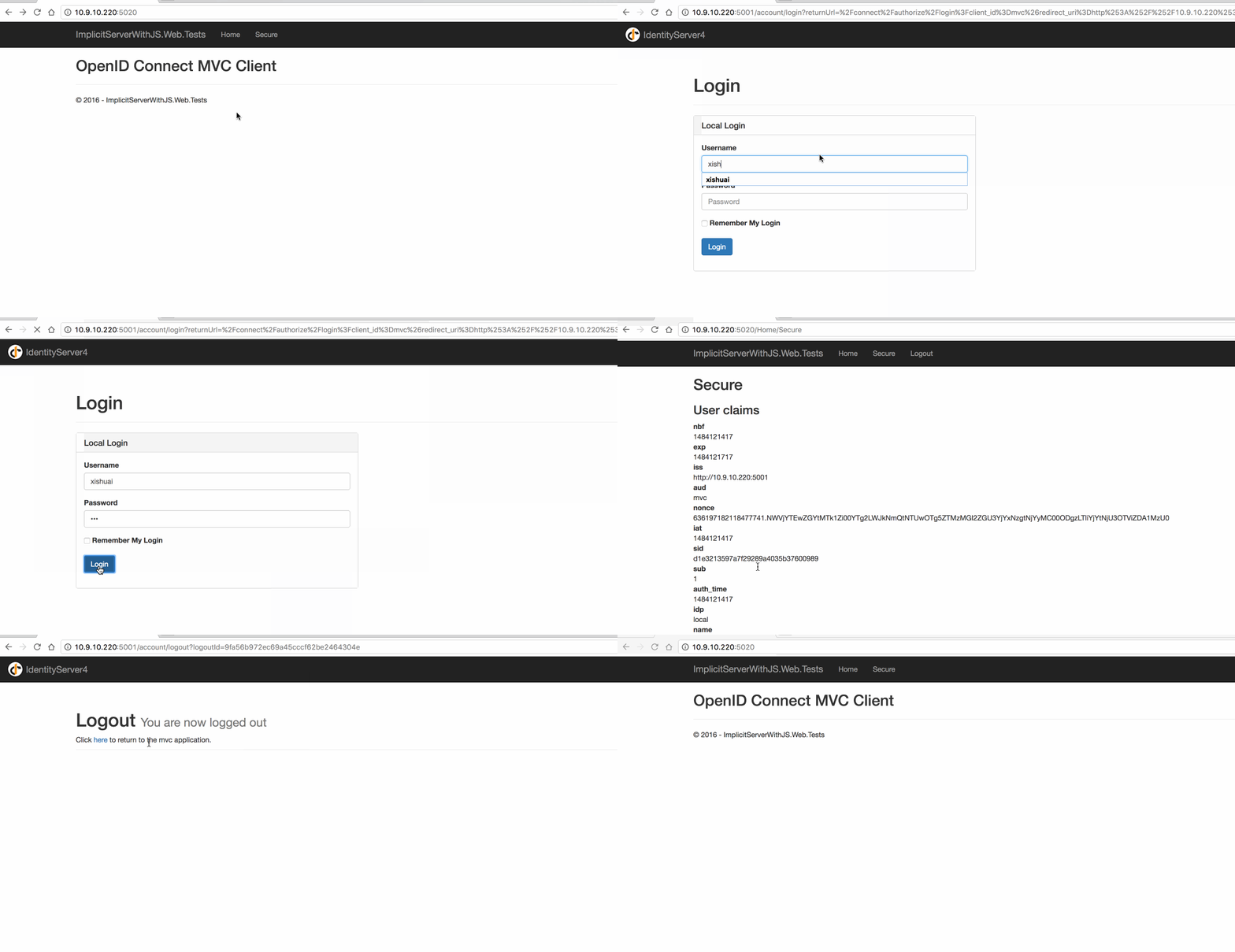
访问 Secure 页面,跳转到认证服务地址,进行账号密码登录,Logout 用于用户的注销操作。
4.3 Web 测试
5. 简化模式-With OpenID & OAuth(JS 客户端调用)
简单概述:客户端确定 URL(用户认证服务),登录在用户认证服务,验证成功,返回客户端想要的用户数据 和 access_token,并使此用户为登录状态,可以在客户端进行注销用户,客户端可以拿到 access_token,去访问授权范围之内的 API 资源。
需要注意的是:因为简化模式,所以 access_token 是作为 URL 参数返回的。
5.1 认证授权服务配置
创建 ASP.NET Core 站点,Startup 配置修改如下:
public class Startup
{
    public void ConfigureServices(IServiceCollection services)
    {
        // configure identity server with in-memory stores, keys, clients and scopes
        services.AddIdentityServer()
            .AddTemporarySigningCredential()
            .AddInMemoryIdentityResources(new List<IdentityResource>
            {
                new IdentityResources.OpenId(),
                new IdentityResources.Profile(),
            })
            .AddInMemoryApiResources(new List<ApiResource>
            {
                new ApiResource("api1", "My API")
            })
            .AddInMemoryClients(new List<Client>
            {
                // OpenID Connect implicit flow client (MVC)
                new Client
                {
                    ClientId = "js",
                    ClientName = "JavaScript Client",
                    AllowedGrantTypes = GrantTypes.Implicit,
                    AllowAccessTokensViaBrowser = true,

                    RedirectUris = { "http://localhost:5022/callback.html" },
                    PostLogoutRedirectUris = { "http://localhost:5022/index.html" },
                    AllowedCorsOrigins = { "http://localhost:5022" },

                    RequireConsent = false, //禁用 consent 页面确认 https://github.com/IdentityServer/IdentityServer3/issues/863

                    AllowedScopes =
                    {
                        IdentityServerConstants.StandardScopes.OpenId,
                        IdentityServerConstants.StandardScopes.Profile,
                        "api1"
                    }
                }
            })
            .AddTestUsers(new List<TestUser>
            {
                new TestUser
                {
                    SubjectId = "1",
                    Username = "xishuai",
                    Password = "123",
                    Claims = new List<Claim>
                    {
                        new Claim("name", "xishuai"),
                        new Claim("website", "http://xishuai.cnblogs.com")
                    }
                }
            });
    }

    public void Configure(IApplicationBuilder app, ILoggerFactory loggerFactory)
    {
        loggerFactory.AddConsole(LogLevel.Debug);
        app.UseDeveloperExceptionPage();

        app.UseIdentityServer();
    }
}
因为涉及到访问 API 资源操作,需要需要添加AddInMemoryApiResources配置,AllowedScopes也需要添加对应的 API 资源名称,AllowAccessTokensViaBrowser = true的配置的作用就是,可以在浏览器地址中访问 access_token。
更多实现代码,点击查看:ImplicitServerWithJS.Web
5.2 API 资源服务配置
API 资源服务站点,需要添加程序包:
"IdentityServer4.AccessTokenValidation": "1.0.1",
"Microsoft.AspNetCore.Cors": "1.1.0"
Startup 配置修改如下:
public Startup(IHostingEnvironment env)
{
    var builder = new ConfigurationBuilder()
        .SetBasePath(env.ContentRootPath)
        .AddJsonFile("appsettings.json", optional: true, reloadOnChange: true)
        .AddJsonFile($"appsettings.{env.EnvironmentName}.json", optional: true);

    builder.AddEnvironmentVariables();
    Configuration = builder.Build();
}

public IConfigurationRoot Configuration { get; }

public void ConfigureServices(IServiceCollection services)
{
    services.AddCors(options =>
    {
        // this defines a CORS policy called "default"
        options.AddPolicy("default", policy =>
        {
            policy.WithOrigins("http://localhost:5022")
                .AllowAnyHeader()
                .AllowAnyMethod();
        });
    });

    services.AddMvcCore()
        .AddAuthorization()
        .AddJsonFormatters();
}

public void Configure(IApplicationBuilder app, ILoggerFactory loggerFactory)
{
    loggerFactory.AddConsole(Configuration.GetSection("Logging"));
    loggerFactory.AddDebug();

    app.UseCors("default");

    app.UseIdentityServerAuthentication(new IdentityServerAuthenticationOptions
    {
        Authority = "http://localhost:5003",
        RequireHttpsMetadata = false,

        ApiName = "api1"
    });

    app.UseMvc();
}
因为 JS 需要跨域访问 API 资源服务,所以需要增加 CORS 配置。
添加一个IdentityController:
[Route("[controller]")]
[Authorize]
public class IdentityController : ControllerBase
{
    [HttpGet]
    public IActionResult Get()
    {
        return new JsonResult(from c in User.Claims select new { c.Type, c.Value });
    }
}
5.3 JS Web 站点测试
创建一个 ASP.NET Core 站点,添加oidc-client.js前端组件,测试 JS 代码:
/// <reference path="oidc-client.js" />

function log() {
    document.getElementById('results').innerText = '';

    Array.prototype.forEach.call(arguments, function (msg) {
        if (msg instanceof Error) {
            msg = "Error: " + msg.message;
        }
        else if (typeof msg !== 'string') {
            msg = JSON.stringify(msg, null, 2);
        }
        document.getElementById('results').innerHTML += msg + '\r\n';
    });
}

document.getElementById("login").addEventListener("click", login, false);
document.getElementById("api").addEventListener("click", api, false);
document.getElementById("logout").addEventListener("click", logout, false);

var config = {
    authority: "http://localhost:5003",
    client_id: "js",
    redirect_uri: "http://localhost:5022/callback.html",
    response_type: "id_token token",
    scope:"openid profile api1",
    post_logout_redirect_uri: "http://localhost:5022/index.html",
};
var mgr = new Oidc.UserManager(config);

mgr.getUser().then(function (user) {
    if (user) {
        log("User logged in", user.profile);
    }
    else {
        log("User not logged in");
    }
});

function login() {
    mgr.signinRedirect();
}

function api() {
    mgr.getUser().then(function (