File类的使用
三种文件构造方式
//File file1 = new File("C:\\Users\\Kong\\Desktop\\kong\\xing.txt");

//File file1 = new File("C:\\Users","Kong\\Desktop\\kong\\xing.txt");

File file =new File("C:\\Users");
File file1 = new File(file,"Kong\\Desktop\\kong\\xing.txt");
常用API
bollean es = file.exists();
file.createNewFile();
file.mkdir();
file.mkdirs();
String na = file.getName()
String pa = file.getParent()
boolean cd = file.canRead()
boolean we = file.canWrite()
String gh = file.getPath()
String ah = file.getAbsolutePath()
字节流
- 二进制文件传输(图片)
- 注意flush()和close()
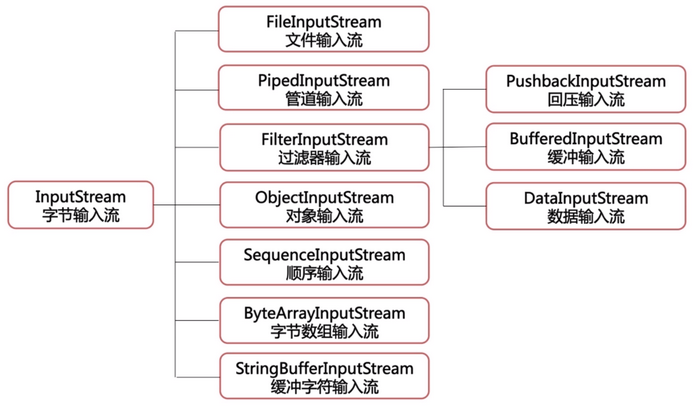
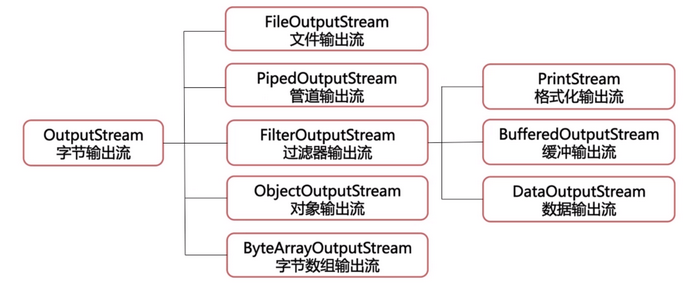
方式一

方式二
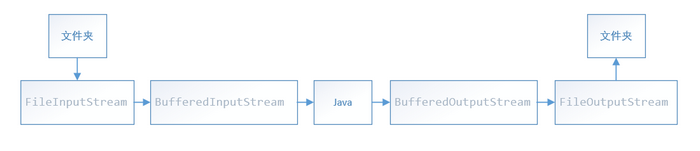
字符流
- 字符文件传输及字节字符转换
- Reader和Writer
- 注意构造器包装类型
方式一
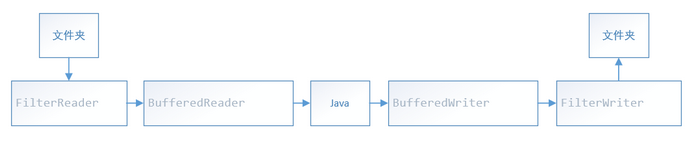
方式二
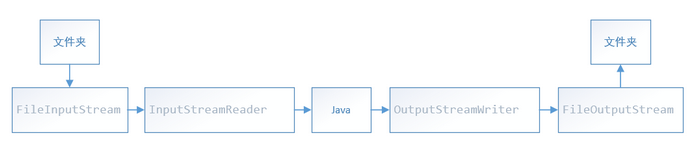
序列化(Serializable)
public class GoodsTest {
    public static void main(String[] args) {
        //Goods类要实现Serializable
        Goods goods1 = new Goods("gd001","电脑",3000);
        try {
            FileOutputStream fos = new FileOutputStream("kong.txt");
            ObjectOutputStream oos = new ObjectOutputStream(fos);
            FileInputStream fis = new FileInputStream("kong.txt");
            ObjectInputStream ois = new ObjectInputStream(fis);

            //将对象信息写入文件
            oos.writeObject(goods1);
            oos.writeBoolean(true);
            oos.flush();

            //读对象信息
            Goods goods = (Goods)ois.readObject();
            System.out.println(goods);
            System.out.println(ois.readBoolean());

            fis.close();
            ois.close();
            fos.close();
            oos.close();

        } catch (FileNotFoundException e) {
            e.printStackTrace();
        } catch (IOException e)
        {
            e.printStackTrace();
        } catch (ClassNotFoundException e) {
            e.printStackTrace();
        }
    }
}


 浙公网安备 33010602011771号