Java自学-图形界面 布局器
Swing五种常见的布局器
布局器是用在容器上的。 用来决定容器上的组件摆放的位置和大小
示例 1 : 绝对定位
绝对定位就是指不使用布局器,组件的位置和大小需要单独指定
package gui;
import javax.swing.JButton;
import javax.swing.JFrame;
public class TestGUI {
public static void main(String[] args) {
JFrame f = new JFrame("LoL");
f.setSize(400, 300);
f.setLocation(200, 200);
// 设置布局器为null,即进行绝对定位,容器上的组件都需要指定位置和大小
f.setLayout(null);
JButton b1 = new JButton("英雄1");
// 指定位置和大小
b1.setBounds(50, 50, 80, 30);
JButton b2 = new JButton("英雄2");
b2.setBounds(150, 50, 80, 30);
JButton b3 = new JButton("英雄3");
b3.setBounds(250, 50, 80, 30);
// 没有指定位置和大小,不会出现在容器上
JButton b4 = new JButton("英雄3");
f.add(b1);
f.add(b2);
f.add(b3);
// b4没有指定位置和大小,不会出现在容器上
f.add(b4);
f.setDefaultCloseOperation(JFrame.EXIT_ON_CLOSE);
f.setVisible(true);
}
}
示例 2 : FlowLayout
设置布局器为FlowLayout,顺序布局器
容器上的组件水平摆放
加入到容器即可,无需单独指定大小和位置

package gui;
import java.awt.FlowLayout;
import javax.swing.JButton;
import javax.swing.JFrame;
public class TestGUI {
public static void main(String[] args) {
JFrame f = new JFrame("LoL");
f.setSize(400, 300);
f.setLocation(200, 200);
// 设置布局器为FlowLayerout
// 容器上的组件水平摆放
f.setLayout(new FlowLayout());
JButton b1 = new JButton("英雄1");
JButton b2 = new JButton("英雄2");
JButton b3 = new JButton("英雄3");
// 加入到容器即可,无需单独指定大小和位置
f.add(b1);
f.add(b2);
f.add(b3);
f.setDefaultCloseOperation(JFrame.EXIT_ON_CLOSE);
f.setVisible(true);
}
}
示例 3 : BorderLayout
设置布局器为BorderLayout
容器上的组件按照上北 下南 左西 右东 中的顺序摆放

package gui;
import java.awt.BorderLayout;
import java.awt.FlowLayout;
import javax.swing.JButton;
import javax.swing.JFrame;
public class TestGUI {
public static void main(String[] args) {
JFrame f = new JFrame("LoL");
f.setSize(400, 300);
f.setLocation(200, 200);
// 设置布局器为BorderLayerout
// 容器上的组件按照上北下南左西右东中的顺序摆放
f.setLayout(new BorderLayout());
JButton b1 = new JButton("洪七");
JButton b2 = new JButton("段智兴");
JButton b3 = new JButton("欧阳锋");
JButton b4 = new JButton("黄药师");
JButton b5 = new JButton("周伯通");
// 加入到容器的时候,需要指定位置
f.add(b1, BorderLayout.NORTH);
f.add(b2, BorderLayout.SOUTH);
f.add(b3, BorderLayout.WEST);
f.add(b4, BorderLayout.EAST);
f.add(b5, BorderLayout.CENTER);
f.setDefaultCloseOperation(JFrame.EXIT_ON_CLOSE);
f.setVisible(true);
}
}
示例 4 : GridLayout
GridLayout,即网格布局器

package gui;
import java.awt.GridLayout;
import javax.swing.JButton;
import javax.swing.JFrame;
public class TestGUI {
public static void main(String[] args) {
JFrame f = new JFrame("LoL");
f.setSize(400, 300);
f.setLocation(200, 200);
// 设置布局器为GridLayerout,即网格布局器
// 该GridLayerout的构造方法表示该网格是2行3列
f.setLayout(new GridLayout(2, 3));
JButton b1 = new JButton("洪七");
JButton b2 = new JButton("段智兴");
JButton b3 = new JButton("欧阳锋");
JButton b4 = new JButton("黄药师");
JButton b5 = new JButton("周伯通");
f.add(b1);
f.add(b2);
f.add(b3);
f.add(b4);
f.add(b5);
f.setDefaultCloseOperation(JFrame.EXIT_ON_CLOSE);
f.setVisible(true);
}
}
示例 5 : setPreferredSize
即便 使用 布局器 ,也可以 通过setPreferredSize,向布局器建议该组件显示的大小.
注 :只对部分布局器起作用,比如FlowLayout可以起作用。 比如GridLayout就不起作用,因为网格布局器必须对齐

package gui;
import java.awt.Dimension;
import java.awt.FlowLayout;
import javax.swing.JButton;
import javax.swing.JFrame;
public class TestGUI {
public static void main(String[] args) {
JFrame f = new JFrame("LoL");
f.setSize(400, 300);
f.setLocation(200, 200);
f.setLayout(new FlowLayout());
JButton b1 = new JButton("英雄1");
JButton b2 = new JButton("英雄2");
JButton b3 = new JButton("英雄3");
// 即便 使用 布局器 ,也可以 通过setPreferredSize,向布局器建议该组件显示的大小
b3.setPreferredSize(new Dimension(180, 40));
f.add(b1);
f.add(b2);
f.add(b3);
f.setDefaultCloseOperation(JFrame.EXIT_ON_CLOSE);
f.setVisible(true);
}
}
示例 6 : CardLayout
CardLayout需要用到面板和JComboBox
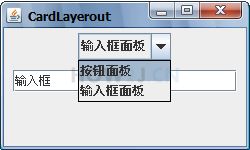
更多内容,点击了解: Swing五种常见的布局器


 浙公网安备 33010602011771号