
构建项目框架笔记3——SSM基于mysql的读写分离的配置
参考文章:
http://www.cnblogs.com/davidwang456/p/4318303.html
这篇文章将spring中配置读写分离原理讲的很清晰。我把主要的摘录下来
1、扩展Spring的AbstractRoutingDataSource抽象类(该类充当了DataSource的路由中介, 能有在运行时, 根据某种key值来动态切换到真正的DataSource上。)
从AbstractRoutingDataSource的源码中 我们可以看到,它继承了AbstractDataSource,而AbstractDataSource不就是javax.sql.DataSource的子类,So我们可以分析下它的getConnection方法:


 1 public abstract class AbstractRoutingDataSource extends AbstractDataSource implements InitializingBean
 2 //........
 3
 4 public Connection getConnection() throws SQLException {
 5     return determineTargetDataSource().getConnection();
 6 }
 7
 8 public Connection getConnection(String username, String password) throws SQLException {
 9      return determineTargetDataSource().getConnection(username, password);
10 }
11
12 //...........
获取连接的方法中,重点是determineTargetDataSource()方法,看源码:
 1 protected DataSource determineTargetDataSource() {
 2         Assert.notNull(this.resolvedDataSources, "DataSource router not initialized");
 3         Object lookupKey = determineCurrentLookupKey();
 4         DataSource dataSource = this.resolvedDataSources.get(lookupKey);
 5         if (dataSource == null && (this.lenientFallback || lookupKey == null)) {
 6             dataSource = this.resolvedDefaultDataSource;
 7         }
 8         if (dataSource == null) {
 9             throw new IllegalStateException("Cannot determine target DataSource for lookup key [" + lookupKey + "]");
10         }
11         return dataSource;
12     }
上面这段源码的重点在于determineCurrentLookupKey()方法,这是AbstractRoutingDataSource类中的一个抽象方法,而它的返回值是你所要用的数据源dataSource的key值,有了这个key值,resolvedDataSource(这是个map,由配置文件中设置好后存入的)就从中取出对应的DataSource,如果找不到,就用配置默认的数据源。
看完源码,应该有点启发了吧,没错!你要扩展AbstractRoutingDataSource类,并重写其中的determineCurrentLookupKey()方法,来实现数据源的切换:
贴实现代码:
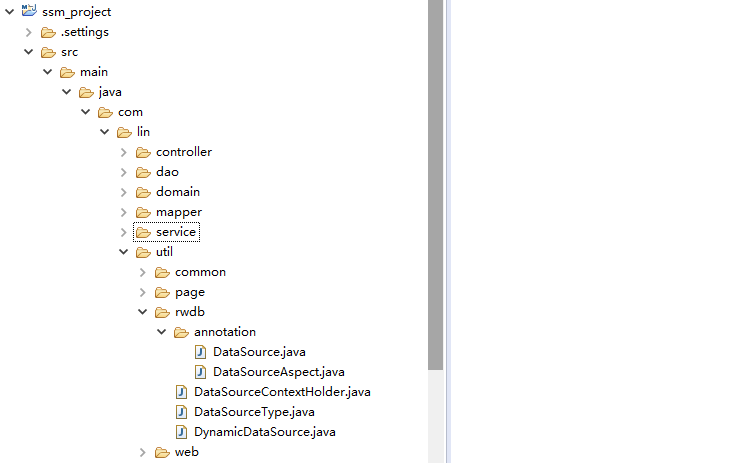
rwdb包中包含了所有实现读写分离的java类:
rwdb.anotation.DataSource.java 自定义注解
rwdb.anotation.DataSourceAspect.java 自定义注解的拦截器,动态设置数据源
rwdb.DataSourceType.java 数据源类型枚举试下你的,读 写
rwdb.DataSourceContextHolder.java 保存数据源key处理类
rwdb.DynamicDataSource.java 实现了AbstractRoutingDataSource重写了determineCurrentLookupKey方法,根据自定义的需求返回相应的datasource的key
calss List:
rwdb.anotation.DataSource.java
 1 package com.lin.util.rwdb.annotation;
 2 import java.lang.annotation.Documented;
 3 import java.lang.annotation.ElementType;
 4 import java.lang.annotation.Retention;
 5 import java.lang.annotation.RetentionPolicy;
 6 import java.lang.annotation.Target;
 7 @Target({ElementType.METHOD, ElementType.TYPE})
 8 @Retention(RetentionPolicy.RUNTIME)
 9 @Documented
10 public @interface DataSource{
11     String value() default "";
12 }
rwdb.anotation.DataSourceAspect.java
 1 package com.lin.util.rwdb.annotation;
 2 import java.lang.reflect.Method;
 3 import org.apache.log4j.Logger;
 4 import org.aspectj.lang.JoinPoint;
 5 import org.aspectj.lang.reflect.MethodSignature;
 6 import com.lin.util.rwdb.DataSourceContextHolder;
 7 public class DataSourceAspect {
 8     Logger log = Logger.getLogger(this.getClass());
 9      /**
10      * 拦截目标方法,获取由@DataSource指定的数据源标识,设置到线程存储中以便切换数据源
11      * 注解@DataSource既可以加在方法上,也可以加在接口或者接口的实现类上,
12      * 优先级别:方法>实现类>接口。也就是说如果接口、
13      * 接口实现类以及方法上分别加了@DataSource注解来指定数据源,
14      * 则优先以方法上指定的为准。
15      */
16     public void intercept(JoinPoint point) throws Exception {
17         log.info("-----------------i am coming---------------");
18         Class<?> target = point.getTarget().getClass();
19         MethodSignature signature = (MethodSignature) point.getSignature();
20         // 默认使用目标类型的注解,如果没有则使用其实现接口的注解
21         for (Class<?> clazz : target.getInterfaces()) {
22             log.info("-----------------接口注解---------------");
23             resolveDataSource(clazz, signature.getMethod());
24         }
25         resolveDataSource(target, signature.getMethod());
26         log.info("-----------------i am out---------------");
27     }
28
29     /**
30      * 提取目标对象方法注解和类型注解中的数据源标识
31      */
32     private void resolveDataSource(Class<?> clazz, Method method) {
33         try {
34             Class<?>[] types = method.getParameterTypes();
35             // 默认使用类型注解
36             if (clazz.isAnnotationPresent(DataSource.class)) {
37                 log.info("-----------------类注解---------------");
38                 DataSource source = clazz.getAnnotation(DataSource.class);
39                 DataSourceContextHolder.setDataSourceType(source.value());
40             }
41             // 方法注解可以覆盖类型注解
42             Method m = clazz.getMethod(method.getName(), types);
43             if (m != null && m.isAnnotationPresent(DataSource.class)) {
44                 log.info("-----------------方法注解注解---------------");
45                 DataSource source = m.getAnnotation(DataSource.class);
46                 DataSourceContextHolder.setDataSourceType(source.value());
47             }
48         } catch (Exception e) {
49             e.printStackTrace();
50             log.info(clazz + ":" + e.getMessage());
51         }
52     }
53 }
rwdb.DataSourceType.java
 1 package com.lin.util.rwdb;
 2 public enum DataSourceType {
 3     read("read", "从库"), write("write", "主库");
 4     private String type;
 5     private String name;
 6     DataSourceType(String type, String name) {
 7         this.type = type;
 8         this.name = name;
 9     }
10     public String getType() {
11         return type;
12     }
13     public void setType(String type) {
14         this.type = type;
15     }
16     public String getName() {
17         return name;
18     }
19     public void setName(String name) {
20         this.name = name;
21     }
22
23
24 }
rwdb.DataSourceContextHolder.java
 1 package com.lin.util.rwdb;
 2 import java.util.ArrayList;
 3 import java.util.List;
 4 public class DataSourceContextHolder {
 5     private static final ThreadLocal<String> local = new ThreadLocal<String>();
 6     public static List<String> dataSourceIds = new ArrayList<>();
 7     public static ThreadLocal<String> getLocal() {
 8         return local;
 9     }
10     public static void setDataSourceType(String dataSourceType) {
11         local.set(dataSourceType);
12     }
13     /**
14      * 读可能是多个库
15      */
16     public static void read() {
17         local.set(DataSourceType.read.getType());
18     }
19     /**
20      * 写只有一个库
21      */
22     public static void write() {
23         local.set(DataSourceType.write.getType());
24     }
25
26     public static void clearDataSourceType() {
27         local.remove();
28     }
29      //获取数据源
30     public static String getDataSourceType() {
31         return (String) local.get();
32     }
33
34     /**
35      * 判断指定DataSrouce当前是否存在
36      */
37     public static boolean containsDataSource(String dataSourceId){
38         return dataSourceIds.contains(dataSourceId);
39     }
40 }
rwdb.DynamicDataSource.java
 1 package com.lin.util.rwdb;
 2 import java.util.Random;
 3 import org.apache.commons.lang.StringUtils;
 4 import org.springframework.jdbc.datasource.lookup.AbstractRoutingDataSource;
 5 public class DynamicDataSource extends AbstractRoutingDataSource{
 6     @Override
 7     protected Object determineCurrentLookupKey() {
 8          System.out.println(">>>>>>>>>>>>>>>>>determineCurrentLookupKey");
 9          String typeKey = DataSourceContextHolder.getDataSourceType();
10          System.out.println("typeKey="+typeKey);
11             if (StringUtils.isEmpty(typeKey) || typeKey.equals(DataSourceType.write.getType())){
12                 return DataSourceType.write.getType();
13             }
14             String dataSourceName = "read"+(new Random().nextInt(2)+1);
15             // 读 简单负载均衡
16             return dataSourceName;
17
18     }
19
20 }
这里面返回读库的key我是用的是Random产生随机数来实现的,回头看看有没有好的实现方式
spring-mybatis的xml中的配置如下:
 1 <!-- 多数据源引入 -->
 2     <import resource="classpath:mybatis/mybatis-dataSources.xml"/>
 3     <!-- 配置Mybatis的文件 ,mapperLocations配置**Mapper.xml文件位置,configLocation配置mybatis-config文件位置-->
 4     <bean id="sqlSessionFactory" class="org.mybatis.spring.SqlSessionFactoryBean">
 5         <property name="dataSource" ref="readWriteDataSource" />
 6         <property name="mapperLocations" value="classpath*:com/lin/mapper/**/*.xml"/>
 7         <property name="configLocation" value="classpath:mybatis/mybatis-config.xml" />
 8     </bean>
 9     <!-- 读写分离的配置 -->
10     <bean id="dataSourceAspect" class="com.lin.util.rwdb.annotation.DataSourceAspect" />
11     <aop:config>
12         <aop:aspect ref="dataSourceAspect">
13             <!-- 拦截所有service方法 -->
14             <aop:pointcut id="dataSourcePointcut" expression="execution(* com.lin.service.*.*(..))"/>
15             <aop:before pointcut-ref="dataSourcePointcut" method="intercept" />
16         </aop:aspect>
17     </aop:config>
数据源配置如下:
mybatis-dataSources.xml
 1 <?xml version="1.0" encoding="UTF-8"?>
 2 <beans xmlns="http://www.springframework.org/schema/beans"
 3     xmlns:xsi="http://www.w3.org/2001/XMLSchema-instance" xmlns:context="http://www.springframework.org/schema/context"
 4     xmlns:aop="http://www.springframework.org/schema/aop"
 5     xsi:schemaLocation="
 6            http://www.springframework.org/schema/beans
 7            http://www.springframework.org/schema/beans/spring-beans-3.0.xsd
 8            http://www.springframework.org/schema/aop
 9            http://www.springframework.org/schema/aop/spring-aop-3.0.xsd
10            http://www.springframework.org/schema/context
11            http://www.springframework.org/schema/context/spring-context-3.0.xsd">
12      <!-- 引入jdbc配置文件 -->
13      <bean id="propertyConfigurer" class="org.springframework.beans.factory.config.PropertyPlaceholderConfigurer">
14         <property name="locations">
15             <list>
16                <value>classpath:properties/*.properties</value>
17                 <!--要是有多个配置文件,只需在这里继续添加即可 -->
18             </list>
19         </property>
20     </bean>
21     <!-- 读写数据源 主数据源-->
22     <bean id="writeDataSource" class="com.alibaba.druid.pool.DruidDataSource" init-method="init" destroy-method="close">
23         <property name="driverClassName" value="${jdbc_driverClassName}" />
24         <property name="url" value="${jdbc_write_url}" />
25         <property name="username" value="${jdbc_username}" />
26         <property name="password" value="${jdbc_password}" />
27         <property name="filters" value="stat" />
28         <property name="maxActive" value="20" />
29         <property name="initialSize" value="1" />
30         <property name="maxWait" value="60000" />
31         <property name="minIdle" value="1" />
32         <property name="timeBetweenEvictionRunsMillis" value="60000" />
33         <property name="minEvictableIdleTimeMillis" value="300000" />
34         <property name="validationQuery" value="SELECT 'x'" />
35         <property name="testWhileIdle" value="true" />
36         <property name="testOnBorrow" value="false" />
37         <property name="testOnReturn" value="false" />
38         <property name="poolPreparedStatements" value="true" />
39         <property name="maxPoolPreparedStatementPerConnectionSize" value="50" />
40     </bean>
41     <!-- 读数据源1-->
42     <bean id="read1DataSource" class="com.alibaba.druid.pool.DruidDataSource" init-method="init" destroy-method="close">
43         <property name="driverClassName" value="${jdbc_driverClassName}" />
44         <property name="url" value="${jdbc_read1_url}" />
45         <property name="username" value="${jdbc_username}" />
46         <property name="password" value="${jdbc_password}" />
47         <property name="filters" value="stat" />
48         <property name="maxActive" value="20" />
49         <property name="initialSize" value="1" />
50         <property name="maxWait" value="60000" />
51         <property name="minIdle" value="1" />
52         <property name="timeBetweenEvictionRunsMillis" value="60000" />
53         <property name="minEvictableIdleTimeMillis" value="300000" />
54         <property name="validationQuery" value="SELECT 'x'" />
55         <property name="testWhileIdle" value="true" />
56         <property name="testOnBorrow" value="false" />
57         <property name="testOnReturn" value="false" />
58         <property name="poolPreparedStatements" value="true" />
59         <property name="maxPoolPreparedStatementPerConnectionSize" value="50" />
60     </bean>
61     <!-- 读数据源2-->
62     <bean id="read2DataSource" class="com.alibaba.druid.pool.DruidDataSource" init-method="init" destroy-method="close">
63         <property name="driverClassName" value="${jdbc_driverClassName}" />
64         <property name="url" value="${jdbc_read2_url}" />
65         <property name="username" value="${jdbc_username}" />
66         <property name="password" value="${jdbc_password}" />
67         <property name="filters" value="stat" />
68         <property name="maxActive" value="20" />
69         <property name="initialSize" value="1" />
70         <property name="maxWait" value="60000" />
71         <property name="minIdle" value="1" />
72         <property name="timeBetweenEvictionRunsMillis" value="60000" />
73         <property name="minEvictableIdleTimeMillis" value="300000" />
74         <property name="validationQuery" value="SELECT 'x'" />
75         <property name="testWhileIdle" value="true" />
76         <property name="testOnBorrow" value="false" />
77         <property name="testOnReturn" value="false" />
78         <property name="poolPreparedStatements" value="true" />
79         <property name="maxPoolPreparedStatementPerConnectionSize" value="50" />
80     </bean>
81     <!-- 整合多数据源 -->
82     <bean id="readWriteDataSource" class="com.lin.util.rwdb.DynamicDataSource">
83         <property name="targetDataSources">
84             <map key-type="java.lang.String">
85                 <entry key="write" value-ref="writeDataSource"></entry>
86                 <entry key="read1" value-ref="read1DataSource"></entry>
87                 <entry key="read2" value-ref="read2DataSource"></entry>
88             </map>
89         </property>
90         <!-- 默认目标数据源为你主库数据源 -->
91         <property name="defaultTargetDataSource" ref="writeDataSource"/>
92     </bean>
93 </beans>
具体的应用:
 1     @DataSource("write")
 2     @Transactional
 3     public boolean updateUsers(){
 4         User user = new User();
 5         user.setUserId(1);
 6         user.setUserName("userName1");
 7         user.setUserPassword("userPassword1");
 8         user.setUserEmail("userEmail");
 9         userDao.updateUserById(user);
10         User user1 = new User();
11         user1.setUserId(2);
12         user1.setUserName("userName2");
13         user1.setUserPassword("userPassword2");
14         user1.setUserEmail("userEmail");
15         userDao.updateUserById(user1);
16 //        int i = 1/(1-1);
17         return true;
18     }
最后关于注解的配置也很简单:
1 <!-- 配置事务 -->
2     <bean id="transactionManager"  class="org.springframework.jdbc.datasource.DataSourceTransactionManager">
3         <property name="dataSource" ref="readWriteDataSource" />
4     </bean>
5     <tx:annotation-driven transaction-manager="transactionManager" />

 浙公网安备 33010602011771号