
【Redis】2-2 SpringBoot整合Redis实战
目录
1. 内容概要
场景:
- Spring boot (相当于redis客户端)
1.1 总结
1.1.1 实战
- Step 1:Spring boot 项目(添加redis依赖后 install)
        <dependency>
            <groupId>org.springframework.boot</groupId>
            <artifactId>spring-boot-starter-data-redis</artifactId>
</dependency>- Step 2:配置文件中,配置redis(yml文件为例)
spring:
  redis:
    database: 1
    host: 192.168.1.191
    port: 6379
password: imooc- Step 3:编写RedisController ,测试接口
import io.swagger.annotations.Api;
import io.swagger.annotations.ApiImplicitParam;
import io.swagger.annotations.ApiImplicitParams;
import org.springframework.beans.factory.annotation.Autowired;
import org.springframework.data.redis.core.RedisTemplate;
import org.springframework.web.bind.annotation.GetMapping;
import org.springframework.web.bind.annotation.RequestMapping;
import org.springframework.web.bind.annotation.RequestParam;
import org.springframework.web.bind.annotation.RestController;
import springfox.documentation.annotations.ApiIgnore;

import java.util.ArrayList;
import java.util.Arrays;
import java.util.Collections;
import java.util.List;

@ApiIgnore
@RestController
@RequestMapping("redis")
public class RedisController {

    @Autowired
    private RedisTemplate redisTemplate;

    @GetMapping("/set")
        @ApiImplicitParams(value = {
            @ApiImplicitParam(paramType = "query",name = "key", value = "键", required = true, dataType = "String"),
            @ApiImplicitParam(paramType = "query",name = "value", value = "设值", required = true, dataType = "String")

    })
    public Object set(String key, String value) {
        redisTemplate.opsForValue().set(key, value);
        return "OK";
    }

    @GetMapping("/get")
    @ApiImplicitParam(paramType = "query", name = "key", value = "key", required = true, dataType = "String")
    public String get(String key) {
        return (String)redisTemplate.opsForValue().get(key);
    }

    @GetMapping("/delete")
    @ApiImplicitParam(paramType = "query", name = "key", value = "key", required = true, dataType = "String")
    public Object delete(String key) {
        redisTemplate.delete(key);
        return "OK";
    }
}- Step 4:测试
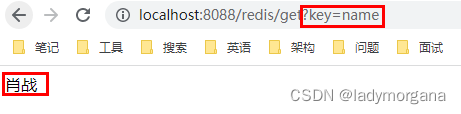
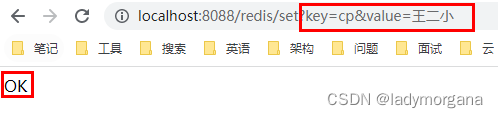

 浙公网安备 33010602011771号