

[转]RevealTrans滤镜特效小记
今天无意发现一个人网站在页面转换之间很眩,所以就顺便看了一下他的页面,顺藤摸瓜,就找到了RevealTrans。既然它这么好玩,那就顺便学习一下,下面我就做一个学习总结。
首先,它的功能是:使用预定义的24种效果之一来展示某物件新的内容。使用方法为:RevealTrans(duration=转换的秒数,transition=转换的类型),那么接下来给你介绍的就是它的24种效果。
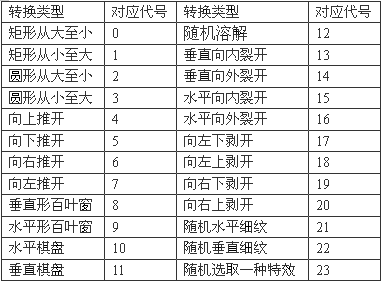
1 <META http-equiv='Page-Exit’ CONTENT='RevealTrans(Duration=0.5,Transition=23)'>
即可。在物件上的应用,我从msdn上找到了一个很好的例子,把代码贴在下面:
1 即可。在物件上的应用,我从msdn上找到了一个很好的例子,把代码贴在下面:
2 <html>
3 <head>
4 <SCRIPT>
5 function go() {
6 oSpan.filters[0].Apply();
7 if (oSpan.style.visibility == "visible") {
8 oSpan.style.visibility = "hidden";
9 oSpan.filters.revealTrans.transition=0;
10 }
11 else {
12 oSpan.style.visibility = "visible";
13 oSpan.filters[0].transition=1;
14 }
15 oSpan.filters[0].Play();
16 }
17 </SCRIPT>
18 </head>
19 <body>
20 <INPUT TYPE="BUTTON" VALUE="Play Transistion" onclick="go();" />
21 <SPAN ID=oSpan STYLE="position:absolute; Visibility:visible;
22 Filter:revealTrans(duration=1, transition=0);
23 width:300; height:300; background-color: lightgreen;">
24 <CENTER style="background-color=red; height=100; width:100;
25 position:relative; top:100">
26 </CENTER>
27 </SPAN>
28 </body>
29 </html>
30
2 <html>
3 <head>
4 <SCRIPT>
5 function go() {
6 oSpan.filters[0].Apply();
7 if (oSpan.style.visibility == "visible") {
8 oSpan.style.visibility = "hidden";
9 oSpan.filters.revealTrans.transition=0;
10 }
11 else {
12 oSpan.style.visibility = "visible";
13 oSpan.filters[0].transition=1;
14 }
15 oSpan.filters[0].Play();
16 }
17 </SCRIPT>
18 </head>
19 <body>
20 <INPUT TYPE="BUTTON" VALUE="Play Transistion" onclick="go();" />
21 <SPAN ID=oSpan STYLE="position:absolute; Visibility:visible;
22 Filter:revealTrans(duration=1, transition=0);
23 width:300; height:300; background-color: lightgreen;">
24 <CENTER style="background-color=red; height=100; width:100;
25 position:relative; top:100">
26 </CENTER>
27 </SPAN>
28 </body>
29 </html>
30
CSS中定义:
1 #text00{
2 filter:revealTrans(Duration=1.5,Transition=12)
3 }
4 <script language=javascript>
5 function replay(){
6 if(text00.style.visibility=="hidden")
7 text00.filter.revealTrans.play()
8 text00.style.visibility="visible"
9 }
10
11 <div id=text00 style=width:200;length:200;visibility=hidden onclick=replay()>现学现卖</div>
2 filter:revealTrans(Duration=1.5,Transition=12)
3 }
4 <script language=javascript>
5 function replay(){
6 if(text00.style.visibility=="hidden")
7 text00.filter.revealTrans.play()
8 text00.style.visibility="visible"
9 }
10
11 <div id=text00 style=width:200;length:200;visibility=hidden onclick=replay()>现学现卖</div>

 浙公网安备 33010602011771号