
Spring基础学习(六)
本Spring教程是在极客学院网站进行的学习,仅用于自己记录学习用途,如有问题,会及时删除。
请到这里进行学习--->https://wiki.jikexueyuan.com/list/java/
23.JDBC 框架概述
在使用普通的 JDBC 数据库时,就会很麻烦的写不必要的代码来处理异常,打开和关闭数据库连接等。但 Spring JDBC 框架负责所有的低层细节,从开始打开连接,准备和执行 SQL 语句,处理异常,处理事务,到最后关闭连接。
所以当从数据库中获取数据时,你所做的是定义连接参数,指定要执行的 SQL 语句,每次迭代完成所需的工作。
Spring JDBC 提供几种方法和数据库中相应的不同的类与接口。我将给出使用 JdbcTemplate 类框架的经典和最受欢迎的方法。这是管理所有数据库通信和异常处理的中央框架类。
JdbcTemplate 类
JdbcTemplate 类执行 SQL 查询、更新语句和存储过程调用,执行迭代结果集和提取返回参数值。它也捕获 JDBC 异常并转换它们到 org.springframework.dao 包中定义的通用类、更多的信息、异常层次结构。
JdbcTemplate 类的实例是线程安全配置的。所以你可以配置 JdbcTemplate 的单个实例,然后将这个共享的引用安全地注入到多个 DAOs 中。
使用 JdbcTemplate 类时常见的做法是在你的 Spring 配置文件中配置数据源,然后共享数据源 bean 依赖注入到 DAO 类中,并在数据源的设值函数中创建了 JdbcTemplate。
配置数据源
我们在数据库 TEST 中创建一个数据库表 Student。假设你正在使用 MySQL 数据库,如果你使用其他数据库,那么你可以改变你的 DDL 和相应的 SQL 查询。
CREATE TABLE Student(

    ID INT NOT NULL AUTO_INCREMENT,
    NAME VARCHAR(20) NOT NULL,
    AGE INT NOT NULL,
    PRIMARY KEY(ID)

);
现在,我们需要提供一个数据源到 JdbcTemplate 中,所以它可以配置本身来获得数据库访问。你可以在 XML 文件中配置数据源,其中一段代码如下所示:
<bean id="dataSource"
class="org.springframework.jdbc.datasource.DriverManagerDataSource">
   <property name="driverClassName" value="com.mysql.jdbc.Driver"/>
   <property name="url" value="jdbc:mysql://localhost:3306/TEST"/>
   <property name="username" value="root"/>
   <property name="password" value="password"/>
</数据访问对象(DAO)
DAO 代表常用的数据库交互的数据访问对象。DAOs 提供一种方法来读取数据并将数据写入到数据库中,它们应该通过一个接口显示此功能,应用程序的其余部分将访问它们。
在 Spring 中,数据访问对象(DAO)支持很容易用统一的方法使用数据访问技术,如 JDBC、Hibernate、JPA 或者 JDO。
执行 SQL 语句
我们看看如何使用 SQL 和 jdbcTemplate 对象在数据库表中执行 CRUD(创建、读取、更新和删除)操作。
查询一个整数类型:
String SQL = "select count(*) from Student";
int rowCount = jdbcTemplateObject.queryForInt( SQL );
查询一个 long 类型:
String SQL = "select count(*) from Student";
long rowCount = jdbcTemplateObject.queryForLong( SQL );
一个使用绑定变量的简单查询:
String SQL = "select age from Student where id = ?";
int age = jdbcTemplateObject.queryForInt(SQL, new Object[]{10});
查询字符串:
String SQL = "select name from Student where id = ?";
String name = jdbcTemplateObject.queryForObject(SQL, new Object[]{10}, String.class);
查询并返回一个对象:
String SQL = "select * from Student where id = ?";
Student student = jdbcTemplateObject.queryForObject(SQL,
                  new Object[]{10}, new StudentMapper());
public class StudentMapper implements RowMapper<Student> {
   public Student mapRow(ResultSet rs, int rowNum) throws SQLException {
      Student student = new Student();
      student.setID(rs.getInt("id"));
      student.setName(rs.getString("name"));
      student.setAge(rs.getInt("age"));
      return student;
   }
}
查询并返回多个对象:
String SQL = "select * from Student";
List<Student> students = jdbcTemplateObject.query(SQL,
                         new StudentMapper());
public class StudentMapper implements RowMapper<Student> {
   public Student mapRow(ResultSet rs, int rowNum) throws SQLException {
      Student student = new Student();
      student.setID(rs.getInt("id"));
      student.setName(rs.getString("name"));
      student.setAge(rs.getInt("age"));
      return student;
   }
}
在表中插入一行:
String SQL = "insert into Student (name, age) values (?, ?)";
jdbcTemplateObject.update( SQL, new Object[]{"Zara", 11} );
更新表中的一行:
String SQL = "update Student set name = ? where id = ?";
jdbcTemplateObject.update( SQL, new Object[]{"Zara", 10} );
从表中删除一行:
String SQL = "delete Student where id = ?";
jdbcTemplateObject.update( SQL, new Object[]{20} );
执行 DDL 语句
你可以使用 jdbcTemplate 中的 execute(..) 方法来执行任何 SQL 语句或 DDL 语句。下面是一个使用 CREATE 语句创建一个表的示例:
String SQL = "CREATE TABLE Student( " +
   "ID   INT NOT NULL AUTO_INCREMENT, " +
   "NAME VARCHAR(20) NOT NULL, " +
   "AGE  INT NOT NULL, " +
   "PRIMARY KEY (ID));"
jdbcTemplateObject.execute( SQL );
Spring JDBC 框架例子
基于上述概念,让我们看看一些重要的例子来帮助你理解在 Spring 中使用 JDBC 框架:
| 序号 | 例子 & 描述 |
|---|---|
| 1 | Spring JDBC Example
这个例子将解释如何编写一个简单的基于 Spring 应用程序的 JDBC。 |
| 2 | SQL Stored Procedure in Spring
学习在使用 Spring 中的 JDBC 时如何调用 SQL 存储过程。 |
1.Spring JDBC 示例
想要理解带有 jdbc 模板类的 Spring JDBC 框架的相关概念,让我们编写一个简单的示例,来实现下述 Student 表的所有 CRUD 操作。
CREATE TABLE Student(
   ID   INT NOT NULL AUTO_INCREMENT,
   NAME VARCHAR(20) NOT NULL,
   AGE  INT NOT NULL,
   PRIMARY KEY (ID)
);
在继续之前,让我们适当地使用 Eclipse IDE 并按照如下所示的步骤创建一个 Spring 应用程序:
| 步骤 | 描述 |
|---|---|
| 1 | 创建一个名为 SpringExample 的项目,并在创建的项目中的 src 文件夹下创建包 com.tutorialspoint.JDBCExample。 |
| 2 | 使用 Add External JARs 选项添加必需的 Spring 库,解释见 Spring Hello World Example 章节。 |
| 3 | 在项目中添加 Spring JDBC 指定的最新的库 mysql-connector-java.jar,org.springframework.jdbc.jar 和 org.springframework.transaction.jar。如果这些库不存在,你可以下载它们。 |
| 4 | 创建 DAO 接口 StudentDAO 并列出所有必需的方法。尽管这一步不是必需的而且你可以直接编写 StudentJDBCTemplate 类,但是作为一个好的实践,我们最好还是做这一步。 |
| 5 | 在 com.tutorialspoint.JDBCExample 包下创建其他的必需的 Java 类 Student,StudentMapper,StudentJDBCTemplate 和 MainApp 。 |
| 6 | 确保你已经在 TEST 数据库中创建了 Student 表。并确保你的 MySQL 服务器运行正常,且你可以使用给出的用户名和密码读/写访问数据库。 |
| 7 | 在 src 文件夹下创建 Beans 配置文件 Beans.xml。 |
| 8 | 最后一步是创建所有的 Java 文件和 Bean 配置文件的内容并按照如下所示的方法运行应用程序。 |
以下是数据访问对象接口文件 StudentDAO.java 的内容:
package com.tutorialspoint.JDBCExample;

import java.util.List;

import javax.sql.DataSource;

public interface StudentDAO {

    /**
        * This is the method to be used to initialize
        * database resources ie. connection.
        */
       public void setDataSource(DataSource ds);
       /**
        * This is the method to be used to create
        * a record in the Student table.
        */
       public void create(String name, Integer age);
       /**
        * This is the method to be used to list down
        * a record from the Student table corresponding
        * to a passed student id.
        */
       public Student getStudent(Integer id);
       /**
        * This is the method to be used to list down
        * all the records from the Student table.
        */
       public List<Student> listStudents();
       /**
        * This is the method to be used to delete
        * a record from the Student table corresponding
        * to a passed student id.
        */
       public void delete(Integer id);
       /**
        * This is the method to be used to update
        * a record into the Student table.
        */
       public void update(Integer id, Integer age);
}
下面是 Student.java 文件的内容:
package com.tutorialspoint.JDBCExample;

public class Student {

    private Integer age;
    private String name;
    private Integer id;

    public void setAge(Integer age) {
        this.age = age;
    }

    public Integer getAge() {
        return age;
    }

    public void setName(String name) {
        this.name = name;
    }

    public String getName() {
        return name;
    }

    public void setId(Integer id) {
        this.id = id;
    }

    public Integer getId() {
        return id;
    }
}
以下是 StudentMapper.java 文件的内容:
package com.tutorialspoint.JDBCExample;

import java.sql.ResultSet;
import java.sql.SQLException;

import org.springframework.jdbc.core.RowMapper;

public class StudentMapper implements RowMapper<Student> {

    @Override
    public Student mapRow(ResultSet rs, int rowNum) throws SQLException {
        Student student = new Student();
        student.setId(rs.getInt("id"));
        student.setAge(rs.getInt("age"));
        student.setName(rs.getString("name"));
        return student;
    }


}
下面是为定义的 DAO 接口 StudentDAO 的实现类文件 StudentJDBCTemplate.java:
package com.tutorialspoint.JDBCExample;

import java.util.List;

import javax.sql.DataSource;

import org.springframework.jdbc.core.JdbcTemplate;

public class StudentJDBCTemplate implements StudentDAO{

    private DataSource datasource;
    private JdbcTemplate jdbcTemplateObject;


    @Override
    public void create(String name, Integer age) {
        String sql = "insert into Student(name,age) values(?,?)";
        jdbcTemplateObject.update(sql,name,age);
        System.out.println("插入数据详情:Name="+name+",age="+age);
        return;
    }

    @Override
    public void delete(Integer id) {
        String sql = "delete from Student where id = ?";
        jdbcTemplateObject.update(sql, id);
        System.out.println("删除数据ID:"+id);

    }

    @Override
    public Student getStudent(Integer id) {

        String sql = "select * from Student where id=?";
        Student student=jdbcTemplateObject.queryForObject(sql, new Object[]{id},new StudentMapper());
        return student;
    }

    @Override
    public List<Student> listStudents() {
        String sql = "select * from Student";
        List<Student> student = jdbcTemplateObject.query(sql, new StudentMapper());
        return student;
    }

    @Override
    public void setDataSource(DataSource ds) {
        this.datasource = ds;
        this.jdbcTemplateObject = new JdbcTemplate(ds);

    }

    @Override
    public void update(Integer id, Integer age) {
        String sql = "update Student set age=? where id=?";
        jdbcTemplateObject.update(sql,age,id);
        System.out.println("Updated Record with ID = " + id );
        return;

    }

}
以下是 MainApp.java 文件的内容:
package com.tutorialspoint.JDBCExample;

import java.util.List;

import org.springframework.context.ApplicationContext;
import org.springframework.context.support.ClassPathXmlApplicationContext;

public class MainApp {

    public static void main(String[] args) {

     ApplicationContext context = new ClassPathXmlApplicationContext("Beans.xml");
     StudentJDBCTemplate studentJDBCTemplate =
     (StudentJDBCTemplate)context.getBean("studentJDBCTemplate");
     System.out.println("------Records Creation--------" );
     studentJDBCTemplate.create("Zara", 11);
     studentJDBCTemplate.create("Nuha", 2);
     studentJDBCTemplate.create("Ayan", 15);
     System.out.println("------Listing Multiple Records--------" );
     List<Student> students = studentJDBCTemplate.listStudents();
     for (Student record : students) {
        System.out.print("ID : " + record.getId() );
        System.out.print(", Name : " + record.getName() );
        System.out.println(", Age : " + record.getAge());
     }
     System.out.println("----Updating Record with ID = 2 -----" );
     studentJDBCTemplate.update(2, 20);
     System.out.println("----Listing Record with ID = 2 -----" );
     Student student = studentJDBCTemplate.getStudent(2);
     System.out.print("ID : " + student.getId() );
     System.out.print(", Name : " + student.getName() );
     System.out.println(", Age : " + student.getAge());

    }
}
下述是配置文件 Beans.xml 的内容:
<?xml version="1.0" encoding="UTF-8"?>
<beans xmlns="http://www.springframework.org/schema/beans"
    xmlns:xsi="http://www.w3.org/2001/XMLSchema-instance"
    xsi:schemaLocation="http://www.springframework.org/schema/beans
    http://www.springframework.org/schema/beans/spring-beans-3.0.xsd ">

   <!-- Initialization for data source -->
   <bean id="dataSource"
      class="org.springframework.jdbc.datasource.DriverManagerDataSource">
      <property name="driverClassName" value="com.mysql.jdbc.Driver"/>
      <property name="url" value="jdbc:mysql://localhost:3306/test"/>
      <property name="username" value="root"/>
      <property name="password" value="root"/>
   </bean>

   <!-- Definition for studentJDBCTemplate bean -->
   <bean id="studentJDBCTemplate"
      class="com.tutorialspoint.JDBCExample.StudentJDBCTemplate">
      <property name="dataSource"  ref="dataSource" />
   </bean>

</beans>
控制台输出信息:
2021-9-24 9:22:07 org.springframework.context.support.AbstractApplicationContext prepareRefresh
信息: Refreshing org.springframework.context.support.ClassPathXmlApplicationContext@19bd03e: startup date [Fri Sep 24 09:22:07 CST 2021]; root of context hierarchy
2021-9-24 9:22:07 org.springframework.beans.factory.xml.XmlBeanDefinitionReader loadBeanDefinitions
信息: Loading XML bean definitions from class path resource [Beans.xml]
2021-9-24 9:22:07 org.springframework.jdbc.datasource.DriverManagerDataSource setDriverClassName
信息: Loaded JDBC driver: com.mysql.jdbc.Driver
------Records Creation--------
插入数据详情:Name=Zara,age=11
插入数据详情:Name=Nuha,age=2
插入数据详情:Name=Ayan,age=15
------Listing Multiple Records--------
ID : 1, Name : Zara, Age : 11
ID : 2, Name : Nuha, Age : 20
ID : 3, Name : Ayan, Age : 15
ID : 4, Name : Zara, Age : 11
ID : 5, Name : Nuha, Age : 2
ID : 6, Name : Ayan, Age : 15
ID : 7, Name : Zara, Age : 11
ID : 8, Name : Nuha, Age : 2
ID : 9, Name : Ayan, Age : 15
ID : 10, Name : Zara, Age : 11
ID : 11, Name : Nuha, Age : 2
ID : 12, Name : Ayan, Age : 15
----Updating Record with ID = 2 -----
Updated Record with ID = 2
----Listing Record with ID = 2 -----
ID : 2, Name : Nuha, Age : 20
2.Spring 中 SQL 的存储过程
SimpleJdbcCall 类可以被用于调用一个包含 IN 和 OUT 参数的存储过程。你可以在处理任何一个 RDBMS 时使用这个方法,就像 Apache Derby, DB2, MySQL, Microsoft SQL Server, Oracle,和 Sybase。
为了了解这个方法,我们使用我们的 Student 表,它可以在 MySQL TEST 数据库中使用下面的 DDL 进行创建:
CREATE TABLE Student(
   ID   INT NOT NULL AUTO_INCREMENT,
   NAME VARCHAR(20) NOT NULL,
   AGE  INT NOT NULL,
   PRIMARY KEY (ID)
);
下一步,考虑接下来的 MySQL 存储过程,该过程使用 学生 Id 并且使用 OUT 参数返回相应的学生的姓名和年龄。所以让我们在你的 TEST 数据库中使用 MySQL 命令提示符创建这个存储过程:
DELIMITER $$
DROP PROCEDURE IF EXISTS `TEST`.`getRecord` $$
CREATE PROCEDURE `TEST`.`getRecord` (
IN in_id INTEGER,
OUT out_name VARCHAR(20),
OUT out_age  INTEGER)
BEGIN
   SELECT name, age
   INTO out_name, out_age
   FROM Student where id = in_id;
END $$
DELIMITER ;
现在,让我们编写我们的 Spring JDBC 应用程序,它可以实现对我们的 Student 数据库表的创建和读取操作。让我们使 Eclipse IDE 处于工作状态,然后按照如下步骤创建一个 Spring 应用程序:
| 步骤 | 描述 |
|---|---|
| 1 | 创建一个名为 SpringExample 的项目,并且在所创建项目的 src 文件夹下创建一个名为 com.tutorialspoint 的包。 |
| 2 | 使用 Add External JARs 选项添加所需的 Spring 库文件,就如在 Spring Hello World Example 章节中解释的那样。 |
| 3 | 在项目中添加 Spring JDBC 指定的最新的库文件 mysql-connector-java.jar, org.springframework.jdbc.jar 和 org.springframework.transaction.jar。如果你还没有这些所需要的库文件,你可以下载它们。 |
| 4 | 创建 DAO 接口 StudentDAO 并且列出所有需要的方法。 即使他不是必需的,你可以直接编写 StudentJDBCTemplate 类,但是作为一个良好的实践,让我们编写它。 |
| 5 | 在 com.tutorialspoint 包下创建其他所需要的 Java 类 Student, StudentMapper, StudentJDBCTemplate 和 MainApp。 |
| 6 | 确保你已经在 TEST 数据库中创建了 Student 表。同样确保你的 MySQL 服务器是正常工作的,并且保证你可以使用给定的用户名和密码对数据库有读取/写入的权限。 |
| 7 | 在 src 文件夹下创建 Beans 配置文件 Beans.xml。 |
| 8 |
最后一步是创建所有 Java 文件和 Bean 配置文件的内容,并且按如下解释的那样运行应用程序。 |
下面是数据访问对象接口文件 StudentDAO.java 的内容:
package com.tutorialspoint.JDBCSqlProcedure;

import java.util.List;

import javax.sql.DataSource;

public interface StudentDao {
    /**
     * this is the mothod to be used to initialize
     * database resources ie.connection
     * @param ds
     */
    public void setDataSource(DataSource ds);
    /**
     * This is the method to be used to create
     * a record in the Student table.
     * @param name
     * @param age
     */
    public void create(String name,Integer age);

    /*
     *This is the method to be used to list down
     * a record from the Student table corresponding
     * to a passed student id.
     */
    public Student getStudent(Integer id);
    /*
     * This is the method to be used to list down
     * all the records from the Student table.
     */
    public List<Student> listStudents();

}
下面是 Student.java 文件的内容:
package com.tutorialspoint.JDBCSqlProcedure;

public class Student {

    private Integer id;
    private String name;
    private Integer age;
    public Integer getId() {
        return id;
    }
    public void setId(Integer id) {
        this.id = id;
    }
    public String getName() {
        return name;
    }
    public void setName(String name) {
        this.name = name;
    }
    public Integer getAge() {
        return age;
    }
    public void setAge(Integer age) {
        this.age = age;
    }

}
下面是 StudentMapper.java 文件的内容:
package com.tutorialspoint.JDBCSqlProcedure;

import java.sql.ResultSet;
import java.sql.SQLException;

import org.springframework.jdbc.core.RowMapper;

public class StudentMapper implements RowMapper<Student>{

    @Override
    public Student mapRow(ResultSet set, int rowNum) throws SQLException {
        Student student = new Student();
        student.setId(set.getInt("id"));
        student.setName(set.getString("name"));
        student.setAge(set.getInt("age"));
        return student;
    }

}
下面是实现类文件 StudentJDBCTemplate.java,定义了 DAO 接口 StudentDAO:
package com.tutorialspoint.JDBCSqlProcedure;

import java.util.List;
import java.util.Map;

import javax.sql.DataSource;

import org.springframework.jdbc.core.JdbcTemplate;
import org.springframework.jdbc.core.namedparam.MapSqlParameterSource;
import org.springframework.jdbc.core.namedparam.SqlParameterSource;
import org.springframework.jdbc.core.simple.SimpleJdbcCall;

public class StudentJDBCTemplate implements StudentDao{

    private DataSource dataSource;
    private SimpleJdbcCall jdbcCall;

    //private JdbcTemplate jdbcTemplateObject;

    @Override
    public void create(String name, Integer age) {
        // TODO Auto-generated method stub
        JdbcTemplate jt = new JdbcTemplate(dataSource);
        String SQL = "insert into Student(name,age) values(?,?)";
        jt.update(SQL,name,age);
        System.out.println("Created Record Name="+name+",Age="+age);
        return;
    }

    @Override
    public Student getStudent(Integer id) {
        // TODO Auto-generated method stub
        SqlParameterSource in = new MapSqlParameterSource().addValue("in_id", id);
        Map<String,Object> out = jdbcCall.execute(in);
        Student student = new Student();
        student.setId(id);
        student.setName((String)out.get("out_name"));
        student.setAge((Integer)out.get("out_age"));

        return student;
    }

    @Override
    public List<Student> listStudents() {
        // TODO Auto-generated method stub
        JdbcTemplate jdbcTemplateObject = new JdbcTemplate(dataSource);
        String SQL = "select * from Student";
        List<Student> students = jdbcTemplateObject.query(SQL,new StudentMapper());
        return students;
    }

    @Override
    public void setDataSource(DataSource dataSource) {
        // TODO Auto-generated method stub
        this.dataSource = dataSource;
        this.jdbcCall = new SimpleJdbcCall(dataSource).withProcedureName("getRecord");

    }

}
关于上述项目的几句话:你编写的课调用执行的代码涉及创建一个包含 IN 参数的 SqlParameterSource。名称的匹配是很重要的,该名称可以使用在存储过程汇总声明的参数名称来提供输入值。execute 方法利用 IN 参数返回一个包含在存储过程中由名称指定的任何外部参数键的映射。现在让我们移动主应用程序文件 MainApp.java,如下所示:
package com.tutorialspoint.JDBCSqlProcedure;

import java.util.List;

import org.springframework.context.ApplicationContext;
import org.springframework.context.support.ClassPathXmlApplicationContext;


public class MainApp {

    public static void main(String[] args) {

    ApplicationContext context =
            new ClassPathXmlApplicationContext("Beans.xml");
     StudentJDBCTemplate studentJDBCTemplate =
     (StudentJDBCTemplate)context.getBean("studentJDBCTemplate");
     System.out.println("------Records Creation--------" );
     studentJDBCTemplate.create("Zara", 11);
     studentJDBCTemplate.create("Nuha", 2);
     studentJDBCTemplate.create("Ayan", 15);
     System.out.println("------Listing Multiple Records--------" );
     List<Student> students = studentJDBCTemplate.listStudents();
     for (Student record : students) {
        System.out.print("ID : " + record.getId() );
        System.out.print(", Name : " + record.getName() );
        System.out.println(", Age : " + record.getAge());
     }
//     System.out.println("----Updating Record with ID = 2 -----" );
    // studentJDBCTemplate.update(2, 20);
     System.out.println("----Listing Record with ID = 2 -----" );
     Student student = studentJDBCTemplate.getStudent(2);
     System.out.print("ID : " + student.getId() );
     System.out.print(", Name : " + student.getName() );
     System.out.println(", Age : " + student.getAge());

    }
}
下面是配置文件 Beans.xml:
<?xml version="1.0" encoding="UTF-8"?>
<beans xmlns="http://www.springframework.org/schema/beans"
    xmlns:xsi="http://www.w3.org/2001/XMLSchema-instance"
    xsi:schemaLocation="http://www.springframework.org/schema/beans
    http://www.springframework.org/schema/beans/spring-beans-3.0.xsd ">


   <!-- Initialization for data source -->
   <bean id="dataSource"
      class="org.springframework.jdbc.datasource.DriverManagerDataSource">
      <property name="driverClassName" value="com.mysql.jdbc.Driver"/>
      <property name="url" value="jdbc:mysql://localhost:3306/test"/>
      <property name="username" value="root"/>
      <property name="password" value="root"/>
   </bean>

   <!-- Definition for studentJDBCTemplate bean -->
   <bean id="studentJDBCTemplate"
      class="com.tutorialspoint.JDBCSqlProcedure.StudentJDBCTemplate">
      <property name="dataSource"  ref="dataSource" />
   </bean>

</beans>
上面是修改后的代码。运行没有错误。
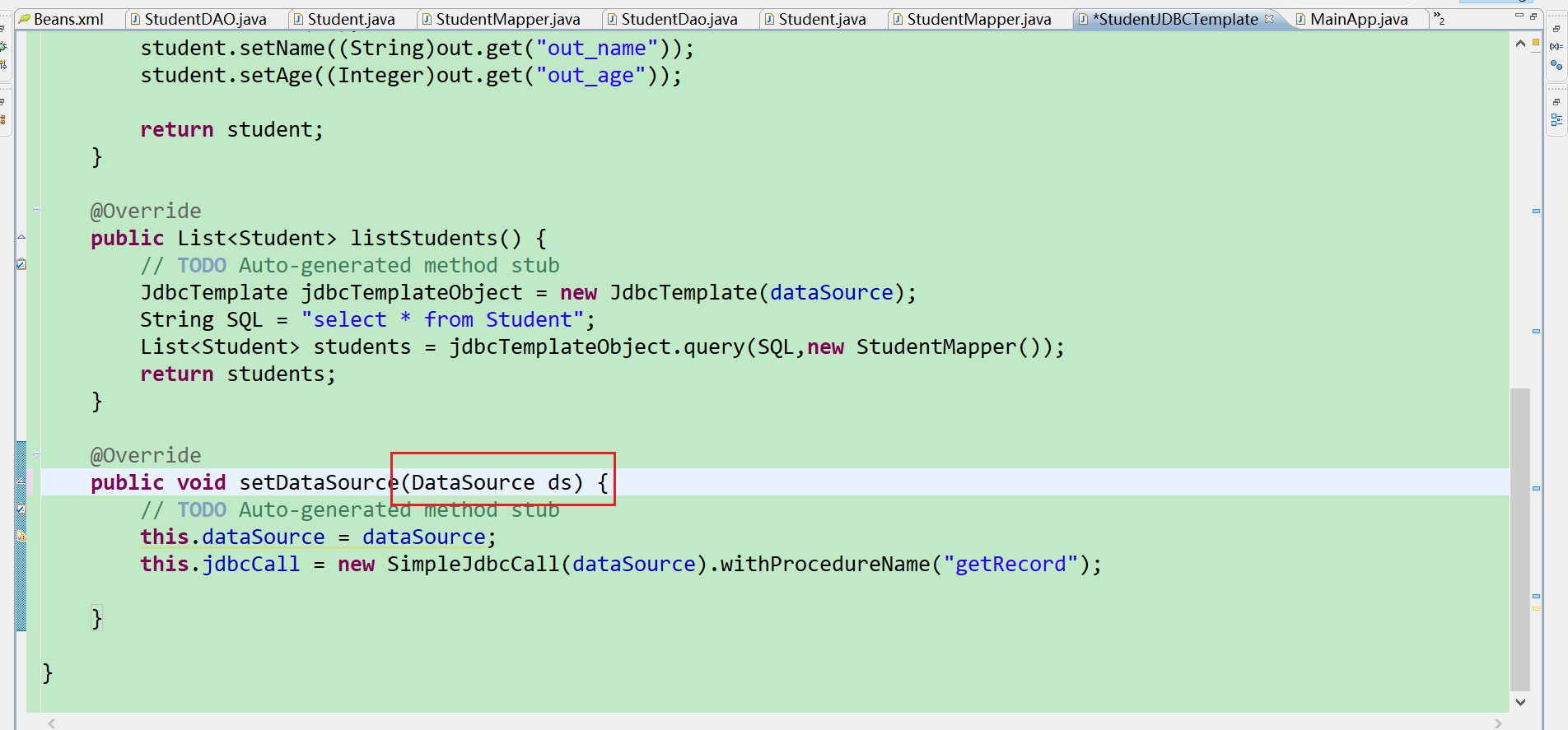
自己写的时候项目报错
第一处报错点:参数写的ds,而不是dataSource,然后就报错了,看不出来为啥
2021-9-28 10:12:22 org.springframework.context.support.AbstractApplicationContext prepareRefresh
信息: Refreshing org.springframework.context.support.ClassPathXmlApplicationContext@1c672d0: startup date [Tue Sep 28 10:12:22 CST 2021]; root of context hierarchy
2021-9-28 10:12:22 org.springframework.beans.factory.xml.XmlBeanDefinitionReader loadBeanDefinitions
信息: Loading XML bean definitions from class path resource [Beans.xml]
2021-9-28 10:12:22 org.springframework.jdbc.datasource.DriverManagerDataSource setDriverClassName
信息: Loaded JDBC driver: com.mysql.jdbc.Driver
2021-9-28 10:12:22 org.springframework.context.support.AbstractApplicationContext refresh
警告: Exception encountered during context initialization - cancelling refresh attempt
org.springframework.beans.factory.BeanCreationException: Error creating bean with name 'studentJDBCTemplate' defined in class path resource [Beans.xml]: Error setting property values; nested exception is org.springframework.beans.PropertyBatchUpdateException; nested PropertyAccessExceptions (1) are:
PropertyAccessException 1: org.springframework.beans.MethodInvocationException: Property 'dataSource' threw exception; nested exception is java.lang.IllegalArgumentException: Property 'dataSource' is required
    at org.springframework.beans.factory.support.AbstractAutowireCapableBeanFactory.applyPropertyValues(AbstractAutowireCapableBeanFactory.java:1514)
    at org.springframework.beans.factory.support.AbstractAutowireCapableBeanFactory.populateBean(AbstractAutowireCapableBeanFactory.java:1222)
    at org.springframework.beans.factory.support.AbstractAutowireCapableBeanFactory.doCreateBean(AbstractAutowireCapableBeanFactory.java:537)
    at org.springframework.beans.factory.support.AbstractAutowireCapableBeanFactory.createBean(AbstractAutowireCapableBeanFactory.java:476)
    at org.springframework.beans.factory.support.AbstractBeanFactory$1.getObject(AbstractBeanFactory.java:303)
    at org.springframework.beans.factory.support.DefaultSingletonBeanRegistry.getSingleton(DefaultSingletonBeanRegistry.java:230)
    at org.springframework.beans.factory.support.AbstractBeanFactory.doGetBean(AbstractBeanFactory.java:299)
    at org.springframework.beans.factory.support.AbstractBeanFactory.getBean(AbstractBeanFactory.java:194)
    at org.springframework.beans.factory.support.DefaultListableBeanFactory.preInstantiateSingletons(DefaultListableBeanFactory.java:755)
    at org.springframework.context.support.AbstractApplicationContext.finishBeanFactoryInitialization(AbstractApplicationContext.java:757)
    at org.springframework.context.support.AbstractApplicationContext.refresh(AbstractApplicationContext.java:480)
    at org.springframework.context.support.ClassPathXmlApplicationContext.<init>(ClassPathXmlApplicationContext.java:139)
    at org.springframework.context.support.ClassPathXmlApplicationContext.<init>(ClassPathXmlApplicationContext.java:83)
    at com.tutorialspoint.JDBCSqlProcedure.MainApp.main(MainApp.java:15)
Caused by: org.springframework.beans.PropertyBatchUpdateException; nested PropertyAccessExceptions (1) are:
PropertyAccessException 1: org.springframework.beans.MethodInvocationException: Property 'dataSource' threw exception; nested exception is java.lang.IllegalArgumentException: Property 'dataSource' is required
    at org.springframework.beans.AbstractPropertyAccessor.setPropertyValues(AbstractPropertyAccessor.java:121)
    at org.springframework.beans.AbstractPropertyAccessor.setPropertyValues(AbstractPropertyAccessor.java:75)
    at org.springframework.beans.factory.support.AbstractAutowireCapableBeanFactory.applyPropertyValues(AbstractAutowireCapableBeanFactory.java:1510)
    ... 13 more
Exception in thread "main" org.springframework.beans.factory.BeanCreationException: Error creating bean with name 'studentJDBCTemplate' defined in class path resource [Beans.xml]: Error setting property values; nested exception is org.springframework.beans.PropertyBatchUpdateException; nested PropertyAccessExceptions (1) are:
PropertyAccessException 1: org.springframework.beans.MethodInvocationException: Property 'dataSource' threw exception; nested exception is java.lang.IllegalArgumentException: Property 'dataSource' is required
    at org.springframework.beans.factory.support.AbstractAutowireCapableBeanFactory.applyPropertyValues(AbstractAutowireCapableBeanFactory.java:1514)
    at org.springframework.beans.factory.support.AbstractAutowireCapableBeanFactory.populateBean(AbstractAutowireCapableBeanFactory.java:1222)
    at org.springframework.beans.factory.support.AbstractAutowireCapableBeanFactory.doCreateBean(AbstractAutowireCapableBeanFactory.java:537)
    at org.springframework.beans.factory.support.AbstractAutowireCapableBeanFactory.createBean(AbstractAutowireCapableBeanFactory.java:476)
    at org.springframework.beans.factory.support.AbstractBeanFactory$1.getObject(AbstractBeanFactory.java:303)
    at org.springframework.beans.factory.support.DefaultSingletonBeanRegistry.getSingleton(DefaultSingletonBeanRegistry.java:230)
    at org.springframework.beans.factory.support.AbstractBeanFactory.doGetBean(AbstractBeanFactory.java:299)
    at org.springframework.beans.factory.support.AbstractBeanFactory.getBean(AbstractBeanFactory.java:194)
    at org.springframework.beans.factory.support.DefaultListableBeanFactory.preInstantiateSingletons(DefaultListableBeanFactory.java:755)
    at org.springframework.context.support.AbstractApplicationContext.finishBeanFactoryInitialization(AbstractApplicationContext.java:757)
    at org.springframework.context.support.AbstractApplicationContext.refresh(AbstractApplicationContext.java:480)
    at org.springframework.context.support.ClassPathXmlApplicationContext.<init>(ClassPathXmlApplicationContext.java:139)
    at org.springframework.context.support.ClassPathXmlApplicationContext.<init>(ClassPathXmlApplicationContext.java:83)
    at com.tutorialspoint.JDBCSqlProcedure.MainApp.main(MainApp.java:15)
Caused by: org.springframework.beans.PropertyBatchUpdateException; nested PropertyAccessExceptions (1) are:
PropertyAccessException 1: org.springframework.beans.MethodInvocationException: Property 'dataSource' threw exception; nested exception is java.lang.IllegalArgumentException: Property 'dataSource' is required
    at org.springframework.beans.AbstractPropertyAccessor.setPropertyValues(AbstractPropertyAccessor.java:121)
    at org.springframework.beans.AbstractPropertyAccessor.setPropertyValues(AbstractPropertyAccessor.java:75)
    at org.springframework.beans.factory.support.AbstractAutowireCapableBeanFactory.applyPropertyValues(AbstractAutowireCapableBeanFactory.java:1510)
    ... 13 more
第二处报错的地方:下方类里面listStudents()方法里面没有创建
JdbcTemplate jdbcTemplateObject = new JdbcTemplate(dataSource);对象,这个应该是要每次都创建的。
package com.tutorialspoint.JDBCSqlProcedure;

import java.util.List;
import java.util.Map;

import javax.sql.DataSource;

import org.springframework.jdbc.core.JdbcTemplate;
import org.springframework.jdbc.core.namedparam.MapSqlParameterSource;
import org.springframework.jdbc.core.namedparam.SqlParameterSource;
import org.springframework.jdbc.core.simple.SimpleJdbcCall;

public class StudentJDBCTemplate implements StudentDao{

    private DataSource dataSource;
    private SimpleJdbcCall jdbcCall;

    //private JdbcTemplate jdbcTemplateObject;

    @Override
    public void create(String name, Integer age) {
        // TODO Auto-generated method stub
        JdbcTemplate jt = new JdbcTemplate(dataSource);
        String SQL = "insert into Student(name,age) values(?,?)";
        jt.update(SQL,name,age);
        System.out.println("Created Record Name="+name+",Age="+age);
        return;
    }

    @Override
    public Student getStudent(Integer id) {
        // TODO Auto-generated method stub
        SqlParameterSource in = new MapSqlParameterSource().addValue("in_id", id);
        Map<String,Object> out = jdbcCall.execute(in);
        Student student = new Student();
        student.setId(id);
        student.setName((String)out.get("out_name"));
        student.setAge((Integer)out.get("out_age"));

        return student;
    }

    @Override
    public List<Student> listStudents() {
        // TODO Auto-generated method stub
        JdbcTemplate jdbcTemplateObject = new JdbcTemplate(dataSource);
        String SQL = "select * from Student";
        List<Student> students = jdbcTemplateObject.query(SQL,new StudentMapper());
        return students;
    }

    @Override
    public void setDataSource(DataSource dataSource) {
        // TODO Auto-generated method stub
        this.dataSource = dataSource;
        this.jdbcCall = new SimpleJdbcCall(dataSource).withProcedureName("getRecord");

    }

}
24.事务管理
一个数据库事务是一个被视为单一的工作单元的操作序列。这些操作应该要么完整地执行,要么完全不执行。事务管理是一个重要组成部分,RDBMS 面向企业应用程序,以确保数据完整性和一致性。事务的概念可以描述为具有以下四个关键属性说成是 ACID:
-
原子性:事务应该当作一个单独单元的操作,这意味着整个序列操作要么是成功,要么是失败的。
-
一致性:这表示数据库的引用完整性的一致性,表中唯一的主键等。
-
隔离性:可能同时处理很多有相同的数据集的事务,每个事务应该与其他事务隔离,以防止数据损坏。
- 持久性:一个事务一旦完成全部操作后,这个事务的结果必须是永久性的,不能因系统故障而从数据库中删除。
一个真正的 RDBMS 数据库系统将为每个事务保证所有的四个属性。使用 SQL 发布到数据库中的事务的简单视图如下:
-
使用 begin transaction 命令开始事务。
-
使用 SQL 查询语句执行各种删除、更新或插入操作。
- 如果所有的操作都成功,则执行提交操作,否则回滚所有操作。
Spring 框架在不同的底层事务管理 APIs 的顶部提供了一个抽象层。Spring 的事务支持旨在通过添加事务能力到 POJOs 来提供给 EJB 事务一个选择方案。Spring 支持编程式和声明式事务管理。EJBs 需要一个应用程序服务器,但 Spring 事务管理可以在不需要应用程序服务器的情况下实现。
局部事物 vs. 全局事务
局部事务是特定于一个单一的事务资源,如一个 JDBC 连接,而全局事务可以跨多个事务资源事务,如在一个分布式系统中的事务。
局部事务管理在一个集中的计算环境中是有用的,该计算环境中应用程序组件和资源位于一个单位点,而事务管理只涉及到一个运行在一个单一机器中的本地数据管理器。局部事务更容易实现。
全局事务管理需要在分布式计算环境中,所有的资源都分布在多个系统中。在这种情况下事务管理需要同时在局部和全局范围内进行。分布式或全局事务跨多个系统执行,它的执行需要全局事务管理系统和所有相关系统的局部数据管理人员之间的协调。
编程式 vs. 声明式
Spring 支持两种类型的事务管理:
声明式事务管理比编程式事务管理更可取,尽管它不如编程式事务管理灵活,但它允许你通过代码控制事务。但作为一种横切关注点,声明式事务管理可以使用 AOP 方法进行模块化。Spring 支持使用 Spring AOP 框架的声明式事务管理。
0.Spring 事务抽象
Spring 事务抽象的关键是由 org.springframework.transaction.PlatformTransactionManager 接口定义,如下所示:
public interface PlatformTransactionManager {
   TransactionStatus getTransaction(TransactionDefinition definition);
   throws TransactionException;
   void commit(TransactionStatus status) throws TransactionException;
   void rollback(TransactionStatus status) throws TransactionException;
}
| 序号 | 方法 & 描述 |
|---|---|
| 1 |
TransactionStatus getTransaction(TransactionDefinition definition) 根据指定的传播行为,该方法返回当前活动事务或创建一个新的事务。 |
| 2 |
void commit(TransactionStatus status) 该方法提交给定的事务和关于它的状态。 |
| 3 |
void rollback(TransactionStatus status) 该方法执行一个给定事务的回滚。 |
TransactionDefinition 是在 Spring 中事务支持的核心接口,它的定义如下:
public interface TransactionDefinition {
   int getPropagationBehavior();
   int getIsolationLevel();
   String getName();
   int getTimeout();
   boolean isReadOnly();
}
| 序号 | 方法 & 描述 |
|---|---|
| 1 |
int getPropagationBehavior() 该方法返回传播行为。Spring 提供了与 EJB CMT 类似的所有的事务传播选项。 |
| 2 |
int getIsolationLevel() 该方法返回该事务独立于其他事务的工作的程度。 |
| 3 |
String getName() 该方法返回该事务的名称。 |
| 4 |
int getTimeout() 该方法返回以秒为单位的时间间隔,事务必须在该时间间隔内完成。 |
| 5 |
boolean isReadOnly() 该方法返回该事务是否是只读的。 |
下面是隔离级别的可能值:
| 序号 | 隔离 & 描述 |
|---|---|
| 1 |
TransactionDefinition.ISOLATION_DEFAULT 这是默认的隔离级别。 |
| 2 |
TransactionDefinition.ISOLATION_READ_COMMITTED 表明能够阻止误读;可以发生不可重复读和虚读。 |
| 3 |
TransactionDefinition.ISOLATION_READ_UNCOMMITTED 表明可以发生误读、不可重复读和虚读。 |
| 4 |
TransactionDefinition.ISOLATION_REPEATABLE_READ 表明能够阻止误读和不可重复读;可以发生虚读。 |
| 5 |
TransactionDefinition.ISOLATION_SERIALIZABLE 表明能够阻止误读、不可重复读和虚读。 |
下面是传播类型的可能值:
| 序号 | 传播 & 描述 |
|---|---|
| 1 |
TransactionDefinition.PROPAGATION_MANDATORY 支持当前事务;如果不存在当前事务,则抛出一个异常。 |
| 2 |
TransactionDefinition.PROPAGATION_NESTED 如果存在当前事务,则在一个嵌套的事务中执行。 |
| 3 |
TransactionDefinition.PROPAGATION_NEVER 不支持当前事务;如果存在当前事务,则抛出一个异常。 |
| 4 |
TransactionDefinition.PROPAGATION_NOT_SUPPORTED 不支持当前事务;而总是执行非事务性。 |
| 5 |
TransactionDefinition.PROPAGATION_REQUIRED 支持当前事务;如果不存在事务,则创建一个新的事务。 |
| 6 |
TransactionDefinition.PROPAGATION_REQUIRES_NEW 创建一个新事务,如果存在一个事务,则把当前事务挂起。 |
| 7 |
TransactionDefinition.PROPAGATION_SUPPORTS 支持当前事务;如果不存在,则执行非事务性。 |
| 8 |
TransactionDefinition.TIMEOUT_DEFAULT 使用默认超时的底层事务系统,或者如果不支持超时则没有。 |
TransactionStatus 接口为事务代码提供了一个简单的方法来控制事务的执行和查询事务状态。
public interface TransactionStatus extends SavepointManager {
   boolean isNewTransaction();
   boolean hasSavepoint();
   void setRollbackOnly();
   boolean isRollbackOnly();
   boolean isCompleted();
}
| 序号 | 方法 & 描述 |
|---|---|
| 1 |
boolean hasSavepoint() 该方法返回该事务内部是否有一个保存点,也就是说,基于一个保存点已经创建了嵌套事务。 |
| 2 |
boolean isCompleted() 该方法返回该事务是否完成,也就是说,它是否已经提交或回滚。 |
| 3 |
boolean isNewTransaction() 在当前事务时新的情况下,该方法返回 true。 |
| 4 |
boolean isRollbackOnly() 该方法返回该事务是否已标记为 rollback-only。 |
| 5 |
void setRollbackOnly() 该方法设置该事务为 rollback-only 标记。 |
2.Spring 编程式事务管理
编程式事务管理方法允许你在对你的源代码编程的帮助下管理事务。这给了你极大地灵活性,但是它很难维护。
在我们开始之前,至少要有两个数据库表,在事务的帮助下我们可以执行多种 CRUD 操作。以 Student 表为例,用下述 DDL 可以在 MySQL TEST 数据库中创建该表:
CREATE TABLE Student(
   ID   INT NOT NULL AUTO_INCREMENT,
   NAME VARCHAR(20) NOT NULL,
   AGE  INT NOT NULL,
   PRIMARY KEY (ID)
);
第二个表是 Marks,用来存储基于年份的学生的标记。这里 SID 是 Student 表的外键。
CREATE TABLE Marks(
   SID INT NOT NULL,
   MARKS  INT NOT NULL,
   YEAR   INT NOT NULL
);
让我们直接使用 PlatformTransactionManager 来实现编程式方法从而实现事务。要开始一个新事务,你需要有一个带有适当的 transaction 属性的 TransactionDefinition 的实例。这个例子中,我们使用默认的 transaction 属性简单的创建了 DefaultTransactionDefinition 的一个实例。
当 TransactionDefinition 创建后,你可以通过调用 getTransaction() 方法来开始你的事务,该方法会返回 TransactionStatus 的一个实例。 TransactionStatus 对象帮助追踪当前的事务状态,并且最终,如果一切运行顺利,你可以使用 PlatformTransactionManager 的 commit() 方法来提交这个事务,否则的话,你可以使用 rollback() 方法来回滚整个操作。
现在让我们编写我们的 Spring JDBC 应用程序,它能够在 Student 和 Mark 表中实现简单的操作。让我们适当的使用 Eclipse IDE,并按照如下所示的步骤来创建一个 Spring 应用程序:
| 步骤 | 描述 |
|---|---|
| 1 | 创建一个名为 SpringExample 的项目,并在创建的项目中的 src 文件夹下创建包 com.tutorialspoint 。 |
| 2 | 使用 Add External JARs 选项添加必需的 Spring 库,解释见 Spring Hello World Example chapter. |
| 3 | 在项目中添加 Spring JDBC 指定的最新的库 mysql-connector-java.jar,org.springframework.jdbc.jar 和 org.springframework.transaction.jar。如果你还没有这些库,你可以下载它们。 |
| 4 | 创建 DAO 接口 StudentDAO 并列出所有需要的方法。尽管它不是必需的并且你可以直接编写 StudentJDBCTemplate 类,但是作为一个好的实践,我们还是做吧。 |
| 5 | 在 com.tutorialspoint 包下创建其他必需的 Java 类 StudentMarks,StudentMarksMapper,StudentJDBCTemplate 和 MainApp。如果需要的话,你可以创建其他的 POJO 类。 |
| 6 | 确保你已经在 TEST 数据库中创建了 Student 和 Marks 表。还要确保你的 MySQL 服务器运行正常并且你使用给出的用户名和密码可以读/写访问数据库。 |
| 7 | 在 src 文件夹下创建 Beans 配置文件 Beans.xml 。 |
| 8 |
最后一步是创建所有 Java 文件和 Bean 配置文件的内容并按照如下所示的方法运行应用程序。 |
下面是数据访问对象接口文件 StudentDAO.java 的内容:
package com.tutorialspoint.programTransactionManagement;

import java.util.List;

import javax.sql.DataSource;

public interface StudentDao {
    /**
     * This is the method to be used to initialize database resources ie.
     * connection.
     */
    public void setDataSource(DataSource ds);

    /**
     * This is the method to be used to create a record in the Student and Marks
     * tables.
     */
    public void create(String name, Integer age, Integer marks, Integer year);

    /**
     * This is the method to be used to list down all the records from the
     * Student and Marks tables.
     */
    public List<StudentMarks> listStudents();

}
下面是 StudentMarks.java 文件的内容:这里写的是Student和Marks表两个表的表字段总和
package com.tutorialspoint.programTransactionManagement;

public class StudentMarks {

    private Integer age;
    private String name;
    private Integer id;
    private Integer marks;
    private Integer year;
    private Integer sid;
    public Integer getAge() {
        return age;
    }
    public void setAge(Integer age) {
        this.age = age;
    }
    public String getName() {
        return name;
    }
    public void setName(String name) {
        this.name = name;
    }
    public Integer getId() {
        return id;
    }
    public void setId(Integer id) {
        this.id = id;
    }
    public Integer getMarks() {
        return marks;
    }
    public void setMarks(Integer marks) {
        this.marks = marks;
    }
    public Integer getYear() {
        return year;
    }
    public void setYear(Integer year) {
        this.year = year;
    }
    public Integer getSid() {
        return sid;
    }
    public void setSid(Integer sid) {
        this.sid = sid;
    }


}
以下是 StudentMarksMapper.java 文件的内容:
package com.tutorialspoint.programTransactionManagement;

import java.sql.ResultSet;
import java.sql.SQLException;

import org.springframework.jdbc.core.RowMapper;
import org.springframework.jdbc.core.RowMapperResultSetExtractor;

public class StudentMarksMapper implements RowMapper<StudentMarks>{

    @Override
    public StudentMarks mapRow(ResultSet rs, int rowNum) throws SQLException {
        // TODO Auto-generated method stub
        StudentMarks studentMarks = new StudentMarks();
        studentMarks.setId(rs.getInt("id"));
        studentMarks.setName(rs.getString("name"));
        studentMarks.setAge(rs.getInt("age"));
        studentMarks.setSid(rs.getInt("sid"));
        studentMarks.setMarks(rs.getInt("marks"));
        studentMarks.setYear(rs.getInt("year"));
        return studentMarks;


    }

}
下面是定义的 DAO 接口 StudentDAO 实现类文件 StudentJDBCTemplate.java:这里需要注意create()方法中对于事务管理异常捕获。不然运行会报错。
package com.tutorialspoint.programTransactionManagement;

import java.util.List;

import javax.sql.DataSource;

import org.springframework.dao.DataAccessException;
import org.springframework.jdbc.core.JdbcTemplate;
import org.springframework.transaction.PlatformTransactionManager;
import org.springframework.transaction.TransactionDefinition;
import org.springframework.transaction.TransactionStatus;
import org.springframework.transaction.support.DefaultTransactionDefinition;

public class StudentJDBCTemplate implements StudentDao {

    private DataSource dataSource;
    private JdbcTemplate jdbcTemplate;
    private PlatformTransactionManager transactionManager;

    public void setDataSource1(DataSource dataSource) {
          this.dataSource = dataSource;
          this.jdbcTemplate = new JdbcTemplate(dataSource);
    }


    public void setTransactionManager(
          PlatformTransactionManager transactionManager) {
          this.transactionManager = transactionManager;
    }


    @Override
    public void create(String name, Integer age, Integer marks, Integer year) {
        // TODO Auto-generated method stub

        TransactionDefinition def = new DefaultTransactionDefinition();
        TransactionStatus status = transactionManager.getTransaction(def);

        try {
             String SQL1 = "insert into Student (name, age) values (?, ?)";
             jdbcTemplate.update( SQL1, name, age);
             // Get the latest student id to be used in Marks table
             String SQL2 = "select max(id) from Student";
             int sid = jdbcTemplate.queryForInt( SQL2 );
             String SQL3 = "insert into Marks(sid, marks, year) " +
                           "values (?, ?, ?)";
             jdbcTemplate.update( SQL3, sid, marks, year);
             System.out.println("Created Name = " + name + ", Age = " + age);
             transactionManager.commit(status);
          } catch (DataAccessException e) {
             System.out.println("Error in creating record, rolling back");
             transactionManager.rollback(status);
             throw e;
          }
          return;


    }

    @Override
    public List<StudentMarks> listStudents() {
        // TODO Auto-generated method stub
        String sql = "select * from student,marks where student.id=marks.sid";
        List<StudentMarks> studentMarks = jdbcTemplate.query(sql,new StudentMarksMapper());
        return studentMarks;
    }


    @Override
    public void setDataSource(DataSource dataSource) {
        // TODO Auto-generated method stub
        this.dataSource = dataSource;
        this.jdbcTemplate = new JdbcTemplate(dataSource);
    }


//    @Override
//    public void setDataSource(DataSource ds) {
//        // TODO Auto-generated method stub
//
//    }

}
现在让我们改变主应用程序文件 MainApp.java,如下所示:
package com.tutorialspoint.programTransactionManagement;

import java.util.List;

import org.springframework.context.ApplicationContext;
import org.springframework.context.support.ClassPathXmlApplicationContext;

public class MainApp {
    public static void main(String[] args) {

        ApplicationContext ac = new ClassPathXmlApplicationContext("Beans.xml");
        StudentJDBCTemplate studentJDBCTemplate = (StudentJDBCTemplate)ac.getBean("studentJDBCTemplate");
         System.out.println("------Records creation--------" );
          studentJDBCTemplate.create("Zara", 11, 99, 2010);
          studentJDBCTemplate.create("Nuha", 20, 97, 2010);
          studentJDBCTemplate.create("Ayan", 25, 100, 2011);
          System.out.println("------Listing all the records--------" );
          List<StudentMarks> studentMarks = studentJDBCTemplate.listStudents();
          for (StudentMarks record : studentMarks) {
             System.out.print("ID : " + record.getId() );
             System.out.print(", Name : " + record.getName() );
             System.out.print(", Marks : " + record.getMarks());
             System.out.print(", Year : " + record.getYear());
             System.out.println(", Age : " + record.getAge());
          }


    }
}
下面是配置文件 Beans.xml 的内容:
<?xml version="1.0" encoding="UTF-8"?>
<beans xmlns="http://www.springframework.org/schema/beans"
    xmlns:xsi="http://www.w3.org/2001/XMLSchema-instance"
    xsi:schemaLocation="http://www.springframework.org/schema/beans
    http://www.springframework.org/schema/beans/spring-beans-3.0.xsd ">


   <!-- Initialization for data source -->
   <bean id="dataSource"
      class="org.springframework.jdbc.datasource.DriverManagerDataSource">
      <property name="driverClassName" value="com.mysql.jdbc.Driver"/>
      <property name="url" value="jdbc:mysql://localhost:3306/test"/>
      <property name="username" value="root"/>
      <property name="password" value="root"/>
   </bean>

    <!-- Initialization for TransactionManager -->
   <bean id="transactionManager"
      class="org.springframework.jdbc.datasource.DataSourceTransactionManager">
      <property name="dataSource"  ref="dataSource" />
   </bean>

   <!-- Definition for studentJDBCTemplate bean -->
   <bean id="studentJDBCTemplate"
      class="com.tutorialspoint.programTransactionManagement.StudentJDBCTemplate">
      <property name="dataSource"  ref="dataSource" />
      <property name="transactionManager"  ref="transactionManager" />
   </bean>

</beans>
控制台输出语句:
2021-9-28 14:26:40 org.springframework.context.support.AbstractApplicationContext prepareRefresh
信息: Refreshing org.springframework.context.support.ClassPathXmlApplicationContext@19bd03e: startup date [Tue Sep 28 14:26:40 CST 2021]; root of context hierarchy
2021-9-28 14:26:40 org.springframework.beans.factory.xml.XmlBeanDefinitionReader loadBeanDefinitions
信息: Loading XML bean definitions from class path resource [Beans.xml]
2021-9-28 14:26:40 org.springframework.jdbc.datasource.DriverManagerDataSource setDriverClassName
信息: Loaded JDBC driver: com.mysql.jdbc.Driver
------Records creation--------
Created Name = Zara, Age = 11
Created Name = Nuha, Age = 20
Created Name = Ayan, Age = 25
------Listing all the records--------
ID : 5, Name : Zara, Marks : 99, Year : 2010, Age : 11
ID : 6, Name : Nuha, Marks : 97, Year : 2010, Age : 20
ID : 7, Name : Ayan, Marks : 100, Year : 2011, Age : 25
自己写的代码,跟学习的不一样,没有try catch ,我自己写的时候也不提示需要try catch,确实需要捕获异常,自己写的有问题。2021-9-28 14:02:34 org.springframework.context.support.AbstractApplicationContext prepareRefresh 信息: Refreshing org.springframework.context.support.ClassPathXmlApplicationContext@19bd03e: startup date [Tue Sep 28 14:02:34 CST 2021]; root of context hierarchy 2021-9-28 14:02:34 org.springframework.beans.factory.xml.XmlBeanDefinitionReader loadBeanDefinitions 信息: Loading XML bean definitions from class path resource [Beans.xml] 2021-9-28 14:02:34 org.springframework.jdbc.datasource.DriverManagerDataSource setDriverClassName 信息: Loaded JDBC driver: com.mysql.jdbc.Driver ------Records creation-------- create Name=Zara,Age=11 Exception in thread "main" org.springframework.transaction.IllegalTransactionStateException: Transaction is already completed - do not call commit or rollback more than once per transaction at org.springframework.transaction.support.AbstractPlatformTransactionManager.rollback(AbstractPlatformTransactionManager.java:821) at com.tutorialspoint.programTransactionManagement.StudentJDBCTemplate.create(StudentJDBCTemplate.java:47) at com.tutorialspoint.programTransactionManagement.MainApp.main(MainApp.java:14)
2.Spring 声明式事务管理
声明式事务管理方法允许你在配置的帮助下而不是源代码硬编程来管理事务。这意味着你可以将事务管理从事务代码中隔离出来。你可以只使用注释或基于配置的 XML 来管理事务。 bean 配置会指定事务型方法。这是与声明式事务相关的步骤:
-
我们使用 标签,它创建一个事务处理的建议,同时,我们定义一个匹配所有方法的切入点,我们希望这些方法是事务型的并且会引用事务型的建议。
-
如果在事务型配置中包含了一个方法的名称,那么创建的建议在调用方法之前就会在事务中开始进行。
-
目标方法会在 try / catch 块中执行。
- 如果方法正常结束,AOP 建议会成功的提交事务,否则它执行回滚操作。
让我们看看上述步骤是如何实现的。但是在我们开始之前,至少有两个数据库表是至关重要的,在事务的帮助下,我们可以实现各种 CRUD 操作。以 Student 表为例,该表是使用下述 DDL 在 MySQL TEST 数据库中创建的。
CREATE TABLE Student(
   ID   INT NOT NULL AUTO_INCREMENT,
   NAME VARCHAR(20) NOT NULL,
   AGE  INT NOT NULL,
   PRIMARY KEY (ID)
);
第二个表是 Marks,我们用来存储基于年份的学生标记。在这里,SID 是 Student 表的外键。
CREATE TABLE Marks(
   SID INT NOT NULL,
   MARKS  INT NOT NULL,
   YEAR   INT NOT NULL
);
现在让我们编写 Spring JDBC 应用程序来在 Student 和 Marks 表中实现简单的操作。让我们适当的使用 Eclipse IDE,并按照如下所示的步骤来创建一个 Spring 应用程序:
| 步骤 | 描述 |
|---|---|
| 1 | 创建一个名为 SpringExample 的项目,并在创建的项目中的 src 文件夹下创建包 com.tutorialspoint 。 |
| 2 | 使用 Add External JARs 选项添加必需的 Spring 库,解释见 Spring Hello World Example chapter. |
| 3 | 在项目中添加其它必需的库 mysql-connector-java.jar,org.springframework.jdbc.jar 和 org.springframework.transaction.jar。如果你还没有这些库,你可以下载它们。 |
| 4 | 创建 DAO 接口 StudentDAO 并列出所有需要的方法。尽管它不是必需的并且你可以直接编写 StudentJDBCTemplate 类,但是作为一个好的实践,我们还是做吧。 |
| 5 | 在 com.tutorialspoint 包下创建其他必需的 Java 类 StudentMarks,StudentMarksMapper,StudentJDBCTemplate 和 MainApp。如果需要的话,你可以创建其他的 POJO 类。 |
| 6 | 确保你已经在 TEST 数据库中创建了 Student 和 Marks 表。还要确保你的 MySQL 服务器运行正常并且你使用给出的用户名和密码可以读/写访问数据库。 |
| 7 | 在 src 文件夹下创建 Beans 配置文件 Beans.xml 。 |
| 8 | 最后一步是创建所有 Java 文件和 Bean 配置文件的内容并按照如下所示的方法运行应用程序。 |
下面是数据访问对象接口文件 StudentDAO.java 的内容:
package com.tutorialspoint.statementTransactionManagement;

import java.util.List;

import javax.sql.DataSource;

public interface StudentDao {

    public void setDataSource(DataSource dataSource);

    public void create(String name,Integer age, Integer marks,Integer year);

    public List<StudentMarks> listStudentMarks();


}
以下是 StudentMarks.java 文件的内容:
package com.tutorialspoint.statementTransactionManagement;

public class StudentMarks {

    private Integer id;
    private String name;
    private Integer age;
    private Integer marks;
    private Integer year;
    private Integer sid;
    public Integer getId() {
        return id;
    }
    public void setId(Integer id) {
        this.id = id;
    }
    public String getName() {
        return name;
    }
    public void setName(String name) {
        this.name = name;
    }
    public Integer getAge() {
        return age;
    }
    public void setAge(Integer age) {
        this.age = age;
    }
    public Integer getMarks() {
        return marks;
    }
    public void setMarks(Integer marks) {
        this.marks = marks;
    }
    public Integer getYear() {
        return year;
    }
    public void setYear(Integer year) {
        this.year = year;
    }
    public Integer getSid() {
        return sid;
    }
    public void setSid(Integer sid) {
        this.sid = sid;
    }


}
下面是 StudentMarksMapper.java 文件的内容:
package com.tutorialspoint.statementTransactionManagement;

import java.sql.ResultSet;
import java.sql.SQLException;

import org.springframework.jdbc.core.RowMapper;

public class StudentMarksMapper implements RowMapper<StudentMarks>{

    @Override
    public StudentMarks mapRow(ResultSet rs, int rowNum) throws SQLException {
        // TODO Auto-generated method stub
        StudentMarks marks = new StudentMarks();
        marks.setId(rs.getInt("id"));
        marks.setName(rs.getString("name"));
        marks.setAge(rs.getInt("age"));
        marks.setSid(rs.getInt("sid"));
        marks.setMarks(rs.getInt("marks"));
        marks.setYear(rs.getInt("year"));
        return marks;
    }

}
下面是定义的 DAO 接口 StudentDAO 实现类文件 StudentJDBCTemplate.java:
package com.tutorialspoint.statementTransactionManagement;

import java.util.List;

import javax.sql.DataSource;

import org.springframework.dao.DataAccessException;
import org.springframework.jdbc.core.JdbcTemplate;

public class StudentJDBCTemplate implements StudentDao{

    private JdbcTemplate jdbcTemplate;


    @Override
    public void create(String name, Integer age, Integer marks, Integer year) {
        // TODO Auto-generated method stub
        try {
            String sql1 = "insert into Student (name,age) values(?,?)";
            jdbcTemplate.update(sql1,name,age);
            String sql2 = "select max(id) from Student";
            int sid = jdbcTemplate.queryForInt(sql2);
            String sql3 = "insert into Marks(sid,marks,year) values(?,?,?)";
            jdbcTemplate.update(sql3,sid,marks,year);
            System.out.println("Create Name = "+name+",Age = "+age);
            throw new RuntimeException("simulate Error condition");
        } catch (DataAccessException e) {
            // TODO: handle exception
            System.out.println("Error in creating record,rolling back");
            throw e;

        }


    }

    @Override
    public List<StudentMarks> listStudentMarks() {
        // TODO Auto-generated method stub

        String sqlString = "select * from student,marks where student.id=marks.sid";
        jdbcTemplate.query(sqlString, new StudentMarksMapper());
        return null;
    }

    @Override
    public void setDataSource(DataSource dataSource) {
        // TODO Auto-generated method stub
        this.jdbcTemplate = new JdbcTemplate(dataSource);

    }


}
MainApp.java
package com.tutorialspoint.statementTransactionManagement;

import java.util.List;

import org.springframework.context.ApplicationContext;
import org.springframework.context.support.ClassPathXmlApplicationContext;

public class MainApp {

    /**
     * @param args
     */
    public static void main(String[] args) {
        // TODO Auto-generated method stub
        ApplicationContext ac    = new ClassPathXmlApplicationContext("Beans.xml");
        StudentDao studentJDBCTemplate  = (StudentDao)ac.getBean("studentJDBCTemplate");
        System.out.println("---Records creation-----------");
        studentJDBCTemplate .create("zhangsan", 14, 99, 2021);
        studentJDBCTemplate .create("zhangsansan", 144, 999, 2021);
        System.out.println("----------Listing all the records--------------------");
        List<StudentMarks> listStudentMarks = studentJDBCTemplate.listStudentMarks();

        for (StudentMarks studentMarks : listStudentMarks) {
            System.out.println("ID:"+studentMarks.getId());
            System.out.println("Age:"+studentMarks.getAge());
            System.out.println("Name:"+studentMarks.getName());
            System.out.println("sid:"+studentMarks.getSid());
            System.out.println("Marks:"+studentMarks.getMarks());
            System.out.println("Year:"+studentMarks.getYear());

        }
    }

}
以下是配置文件 Beans.xml 的内容:
<?xml version="1.0" encoding="UTF-8"?>
<beans xmlns="http://www.springframework.org/schema/beans"
   xmlns:xsi="http://www.w3.org/2001/XMLSchema-instance"
   xmlns:tx="http://www.springframework.org/schema/tx"
   xmlns:aop="http://www.springframework.org/schema/aop"
   xsi:schemaLocation="http://www.springframework.org/schema/beans
   http://www.springframework.org/schema/beans/spring-beans-3.0.xsd
   http://www.springframework.org/schema/tx
   http://www.springframework.org/schema/tx/spring-tx-3.0.xsd
   http://www.springframework.org/schema/aop
   http://www.springframework.org/schema/aop/spring-aop-3.0.xsd">


   <!-- Initialization for data source -->
   <bean id="dataSource"
      class="org.springframework.jdbc.datasource.DriverManagerDataSource">
      <property name="driverClassName" value="com.mysql.jdbc.Driver"/>
      <property name="url" value="jdbc:mysql://localhost:3306/test"/>
      <property name="username" value="root"/>
      <property name="password" value="root"/>
   </bean>

  <tx:advice id="txAdvice"  transaction-manager="transactionManager">
      <tx:attributes>
      <tx:method name="create"/>
      </tx:attributes>
   </tx:advice>

   <aop:config>
      <aop:pointcut id="createOperation"
      expression="execution(* com.tutorialspoint.statementTransactionManagement.StudentJDBCTemplate.create(..))"/>
      <aop:advisor advice-ref="txAdvice" pointcut-ref="createOperation"/>
   </aop:config>

   <!-- Initialization for TransactionManager -->
   <bean id="transactionManager"
   class="org.springframework.jdbc.datasource.DataSourceTransactionManager">
      <property name="dataSource"  ref="dataSource" />
   </bean>

   <!-- Definition for studentJDBCTemplate bean -->
   <bean id="studentJDBCTemplate"
   class="com.tutorialspoint.statementTransactionManagement.StudentJDBCTemplate">
      <property name="dataSource"  ref="dataSource" />
   </bean>


</beans>
当你完成了创建源和 bean 配置文件后,让我们运行应用程序。如果你的应用程序运行顺利的话,那么会输出如下所示的异常。在这种情况下,事务会回滚并且在数据库表中不会创建任何记录。
2021-9-28 15:35:07 org.springframework.context.support.AbstractApplicationContext prepareRefresh
信息: Refreshing org.springframework.context.support.ClassPathXmlApplicationContext@19bd03e: startup date [Tue Sep 28 15:35:07 CST 2021]; root of context hierarchy
2021-9-28 15:35:07 org.springframework.beans.factory.xml.XmlBeanDefinitionReader loadBeanDefinitions
信息: Loading XML bean definitions from class path resource [Beans.xml]
2021-9-28 15:35:07 org.springframework.jdbc.datasource.DriverManagerDataSource setDriverClassName
信息: Loaded JDBC driver: com.mysql.jdbc.Driver
---Records creation-----------
Create Name = zhangsan,Age = 14
Exception in thread "main" java.lang.RuntimeException: simulate Error condition
    at com.tutorialspoint.statementTransactionManagement.StudentJDBCTemplate.create(StudentJDBCTemplate.java:27)
    at sun.reflect.NativeMethodAccessorImpl.invoke0(Native Method)
    at sun.reflect.NativeMethodAccessorImpl.invoke(NativeMethodAccessorImpl.java:39)
    at sun.reflect.DelegatingMethodAccessorImpl.invoke(DelegatingMethodAccessorImpl.java:25)
    at java.lang.reflect.Method.invoke(Method.java:597)
    at org.springframework.aop.support.AopUtils.invokeJoinpointUsingReflection(AopUtils.java:317)
    at org.springframework.aop.framework.ReflectiveMethodInvocation.invokeJoinpoint(ReflectiveMethodInvocation.java:190)
    at org.springframework.aop.framework.ReflectiveMethodInvocation.proceed(ReflectiveMethodInvocation.java:157)
    at org.springframework.transaction.interceptor.TransactionInterceptor$1.proceedWithInvocation(TransactionInterceptor.java:99)
    at org.springframework.transaction.interceptor.TransactionAspectSupport.invokeWithinTransaction(TransactionAspectSupport.java:281)
    at org.springframework.transaction.interceptor.TransactionInterceptor.invoke(TransactionInterceptor.java:96)
    at org.springframework.aop.framework.ReflectiveMethodInvocation.proceed(ReflectiveMethodInvocation.java:179)
    at org.springframework.aop.interceptor.ExposeInvocationInterceptor.invoke(ExposeInvocationInterceptor.java:92)
    at org.springframework.aop.framework.ReflectiveMethodInvocation.proceed(ReflectiveMethodInvocation.java:179)
    at org.springframework.aop.framework.JdkDynamicAopProxy.invoke(JdkDynamicAopProxy.java:207)
    at $Proxy3.create(Unknown Source)
    at com.tutorialspoint.statementTransactionManagement.MainApp.main(MainApp.java:18)
在删除异常后,你可以尝试上述示例,在这种情况下,会提交事务并且你可以在数据库中看见一条记录。

 浙公网安备 33010602011771号