
如何使用deepFace批量创建有创意的GIF图片表情包?


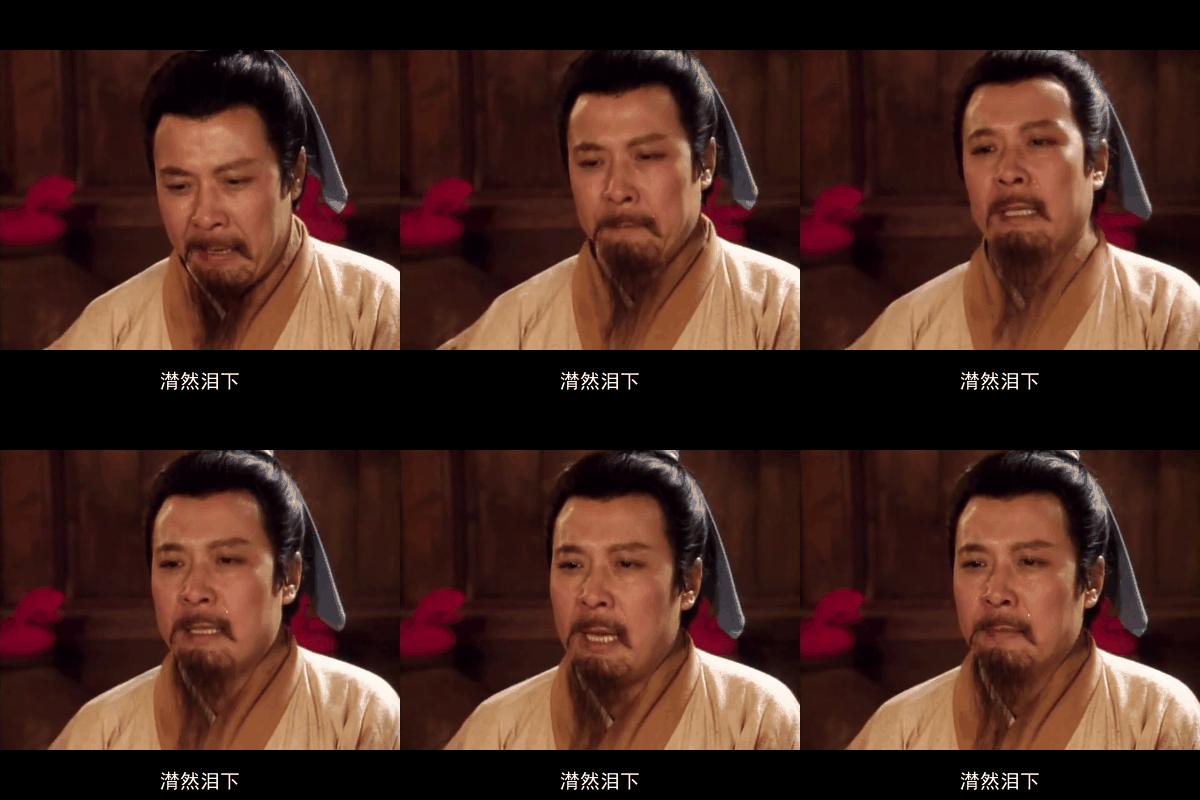
是否你也想知道这样有意思的表情包在哪里下载的?
聊天的时候找啊找,感觉找不到有用的表情包来表达你此刻的心情?
今天我们用python deepFace库来实现一个读取视频,并且根据提供的面部特征来批量生成有意思的表情包的工具。。。。。。
依赖库
numpy==1.22.3
pandas==2.0.3
Pillow==9.0.0
opencv-python==4.9.0.80
tensorflow==2.13.1
keras==2.13.1
requests==2.27.1
gdown==4.2.0
tqdm==4.66.1
Flask==2.0.2
Werkzeug==2.0.2
flask_cors==4.0.1
mtcnn==0.1.1
retina-face==0.0.17
fire==0.4.0
gunicorn==20.1.0
lightphe==0.0.19
这里可能会有numpy 的兼容问题,
我们修改代码 numpy 库的 __init__.py 中的def __getattr__(attr) 方法:
def __getattr__(attr):
        # Warn for expired attributes, and return a dummy function
        # that always raises an exception.
        print(f"attrattrattrattrattrattr:{attr}")
        import warnings
        try:
            msg = __expired_functions__[attr]
        except KeyError:
            pass
        else:
            warnings.warn(msg, DeprecationWarning, stacklevel=2)

            def _expired(*args, **kwds):
                raise RuntimeError(msg)

            return _expired

        # Emit warnings for deprecated attributes
        try:
            val, msg = __deprecated_attrs__[attr]
        except KeyError:
            pass
        else:
            warnings.warn(msg, DeprecationWarning, stacklevel=2)
            return val

        if attr in __future_scalars__:
            # And future warnings for those that will change, but also give
            # the AttributeError
            warnings.warn(
                f"In the future `np.{attr}` will be defined as the "
                "corresponding NumPy scalar.", FutureWarning, stacklevel=2)

        if attr in __former_attrs__:
            raise AttributeError(__former_attrs__[attr])


        # Importing Tester requires importing all of UnitTest which is not a
        # cheap import Since it is mainly used in test suits, we lazy import it
        # here to save on the order of 10 ms of import time for most users
        #
        # The previous way Tester was imported also had a side effect of adding
        # the full `numpy.testing` namespace
        if attr == 'testing':
            import numpy.testing as testing
            return testing
        elif attr == 'Tester':
            from .testing import Tester
            return Tester
        elif attr == 'typeDict':
            import numpy as np

            # Note: we use dtype objects instead of dtype classes. The spec does not
            # require any behavior on dtypes other than equality.
            int8 = np.dtype("int8")
            int16 = np.dtype("int16")
            int32 = np.dtype("int32")
            int64 = np.dtype("int64")
            uint8 = np.dtype("uint8")
            uint16 = np.dtype("uint16")
            uint32 = np.dtype("uint32")
            uint64 = np.dtype("uint64")
            float32 = np.dtype("float32")
            float64 = np.dtype("float64")
            # Note: This name is changed
            bool = np.dtype("bool")


            typeDict = {
                # 整数类型
                'int8': np.int8, 'int16': np.int16, 'int32': np.int32, 'int64': np.int64,
                'uint8': np.uint8, 'uint16': np.uint16, 'uint32': np.uint32, 'uint64': np.uint64,
                # 浮点类型
                'float16': np.float16, 'float32': np.float32, 'float64': np.float64,
                # 其他常用类型
                'bool': np.bool_, 'str': np.str_, 'object': np.object_,
            }
            return typeDict

        raise AttributeError("module {!r} has no attribute "
                             "{!r}".format(__name__, attr))
蓝色部分是新增的代码,兼容以前的库没有typeDict属性,导致报错的问题。
核心文件来了:
import cv2
import imageio
import numpy as np
import os
import time
import gc
from deepface import DeepFace
from PIL import Image, ImageDraw, ImageFont

# ===================== 兼容DeepFace版本的核心修复 =====================
# 兼容DeepFace新旧版本的距离计算导入
try:
    # 新版本(≥0.0.79)
    from deepface.commons.distance_utils import findCosineDistance
except ImportError:
    try:
        # 旧版本(<0.0.79)
        from deepface.commons import distance as dst
        findCosineDistance = dst.findCosineDistance
    except ImportError:
        # 终极兜底:手动实现余弦距离计算
        def findCosineDistance(vector1, vector2):
            vec1 = np.array(vector1) / np.linalg.norm(vector1)
            vec2 = np.array(vector2) / np.linalg.norm(vector2)
            return 1 - np.dot(vec1, vec2)

class TargetFaceGIFGenerator:
    def __init__(self, video_path, target_face_path,
                 save_dir="./face_gifs",
                 similarity_threshold=0.65,  # 人脸匹配阈值(0~1)
                 detect_backend="mtcnn",     # 检测后端:mtcnn/ssd/opencv
                 gif_cache_seconds=3,        # 检测到人脸后缓存多少秒的帧生成GIF
                 gif_fps=3,                  # GIF帧率(降低至3以延长显示时间)
                 gif_size=(400, 400),        # GIF尺寸
                 cool_down_seconds=5):       # 冷却时间(避免重复生成)
        """
        初始化特定人脸GIF生成器
        :param video_path: 待分析视频路径
        :param target_face_path: 目标人脸图片路径(单/多人脸)
        :param save_dir: GIF保存目录
        :param similarity_threshold: 人脸匹配余弦相似度阈值
        :param gif_cache_seconds: 检测到人脸后缓存的帧时长(秒)
        :param cool_down_seconds: 生成GIF后冷却时间(避免短时间重复生成)
        """
        # 视频初始化
        self.cap = cv2.VideoCapture(video_path)
        if not self.cap.isOpened():
            raise ValueError(f"❌ 无法读取视频:{video_path}")

        # 视频基础参数
        self.fps = self.cap.get(cv2.CAP_PROP_FPS)
        self.total_frames = int(self.cap.get(cv2.CAP_PROP_FRAME_COUNT))
        self.total_duration = self.total_frames / self.fps
        self.current_frame_idx = 0
        self.current_sec = 0

        # 人脸匹配配置
        self.target_face_path = target_face_path
        self.sim_threshold = similarity_threshold
        self.detect_backend = detect_backend
        self.target_embeddings = []  # 目标人脸特征库
        self._load_target_face()     # 加载目标人脸特征

        # 修复:移除旧的Emotion模型加载,改用DeepFace.analyze直接分析表情
        self.emotion_labels = ['angry', 'disgust', 'fear', 'happy', 'sad', 'surprise', 'neutral']
        # 文言文风格表情文字映射表
        self.emotion_text_map = {
            'angry': '嗯?!',
            'disgust': '哼!!',
            'fear': 'Oh~ NO!',
            'happy': '哈哈哈哈~~~',
            'sad': 'SADDLY...',
            'surprise': 'What??',
            'neutral': 'enn hn ? little case !'
        }

        # GIF生成配置
        self.gif_cache_frames = int(gif_cache_seconds * self.fps)  # 缓存帧数
        self.gif_fps = gif_fps
        self.gif_size = gif_size
        self.cool_down_frames = int(cool_down_seconds * self.fps)  # 冷却帧数
        self.last_generate_frame = -self.cool_down_frames  # 上一次生成GIF的帧数

        # 缓存与保存配置
        self.save_dir = save_dir
        self._create_save_dir()
        self.frame_buffer = []       # 帧缓存队列(用于生成GIF)
        self.generated_gif_count = 0
        self.generated_gif_paths = []

    def _create_save_dir(self):
        """创建GIF保存目录"""
        if not os.path.exists(self.save_dir):
            os.makedirs(self.save_dir)
            print(f"📁 自动创建GIF目录:{self.save_dir}")
        else:
            print(f"📁 GIF保存目录:{self.save_dir}")

    # def _load_target_face(self):
    #     """加载目标人脸并提取特征(支持多人脸)"""
    #     print(f"🔍 正在加载目标人脸:{self.target_face_path}")
    #     try:
    #         # 提取目标人脸的特征向量(Facenet模型轻量且精准)
    #         target_objs = DeepFace.represent(
    #             img_path=self.target_face_path,
    #             model_name="Facenet",
    #             detector_backend=self.detect_backend,
    #             enforce_detection=True
    #         )
    #         self.target_embeddings = [obj["embedding"] for obj in target_objs]
    #         print(f"✅ 成功加载 {len(self.target_embeddings)} 个人脸特征")

    #         if len(self.target_embeddings) == 0:
    #             raise ValueError("❌ 目标图片中未检测到人脸!")
    #     except Exception as e:
    #         raise RuntimeError(f"❌ 加载目标人脸失败:{str(e)}")

    def _calc_cosine_similarity(self, embedding1, embedding2):
        """计算余弦相似度(值越大越相似,范围0~1)"""
        embedding1 = np.array(embedding1)
        embedding2 = np.array(embedding2)
        # 修复:直接调用兼容后的findCosineDistance
        return 1 - findCosineDistance(embedding1, embedding2)

    def _analyze_face_emotion(self, face_img):
        """
        修复版表情分析:使用DeepFace.analyze直接获取表情(兼容新版本)
        :param face_img: 人脸区域图片(BGR格式)
        :return: 最可能的表情标签
        """
        try:
            # 使用analyze接口直接分析表情,关闭其他分析项提升速度
            analysis = DeepFace.analyze(
                img_path=face_img,
                actions=['emotion'],  # 只分析表情,跳过年龄/性别/种族
                detector_backend=self.detect_backend,
                enforce_detection=False,  # 小人脸也尝试分析
                silent=True  # 关闭冗余日志
            )
            # 兼容新版本返回格式(单人脸返回字典,多人脸返回列表)
            if isinstance(analysis, list):
                emotion = analysis[0]['dominant_emotion'] if analysis else 'neutral'
            else:
                emotion = analysis['dominant_emotion']
            return emotion
        except Exception as e:
            print(f"⚠️ 表情分析失败(降级为平静):{str(e)}")
            return 'neutral'

    def _match_face(self, frame):
        """
        匹配当前帧中的人脸(修复表情分析逻辑)
        :return: (is_matched, max_similarity, face_regions, emotions)
                 is_matched: 是否匹配目标人脸
                 max_similarity: 最高相似度值
                 face_regions: 匹配的人脸区域坐标 [(x1,y1,x2,y2), ...]
                 emotions: 匹配人脸的表情列表
        """
        try:
            # 提取当前帧的所有人脸特征
            frame_faces = DeepFace.represent(
                img_path=frame,
                model_name="Facenet",
                detector_backend=self.detect_backend,
                enforce_detection=False  # 无脸时不报错
            )

            if len(frame_faces) == 0:
                return False, 0.0, [], []

            # 逐一匹配目标人脸
            max_sim = 0.0
            matched_regions = []
            matched_emotions = []

            for face_obj in frame_faces:
                frame_emb = face_obj["embedding"]
                # 计算与所有目标人脸的相似度
                sims = [self._calc_cosine_similarity(frame_emb, t_emb) for t_emb in self.target_embeddings]
                current_sim = max(sims)  # 取最高相似度

                # 超过阈值则判定为匹配
                if current_sim >= self.sim_threshold:
                    max_sim = max(max_sim, current_sim)
                    # 获取人脸区域坐标
                    facial_area = face_obj["facial_area"]
                    x1, y1 = facial_area["x"], facial_area["y"]
                    x2, y2 = x1 + facial_area["w"], y1 + facial_area["h"]
                    matched_regions.append((x1, y1, x2, y2))

                    # 修复:调用新的表情分析方法
                    face_img = frame[y1:y2, x1:x2]
                    emotion = self._analyze_face_emotion(face_img)
                    matched_emotions.append(emotion)

            return max_sim >= self.sim_threshold, max_sim, matched_regions, matched_emotions
        except Exception as e:
            print(f"⚠️ 人脸匹配失败:{str(e)}")
            return False, 0.0, [], []

    def _draw_face_info_on_frame(self, frame, face_regions, similarity, emotions):
        """在单帧上绘制人脸框、相似度、时间戳和表情文字"""
        # 转换为PIL(支持中文绘制)
        frame_rgb = cv2.cvtColor(frame, cv2.COLOR_BGR2RGB)
        pil_img = Image.fromarray(frame_rgb)
        draw = ImageDraw.Draw(pil_img)

        # 加载字体(Windows默认黑体,Mac/Linux替换为"/System/Library/Fonts/PingFang.ttc")
        try:
            font_large = ImageFont.truetype("C:/Windows/Fonts/simhei.ttf", 24)
            font_small = ImageFont.truetype("C:/Windows/Fonts/simhei.ttf", 20)
        except:
            font_large = ImageFont.load_default()
            font_small = ImageFont.load_default()
            print("⚠️ 无法加载中文字体,使用默认字体")

        # 选择传入的主表情(如果有)
        if emotions:
            main_emotion = emotions[0]
            biaoqing_text = self.emotion_text_map.get(main_emotion, "")
        else:
            biaoqing_text = ""

        # 获取画面宽高(用于计算文字居中位置)
        frame_width, frame_height = pil_img.size

        # 计算文字尺寸和位置(底部居中)
        text_bbox = draw.textbbox((0,0), biaoqing_text, font=font_small)
        text_w = text_bbox[2] - text_bbox[0]
        text_h = text_bbox[3] - text_bbox[1]
        time_x = (frame_width - text_w) / 2  # 水平居中
        time_y = frame_height - text_h - 10  # 底部向上10像素
        text_color = (254,254, 254)
        # 绘制表情文字
        draw.text((time_x, time_y), biaoqing_text,  fill=text_color, font=font_small)

        # 转换回OpenCV格式
        frame_marked = cv2.cvtColor(np.array(pil_img), cv2.COLOR_RGB2BGR)
        return frame_marked

    def _generate_gif_from_buffer(self, similarity):
        """从帧缓存生成GIF并保存(修复文字一闪而过问题)"""
        # 确保至少有5帧才生成GIF,避免动画过短
        if len(self.frame_buffer) < 5:
            print("⚠️ 缓存帧数不足(至少需要5帧),跳过GIF生成")
            self.frame_buffer.clear()
            return

        # 统计缓存帧中所有表情,取出现次数最多的作为主表情(稳定文字)
        all_emotions = []
        for _, _, emotions in self.frame_buffer:
            if emotions:  # 只收集有效表情
                all_emotions.extend(emotions)
        # 确定主表情(如果没有有效表情则用中性)
        if all_emotions:
            main_emotion = max(set(all_emotions), key=all_emotions.count)
        else:
            main_emotion = 'neutral'
        main_emotion_text = self.emotion_text_map.get(main_emotion, "")

        # 1. 帧预处理(优化采样逻辑,确保足够帧数量)
        processed_frames = []
        # 重新计算采样步长:确保最终有8-15帧(平衡流畅度和体积)
        max_frames_needed = 15
        sample_step = max(1, len(self.frame_buffer) // max_frames_needed)
        sample_step = min(sample_step, 3)  # 限制最大步长为3,保证帧变化

        for idx, (frame, face_regions, _) in enumerate(self.frame_buffer):  # 忽略单帧表情
            if idx % sample_step != 0:
                continue

            # 缩放+填充(保持比例,黑边填充)
            h, w = frame.shape[:2]
            scale = min(self.gif_size[0]/w, self.gif_size[1]/h)
            new_w, new_h = int(w*scale), int(h*scale)
            frame_resized = cv2.resize(frame, (new_w, new_h), cv2.INTER_AREA)

            pad_l = (self.gif_size[0] - new_w) // 2
            pad_r = self.gif_size[0] - new_w - pad_l
            pad_t = (self.gif_size[1] - new_h) // 2
            pad_b = self.gif_size[1] - new_h - pad_t
            frame_padded = cv2.copyMakeBorder(
                frame_resized, pad_t, pad_b, pad_l, pad_r,
                cv2.BORDER_CONSTANT, value=(0, 0, 0)
            )

            # 使用主表情文字,而非单帧表情
            frame_marked = self._draw_face_info_on_frame(
                frame_padded,
                face_regions,
                similarity,
                [main_emotion]  # 传入主表情,确保文字稳定
            )
            # 转换为RGB(GIF要求)
            frame_rgb = cv2.cvtColor(frame_marked, cv2.COLOR_BGR2RGB)
            processed_frames.append(frame_rgb)

        # 确保至少8帧,不足则补充最后几帧
        if len(processed_frames) < 8:
            processed_frames += processed_frames[-3:] * (8 - len(processed_frames))

        # 2. 生成GIF文件名(使用格式化时间戳:YYYYMMDD_HHMMSS_ms)
        timestamp = time.strftime("%Y%m%d_%H%M%S", time.localtime())
        ms = int(time.time() * 1000) % 1000  # 毫秒部分保证唯一性
        gif_filename = f"face_gif_{timestamp}_{ms}_sim{similarity:.2f}.gif"
        gif_path = os.path.join(self.save_dir, gif_filename)

        # 3. 生成GIF(降低帧率,延长单帧显示时间)
        frame_interval = 1.0 / self.gif_fps  # 延长帧间隔(至少0.2秒)
        imageio.mimsave(
            gif_path, processed_frames,
            duration=frame_interval,  # 明确帧间隔(秒)
            loop=0,                   # 无限循环
            fps=self.gif_fps,         # 强制帧率
            format='GIF',
            palettesize=256,          # 增加色彩数量,避免失真
            subrectangles=True        # 只更新变化区域,优化体积
        )

        # 4. 统计与日志
        file_size = os.path.getsize(gif_path) / 1024
        self.generated_gif_count += 1
        self.generated_gif_paths.append(gif_path)
        self.last_generate_frame = self.current_frame_idx  # 更新最后生成帧数

        print(f"\n✅ 生成目标人脸GIF:")
        print(f"   📍 时间:{self.current_sec:.1f}秒 | 相似度:{similarity:.3f} | 主表情:{main_emotion_text}")
        print(f"   📄 文件:{gif_path} | 帧数:{len(processed_frames)} | 大小:{file_size:.2f}KB")

        # 清空缓存
        self.frame_buffer.clear()

    def _draw_progress(self):
        """绘制处理进度条"""
        progress = (self.current_frame_idx / self.total_frames) * 100
        bar_length = 50
        filled = int(bar_length * progress / 100)
        bar = "█" * filled + "-" * (bar_length - filled)
        print(f"\r处理进度:|{bar}| {progress:.1f}% | 已生成GIF:{self.generated_gif_count}个", end="")

    def run_face_gif_detection(self, skip_frames=3):
        """
        主函数:运行人脸检测,匹配到目标则生成GIF
        :param skip_frames: 跳帧检测(减少计算量,默认每3帧检测一次)
        """
        print(f"\n🚀 开始检测目标人脸并生成GIF | 视频总时长:{self.total_duration:.1f}秒")
        print(f"🔧 匹配阈值:{self.sim_threshold} | 缓存时长:{self.gif_cache_frames/self.fps:.1f}秒 | 跳帧检测:每{skip_frames}帧一次")

        finish_flag = False
        while not finish_flag:
            # 读取帧
            ret, frame = self.cap.read()
            if not ret:
                finish_flag = True
                break

            # 初始化当前帧的人脸匹配结果
            is_matched = False
            max_sim = 0.0
            matched_regions = []
            matched_emotions = []

            # 跳帧检测(提升效率)+ 冷却时间内不检测
            if (self.current_frame_idx % skip_frames == 0) and \
               (self.current_frame_idx - self.last_generate_frame > self.cool_down_frames):
                # 匹配人脸(包含表情分析)
                is_matched, max_sim, matched_regions, matched_emotions = self._match_face(frame)

            # 缓存帧逻辑:
            # 1. 检测到匹配人脸 → 开始缓存帧(直到缓存满)
            # 2. 缓存满后 → 生成GIF
            if is_matched or (len(self.frame_buffer) > 0 and len(self.frame_buffer) < self.gif_cache_frames):
                self.frame_buffer.append((frame.copy(), matched_regions, matched_emotions))

                # 缓存满则生成GIF
                if len(self.frame_buffer) >= self.gif_cache_frames:
                    self._generate_gif_from_buffer(max_sim)

            # 更新进度
            self.current_frame_idx += 1
            self.current_sec = self.current_frame_idx / self.fps
            self._draw_progress()

            # 内存清理
            gc.collect()

        # 处理剩余缓存帧(若有)
        if len(self.frame_buffer) >= 5:  # 剩余帧至少5帧才生成
            print(f"\n📌 处理剩余缓存帧,生成最后一个GIF")
            self._generate_gif_from_buffer(max_sim)

        # 最终统计
        self.cap.release()
        print(f"\n\n📋 检测完成!")
        print(f"   🎯 共生成 {self.generated_gif_count} 个目标人脸GIF")
        print(f"   📂 GIF保存路径:{self.save_dir}")
        if self.generated_gif_paths:
            print(f"   📄 GIF列表:")
            for idx, path in enumerate(self.generated_gif_paths, 1):
                print(f"      {idx}. {path}")

        return self.generated_gif_paths

    def _load_target_face(self):
        """加载目标人脸并提取特征(支持多图片+单图片多个人脸)"""
        print(f"🔍 正在加载目标人脸:{self.target_face_path}")
        try:
            self.target_embeddings = []
            # 处理多图片路径(如果是列表)
            if isinstance(self.target_face_path, list):
                img_paths = self.target_face_path
            else:
                img_paths = [self.target_face_path]

            # 逐个加载图片并提取特征
            for img_path in img_paths:
                target_objs = DeepFace.represent(
                    img_path=img_path,
                    model_name="Facenet",
                    detector_backend=self.detect_backend,
                    enforce_detection=True
                )
                self.target_embeddings.extend([obj["embedding"] for obj in target_objs])

            print(f"✅ 成功加载 {len(self.target_embeddings)} 个人脸特征")

            if len(self.target_embeddings) == 0:
                raise ValueError("❌ 目标图片中未检测到人脸!")
        except Exception as e:
            raise RuntimeError(f"❌ 加载目标人脸失败:{str(e)}")

# ------------------------------
# 示例调用
# ------------------------------
if __name__ == "__main__":
    # 配置参数(替换为你的实际路径)
    VIDEO_PATH = r"D:\BaiduNetdiskDownload\火烧赤壁2.mp4"  # 待分析视频
    TARGET_FACE_PATH = [
        f"F:\\OpenCV\\pm\\deepface\\tests\\liubei.png",
        f"F:\\OpenCV\\pm\\deepface\\tests\\caocao.png",

     ]  # 目标人脸图片
    SAVE_DIR = f"F:\\OpenCV\\video_gifs"          # GIF保存目录
    SIM_THRESHOLD = 0.7                      # 匹配阈值(建议0.65~0.8)

    # 初始化生成器
    face_gif_generator = TargetFaceGIFGenerator(
        video_path=VIDEO_PATH,
        target_face_path=TARGET_FACE_PATH,
        save_dir=SAVE_DIR,
        similarity_threshold=SIM_THRESHOLD,
        detect_backend="mtcnn",       # mtcnn检测精度最高(推荐)
        gif_cache_seconds=3,          # 检测到人脸后缓存3秒帧
        gif_fps=5,                    # 降低帧率至3(每帧显示约0.33秒)
        gif_size=(400, 400),          # GIF尺寸
        cool_down_seconds=5           # 5秒冷却(避免重复生成)
    )

    # 开始检测并生成GIF(跳帧建议30-60,过大会导致帧变化不明显)
    face_gif_generator.run_face_gif_detection(skip_frames=60)c次
此文件会逐帧的读取视频文件(.mp4)中的图片, 并和传入的特征人物图片比对, 如果相似度到达阈值,就会将一定数量的帧合并起来, 生成GIF图片。并根据识别出来的情绪特征,打上对应的文字。
 F:\OpenCV\pm\deepface> & C:/Users/yigepingfanren/AppData/Local/Programs/Python/Python38/python.exe f:/OpenCV/pm/deepface/tests/cc.py
attrattrattrattrattrattr:float128
attrattrattrattrattrattr:complex256
attrattrattrattrattrattr:flatten
attrattrattrattrattrattr:random.seed
attrattrattrattrattrattr:random.randn
attrattrattrattrattrattr:random.standard_normal
attrattrattrattrattrattr:random.uniform
attrattrattrattrattrattr:random.poisson
attrattrattrattrattrattr:random.random
attrattrattrattrattrattr:random.rand
attrattrattrattrattrattr:random.randint
attrattrattrattrattrattr:typeDict
🔍 正在加载目标人脸:['F:\\OpenCV\\pm\\deepface\\tests\\liubei.png', 'F:\\OpenCV\\pm\\deepface\\tests\\caocao.png']
attrattrattrattrattrattr:__module__
1/1 [==============================] - 1s 524ms/step
1/1 [==============================] - 0s 131ms/step
1/1 [==============================] - 0s 46ms/step
1/1 [==============================] - 0s 35ms/step
1/1 [==============================] - 0s 43ms/step
1/1 [==============================] - 0s 25ms/step
1/1 [==============================] - 0s 33ms/step
1/1 [==============================] - 0s 23ms/step
1/1 [==============================] - 0s 28ms/step
1/1 [==============================] - 0s 14ms/step
1/1 [==============================] - 0s 26ms/step
1/1 [==============================] - 0s 27ms/step
2/2 [==============================] - 0s 0s/step
1/1 [==============================] - 0s 107ms/step
1/1 [==============================] - 0s 128ms/step
1/1 [==============================] - 0s 72ms/step
1/1 [==============================] - 0s 54ms/step
1/1 [==============================] - 0s 34ms/step
1/1 [==============================] - 0s 35ms/step
1/1 [==============================] - 0s 36ms/step
1/1 [==============================] - 0s 28ms/step
1/1 [==============================] - 0s 25ms/step
1/1 [==============================] - 0s 25ms/step
1/1 [==============================] - 0s 28ms/step
1/1 [==============================] - 0s 28ms/step
1/1 [==============================] - 0s 27ms/step
14/14 [==============================] - 0s 7ms/step
1/1 [==============================] - 0s 37ms/step
✅ 成功加载 2 个人脸特征
📁 GIF保存目录:F:\OpenCV\video_gifs

🚀 开始检测目标人脸并生成GIF | 视频总时长:1680.0秒
🔧 匹配阈值:0.7 | 缓存时长:3.0秒 | 跳帧检测:每60帧一次
处理进度:|--------------------------------------------------| 0.1% | 已生成GIF:0个
执行效果
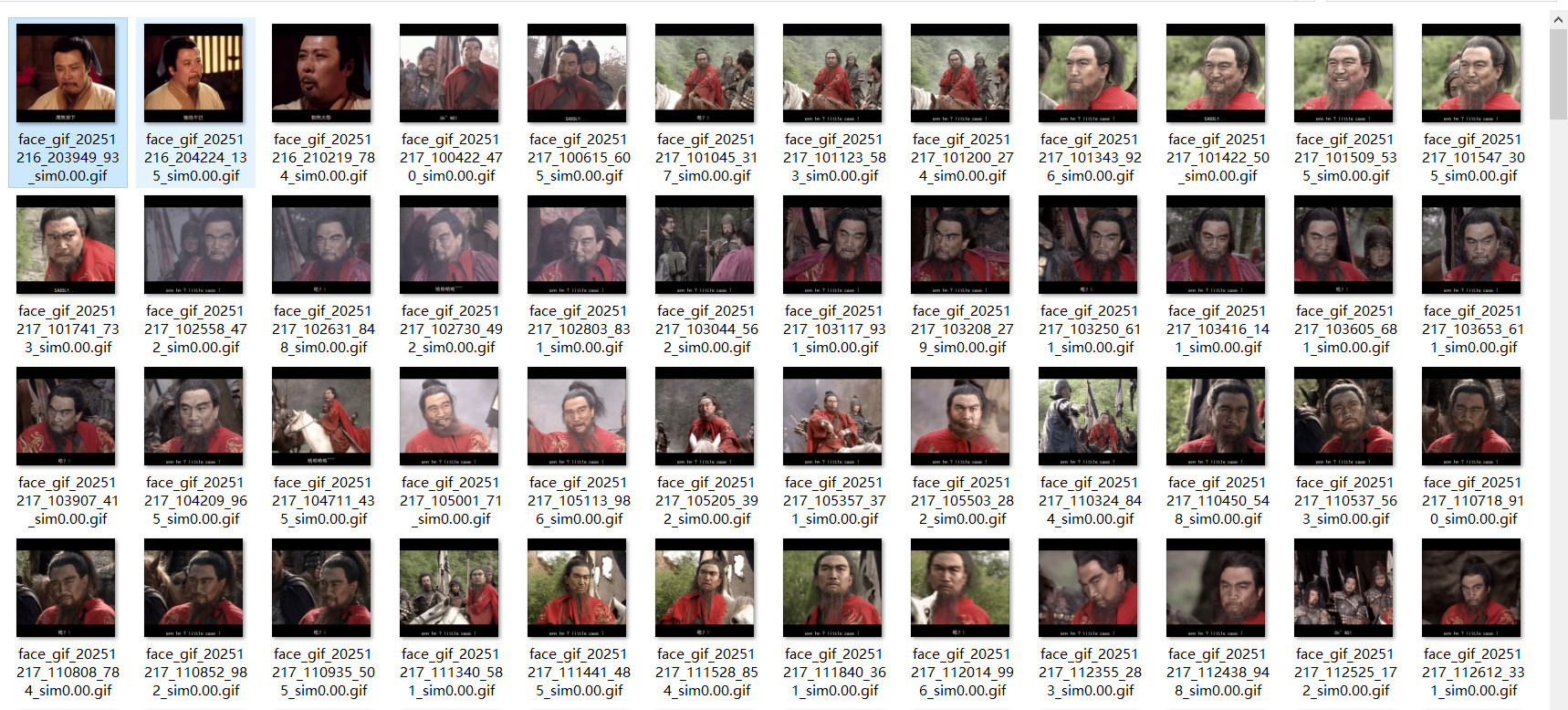
可以根据你想要的视频,和你想要的文字,来生成不同的表情包哦!~~~~

 浙公网安备 33010602011771号