
Ubuntu系统Docker-Compose安装Nginx
一、编写Nginx配置
cd /home/nginx/conf
vi nginx.conf
#user  nobody;
worker_processes  1;

#error_log  logs/error.log;
#error_log  logs/error.log  notice;
#error_log  logs/error.log  info;

pid        /var/run/nginx.pid;


events {
    worker_connections  1024;
}


http {
    include       mime.types;
    default_type  application/octet-stream;

    #log_format  main  '$remote_addr - $remote_user [$time_local] "$request" '
    #                  '$status $body_bytes_sent "$http_referer" '
    #                  '"$http_user_agent" "$http_x_forwarded_for"';

    #access_log  logs/access.log  main;

    sendfile        on;
    #tcp_nopush     on;

    #keepalive_timeout  0;
    keepalive_timeout  65;

    #gzip  on;

    server {
	listen 80;
	server_name  localhost;
	index  index.html index.htm;
	root /usr/share/nginx/html/platform/;
	charset utf-8;
	error_page 404 /index.html;


	location /platform/ {
		proxy_pass http://10.12.xx.xx:8080/platform/;
		}

	}
}
保存并退出。
二、编写Docker-Compose.yml脚本
cd /home/nginx
vi docker-compose.yml
version: '3.0'
services:
      nginx:
        image: nginx:latest
        restart: always
        hostname: nginx
        container_name: nginx
        privileged: true
        ports:
          - 80:80
          - 8080:8080
        volumes:
          - ./conf/nginx.conf:/etc/nginx/nginx.conf
          - ./www/:/usr/share/nginx/html/
          - ./logs/:/var/log/nginx/
保存并退出。
三、配置&启动
目录结果如下:
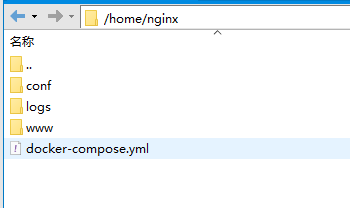
www下面建了一个前端项目目录:
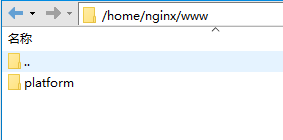
可以根据需要建多个,只要都在这个目录下面就行。
后面直接在 /home/nginx 目录下执行:docker-compose up -d。
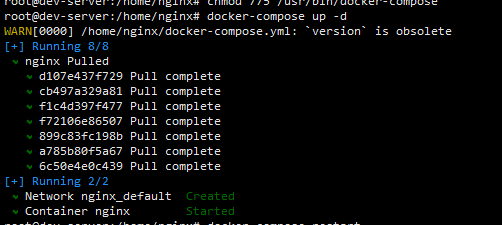
显示Started 就成功了。

 浙公网安备 33010602011771号