
kafka-linux-install
linux按照kafka
必须先按照java jdk包!!!!!!!!!!!!
先安装zookeeper
下载:http://mirrors.hust.edu.cn/apache/zookeeper/zookeeper-3.4.14/zookeeper-3.4.14.tar.gz
解压,整个目录复制到/usr/local中

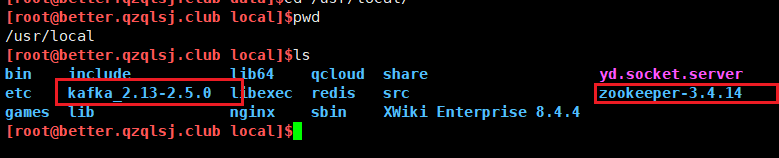
环境变量配置
编辑环境变量配置文件:vim /etc/profile
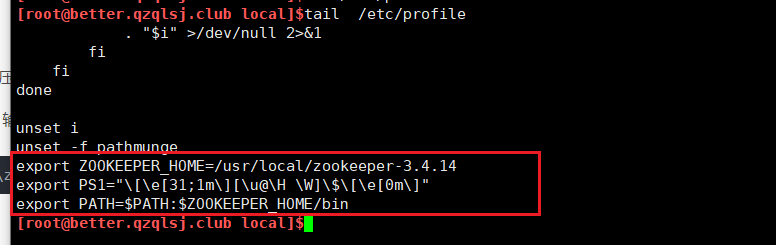
在文件末尾位置添加如下内容
export ZOOKEEPER_HOME=/usr/local/zookeeper-3.4.11
export PATH=$PATH:$ZOOKEEPER_HOME/bin
通过vim的 ":wq" 命令进行保存退出
使配置生效:source /etc/profile
修改zookeeper的配置文件
mv zoo_sample.cfg zoo.cfgzkServer.sh start|stop|restart|status客户端连接:
zkCli.sh -server ${ip}:${port}客户端关闭:
quit 或者按 Ctrl + C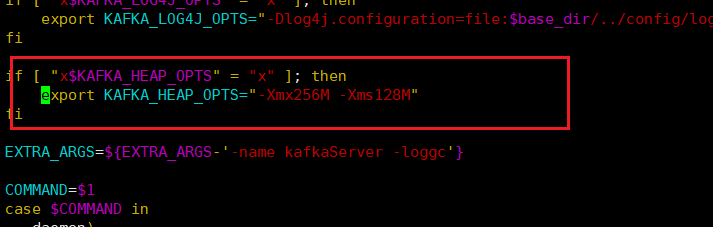
bin/kafka-topics.sh --create --zookeeper localhost:2181 --replication-factor 1 --partitions 1 --topic demo
[root@better.qzqlsj.club kafka_2.13-2.5.0]$bin/kafka-topics.sh --create --zookeeper localhost:2181 --replication-factor 1 --partitions 1 --topic huolala-kafka-topic
OpenJDK 64-Bit Server VM warning: If the number of processors is expected to increase from one, then you should configure the number of parallel GC threads appropriately using -XX:ParallelGCThreads=N
Created topic huolala-kafka-topic.
解析:
partitions指定topic分区数
replication-factor指定topic每个分区的副本数
--zookeeper:表示在这个集群里面创建
查询toipc列表
bin/kafka-topics.sh --zookeeper localhost:2181 --list
bin/kafka-topics.sh --zookeeper 129.204.3.133:2181 --list
[root@better.qzqlsj.club kafka_2.13-2.5.0]$bin/kafka-topics.sh --zookeeper localhost:2181 --list
OpenJDK 64-Bit Server VM warning: If the number of processors is expected to increase from one, then you should configure the number of parallel GC threads appropriately using -XX:ParallelGCThreads=N
__consumer_offsets
demo
huolala
huolala-kafka-topic
my-kafka-topic
test
查看指定topic信息
bin/kafka-topics.sh --zookeeper 129.204.3.133:2181 --describe --topic huolala
[root@better.qzqlsj.club kafka_2.13-2.5.0]$bin/kafka-topics.sh --zookeeper 129.204.3.133:2181 --describe --topic  huolala
OpenJDK 64-Bit Server VM warning: If the number of processors is expected to increase from one, then you should configure the number of parallel GC threads appropriately using -XX:ParallelGCThreads=N
Topic: huolala    PartitionCount: 1    ReplicationFactor: 1    Configs:
    Topic: huolala    Partition: 0    Leader: 0    Replicas: 0    Isr: 0
删除topic
bin/kafka-topics.sh --zookeeper localhost:2181 --delete --topic my-kafka-topic
[root@better.qzqlsj.club kafka_2.13-2.5.0]$bin/kafka-topics.sh --zookeeper localhost:2181 --delete --topic my-kafka-topic
OpenJDK 64-Bit Server VM warning: If the number of processors is expected to increase from one, then you should configure the number of parallel GC threads appropriately using -XX:ParallelGCThreads=N
Topic my-kafka-topic is marked for deletion.
Note: This will have no impact if delete.topic.enable is not set to true.
[root@better.qzqlsj.club kafka_2.13-2.5.0]$bin/kafka-topics.sh --zookeeper 129.204.3.133:2181 --list
OpenJDK 64-Bit Server VM warning: If the number of processors is expected to increase from one, then you should configure the number of parallel GC threads appropriately using -XX:ParallelGCThreads=N
__consumer_offsets
demo
huolala
huolala-kafka-topic
test
[root@better.qzqlsj.club kafka_2.13-2.5.0]$
kafka 生产和消费:
bin/kafka-console-producer.sh --broker-list localhost:9092 --topic huolala
代理列表 - 我们要发送邮件的代理列表。 在这种情况下,我们只有一个代理。 Config / server.properties文件包含代理端口ID,因为我们知道我们的代理正在侦听端口9092
直接指定它。主题huolala
启动消费者
bin/kafka-console-consumer.sh --bootstrap-server localhost:9092 --topic huolala --from-beginning
查看topic某分区偏移量最大(小)值
bin/kafka-run-class.sh kafka.tools.GetOffsetShell --topic huolala --time -1 --broker-list localhost:9092 --partitions 0
[root@better.qzqlsj.club kafka_2.13-2.5.0]$bin/kafka-run-class.sh kafka.tools.GetOffsetShell --topic huolala  --time -1 --broker-list localhost:9092 --partitions 0
OpenJDK 64-Bit Server VM warning: If the number of processors is expected to increase from one, then you should configure the number of parallel GC threads appropriately using -XX:ParallelGCThreads=N
huolala:0:16
增加topic分区数
bin/kafka-topics.sh --zookeeper localhost:2181 --alter --topic huolala --partitions 10
[root@better.qzqlsj.club kafka_2.13-2.5.0]$bin/kafka-topics.sh --zookeeper localhost:2181  --alter --topic huolala --partitions 10
OpenJDK 64-Bit Server VM warning: If the number of processors is expected to increase from one, then you should configure the number of parallel GC threads appropriately using -XX:ParallelGCThreads=N
WARNING: If partitions are increased for a topic that has a key, the partition logic or ordering of the messages will be affected
Adding partitions succeeded!
[root@better.qzqlsj.club kafka_2.13-2.5.0]$bin/kafka-topics.sh --zookeeper 129.204.3.133:2181 --describe --topic huolala
OpenJDK 64-Bit Server VM warning: If the number of processors is expected to increase from one, then you should configure the number of parallel GC threads appropriately using -XX:ParallelGCThreads=N
Topic: huolala    PartitionCount: 10    ReplicationFactor: 1    Configs:
    Topic: huolala    Partition: 0    Leader: 0    Replicas: 0    Isr: 0
    Topic: huolala    Partition: 1    Leader: 0    Replicas: 0    Isr: 0
    Topic: huolala    Partition: 2    Leader: 0    Replicas: 0    Isr: 0
    Topic: huolala    Partition: 3    Leader: 0    Replicas: 0    Isr: 0
    Topic: huolala    Partition: 4    Leader: 0    Replicas: 0    Isr: 0
    Topic: huolala    Partition: 5    Leader: 0    Replicas: 0    Isr: 0
    Topic: huolala    Partition: 6    Leader: 0    Replicas: 0    Isr: 0
    Topic: huolala    Partition: 7    Leader: 0    Replicas: 0    Isr: 0
    Topic: huolala    Partition: 8    Leader: 0    Replicas: 0    Isr: 0
    Topic: huolala    Partition: 9    Leader: 0    Replicas: 0    Isr: 0

 浙公网安备 33010602011771号