

基于 JDK HttpServer 的 HTTPS 服务器
1. 基于 JDK HttpServer 的 HTTPS 服务器
1.1. 版本说明
| 构件 | 版本 |
|---|---|
| bcpkix-jdk18on | 1.78.1 |
| hutool-all | 5.8.27 |
1.2. Key Store 类型
参考 Oracle 官方文档
| Type | Description |
|---|---|
| jceks | The proprietary keystore implementation provided by the SunJCE provider. |
| jks | The proprietary keystore implementation provided by the SUN provider. |
| dks | A domain keystore is a collection of keystores presented as a single logical keystore. It is specified by configuration data whose syntax is described in DomainLoadStoreParameter. |
| pkcs11 | A keystore backed by a PKCS #11 token. |
| pkcs12 | The transfer syntax for personal identity information as defined in PKCS #12: Personal Information Exchange Syntax v1.1. |
1.3. Key Manager Factory 算法
参考 Oracle 官方文档
| Type | Description |
|---|---|
| PKIX | A factory for X509ExtendedKeyManagers that manage X.509 certificate-based key pairs for local side authentication according to the rules defined by the IETF PKIX working group in RFC 5280 or its successor. The KeyManagerFactory must support initialization using the class javax.net.ssl.KeyStoreBuilderParameters. |
1.4. Trust Manager Factory 算法
参考 Oracle 官方文档
| Type | Description |
|---|---|
| PKIX | A factory for X509ExtendedTrustManager objects that validate certificate chains according to the rules defined by the IETF PKIX working group in RFC 5280, Internet X.509 Public Key Infrastructure Certificate and Certificate Revocation List (CRL) Profile, or its successor. The TrustManagerFactory must support initialization using the class javax.net.ssl.CertPathTrustManagerParameters. |
1.5. SSLContext 算法
参考 Oracle 官方文档
| Algorithm Name | Description |
|---|---|
| SSL | Supports some version of SSL; may support other versions |
| SSLv2 | Supports SSL version 2 or later; may support other versions |
| SSLv3 | Supports SSL version 3; may support other versions |
| TLS | Supports some version of TLS; may support other versions |
| TLSv1 | Supports RFC 2246: TLS version 1.0 ; may support other versions |
| TLSv1.1 | Supports RFC 4346: TLS version 1.1 ; may support other versions |
| TLSv1.2 | Supports RFC 5246: TLS version 1.2 ; may support other versions |
1.6. 准备自签名证书及其密钥文件
.
├── ca
│   └── ca.cer
└── self
    ├── self-private.key
    ├── self-public.key
    ├── self.cer
1.7. 定义常量
public class JdkHttpsServerDemoConstants {
    public static final String KEY_STORE_TYPE = "pkcs12";
    public static final String KEY_MANAGER_FACTORY_ALGORITHM = "PKIX";
    public static final String TRUST_MANAGER_FACTORY_ALGORITHM = "PKIX";
}
1.8. 测试
public class JdkHttpsServerDemo {

    /**
     * 证书私钥路径
     */
    private static final String SELF_SIGNED_PRIVATE_KEY_FILE_PATH = StrUtil.format("{}/x509-certificate-demo/self/self-private.key", System.getProperty("user.home"));
    /**
     * 证书路径
     */
    private static final String SELF_SIGNED_CERTIFICATE_FILE_PATH = StrUtil.format("{}/x509-certificate-demo/self/self.cer", System.getProperty("user.home"));
    /**
     * CA 证书路径
     */
    private static final String CA_CERTIFICATE_FILE_PATH = StrUtil.format("{}/x509-certificate-demo/ca/ca.cer", System.getProperty("user.home"));
    /**
     * JDK Key Store 密码
     */
    private static final char[] KEY_STORE_PASSWORD = "123456".toCharArray();

    public static void main(String[] args) throws Throwable {
        startHttpServer(8080);
    }

    /**
     * 生成 SSLContext
     * @return
     * @throws Throwable
     */
    public static SSLContext generateSslContext() throws Throwable {
        //证书私钥
        PrivateKey privateKey;
        //从磁盘加载证书私钥
        try(FileInputStream fileInputStream = new FileInputStream(SELF_SIGNED_PRIVATE_KEY_FILE_PATH)) {
            privateKey = PemUtil.readPemPrivateKey(fileInputStream);
        }
        //证书
        Certificate certificate;
        //从磁盘加载证书
        try(FileInputStream fileInputStream = new FileInputStream(SELF_SIGNED_CERTIFICATE_FILE_PATH)) {
            certificate = KeyUtil.readX509Certificate(fileInputStream);
        }
        //CA 证书
        Certificate caCertificate;
        //从磁盘加载 CA 证书
        try(FileInputStream fileInputStream = new FileInputStream(CA_CERTIFICATE_FILE_PATH)) {
            caCertificate = KeyUtil.readX509Certificate(fileInputStream);
        }
        //KeyStore 密钥库实例,pkcs12 格式
        KeyStore kmfks = KeyStore.getInstance(KEY_STORE_TYPE);
        //加载一个空的 KeyStore 密钥库,并设置密钥库的密码
        kmfks.load(null, KEY_STORE_PASSWORD);
        //设置 KeyStore 密钥库的私钥,证书
        kmfks.setKeyEntry("self signed key store", privateKey, KEY_STORE_PASSWORD, new Certificate[]{certificate});
        //密钥管理器工厂,使用默认 SunX509 算法
        KeyManagerFactory keyManagerFactory = KeyManagerFactory.getInstance(KEY_MANAGER_FACTORY_ALGORITHM);
        //初始化密钥管理器工厂
        keyManagerFactory.init(kmfks, KEY_STORE_PASSWORD);

        //KeyStore 密钥库实例,pkcs12 格式
        KeyStore tmfks = KeyStore.getInstance(KEY_STORE_TYPE);
        //加载一个空的 KeyStore 密钥库,并设置密钥库的密码
        tmfks.load(null, KEY_STORE_PASSWORD);
        //设置 KeyStore 密钥库的证书
        tmfks.setKeyEntry("ca certificate", privateKey, KEY_STORE_PASSWORD, new Certificate[]{caCertificate});
        //信任管理器工厂,使用默认 SunX509 算法
        TrustManagerFactory trustManagerFactory = TrustManagerFactory.getInstance(TRUST_MANAGER_FACTORY_ALGORITHM);
        //初始化信任管理器工厂
        trustManagerFactory.init(tmfks);

        SSLContext sslContext = SSLContextBuilder.create()
                .setProtocol(TLS) //使用 TLS 协议
                .setKeyManagers(keyManagerFactory.getKeyManagers())
                .setTrustManagers(trustManagerFactory.getTrustManagers())
                .setSecureRandom(new SecureRandom())
                .build();
        return sslContext;
    }

    /**
     * 启动 HTTPS 服务器
     * @param port 指定端口
     * @throws Throwable
     */
    public static void startHttpServer(int port) throws Throwable {
        //生成 SSLContext
        SSLContext sslContext = generateSslContext();
        //从端口生成 InetSocketAddress
        InetSocketAddress inetSocketAddress = new InetSocketAddress(port);
        //HTTPS 配置
        HttpsConfigurator httpsConfigurator = new HttpsConfigurator(sslContext);
        //HTTPS 服务器
        SimpleServer simpleServer = new SimpleServer(inetSocketAddress, httpsConfigurator);
        //请求处理
        simpleServer.addAction("/hello-world", (request, response) -> {
            response.setHeader(Header.CONTENT_TYPE, ContentType.JSON.getValue());
            Map<String, String> body = MapUtil.of("message", "hello world");
            response.write(JSONUtil.toJsonStr(body));
        });
        //启动 HTTPS 服务器
        simpleServer.start();
    }
}
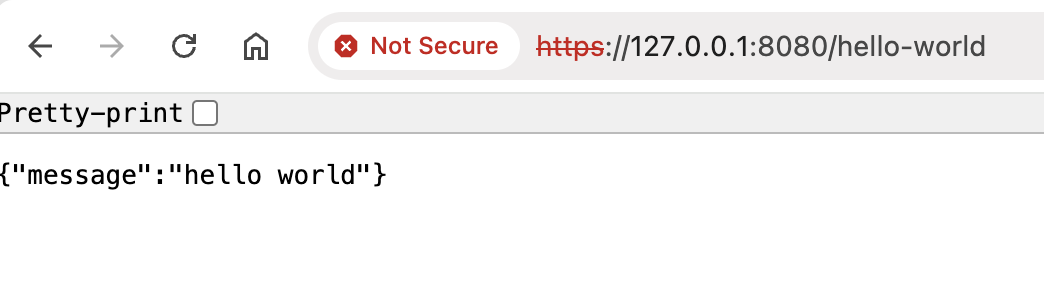
启动程序,从浏览器访问接口,可以看到地址栏显示不安全警告,这是因为服务器使用了自签名证书,而不是权威 CA 机构颁发的证书,操作系统无法识别证书的合法性。
本文来自博客园,作者:Jason,转载请注明原文链接:https://www.cnblogs.com/jason207010/p/18511039

 浙公网安备 33010602011771号