JDBC

JDBC概述

JDBC(Java Database Connectivity)是一个独立于特定数据库管理系统、通用的SQL数据库存取和操作的公共接口(一组API)。
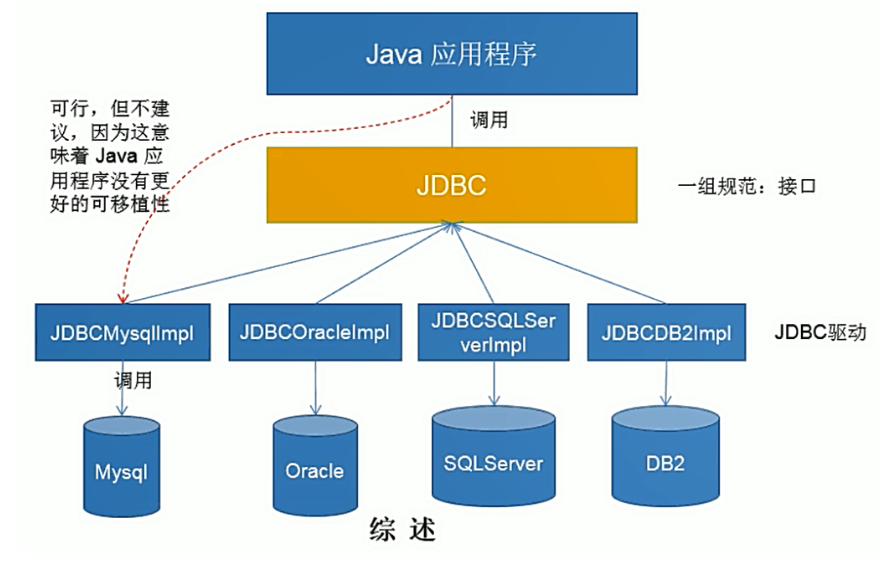


JDBC接口(API)包括两个层次:

  • 面向应用的API:java API,抽象接口,供应用程序开发人员使用(连接数据库,执行SQL语句,获得结果)

  • 面向数据库的API:Java Driver API,供开发商开发数据库驱动程序用

JDBC程序编写步骤:
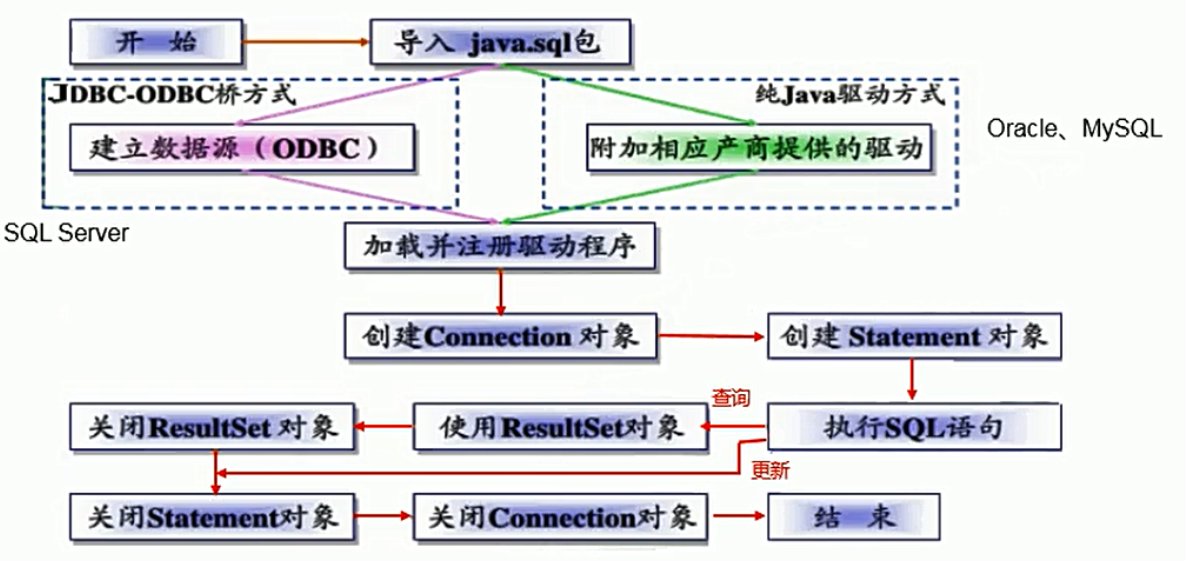


获取数据库连接

配置文件jdbc.properties:

 driver=com.mysql.jdbc.Driver
 url=jdbc:mysql://localhost:3306/test
 user=root
 password=123456

jdbc程序:

 @Test
 public void testConnection() throws Exception{
     // 1. 读取配置文件的4个基本信息
     InputStream is = testConnection.class.getClassLoader().getResourceAsStream("jdbc.properties");
     Properties pros = new Properties();
     pros.load(is);
     String driver = pros.getProperty("driver");
     String url = pros.getProperty("url");
     String user = pros.getProperty("user");
     String password = pros.getProperty("password");
     
     // 2. 加载驱动
     Class.forName(driver);
     
     // 3. 获取连接
     Connection conn = DriverManager.getConnection(url, user, password);
 }

使用PreparedStatement实现CRUD操作

JDBCUtils工具类

 public class JDBCUtils {
     /**
     * 获取数据库连接
     */
     public static Connection getConnection() throws Exception{
          // 1. 读取配置文件的4个基本信息
    InputStream is = ClassLoader.getSystemClassLoader.getResourceAsStream("jdbc.properties");
         Properties pros = new Properties();
         pros.load(is);
         
         String driver = pros.getProperty("driver");
         String url = pros.getProperty("url");
         String user = pros.getProperty("user");
         String password = pros.getProperty("password");
     
         // 2. 加载驱动
         Class.forName(driver);
 
         // 3. 获取连接
         Connection conn = DriverManager.getConnection(url, user, password);
         return conn;
  }
     
     public static void closeResource(Connection conn, Statement ps, ResultSet rs){
         try{
             if(ps != null)
                 ps.close();
        } catch(SQLEXception e){
             e.printStackTrace();
        }
         
         try{
             if(conn != null)
                 conn.close();
        } catch(SQLEXception e){
        e.printStackTrace();
        }
         
        try{
            if(rs != null)
                rs.close();
        } catch(SQLEXception e){
        e.printStackTrace();
        }    
    }
 }
  1. 插入数据

     @Test
     public void testInsert() {
         Connection conn = null;
         PreparedStatement ps = null;
         ResultSet rs = null;
         
         try{
             // 1. 获取数据库库连接
             conn = JdbcUtils.getConnection();
             
             // 2. 预编译sql语句,返回PreparedStatement的实例
             String sql = "insert into users(id,name,password,email,birthday) values(?,?,?,?,?)";
             ps = conn.prepareStatement(sql);
             
             // 3. 填充占位符,注意,索引是从1开始的
             ps.setInt(1, 4);  //id是int类型的
             ps.setString(2, "Jarreet");  //name是varchar(字符串类型)
             ps.setString(3, "123456");  //password是varchar(字符串类型)
             ps.setString(4, "1234563@qq.com");  //email是varchar(字符串类型)
             SimpleDateFormat sdf = new  SimpleDateFormat("yyyy-MM-dd");
             java.util.Date date = sdf.parse("1999-01-01");
             ps.setDate(5, new Date(date.getTime()));  //birthday是date类型
             
             // 4. 执行操作
             int num = ps.executeUpdate();
             if(num>0){
                 System.out.println("插入成功!!");
      }
        } catch(Exception e){
             e.printStackTrace();
        } finally{
             // 5. SQL执行完成之后释放相关资源
             JdbcUtils.closeResource(conn, ps, rs);
        }
     }
  2. 删除一条数据

     @Test
     public void testDelete() {
         Connection conn = null;
         PreparedStatement ps = null;
         ResultSet rs = null;
         
         try{
             // 1. 获取数据库库连接
             conn = JdbcUtils.getConnection();
             
             // 2. 预编译sql语句,返回PreparedStatement的实例
             String sql = "delete from users where id=?";
             ps = conn.prepareStatement(sql);
             
             // 3. 填充占位符,注意,索引是从1开始的
             ps.setInt(1, 4);  //id是int类型的
             
             // 4. 执行操作
             int num = ps.executeUpdate();
             if(num>0){
                 System.out.println("删除成功!!");
      }
        } catch(Exception e){
             e.printStackTrace();
        } finally{
             // 5. SQL执行完成之后释放相关资源
             JdbcUtils.closeResource(conn, ps, rs);
        }
     }
  3. 更新一条数据

     @Test
     public void testUpdate() {
         Connection conn = null;
         PreparedStatement ps = null;
         ResultSet rs = null;
         
         try{
             // 1. 获取数据库库连接
             conn = JdbcUtils.getConnection();
             
             // 2. 预编译sql语句,返回PreparedStatement的实例
             String sql = "update users set name=?,email=? where id=?";
             ps = conn.prepareStatement(sql);
             
             // 3. 填充占位符,注意,索引是从1开始的
             ps.setString(1, "Jarreet");
             ps.setString(2, "1234563@qq.com");
             ps..setInt(3, 2);
             
             // 4. 执行操作
             int num = ps.executeUpdate();
             if(num>0){
                 System.out.println("更新成功!!");
      }
        } catch(Exception e){
             e.printStackTrace();
        } finally{
             // 5. SQL执行完成之后释放相关资源
             JdbcUtils.closeResource(conn, ps, rs);
        }
     }
  4. 查询一条数据

     @Test
     public void testSelect() {
         Connection conn = null;
         PreparedStatement ps = null;
         ResultSet rs = null;
         
         try{
             // 1. 获取数据库库连接
             conn = JdbcUtils.getConnection();
             
             // 2. 预编译sql语句,返回PreparedStatement的实例
             String sql = "select * from users where id=?";
             ps = conn.prepareStatement(sql);
             
             // 3. 填充占位符,注意,索引是从1开始的
             ps.setInt(1, 1);  //id是int类型的
             
             // 4. 执行操作
             rs = ps.executeQuery();
        if(rs.next()){
                 System.out.println(rs.getString("name"));
            }
        } catch(Exception e){
             e.printStackTrace();
        } finally{
             // 5. SQL执行完成之后释放相关资源
             JdbcUtils.closeResource(conn, ps, rs);
        }
     }

考虑事务的JDBC

  1. 模拟转账过程中出现异常导致有一部分SQL执行失败后让数据库自动回滚事务

     @Test
     public void testTransaction1() {
         Connection conn = null;
         PreparedStatement ps = null;
         ResultSet rs = null;
         
         try{
             conn = JdbcUtils.getConnection();
             conn.setAutoCommit(false);//通知数据库开启事务(start transaction)
             
             String sql1 = "update account set money=money-100 where name='A'";
             ps = conn.prepareStatement(sql1);
             ps.executeUpdate();
             //用这句代码模拟执行完SQL1之后程序出现了异常而导致后面的SQL无法正常执行,事 务也无法正常提交,此时数据库会自动执行回滚操作
             
             int x = 1/0;
             String sql2 = "update account set money=money+100 where name='B'";
             
             ps = conn.prepareStatement(sql2);
             ps.executeUpdate();
             
             conn.commit();//上面的两条SQL执行Update语句成功之后就通知数据库提交事务 (commit)
             System.out.println("成功!!!");
        }catch (Exception e) {
        e.printStackTrace();
        }finally{
             JdbcUtils.closeResource(conn, st, rs);
        }
     }
  2. 模拟转账过程中出现异常导致有一部分SQL执行失败时手动通知数据库回滚事务

    @Test
    public void testTransaction2() {
    Connection conn = null;
    PreparedStatement ps = null;
    ResultSet rs = null;

    try{
    conn = JdbcUtils.getConnection();
    conn.setAutoCommit(false);//通知数据库开启事务(start transaction)

    String sql1 = "update account set money=money-100 where name='A'";
    ps = conn.prepareStatement(sql1);
    ps.executeUpdate();
    //用这句代码模拟执行完SQL1之后程序出现了异常而导致后面的SQL无法正常执行,事 务也无法正常提交

    int x = 1/0;
    String sql2 = "update account set money=money+100 where name='B'";

    ps = conn.prepareStatement(sql2);
    ps.executeUpdate();

    conn.commit();//上面的两条SQL执行Update语句成功之后就通知数据库提交事务 (commit)
    System.out.println("成功!!!");
    }catch (Exception e) {
    try{
    //捕获到异常之后手动通知数据库执行回滚事务的操作
    conn.rollback();
    } catch (SQLException e1) {
    e1.printStackTrace();
    }
    e.printStackTrace();
    }finally{
    JdbcUtils.closeResource(conn, st, rs);
    }
    }
posted @ 2021-05-06 00:58  离渊灬  阅读(183)  评论(0)    收藏  举报