git撤销
撤销暂存区的文件:
git服务端:
mkdir /opt/demo.git
git init --bare
cd /opt
chown git. demo.git/ -R
git客户端:
[root@localhost demo]# touch 11
加入暂存区:
[root@localhost demo]# git add 11
从暂存区撤销:
[root@localhost demo]# git rm --cached 11
rm '11'
已经存入暂存区后又修改过的文件为修改后的版本,撤销分两种情况:
[root@localhost tree]# echo "1" > a
[root@localhost tree]# git add .
[root@localhost tree]# echo "2" > a
[root@localhost tree]# git status
# On branch aa
#
# Initial commit
#
# Changes to be committed:
# (use "git rm --cached <file>..." to unstage)
#
# new file: a
#
# Changes not staged for commit:
# (use "git add <file>..." to update what will be committed)
# (use "git checkout -- <file>..." to discard changes in working directory)
#
# modified: a
第一种:撤销暂存区,也就是保留工作区修改的版本:
git rm --cached a
第二种:撤销工作区修改的,也就是保留暂存区的版本:
git checkout --a
或者:
git add .把工作区修改的内容更新到暂存区
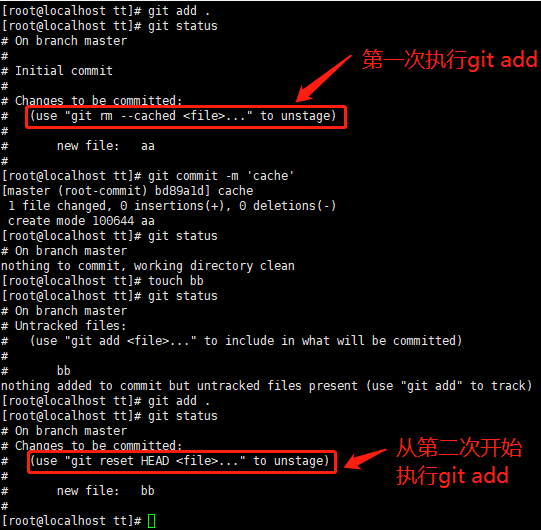
撤销已经commit的:
commit后会生成新的版本号,通过git log可以查看到,回退有两种方法:
1.回退上一个版本: git reset HEAD^
2.回退到之前的某个版本:git reset 版本号
注意:git reset 后面跟的一个是HEAD,一个是HEAD^,一个没有commit,还没有生成版本号,一个已经commit了,有的新的版本号了。要回退肯定要用之前的版本号了。
注意:git reset--hard HEAD,参数--hard把工作区的内容也修改了,不加--hard只修改暂存区,不影响工作区

 浙公网安备 33010602011771号