 1 from pyecharts.charts import Bar,Line
 2 from pyecharts import options as opts
 3
 4 #x_data = ["婴幼儿(0到6岁)", "少儿(7到12岁)", "青少年(13到17岁)", "青年(18到45岁)", "中年(46到60岁)", "老年(60岁以上)"]
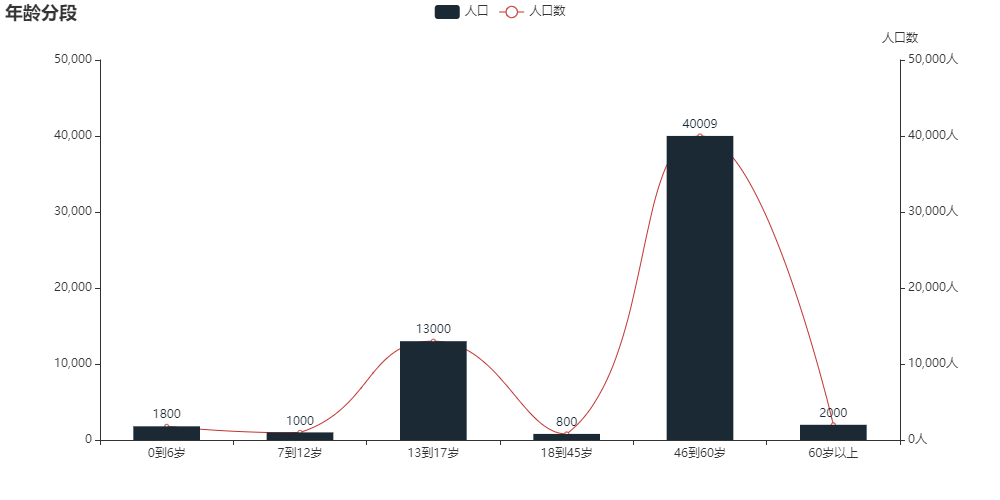
 5 x_data = ["0到6岁", "7到12岁", "13到17岁", "18到45岁", "46到60岁", "60岁以上"]
 6
 7 y_data = [1800, 1000, 13000, 800, 40009, 2000]
 8 def bar_charts()->Bar:
 9     bar1 = (
10         Bar(init_opts=opts.InitOpts(width='1000px',height='500px'))        # 示例对象
11         .add_xaxis(x_data)        # x轴数据
12         .add_yaxis("人口",y_data,color='#1a2933',category_gap="50%" )    # 图例名称 + y轴数据+颜色+图间隔
13         #.add_yaxis("商家B",B)
14         # 全局配置:标题/副标题
15         .set_global_opts(title_opts=opts.TitleOpts(title="年龄分段"),
16                          #tooltip_opts=opts.TooltipOpts(trigger='axis',axis_pointer_type='cross'), # 指示器类型,十字/阴影/直线/无
17                          #toolbox_opts=opts.ToolboxOpts(
18                                                #is_show = True,      )
19                         )
20
21         # bar 拓展
22         .extend_axis(
23                      yaxis=opts.AxisOpts(              # 右侧y轴标签
24                                         name='人口数',
25                                         type_='value',  # 类型
26                                         min_=0,
27                                         max_=50000,
28                                         interval=10000,   # 间隔
29                                         axislabel_opts=opts.LabelOpts(formatter='{value}人')  # 标签显示
30
31                                         )
32                       )
33            )
34
35     return bar1
36
37
38 def line_charts()->Line():
39     line1=(
40            Line()
41           .add_xaxis(x_data)
42           .add_yaxis('人口数',y_data,yaxis_index=1,   # 线图用右侧索引,因此为1
43                      label_opts=opts.LabelOpts(is_show=False),is_smooth=True)
44           )
45     return line1
46
47 bar1=bar_charts()
48 line1=line_charts()
49
50 # line1.render_notebook()
51 bar1.overlap(line1).render_notebook()
![]()


 浙公网安备 33010602011771号