

SpringBootWebFlux学习笔记(五)--整合 Thymeleaf 和 MongoDB
需求
对城市(City)进行管理实现 CRUD 操作。
项目结构
├── pom.xml
├── src
│    └── main
│        ├── java
│        │     └── org
│        │         └── spring
│        │             └── springboot
│        │                 ├── Application.java
│        │                 ├── dao
│        │                 │    └── CityRepository.java
│        │                 ├── domain
│        │                 │    └── City.java
│        │                 ├── handler
│        │                 │    └── CityHandler.java
│        │                 └── webflux
│        │                     └── controller
│        │                         └── CityWebFluxController.java
│        └── resources
│            └── application.properties
|            └──  templates
|                  └──  cityList.html
|                  └──  city.html
└── target
项目详情
新增依赖
在 pom.xml 配置新的依赖:
<dependencies>
	<dependency>
		<groupId>org.springframework.boot</groupId>
		<artifactId>spring-boot-starter-webflux</artifactId>
	</dependency>

	<dependency>
		<groupId>org.springframework.boot</groupId>
		<artifactId>spring-boot-starter-test</artifactId>
		<scope>test</scope>
	</dependency>
	<dependency>
		<groupId>io.projectreactor</groupId>
		<artifactId>reactor-test</artifactId>
		<scope>test</scope>
	</dependency>
	<!--新增依赖-->
	<!-- 模板引擎 Thymeleaf 依赖-->
	<dependency>
      <groupId>org.springframework.boot</groupId>
      <artifactId>spring-boot-starter-thymeleaf</artifactId>
    </dependency>
    <!--Spring Boot 响应式 MongoDB 依赖-->
	<dependency>
      <groupId>org.springframework.boot</groupId>
      <artifactId>spring-boot-starter-data-mongodb-reactive</artifactId>
    </dependency>
</dependencies>
配置 application.yaml
在 application.yaml 配置 MongoDB 连接配置和 thymeleaf 配置
spring:
  application:
    name: web-flux-demo
  thymeleaf:
    prefix: classpath:/templates/
    suffix: .html
    mode: HTML5
    cache: false
  data:
	mongodb:
	  host: localhost
	  database: test-db
	  authentication-database: admin
	  auto-index-creation: true
	  port: 27017
	  username: mongo
	  password: mongo
对象
/**
 * 城市实体类
 *
 */
public class City {

    /**
     * 城市编号
     */
    private Long id;

    /**
     * 省份编号
     */
    private Long provinceId;

    /**
     * 城市名称
     */
    private String cityName;

	// Getter and Setter
}
数据访问层
@Repository
public interface CityRepository extends ReactiveMongoRepository<City, Long> {

    Mono<City> findByCityName(String cityName);

}
- 在 ReactiveMongoRepository 接口的基础上,实现通过城市名找出唯一的城市对象
处理器类
编写城市处理器类 CityHandler。代码如下:
@Component
public class CityHandler {

    private final CityRepository cityRepository;

    @Autowired
    public CityHandler(CityRepository cityRepository) {
        this.cityRepository = cityRepository;
    }

    public Mono<City> save(City city) {
        return cityRepository.save(city);
    }

    public Flux<City> findAllCity() {

        return cityRepository.findAll();
    }

    public Mono<City> getByCityName(String cityName) {
        return cityRepository.findByCityName(cityName);
    }
}
控制器类
@Controller
@RequestMapping(value = "/city")
public class CityWebFluxController {
    @Autowired
    private CityHandler cityHandler;


    @PostMapping()
    @ResponseBody
    public Mono<City> saveCity(@RequestBody City city) {
        return cityHandler.save(city);
    }
    private static final String CITY_LIST_PATH_NAME = "cityList";
    private static final String CITY_PATH_NAME = "city";

    @GetMapping("/page/list")
    public String listPage(final Model model) {
        final Flux<City> cityFluxList = cityHandler.findAllCity();
        model.addAttribute("cityList", cityFluxList);
        return CITY_LIST_PATH_NAME;
    }

    @GetMapping("/getByName")
    public String getByCityName(final Model model,
                                @RequestParam("cityName") String cityName) {
        final Mono<City> city = cityHandler.getByCityName(cityName);
        model.addAttribute("city", city);
        return CITY_PATH_NAME;
    }
}
Tymeleaf 视图
然后编写两个视图 city 和 cityList
city.html:
<!DOCTYPE html>
<html lang="zh-CN" html xmlns:th="http://www.thymeleaf.org">
<head>
    <meta charset="UTF-8"/>
    <title>城市</title>
</head>

<body>

<div>

    <table>
        <legend>
            <strong>城市单个查询</strong>
        </legend>
        <tbody>
        <td th:text="${city.id}"></td>
        <td th:text="${city.provinceId}"></td>
        <td th:text="${city.cityName}"></td>
        </tbody>
    </table>

</div>

</body>
</html>
cityList.html:
<!DOCTYPE html>
<html lang="zh-CN" html xmlns:th="http://www.thymeleaf.org">
<head>
    <meta charset="UTF-8"/>
    <title>城市列表</title>
</head>

<body>

<div>

    <table>
        <legend>
            <strong>城市列表</strong>
        </legend>
        <thead>
        <tr>
            <th>城市编号</th>
            <th>省份编号</th>
            <th>名称</th>
            <th>描述</th>
        </tr>
        </thead>
        <tbody>
        <tr th:each="city : ${cityList}">
            <td th:text="${city.id}"></td>
            <td th:text="${city.provinceId}"></td>
            <td th:text="${city.cityName}"></td>
        </tr>
        </tbody>
    </table>

</div>

</body>
</html>
启动运行项目
mvn clean install
mvn springboot:run
测试项目
新增城市信息:
POST http://127.0.0.1:8080/city
{
    "id" :1,
    "provinceId":3,
    "cityName":"广州"
}

POST http://127.0.0.1:8080/city
{
    "id" :2,
    "provinceId":3,
    "cityName":"深圳"
}
根据城市名获取 city信息:
GET http://localhost:8080/city/getByName?cityName=广州

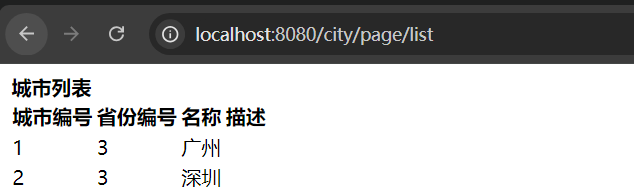
获取 City 列表
GET http://localhost:8080/city/page/list

 浙公网安备 33010602011771号