


gdi+ 选择框的绘制
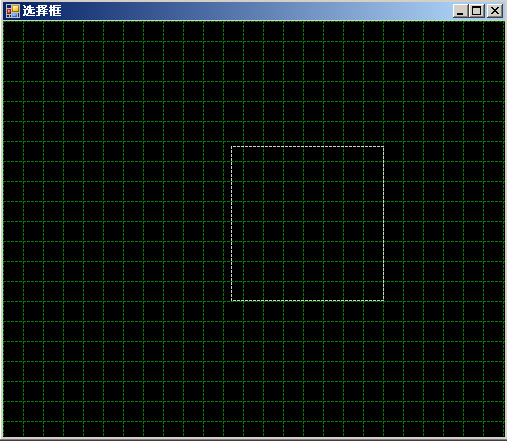
用过绘图软件的人都知道,当我们要选择多个对象的时候时常会用到一个矩形框选. 今天闲来无事就写一个这样的程序.
最主要的一个问题当刷新的时候,我们连同背景也要刷新一遍,这样使得效率非常的低。不知道在GDI+ 里面还有没有别的更加高效的方法。
绘制框先矩形的几点要注意:
(1) 计算机左上角第一个点是(0,0),这点要非常留意,不像我们平时绘图的坐标一样(不过也有转坐标系的方法的).
(2)矩形的长度没有负数, 有时候绘出现这样的问题,要判断那个做为起点那个做为终点.
(3) 尽量使窗体刷新的次数减少.
我把这个封装一个控件了。实现这样的功能没什么难度,也就是画一个矩形而已。难度在于当你窗体上绘图了很多图形的时候,一但你刷新效率会非常的低。
不多说了代码贴出来。
是用VB.NET 写的,代码直接拷过去就可以运行了。
Imports System.Drawing
Imports System.Drawing.Drawing2D
Imports System.IO
Imports System.Math
Imports System.ComponentModel
Imports System.Collections.Generic
Public Class XTable
Sub New()
' This call is required by the Windows Form Designer.
InitializeComponent()
' Add any initialization after the InitializeComponent() call.
Me.SetStyle(ControlStyles.UserPaint, True)
Me.SetStyle(ControlStyles.ResizeRedraw, True)
End Sub
'控件的重绘
Protected Overrides Sub OnPaint(ByVal e As System.Windows.Forms.PaintEventArgs)
DrawTable()
DisponseDraw()
End Sub
Dim offvalue As Integer = 0
Dim DwBmp As Bitmap
Dim g As Graphics
Dim pen_x As Pen
Dim gbmp As Graphics
''' <summary>
''' 绘制网格控件
''' </summary>
''' <remarks></remarks>
Private Sub DrawTable()
g = Me.CreateGraphics
pen_x = New Pen(LineColor, 1)
DwBmp = New Bitmap(Me.Width, Me.Height)
gbmp = Graphics.FromImage(DwBmp)
gbmp.FillRectangle(Brushes.Black, Me.ClientRectangle) '绘制背景
pen_x.DashStyle = DashStyle.Dash
'绘制横线
For startx As Integer = 0 To CInt(Me.Height / CWidth)
gbmp.DrawLine(pen_x, 0, CWidth * startx, Me.Width, CWidth * startx)
startx += 1
Next
'绘制纵线
For starty As Integer = 0 To CInt(Me.Width / CWidth)
gbmp.DrawLine(pen_x, CWidth * starty + offvalue, 0, CWidth * starty + offvalue, Me.Height)
starty += 1
Next
'绘制内存里面的图片
g.DrawImage(DwBmp, 0, 0)
'移起线的起点
'offvalue = offvalue + 1
'If offvalue > 20 Then
'    offvalue = 0
'End If
End Sub
''' <summary>
''' 释放绘图对像
''' </summary>
''' <remarks></remarks>
Sub DisponseDraw()
DwBmp.Dispose()
pen_x.Dispose()
gbmp.Dispose()
g.Dispose()
End Sub
Dim p1 As Point
Protected Overrides Sub OnMouseDown(ByVal e As System.Windows.Forms.MouseEventArgs)
If e.Button = Windows.Forms.MouseButtons.Left Then
p1 = New Point(e.X, e.Y)
End If
End Sub
Dim p2 As Point
Protected Overrides Sub OnMouseMove(ByVal e As System.Windows.Forms.MouseEventArgs)
If e.Button = Windows.Forms.MouseButtons.Left Then
p2 = New Point(e.X, e.Y)
DrawTable()
pen_x = New Pen(SystemColors.ButtonFace, 1)
pen_x.DashStyle = DashStyle.Dash
If p1.X >= p2.X Then
If p1.Y > p2.Y Then
g.DrawRectangle(pen_x, p2.X, p2.Y, p1.X - p2.X, p1.Y - p2.Y)
Else
g.DrawRectangle(pen_x, p2.X, p1.Y, p1.X - p2.X, p2.Y - p1.Y)
End If
Else
If p1.Y < p2.Y Then
g.DrawRectangle(pen_x, p1.X, p1.Y, p2.X - p1.X, p2.Y - p1.Y)
Else
g.DrawRectangle(pen_x, p1.X, p2.Y, p2.X - p1.X, p1.Y - p2.Y)
End If
End If
End If
End Sub
Protected Overrides Sub OnMouseUp(ByVal e As System.Windows.Forms.MouseEventArgs)
If e.Button = Windows.Forms.MouseButtons.Left Then
g.DrawImage(DwBmp, 0, 0)
DisponseDraw()
End If
End Sub
Public LineColor As Color = Color.Green
<Description("数据库的值")> _
<Category("数据处理")> _
Public Property LColor() As Color
Get
Return LineColor
End Get
Set(ByVal value As Color)
LineColor = value
End Set
End Property
Public CellWidth As Integer = 10
Public Property CWidth() As Integer
Get
Return CellWidth
End Get
Set(ByVal value As Integer)
CellWidth = value
End Set
End Property
Public topLine As Color = Color.Red
Public Property TLine() As Color
Get
Return topLine
End Get
Set(ByVal value As Color)
topLine = value
End Set
End Property
End Class

 浙公网安备 33010602011771号