


es的基本操作
环境搭建参考: https://blog.csdn.net/weixin_45647685/article/details/123242577 ,启动dos,然后导入
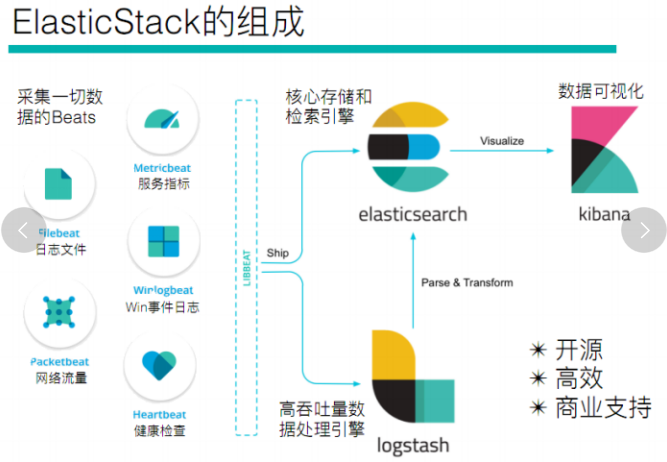
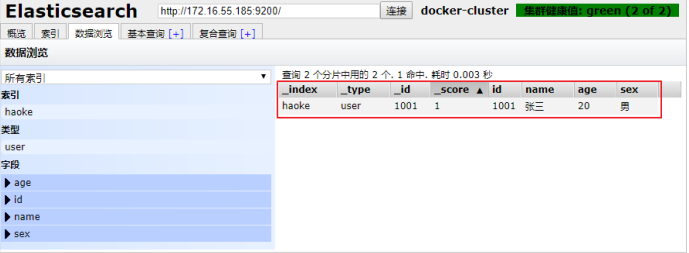
更新数据后:




具体代码实现:
package com.tm.service.impl;
import com.alibaba.fastjson.JSONObject;
import com.tm.config.config;
import com.tm.mapper.EsSyncGoodsSpuMapper;
import com.tm.model.entity.EsSyncGoodsSpuEntity;
import org.elasticsearch.action.bulk.BulkRequest;
import org.elasticsearch.action.index.IndexRequest;
import org.elasticsearch.client.RestHighLevelClient;
import org.elasticsearch.common.xcontent.XContentType;
import org.springframework.context.annotation.Configuration;
import org.springframework.scheduling.annotation.EnableScheduling;
import org.springframework.scheduling.annotation.Scheduled;
import org.springframework.stereotype.Component;
import javax.annotation.Resource;
import java.util.List;
/**
* @author q请问请问q
* @createTime 2021年11月25日 18:20:00
*/
//EnableScheduling开启定时器
//Component让spring能够扫描到当前类
@EnableScheduling
@Component
public class EsSyncGoodsSpuServiceImpl {
//注入一下
@Resource
private EsSyncGoodsSpuMapper esSyncGoodsSpuMapper;
//这个定时器注解就是每过去5秒执行一下这个aaa的方法
@Scheduled(cron = "0/5 * * * * ?")
public void aaa() {
//这边是查询mysql的数据
List<EsSyncGoodsSpuEntity> list = esSyncGoodsSpuMapper.aaa();
//调用高层对象
RestHighLevelClient restHighLevelClient = config.esRestClient();
//然后我这边使用forEach循环将数据添加到es中
list.forEach(a -> {
//创建一个索引请求(这里面写的是我们想要添加的索引)
IndexRequest index = new IndexRequest("goods_spu");
//这边是获取到我们查询得到的数据将这个查询的id当成我们es中_id(不要es自带的)
index.id(a.getSpuId().toString());
//创建批量操作对象
BulkRequest request = new BulkRequest();
//这里我将查询到的数据循环转换成json
index.source(JSONObject.toJSONString(a), XContentType.JSON);
//将转换成json的数据添加到我们创建的对象中去
request.add(index);
try {
//将数据通过bulk操作进入es。。
restHighLevelClient.bulk(request, config.COMMON_OPTIONS);
} catch (Exception e) {
e.printStackTrace();
}
//打印......
System.out.println(list);
});
}
}
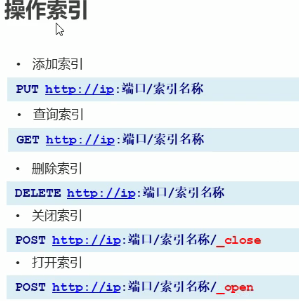
添加索引: put的方式 ,加上索引名称:
http://192.168.119.128:9200/goods_search method : put
响应:
{
"acknowledged": true,
"shards_acknowledged": true,
"index": "goods_search"
}
查询: http://192.168.119.128:9200/goods_search,goods_search1 method: get
响应:

_all查询所有的key
_close 关闭一个主键
_open 打开一个主键
删除一个主键 :

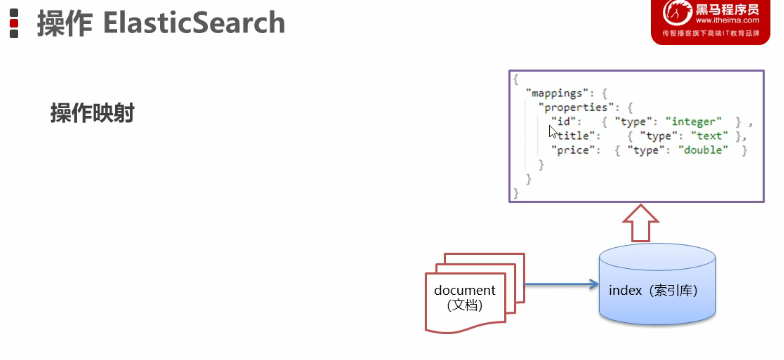
映射操作 :

添加映射:
put person/_mapping
{
"properties": {
"name":{
"type" :"keyword"
},
"age":{
"type":"integer"
}
}
}
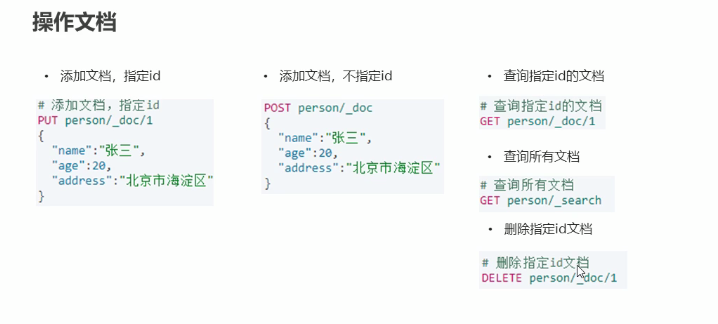
添加文档:
文档需要跟id
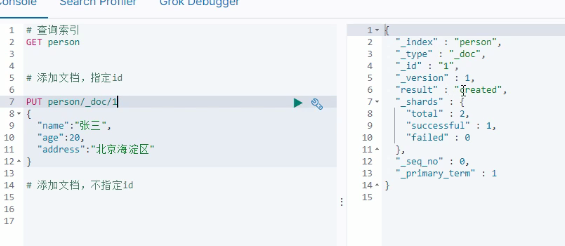
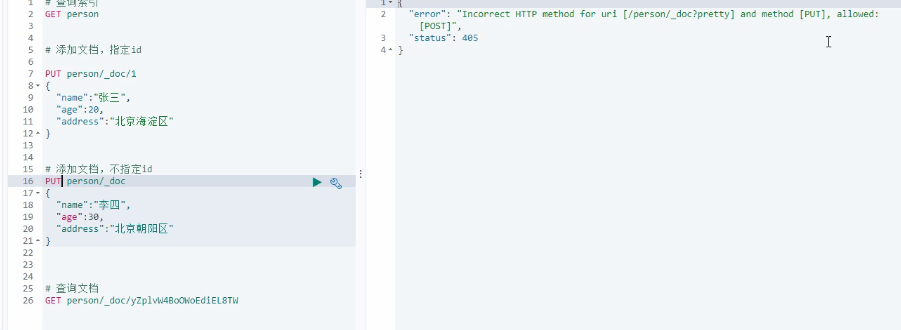
post提交可以不指定id,put必须指定id
springboot 整合 ES :
java封装的配置类:
package com.elasticsearch.hm.elasticsearch.config;


import org.apache.http.HttpHost;
import org.elasticsearch.client.RestClient;
import org.elasticsearch.client.RestHighLevelClient;
import org.springframework.boot.context.properties.ConfigurationProperties;
import org.springframework.context.annotation.Bean;
import org.springframework.context.annotation.Configuration;

@Configuration
@ConfigurationProperties(prefix = "elasticsearch")
public class ElasticsearchConfig {

    private String host ;
    private String port ;

    public String getHost() {
        return host;
    }

    public void setHost(String host) {
        this.host = host;
    }

    public String getPort() {
        return port;
    }

    public void setPort(String port) {
        this.port = port;
    }

    @Bean
    public RestHighLevelClient clientss(){
        return  new RestHighLevelClient(RestClient.builder(
             new HttpHost(
                     getHost() ,
                     Integer.parseInt(getPort()),
                     "http"
             ))) ;
    }

}

测试类:
@Autowired
 private  RestHighLevelClient clientss ;

@Test
void contextLoads() {

    System.out.printf(""+clientss);
}

@Test
public void addIndex() throws IOException {
//创建索引,映射
    IndicesClient indices = clientss.indices();

    CreateIndexRequest indexRequest = new CreateIndexRequest("itmage");

    CreateIndexResponse createIndexResponse = indices.create(indexRequest, RequestOptions.DEFAULT);
    System.out.printf(String.valueOf(createIndexResponse.isShardsAcknowledged()));

}


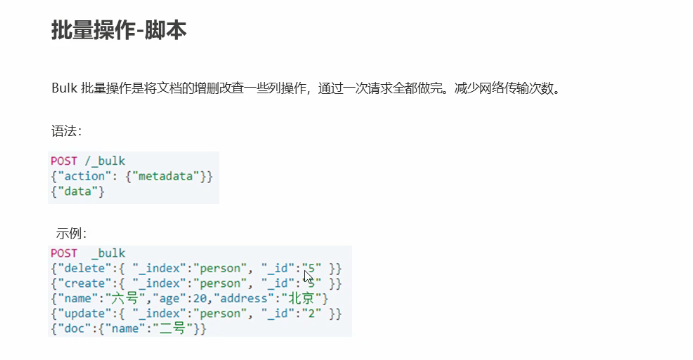
批量操作

 浙公网安备 33010602011771号