04-MySql基础知识总结
Mysql 基础知识总结
一、Mysql 的安装与卸载(Windows环境)
二、Mysql 的连接方式
三、Mysql 的基本常用语句
四、Java连接Mysql技术
Java连接Mysql的步骤
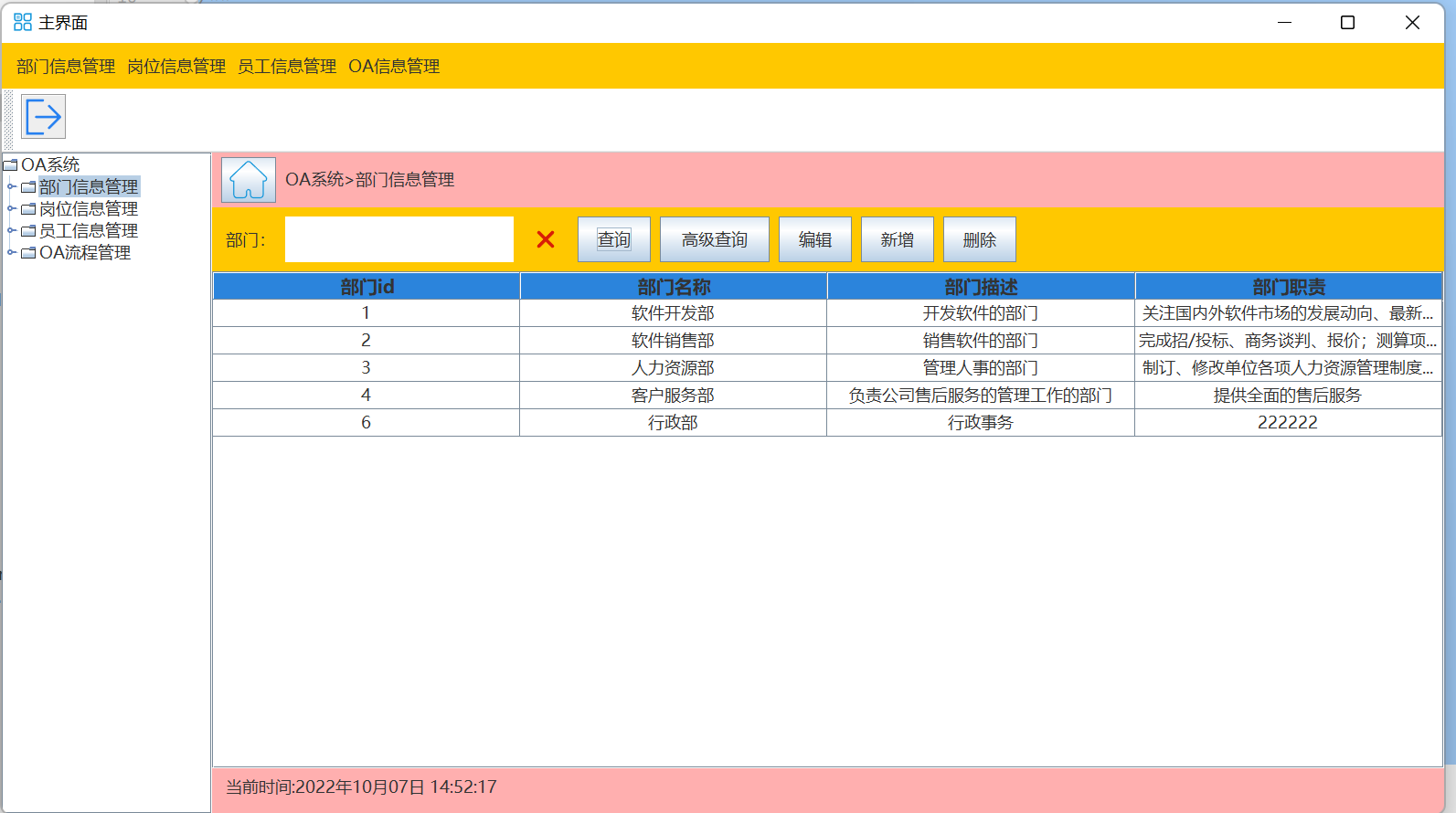
实现的效果最终如下图:
- 在Java项目中写一个通用的Mysql连接工具类,利用这个工具类类进行连接
- 书写一个界面层来展示数据,这里需要设置一个表格模型
- 在界面层调用业务层的方法来操作数据
- 和业务层相关的还有数据层,在数据层拼接sql语句,调用工具类进行查询或其他操作
首先是第一步,Mysql连接通用工具类的书写,首先需要考虑进行连接时需要的参数,即:主机地址(本机为127.0.0.1或localhost)、用户名、密码,这里为了更方便的使用,采用配置文件导入的方法。
1.新建一个配置文件,里面保存的是主机地址、用户名和密码
一般是在resources目录下新建该文件,properties,配置文件里面的代码如下:
jdbc.url = jdbc:mysql://127.0.0.1:3306/company?serverTimezone=Asia/Shanghai
jdbc.user = root
jdbc.password = 123
jdbc:mysql是特定写法,表示Java的驱动连接的是mysql,后面类似于url地址,: //
127.0.0.1:3306 是主机地址加端口号的完整写法
company 这部分内容表示数据库名,后面加?可以设置时区
serverTimezone=Asia/Shanghai表示时区
root表示账号,我是这里是连接的是自己电脑上的mysql,所以用的root账号
password表示密码
1.1 加载配置文件的方法
//得到一个操作配置文件的对象
Properties properties = new Properties();
//下面这句代码一般是在静态代码块中书写,且需要try/catch
//参数为配置文件名,我这里是放在resources目录下的,所以可以直接找到
properties.load(ClassLoader.getSystemResourceAsStream("properties"));
2 书写Java连接Mysql的通用工具类(MysqlUtil),私有属性为主机地址,用户名,密码以及一个配置文件对象;
2.1 在静态代码块中加载配置文件,因为该配置文件只需要加载一次就可以了
2.2 在代码块中初始化私有属性,
2.3 书写操作Mysql语句的方法executeUpdate()与executeQuery()
import java.io.IOException;
import java.sql.*;
import java.util.ArrayList;
import java.util.List;
import java.util.Properties;

/**
 * 封装mysql语句的工具类
 *
 * @author JIA
 * @date 2022/09/30
 */
public class MysqlUtil {
    private static MysqlUtil instance;

    public static MysqlUtil getInstance() {
        if (instance == null) {
            instance = new MysqlUtil();
        }
        return instance;
    }

    private MysqlUtil() {
    }

    /**
     * 主机地址
     */
    private  String url;
    /**
     * 用户名
     */
    private String user;
    /**
     * 密码
     */
    private  String password;

    /**
     * 配置文件
     */
    private static Properties properties;

    /**
     * 先初始化账号密码信息
     */
    static {
        /**
         * 从配置文件里面加载
         */
          properties = new Properties();
        try {
            //加载配置文件
            properties.load(ClassLoader.getSystemResourceAsStream("Properties"));

        } catch (IOException e) {
            throw new RuntimeException("jdbc.properties 文件不存在!!!");
        }
    }
    /**
     * 初始化url,user,pwd
     */
    {
        //得到配置文件里面的内容
        url = properties.getProperty("jdbc.url");
        user = properties.getProperty("jdbc.user");
        password = properties.getProperty("jdbc.password");
    }

    /**
     * 增加记录、修改记录、删除记录的方法
     *
     * @param sql sql语句
     * @return int 该sql语句影响的行数
     * @throws SQLException sqlexception异常
     */
    public int executeUpdate(String sql) throws SQLException {
        //1、创建连接对象
        Connection connection = DriverManager.getConnection(url, user, password);
        //2、创建语句对象
        Statement statement = connection.createStatement();
        //3、生成语句,返回操作结果
        int row = statement.executeUpdate(sql);
        //关闭连接
        statement.close();
        connection.close();
        return row;
    }

    /**
     * 查询记录的方法
     *
     * @param sql    sql语句
     * @param mapper 映射器:把ResultSet集合中每一个元素转换成T后返回
     * @return {@link List}<{@link T}> 一般返回VO对象的集合
     * @throws SQLException sqlexception异常
     */
    public <T> List<T> executeQuery(String sql, MyFunction<ResultSet, T> mapper) throws SQLException {
        List<T> tList = new ArrayList<>();
        //1、创建连接对象
        Connection connection = DriverManager.getConnection(url, user, password);
        //2、创建语句对象
        Statement statement = connection.createStatement();
        //3、执行查询语句,返回结果
        ResultSet resultSet = statement.executeQuery(sql);
        //把数据库返回的每一个结果转换成界面层需要的数据:VO
        while (resultSet.next()) {
            //根据不同的对象,需要手动指定具体的转换方法
            tList.add(mapper.apply(resultSet));
        }
        //4、关闭连接
        resultSet.close();
        statement.close();
        connection.close();
        return tList;
    }
}
2.4 为了使用方便,我这里使用了单例模式
2.5 为了保证可以在数据层抛出异常,我这里自定义了一个用于 实现书写lambda表达式的接口,在接口的抽象方法里直接抛出异常,该抽象方法的作用是将T对象转化成R对象,并返回,
这里的T一般可以写成ResultSet,因为Mysql查询语句返回的结果是一个ResultSet集合
import java.sql.SQLException;

/**
 *自定义接口:实现数据层执行sql可以抛出异常
 *
 * @author JIA
 * @date 2022/10/03
 */
public interface MyFunction<T, R> {
    /**
     * 把T --> R
     *
     * @param t t
     * @return {@link R}
     * @throws SQLException sqlexception异常
     */
    R apply(T t)  throws SQLException;
3 创建一个部门表格模型
继承AbstractTable,重写最基本的四个方法,获取行数、列数、获取列名和获取单元格的值
import com.myproject.oa.domain.vo.DepartmentVO;
import javax.swing.table.AbstractTableModel;
import java.util.ArrayList;
import java.util.Arrays;
import java.util.List;

/**
* department表模型
*
* @author JIA
* @date 2022/10/01
*/
public class DepartmentTableModel extends AbstractTableModel {
 //方便实用,创建部门表格模型的单例模式
 private static  DepartmentTableModel instance;
 public static DepartmentTableModel getInstance() {
     if (instance == null) {
         instance = new DepartmentTableModel();
     }
     return instance;
 }
 private DepartmentTableModel() {
 }

 /**
  * 部门的字段信息,这里的字段信息是固定的
  */
 private final List<String> header = Arrays.asList("部门id", "部门名称", "部门描述", "部门职责");
 /**
  * 提供部门信息的集合,把要显示的数据先存储在这个集合里,一般是VO对象集合
  */
 private List<DepartmentVO> data = new ArrayList<>();

 /**
  * 需要重写的第一个方法:得到数据的行数
  *
  * @return
  */
 @Override
 public int getRowCount() {
     return data.size();
 }

 /**
  *  需要重写的第二个方法:得到字段的数量,即列数
  *
  * @return
  */
 @Override
 public int getColumnCount() {
     return header.size();
 }

 /**
  * 需要重写的第三个方法: 获取字段名,列名(默认为26个字母)
  *
  * @param column 列
  * @return
  */
 @Override
 public String getColumnName(int column) {
     return header.get(column);
 }

 /**
  *  需要重写的第四个方法: 获取单元格的值
  * @param rowIndex    行号
  * @param columnIndex 列号
  * @return
  */
 @Override
 public Object getValueAt(int rowIndex, int columnIndex) {
     //返回数据:一共四个属性
     int index = rowIndex;
     //先拿到需要显示的VO对象(行对象),根据 索引依次返回字段对应的值
     DepartmentVO vo = data.get(rowIndex);
     //先把要设置的值设置为null,类型为Object
     Object valueOfCell = null;
     switch (columnIndex) {
         case 0:
             valueOfCell = vo.getDepartmentId();
             break;
         case 1:
             valueOfCell = vo.getDepartmentName();
             break;
         case 2:
             valueOfCell = vo.getDepartmentDescription();
             break;
         case 3:
             valueOfCell = vo.getDepartmentResponsibility();
             break;
         default:
             break;
     }
     //返回每个单元格的数据
     return valueOfCell;
 }

 /**
  * 对外提供的方法:加载数据的方法
  */
 public void loadData(List<DepartmentVO> departmentVOS) {
     //每次加载之前,清空之前的的数据
     this.data.clear();
     //加载数据
     this.data.addAll(departmentVOS);
     //刷新数据
     this.fireTableDataChanged();
 }

 /**
  * 对外提供的方法:选中某一行,提供行的索引拿到行对应的数据对象
  */
 public DepartmentVO getSelectedIndex(int rowIndex) {
     return data.get(rowIndex);
 }
 /**
  * 直接在这里判断数据是否发生变化,而不是到数据库去判断,修改数据对象
  */
 public boolean setSelectedIndex(int rowIndex, DepartmentVO departmentVO){
     //判断数据是否发生变化:只要有一个属性的值发生变化,那这个数据就发生了变化
     DepartmentVO srcVo = data.get(rowIndex);
     if (!srcVo.getDepartmentName().equals(departmentVO.getDepartmentName())) {
         data.set(rowIndex, departmentVO);
         this.fireTableDataChanged();
         return true;
     }
     if (!srcVo.getDepartmentDescription().equals(departmentVO.getDepartmentDescription())) {
         data.set(rowIndex, departmentVO);
         this.fireTableDataChanged();
         return true;
     }
     if (!srcVo.getDepartmentResponsibility().equals(departmentVO.getDepartmentResponsibility())) {
         data.set(rowIndex, departmentVO);
         this.fireTableDataChanged();
         return true;
     }
     return false;
 }
}
4 书写一个后台管理界面的窗口,这里直接给出代码:
4.1 主界面的代码
import com.myproject.oa.ui.departmentframe.DepartmentMainFrame;
import com.myproject.oa.ui.employeeframe.EmployeeMainFrame;
import com.myproject.oa.ui.postframe.PostMainFrame;
import com.myproject.oa.util.Common;
import javax.swing.*;
import javax.swing.event.TreeSelectionEvent;
import javax.swing.tree.DefaultMutableTreeNode;
import javax.swing.tree.TreePath;
import java.awt.*;
import java.awt.event.ActionEvent;
import java.text.SimpleDateFormat;
import java.util.Date;

/**
 * 主窗体
 *
 * @author JIA
 * @date 2022/09/30
 */
public class MainFrame extends JFrame {
    /**
     * 单例
     */
    private static MainFrame instance;

    public static MainFrame getInstance() {
        if (instance == null) {
            instance = new MainFrame();
        }
        return instance;
    }

    /**
     * 菜单栏
     */
    private JMenuBar menuBar = new JMenuBar();
    /**
     * 工具栏
     */
    private JToolBar toolBar = new JToolBar();
    /**
     * 退出登录按钮
     */
    private JButton logoutButton = new JButton();
    /**
     * 部门菜单项
     */
    private JMenu departmentMenu = new JMenu();
    private JMenuItem departmentMenuItem = new JMenuItem();
    /**
     * 岗位菜单项
     */
    private JMenu postMenu = new JMenu();
    /**
     * 员工管理菜单项
     */
    private JMenu employeeMenu = new JMenu();
    /**
     * OA信息管理
     */
    private JMenu oaMenu = new JMenu();
    /**
     * 显示窗体的面板
     */
    private JPanel centerPanel = new JPanel();
    /**
     * 顶部面板
     */
    private JPanel topPanel = new JPanel();
    /**
     * 左侧滚动面板
     */
    private JScrollPane scrollPane = new JScrollPane();
    /**
     * 左侧树状菜单目录
     */
    private JTree tree;
    /**
     * 树状目录根结点
     */
    private DefaultMutableTreeNode top = new DefaultMutableTreeNode("OA系统");

    /**
     * 显示功能卡片面板的组件
     */
    private JPanel firstPanel = new JPanel();
    /**
     * 主页按钮
     */
    private JButton homeButton = new JButton();
    /**
     * 显示卡片信息的标签
     */
    private JLabel cardLabel = new JLabel();

    private JPanel contentPanel = new JPanel();
    private JPanel lastPanel = new JPanel();
    /**
     * 显示登录信息的标签
     */
    private JLabel loginInfoLabel = new JLabel();
    /**
     * 卡片氏布局
     */
    private CardLayout cardLayout = new CardLayout()

    /**
     * 窗体默认的字体
     */
    private Font defaultFont = new Font("微软雅黑", Font.PLAIN, 25);
    private Font menuFont = new Font("微软雅黑", Font.PLAIN, 18);
    /**
     * 窗体背景色
     */
    private Color windowColor = new Color(62, 120, 187);
    /**
     * 面板背景色
     */
    private Color panelColor = new Color(42, 82, 129);
    /**
     * 按钮颜色
     */
    private Color buttonColor = new Color(43, 132, 220);

    private MainFrame() {
        initProperties();
        initComponents();
        initContentPanel();
        addComponents();
        addCards();
        registerListeners();
        new Timer(100, this::listenerOfShowDate).start();
    }

    /**
     * 初始化窗体本身属性
     */
    private void initProperties() {
        //设置标题
        this.setTitle("主界面");
        //设置字体
        this.setFont(defaultFont);
        //设置图标
        this.setIconImage(Common.getImagePath("images/home.png"));
        //设置关闭方式
        this.setDefaultCloseOperation(JFrame.EXIT_ON_CLOSE);
        //设置窗体大小
        this.setSize(1600, 900);
        //设置窗体居中
        this.setLocationRelativeTo(null);
        //设置布局方式
        //this.setLayout(new FlowLayout(FlowLayout.LEADING));

    }

    /**
     * 初始化组件属性
     */
    private void initComponents() {
        //设置菜单栏属性
        menuBar.setBorder(BorderFactory.createEmptyBorder(5, 10, 5, 30));
        menuBar.setPreferredSize(new Dimension(1600, 50));
        menuBar.setBackground(Color.ORANGE);
        //设置部门菜单项属性
        departmentMenu.setText("部门信息管理");
        departmentMenu.setFont(menuFont);
        departmentMenuItem.setText("查看部门信息");
        departmentMenuItem.setFont(menuFont);
        departmentMenu.add(departmentMenuItem);
        //设置岗位菜单项属性
        postMenu.setText("岗位信息管理");
        postMenu.setFont(menuFont);
        //设置员工菜单项属性
        employeeMenu.setFont(menuFont);
        employeeMenu.setText("员工信息管理");
        //设置OA菜单项属性
        oaMenu.setText("OA信息管理");
        oaMenu.setFont(menuFont);

        menuBar.add(departmentMenu);
        menuBar.add(postMenu);
        menuBar.add(employeeMenu);
        menuBar.add(oaMenu);
        //设置工具栏属性
        toolBar.setBackground(Color.white);
        toolBar.setPreferredSize(new Dimension(0, 100));
        toolBar.setLayout(new FlowLayout(FlowLayout.LEFT));
        //设置退出按钮的属性
        logoutButton.setIcon(new ImageIcon(Common.getImagePath("images/logout.png")));
        logoutButton.setPreferredSize(new Dimension(50, 50));
        logoutButton.setFont(menuFont);
        logoutButton.setToolTipText("退出登录");
        toolBar.add(logoutButton);
        //设置顶部面板属性
        topPanel.setBackground(Color.ORANGE);
        topPanel.setPreferredSize(new Dimension(0, 120));
        topPanel.setLayout(new BorderLayout());
        topPanel.add(menuBar, BorderLayout.NORTH);
        topPanel.add(toolBar);

        //设置左侧面板
        scrollPane.setPreferredSize(new Dimension(230, 0));
        //设置树状目录的属性
        //利用头结点 生成一棵树
        initTree(top);
        tree = new JTree(top);
        tree.setFont(menuFont);
        tree.setEditable(true);
        scrollPane.setViewportView(tree);
        //设置中间面板的属性
        centerPanel.setBackground(Color.cyan);
    }

    /**
     * 初始化内容面板组件的属性
     */
    private void initContentPanel() {
        //设置内容面板的布局方式
        centerPanel.setLayout(new BorderLayout());
        //设置内容面板的顶部按钮所在 面板的属性
        firstPanel.setPreferredSize(new Dimension(0, 60));
        firstPanel.setBackground(Color.pink);
        firstPanel.setLayout(new FlowLayout(FlowLayout.LEFT, 10, 0));
        firstPanel.setBorder(BorderFactory.createEmptyBorder(5, 0, 5, 5));
        //设置回到主页按钮的属性
        homeButton.setIcon(new ImageIcon(Common.getImagePath("images/homePage.png")));
        homeButton.setPreferredSize(new Dimension(60, 50));
        //设置显示卡片信息的标签属性
        cardLabel.setText("OA系统");
        cardLabel.setFont(menuFont);
        cardLabel.setPreferredSize(new Dimension(500, 45));

        firstPanel.add(homeButton);
        firstPanel.add(cardLabel);
        //设置内容面板的底部显示登录信息的面板属性
        lastPanel.setPreferredSize(new Dimension(0, 50));
        lastPanel.setBackground(Color.pink);
        lastPanel.setBorder(BorderFactory.createEmptyBorder(5, 5, 5, 5));
        lastPanel.setLayout(new FlowLayout(FlowLayout.LEFT, 10, 0));
        //设置显示登录时间的标签信息
        loginInfoLabel.setFont(menuFont);
        loginInfoLabel.setPreferredSize(new Dimension(300, 30));
        lastPanel.add(loginInfoLabel);

        //设置内容面板的底部显示其他功能卡片的面板属性
        contentPanel.setBackground(Color.yellow);
        contentPanel.setLayout(cardLayout);

        //添加到内容 面板中
        centerPanel.add(firstPanel, BorderLayout.NORTH);
        centerPanel.add(lastPanel, BorderLayout.SOUTH);
        centerPanel.add(contentPanel);

        //
    }

    /**
     * 注册监听事件
     */
    private void registerListeners() {
        tree.addTreeSelectionListener(this::listenerOfTree);
        tree.addTreeSelectionListener(this::listenerForTree);
        logoutButton.addActionListener(this::listenerOfLogoutButton);
        departmentMenuItem.addActionListener(this::listenerOfDepartmentMenu);
        postMenu.addActionListener(this::listenerOfPostMenu);
    }

    /**
     * 添加组件到窗体中
     */
    private void addComponents() {
        //this.add(menuBar);
        this.add(topPanel, BorderLayout.NORTH);
        this.add(scrollPane, BorderLayout.WEST);
        this.add(centerPanel);
    }
    /**
     * 添加卡片到面板中
     */
    private void addCards(){
        //部门主界面面板
        DepartmentMainFrame departmentMainFrame = DepartmentMainFrame.getInstance();
        contentPanel.add(departmentMainFrame, "departmentMainFrameCard");
        //岗位主界面面板
       // PostMainFrame postMainFrame = PostMainFrame.getInstance();
       // contentPanel.add(postMainFrame, "postMainFrameCard");
        //员工主界面面板
        //EmployeeMainFrame employeeMainFrame = EmployeeMainFrame.getInstance();
       // contentPanel.add(employeeMainFrame, "employeeMainFrameCard");
    }

    /**
     * 点击菜单,展示不同的界面
     */
    private void listenerOfDepartmentMenu(ActionEvent e) {
        //部门主界面面板
       cardLayout.show(contentPanel, "departmentMainFrameCard");
       //添加新路径
       //listenerForTree(new TreeSelectionEvent());
    }
    /**
     * 点击菜单,展示不同的界面
     */
    //private void listenerOfPostMenu(ActionEvent e) {

        //岗位主界面面板
    //    cardLayout.show(contentPanel, "postMainFrameCard");
        //tree.clearSelection();
        //TODO ---

    //}

    /**
     * 初始化树
     */
    private void initTree(DefaultMutableTreeNode top) {
        //1.1 先设置根节点下面的子节点为空
        DefaultMutableTreeNode category = null;
        //1.2 设置根节点下面的子节点的子节点为空
        DefaultMutableTreeNode item = null;

        //------2 创建部门信息的节点
        category = new DefaultMutableTreeNode("部门信息管理");
        top.add(category);
        //------2.1创建部门信息节点下面的子节点
        item = new DefaultMutableTreeNode("查看部门信息");
        category.add(item);
        item = new DefaultMutableTreeNode("修改部门信息");
        category.add(item);
        item = new DefaultMutableTreeNode("新增部门");
        category.add(item);
        item = new DefaultMutableTreeNode("删除部门");
        category.add(item);

        //------3 创建岗位信息的节点
        category = new DefaultMutableTreeNode("岗位信息管理");
        category.setAllowsChildren(true);
        top.add(category);
        //------3.1创建岗位信息节点下面的子节点
        item = new DefaultMutableTreeNode("查看岗位信息");
        category.add(item);
        item = new DefaultMutableTreeNode("修改岗位信息");
        category.add(item);
        item = new DefaultMutableTreeNode("新增岗位");
        category.add(item);
        item = new DefaultMutableTreeNode("删除岗位");
        category.add(item);
        //------4 创建员工信息的节点
        category = new DefaultMutableTreeNode("员工信息管理");
        category.setAllowsChildren(true);
        top.add(category);
        //------4.1创建员工信息节点下面的子节点
        item = new DefaultMutableTreeNode("查看员工信息");
        category.add(item);
        item = new DefaultMutableTreeNode("修改员工信息");
        category.add(item);
        item = new DefaultMutableTreeNode("新增员工");
        category.add(item);
        item = new DefaultMutableTreeNode("删除员工");
        category.add(item);

        //------4 创建OA信息的节点
        category = new DefaultMutableTreeNode("OA流程管理");
        category.setAllowsChildren(true);
        top.add(category);
        //------4.1创建员工信息节点下面的子节点
        item = new DefaultMutableTreeNode("查看OA流程");
        category.add(item);
        item = new DefaultMutableTreeNode("发起OA流程");
        category.add(item);

    }

    /**
     * 树的监听事件:显示操作的功能面板
     */
    private void listenerOfTree(TreeSelectionEvent e) {
        TreePath selectionPath = tree.getSelectionPath();
        int pathCount = selectionPath.getPathCount();
        String str = "";
        for (int i = 0; i < pathCount; i++) {
            //拼接字符串
            if (i == 0) {
                str+= selectionPath.getPathComponent(i).toString();
            }
            if (i < pathCount - 1 && i != 0) {
                str += ">" + selectionPath.getPathComponent(i).toString();
            }
            if (i == pathCount - 1 && i != 0) {
                str +=  ">" + selectionPath.getPathComponent(i).toString() ;
            }
        }
        //设置
        cardLabel.setText(str);

    }
    /**
     * 树的监听事件:显示操作的功能面板
     */
     /*
    private void listenerForTree(TreeSelectionEvent e) {
        TreePath selectionPath = tree.getSelectionPath();
        int pathCount = selectionPath != null ? selectionPath.getPathCount() : 0;
        if (pathCount == 1) {
            //显示主界面
            cardLayout.show(contentPanel, "postMainFrameCard");
        }
        //展示部门管理界面的情况
        if (pathCount > 1 && "部门信息管理".equals(selectionPath.getLastPathComponent().toString())) {
            cardLayout.show(contentPanel, "departmentMainFrameCard");
        }
        if (pathCount > 1 && "岗位信息管理".equals(selectionPath.getLastPathComponent().toString())) {
            cardLayout.show(contentPanel, "postMainFrameCard");
        }
        if (pathCount > 1 && "员工信息管理".equals(selectionPath.getLastPathComponent().toString())) {
            cardLayout.show(contentPanel, "employeeMainFrameCard");
        }

    }
    */
    /**
     * 回到登录界面的事件
     */
    private void listenerOfLogoutButton(ActionEvent e){
        int result = JOptionPane.showConfirmDialog(this, "是否退出登录?", "系统提示", JOptionPane.YES_NO_OPTION);
        if (result == JOptionPane.YES_OPTION) {
            this.dispose();
            //回到登录界面:值和密码默认清空
            LoginFrame loginFrame = LoginFrame.getInstance();
            loginFrame.getDeleteAccountButton().doClick();
            loginFrame.getDeletePasswordButton().doClick();
            loginFrame.setVisible(true);
        }

    }

    /**
     * 显示时间的事件
     */
    private void listenerOfShowDate(ActionEvent e) {
        loginInfoLabel.setText("当前时间:" +
                new SimpleDateFormat("yyyy年MM月dd日 HH:mm:ss").format(new Date(System.currentTimeMillis()))
        );
    }

}
4.2 卡片布局中部门卡片的代码,部门主界面的代码,编辑部门信息的窗体以及添加部门的窗体,一共三个窗体(1张主界面卡片和2个窗体)
4.2.1 部门主界面卡片
import com.myproject.oa.domain.dto.departmentdto.RemoveDepartmentDTO;
import com.myproject.oa.domain.query.DepartmentQuery;
import com.myproject.oa.domain.vo.DepartmentVO;
import com.myproject.oa.service.DepartmentService;
import com.myproject.oa.service.ServiceFactory;
import com.myproject.oa.ui.tablemodel.DepartmentTableModel;
import com.myproject.oa.util.Common;

import javax.swing.*;
import javax.swing.table.DefaultTableCellRenderer;
import javax.swing.table.JTableHeader;
import javax.swing.table.TableColumn;
import java.awt.*;
import java.awt.event.ActionEvent;
import java.awt.event.MouseAdapter;
import java.awt.event.MouseEvent;
import java.util.List;

/**
 * 部门主界面的面板
 *
 * @author JIA
 * @date 2022/10/01
 */
public class DepartmentMainFrame extends JPanel {
    private static DepartmentMainFrame instance;

    public static DepartmentMainFrame getInstance() {
        if (instance == null) {
            instance = new DepartmentMainFrame();
        }
        return instance;
    }

    private DepartmentMainFrame() {
        initProperties();
        initComponents();
        registerListeners();
        addComponents();
        setCenter();
    }

    private Font headerFont = new Font("微软雅黑", Font.BOLD, 20);
    private Font defaultFont = new Font("微软雅黑", Font.PLAIN, 18);
    /**
     * 窗体背景色
     */
    private Color windowColor = new Color(62, 120, 187);
    /**
     * 面板背景色
     */
    private Color panelColor = new Color(42, 82, 129);
    /**
     * 按钮颜色
     */
    private Color headerColor = new Color(43, 132, 220);

    /**
     * 部门主界面顶部面板:包含各功能按钮
     */
    private JLabel titleLabel = new JLabel();
    /**
     * 设置部门标签
     */
    private JPanel topPanel = new JPanel();
    /**
     * 按名称搜索部门的文本框
     */
    private JTextField departmentTextField = new JTextField();

    public JTextField getDepartmentTextField() {
        return departmentTextField;
    }

    /**
     * 清空搜索条件的按钮
     */
    private JButton clearConditionButton = new JButton();
    /**
     * 搜索部门的按钮
     */
    private JButton searchButton = new JButton();
    /**
     * 模糊查询的按钮
     */
    private JButton fuzzyQueryButton = new JButton();
    /**
     * 编辑部门信息的按钮
     */
    private JButton editButton = new JButton();
    /**
     * 添加部门的按钮
     */
    private JButton addButton = new JButton();
    /**
     * 删除部门的按钮
     */
    private JButton deleteButton = new JButton();
    /**
     * 浮动菜单
     */
    private JPopupMenu popupMenu = new JPopupMenu();
    /**
     * 设置菜单项
     */
    private JMenuItem editMenuItem = new JMenuItem();
    private JMenuItem deleteMenuItem = new JMenuItem();


    public JButton getClearConditionButton() {
        return clearConditionButton;
    }

    public JButton getSearchButton() {
        return searchButton;
    }

    /**
     * 部门表格模型
     */
    private JScrollPane tableScrollPanel = new JScrollPane();
    private JTable departmentTable = new JTable();
    private DepartmentTableModel departmentTableModel = DepartmentTableModel.getInstance();

    /**
     * 初始化部门主界面卡片的属性
     */
    private void initProperties() {
        //设置卡片大小
        this.setPreferredSize(new Dimension(1345, 675));
        this.setBackground(Color.ORANGE);
        this.setLayout(new BorderLayout());
    }

    private void initComponents() {

        //设置顶部面板的属性
        topPanel.setPreferredSize(new Dimension(0, 70));
        topPanel.setBorder(BorderFactory.createEmptyBorder(10, 5, 10, 5));
        topPanel.setBackground(Color.ORANGE);
        topPanel.setLayout(new FlowLayout(FlowLayout.LEFT, 10, 0));
        //设置部门标签属性
        titleLabel.setText("部门:");
        titleLabel.setFont(defaultFont);
        titleLabel.setPreferredSize(new Dimension(55, 50));
        //设置搜索部门名称的文本框
        departmentTextField.setFont(defaultFont);
        departmentTextField.setPreferredSize(new Dimension(250, 50));
        departmentTextField.setBorder(null);
        //设置清空搜索条件的按钮
        clearConditionButton.setPreferredSize(new Dimension(50, 50));
        clearConditionButton.setBorder(null);
        clearConditionButton.setBackground(Color.ORANGE);
        clearConditionButton.setIcon(new ImageIcon(Common.getImagePath("images/delete01.png")));
        //设置搜索部门的按钮
        searchButton.setPreferredSize(new Dimension(80, 50));
        searchButton.setFont(defaultFont);
        searchButton.setText("查询");
        //设置搜模糊查询按钮的属性
        fuzzyQueryButton.setPreferredSize(new Dimension(120, 50));
        fuzzyQueryButton.setFont(defaultFont);
        fuzzyQueryButton.setText("高级查询");
        //设置编辑部门信息按钮的属性
        editButton.setPreferredSize(new Dimension(80, 50));
        editButton.setFont(defaultFont);
        editButton.setText("编辑");
        //设置添加部门按钮属性
        addButton.setPreferredSize(new Dimension(80, 50));
        addButton.setFont(defaultFont);
        addButton.setText("新增");
        //设置输出部门按钮属性
        deleteButton.setPreferredSize(new Dimension(80, 50));
        deleteButton.setFont(defaultFont);
        deleteButton.setText("删除");

        topPanel.add(titleLabel);
        topPanel.add(departmentTextField);
        topPanel.add(clearConditionButton);
        topPanel.add(searchButton);
        topPanel.add(fuzzyQueryButton);
        topPanel.add(editButton);
        topPanel.add(addButton);
        topPanel.add(deleteButton);

        //设置浮动 菜单的属性
        popupMenu.setFont(defaultFont);
        editMenuItem.setFont(defaultFont);
        editMenuItem.setText("编辑");
        deleteMenuItem.setFont(defaultFont);
        deleteMenuItem.setText("删除");
        popupMenu.add(editMenuItem);
        popupMenu.add(deleteMenuItem);
        //设置表格的属性
        //设置表头的属性
        JTableHeader tableHeader = departmentTable.getTableHeader();
        tableHeader.setFont(headerFont);
        tableHeader.setPreferredSize(new Dimension(tableHeader.getWidth(), 30));
        tableHeader.setBackground(headerColor);
        departmentTable.setModel(departmentTableModel);
        departmentTable.setFont(defaultFont);
        departmentTable.setRowHeight(30);
        departmentTable.setFillsViewportHeight(true);
        tableScrollPanel.setViewportView(departmentTable);

    }

    /**
     * 注册监听事件
     */
    private void registerListeners() {
        searchButton.addActionListener(this::listenerOfSearchButton);
        fuzzyQueryButton.addActionListener(this::listenerOfFuzzyQueryButton);
        clearConditionButton.addActionListener(this::listenerOfClearConditionButton);
        editMenuItem.addActionListener(this::listenerOfEdiButton);
        editButton.addActionListener(this::listenerOfEdiButton);
        addButton.addActionListener(this::listenerOfAddButton);
        deleteButton.addActionListener(this::listenerOfDeleteButton);
        deleteMenuItem.addActionListener(this::listenerOfDeleteButton);
        //给表格注册监听事件
        departmentTable.addMouseListener(new MouseAdapter() {

            /**
             * @param e
             */
            @Override
            public void mouseClicked(MouseEvent e) {


                //双击左键进入编辑界面
                if (e.getClickCount() == 2 && e.getButton() == MouseEvent.BUTTON1) {
                    Point point = e.getPoint();
                    int row = departmentTable.rowAtPoint(point);
                    if (row != -1) {
                        editButton.doClick();
                        //取消选中
                        departmentTable.clearSelection();
                    }

                }
                //单击右键显示浮动菜单
                if (e.getClickCount() == 1 && e.getButton() == MouseEvent.BUTTON3) {
                    //获取当前右键点的坐标,判断是否在表格内
                    Point point = e.getPoint();
                    int row = departmentTable.rowAtPoint(point);
                    if (row != -1) {
                        //设置当前行选中
                        departmentTable.setRowSelectionInterval(row, row);
                        popupMenu.show(departmentTable, point.x, point.y);

                    }

                }
            }
        });

    }

    /**
     * 添加组件
     */
    private void addComponents() {
        this.add(topPanel, BorderLayout.NORTH);
        this.add(tableScrollPanel, BorderLayout.CENTER);
    }

    /**
     * 设置表格居中对齐
     */
    private void setCenter() {
        //声明一个默认渲染器
        DefaultTableCellRenderer d = new DefaultTableCellRenderer();
        d.setHorizontalAlignment(JLabel.CENTER);
        //每个单元格重新渲染
        for (int i = 0; i < departmentTable.getColumnCount(); i++) {
            TableColumn column = departmentTable.getColumn(departmentTable.getColumnName(i));
            column.setCellRenderer(d);
        }
    }

    /**
     * 清除查询条件按钮的事件
     */
    private void listenerOfClearConditionButton(ActionEvent e) {
        departmentTextField.setText("");
    }


    /**
     * 查询按钮的监听事件
     */
    private void listenerOfSearchButton(ActionEvent e) {
        //1、拿到文本框中的数据,封装一个query对象
        String name = departmentTextField.getText();
        DepartmentQuery departmentQuery = new DepartmentQuery();
        departmentQuery.setDepartmentName(name);
        //2、调用查询业务,防护查询结果
        List<DepartmentVO> departmentVOS = ServiceFactory.getDepartmentService().listDepartment(departmentQuery);
        //3、刷新结果
        departmentTableModel.loadData(departmentVOS);
    }

    /**
     * 编辑部门信息按钮的事件
     */
    private void listenerOfEdiButton(ActionEvent e) {
        //1、判断用户是否选择了一行数控,选择的数据范围是否在显示的表格中
        //拿到当前选着行的数据对象
        int index = departmentTable.getSelectedRow();
        if (index != -1) {
            DepartmentVO departmentVO = departmentTableModel.getSelectedIndex(index);
            //2、把当前选中的数据传递到要编辑的窗体中,弹出编辑信息的窗体,用户输入信息
            EditDepartmentFrame editDepartmentFrame = EditDepartmentFrame.getInstance();
            editDepartmentFrame.setId(departmentVO.getDepartmentId());
            editDepartmentFrame.setIndex(index);
            editDepartmentFrame.getNameTextField().setText(departmentVO.getDepartmentName());
            editDepartmentFrame.getDescriptionTextField().setText(departmentVO.getDepartmentDescription());
            editDepartmentFrame.getResponsibilityTextField().setText(departmentVO.getDepartmentResponsibility());
            editDepartmentFrame.setVisible(true);
            //3、提示用户,确认修改
        } else {
            //提示用户要选择一行数据
            JOptionPane.showMessageDialog(this, "请先选择一行数据!", "系统提示", JOptionPane.PLAIN_MESSAGE);
        }
        departmentTable.clearSelection();
    }

    /**
     * 新增按钮事件
     */
    private void listenerOfAddButton(ActionEvent e) {
        //展示新增 窗体
        AddDepartmentFrame addDepartmentFrame = AddDepartmentFrame.getInstance();
        addDepartmentFrame.setVisible(true);
    }

    /**
     * 删除部门的事件
     */
    private void listenerOfDeleteButton(ActionEvent e) {
        DepartmentService departmentService = ServiceFactory.getDepartmentService();
        //拿到当前选中行的对象
        int row = departmentTable.getSelectedRow();
        if (row != -1) {
            DepartmentVO departmentVO = departmentTableModel.getSelectedIndex(row);
            //vo --> removeDTO
            RemoveDepartmentDTO removeDepartmentDTO = new RemoveDepartmentDTO(
                    departmentVO.getDepartmentId(),
                    departmentVO.getDepartmentName(),
                    departmentVO.getDepartmentDescription(),
                    departmentVO.getDepartmentResponsibility()
            );
            //确认是否删除
            int choice = JOptionPane.showConfirmDialog(this, "是否确认删除?", "系统提示",  JOptionPane.YES_NO_OPTION);
            if (choice == JOptionPane.YES_OPTION) {
                //调用删除业务
                departmentVO = departmentService.removeDepartment(removeDepartmentDTO);
                if (departmentVO != null) {
                    //删除成功
                    //刷新数据
                    clearConditionButton.doClick();
                    searchButton.doClick();
                    JOptionPane.showMessageDialog(this, "删除成功!", "系统提示", JOptionPane.PLAIN_MESSAGE);
                } else {
                    //删除失败
                    JOptionPane.showMessageDialog(this, "删除失败!", "系统警告", JOptionPane.WARNING_MESSAGE);
                }
            } else {
                //取消删除
                JOptionPane.showMessageDialog(this, "取消删除!", "系统提示", JOptionPane.PLAIN_MESSAGE);
            }

        } else {
            //提示用户要选择一行数据
            JOptionPane.showMessageDialog(this, "请先选择一行数据!", "系统警告", JOptionPane.WARNING_MESSAGE);
        }
    }

    /**
     * 模糊查询的按钮事件
     */
    private void listenerOfFuzzyQueryButton(ActionEvent e) {
        //展示模糊查询所用的条件窗口
        DepartmentConditionFrame departmentConditionFrame = DepartmentConditionFrame.getInstance();
        departmentConditionFrame.setVisible(true);
    }


}
4.2.2 部门编辑信息的窗体
import com.myproject.oa.domain.dto.departmentdto.ModifyDepartmentDTO;
import com.myproject.oa.domain.vo.DepartmentVO;
import com.myproject.oa.service.DepartmentService;
import com.myproject.oa.service.ServiceFactory;
import com.myproject.oa.ui.MainFrame;
import com.myproject.oa.ui.tablemodel.DepartmentTableModel;
import com.myproject.oa.util.Common;
import javax.swing.*;
import java.awt.*;
import java.awt.event.ActionEvent;

/**
 * 编辑部门界面
 *
 * @author JIA
 * @date 2022/10/01
 */
public class EditDepartmentFrame extends JFrame {
    private static EditDepartmentFrame instance;

    public static EditDepartmentFrame getInstance() {
        if (instance == null) {
            instance = new EditDepartmentFrame();
        }
        return instance;
    }

    private EditDepartmentFrame() {
        initProperties();
        initComponents();
        registerListeners();
        addComponents();
    }

    private final Font defaultFont = new Font("微软雅黑", Font.PLAIN, 18);
    private final Color defaultColor = new Color(238, 238, 238);
    /**
     * 包含编辑部门名称相关的组件的面板
     */
    private final JPanel namePanel = new JPanel();
    /**
     * 编辑部门名称信息的组件:部门名称标签
     */
    private final JLabel nameLabel = new JLabel();
    /**
     * 编辑部门名称信息的组件:部门名称文本框
     */
    private final JTextField nameTextField = new JTextField();
    /**
     * 清除部门名称文本框信息的按钮
     */
    private final JButton clearNameButton = new JButton();
    /**
     * 包含修改部门描述信息的组件的面板
     */
    private final JPanel descriptionPanel = new JPanel();
    /**
     * 部门描述标签
     */
    private final JLabel descriptionLabel = new JLabel();
    /**
     * 部门描述文本框
     */
    private final JTextField descriptionTextField = new JTextField();
    /**
     * 清除部门描述信息的按钮
     */
    private final JButton clearDescriptionButton = new JButton();

    /**
     * 包含修改部门描述信息的组件的面板
     */
    private final JPanel responsibilityPanel = new JPanel();
    /**
     * 部门描述标签
     */
    private final JLabel responsibilityLabel = new JLabel();
    /**
     * 部门描述文本框
     */
    private final JTextField responsibilityTextField = new JTextField();
    /**
     * 清除部门描述信息的按钮
     */
    private final JButton clearResponsibilityButton = new JButton();
    /**
     * 一键清空按钮
     */
    private final JButton resetButton = new JButton();
    /**
     * 确定按钮
     */
    private final JButton confirmButton = new JButton();
    /**
     * 确定按钮所在的面板
     */
    private final JPanel panel = new JPanel();
    /**
     * 提供文本框的set方法,方便传值
     */
    public JTextField getNameTextField() {
        return nameTextField;
    }

    public JTextField getDescriptionTextField() {
        return descriptionTextField;
    }

    public JTextField getResponsibilityTextField() {
        return responsibilityTextField;
    }

    public JButton getResetButton() {
        return resetButton;
    }

    /**
     * 保存当前数据对象的索引和id
     */
    private int id;
    private  int index;

    public void setId(int id) {
        this.id = id;
    }

    public void setIndex(int index) {
        this.index = index;
    }

    /**
     * 初始化编辑部门信息的窗体属性
     */
    private void initProperties() {
        //设置窗体标题
        this.setTitle("修改部门信息");
        //设置字体及大小
        this.setFont(defaultFont);
        //设置窗体大小
        this.setSize(550, 800);
        //设置窗体位置默认居 部门主窗体的中
        this.setLocationRelativeTo(MainFrame.getInstance());
        //设置窗体大小不可变
        this.setResizable(false);
        //设置窗体的布局方式
        this.setLayout(new FlowLayout(FlowLayout.LEFT, 10, 50));
    }

    /**
     * 初始化窗体组件的属性
     */
    private void initComponents() {
        //设置编辑部门名称的组件属性
        //设置部门名称标签
        nameLabel.setFont(defaultFont);
        nameLabel.setText("部门名称:");
        nameLabel.setPreferredSize(new Dimension(100, 50));
        //设置部门名称文本框属性
        nameTextField.setFont(defaultFont);
        nameTextField.setPreferredSize(new Dimension(300, 50));
        //设置清除部门名称文本框内容的按钮图标
        clearNameButton.setPreferredSize(new Dimension(50, 50));
        clearNameButton.setIcon(new ImageIcon(Common.getImagePath("images/delete01.png")));
        clearNameButton.setBorder(null);
        clearNameButton.setBackground(defaultColor);
        //设置面班布局方式
        namePanel.setLayout(new FlowLayout(FlowLayout.LEFT, 10, 0));
        namePanel.setBorder(BorderFactory.createEmptyBorder(5, 5, 5, 5));
        //添加组件到面板中
        namePanel.add(nameLabel);
        namePanel.add(nameTextField);
        namePanel.add(clearNameButton);
        //设置部门描述面板及其组件的属性
        //设置部门描述标签属性
        descriptionLabel.setFont(defaultFont);
        descriptionLabel.setText("部门描述:");
        descriptionLabel.setPreferredSize(new Dimension(100, 50));
        //设置部门描述称文本框属性
        descriptionTextField.setFont(defaultFont);
        descriptionTextField.setPreferredSize(new Dimension(300, 50));
        //设置清除部门描述文本框内容的按钮图标
        clearDescriptionButton.setPreferredSize(new Dimension(50, 50));
        clearDescriptionButton.setIcon(new ImageIcon(Common.getImagePath("images/delete01.png")));
        clearDescriptionButton.setBackground(defaultColor);
        clearDescriptionButton.setBorder(null);
        //设置面班布局方式
        descriptionPanel.setLayout(new FlowLayout(FlowLayout.LEFT, 10, 0));
        descriptionPanel.setBorder(BorderFactory.createEmptyBorder(5, 5, 5, 5));
        //添加到面板中
        descriptionPanel.add(descriptionLabel);
        descriptionPanel.add(descriptionTextField);
        descriptionPanel.add(clearDescriptionButton);

        //设置部门职责面板及其组件的属性
        //设置部门职责标签属性
        responsibilityLabel.setFont(defaultFont);
        responsibilityLabel.setText("部门职责:");
        responsibilityLabel.setPreferredSize(new Dimension(100, 50));
        //设置部门职责称文本框属性
        responsibilityTextField.setFont(defaultFont);
        responsibilityTextField.setPreferredSize(new Dimension(300, 50));
        //设置清除部门职责文本框内容的按钮图标
        clearResponsibilityButton.setPreferredSize(new Dimension(50, 50));
        clearResponsibilityButton.setIcon(new ImageIcon(Common.getImagePath("images/delete01.png")));
        clearResponsibilityButton.setBackground(defaultColor);
        clearResponsibilityButton.setBorder(null);
        //设置面班布局方式
        responsibilityPanel.setLayout(new FlowLayout(FlowLayout.LEFT, 10, 0));
        responsibilityPanel.setBorder(BorderFactory.createEmptyBorder(5, 5, 5, 5));
        //添加到面板中
        responsibilityPanel.add(responsibilityLabel);
        responsibilityPanel.add(responsibilityTextField);
        responsibilityPanel.add(clearResponsibilityButton);

        //设置确定按钮和重置按钮的属性
        resetButton.setPreferredSize(new Dimension(200, 50));
        resetButton.setFont(defaultFont);
        resetButton.setText("一键清空");
        confirmButton.setPreferredSize(new Dimension(120, 50));
        confirmButton.setFont(defaultFont);
        confirmButton.setText("确定");
        //添加到面板中
        panel.setLayout(new FlowLayout(FlowLayout.LEFT, 10, 0));
        panel.setBorder(BorderFactory.createEmptyBorder(5, 80, 5, 50));
        panel.add(resetButton);
        panel.add(confirmButton);

    }

    /**
     * 注册监听事件
     */
    private void registerListeners() {
        clearNameButton.addActionListener(this::listenerOfClearNameButton);
        clearDescriptionButton.addActionListener(this::listenerOfClearDescriptionButton);
        clearResponsibilityButton.addActionListener(this::listenerOfClearResponsibilityButton);
        resetButton.addActionListener(this::listenerOfResetButton);
        confirmButton.addActionListener(this::listenerOfConfirmButton);
    }

    /**
     * 添加组件到窗体中
     */
    private void addComponents() {
        this.add(namePanel);
        this.add(descriptionPanel);
        this.add(responsibilityPanel);
        this.add(panel);
    }

    /**
     * 清除部门名称文本框按钮的事件
     */
    private void listenerOfClearNameButton(ActionEvent e) {
        nameTextField.setText("");
    }

    /**
     * 清除部门描述文本框按钮的事件
     */
    private void listenerOfClearDescriptionButton(ActionEvent e) {
        descriptionTextField.setText("");
    }

    /**
     * 清除部门职责 文本框按钮的事件
     */
    private void listenerOfClearResponsibilityButton(ActionEvent e) {
        responsibilityTextField.setText("");
    }

    /**
     * 重置按钮的事件
     */
    private void listenerOfResetButton(ActionEvent e) {
        nameTextField.setText("");
        descriptionTextField.setText("");
        responsibilityTextField.setText("");
    }
    /**
     * 确定按钮的事件
     */
    private void listenerOfConfirmButton(ActionEvent e){
        //不能为空
        String name = nameTextField.getText();
        String description = descriptionTextField.getText();
        String responsibility = responsibilityTextField.getText();
        DepartmentTableModel tableModel = DepartmentTableModel.getInstance();
        DepartmentService departmentService = ServiceFactory.getDepartmentService();
        if (!name.isEmpty() && !description.isEmpty() && !responsibility.isEmpty()) {
            int result = JOptionPane.showConfirmDialog(this, "是否确认修改?", "系统提示", JOptionPane.YES_NO_OPTION);
            if (result == JOptionPane.YES_OPTION) {
                //封装一个VO对象到表格模型,看数据是否修改
                DepartmentVO departmentVO = new DepartmentVO(id, name, description, responsibility);
                ModifyDepartmentDTO modifyDepartmentDTO = new ModifyDepartmentDTO(id, name, description, responsibility);
                boolean isModify = tableModel.setSelectedIndex(index, departmentVO);
                if (isModify) {
                    //如果修改,那就调用业务层的修改业务
                    departmentVO = departmentService.modifyDepartment(modifyDepartmentDTO);
                    if (departmentVO != null) {
                        //修改成功
                        JOptionPane.showMessageDialog(this, "修改成功!", "系统提示", JOptionPane.PLAIN_MESSAGE);
                        this.dispose();
                    }

                }else {
                    //修改无效,与源数据一致
                    JOptionPane.showMessageDialog(this, "修改无效,与源数据一致!", "系统提示", JOptionPane.PLAIN_MESSAGE);
                }

            }else {
                JOptionPane.showMessageDialog(this, "修改取消!", "系统提示", JOptionPane.PLAIN_MESSAGE);
            }
        }else {
            //提示用户不能有空数据
            JOptionPane.showMessageDialog(this, "不能有空数据!", "系统警告", JOptionPane.WARNING_MESSAGE);

        }
    }


}
4.2.3 新增部门窗体代码(与编辑部门信息窗体基本一致)
import com.myproject.oa.domain.dto.departmentdto.AddDepartmentDTO;
import com.myproject.oa.domain.query.DepartmentQuery;
import com.myproject.oa.domain.vo.DepartmentVO;
import com.myproject.oa.service.DepartmentService;
import com.myproject.oa.service.ServiceFactory;
import com.myproject.oa.ui.MainFrame;
import com.myproject.oa.util.Common;

import javax.swing.*;
import java.awt.*;
import java.awt.event.ActionEvent;
import java.util.List;

/**
 * 添加部门窗体
 *
 * @author JIA
 * @date 2022/10/01
 */
public class AddDepartmentFrame extends JFrame{
    private static AddDepartmentFrame instance;

    public static AddDepartmentFrame getInstance() {
        if (instance == null) {
            instance = new AddDepartmentFrame();
        }
        return instance;
    }

    private AddDepartmentFrame() {
        initProperties();
        initComponents();
        registerListeners();
        addComponents();

    }
    private final Font defaultFont = new Font("微软雅黑", Font.PLAIN, 18);
    private final Color defaultColor = new Color(238, 238, 238);
    /**
     * 部门名称相关的组件的面板
     */
    private final JPanel namePanel = new JPanel();
    /**
     * 部门名称信息的组件:部门名称标签
     */
    private final JLabel nameLabel = new JLabel();
    /**
     * 部门名称信息的组件:部门名称文本框
     */
    private final JTextField nameTextField = new JTextField();
    /**
     * 清除部门名称文本框信息的按钮
     */
    private final JButton clearNameButton = new JButton();
    /**
     * 包含部门描述信息的组件的面板
     */
    private final JPanel descriptionPanel = new JPanel();
    /**
     * 部门描述标签
     */
    private final JLabel descriptionLabel = new JLabel();
    /**
     * 部门描述文本框
     */
    private final JTextField descriptionTextField = new JTextField();
    /**
     * 清除部门描述信息的按钮
     */
    private final JButton clearDescriptionButton = new JButton();

    /**
     * 包含部门描述信息的组件的面板
     */
    private final JPanel responsibilityPanel = new JPanel();
    /**
     * 部门描述标签
     */
    private final JLabel responsibilityLabel = new JLabel();
    /**
     * 部门描述文本框
     */
    private final JTextField responsibilityTextField = new JTextField();
    /**
     * 清除部门描述信息的按钮
     */
    private final JButton clearResponsibilityButton = new JButton();
    /**
     * 一键清空按钮
     */
    private final JButton resetButton = new JButton();
    /**
     * 确定按钮
     */
    private final JButton confirmButton = new JButton();
    /**
     * 确定按钮所在的面板
     */
    private final JPanel panel = new JPanel();

    /**
     * 初始化编辑部门信息的窗体属性
     */
    private void initProperties() {
        //设置窗体标题
        this.setTitle("新增部门");
        //设置字体及大小
        this.setFont(defaultFont);
        //设置窗体大小
        this.setSize(550, 800);
        //设置窗体位置默认居 部门主窗体的中
        this.setLocationRelativeTo(MainFrame.getInstance());
        //设置窗体大小不可变
        this.setResizable(false);
        //设置窗体的布局方式
        this.setLayout(new FlowLayout(FlowLayout.LEFT, 10, 50));
    }

    /**
     * 初始化窗体组件的属性
     */
    private void initComponents() {
        //设置编辑部门名称的组件属性
        //设置部门名称标签
        nameLabel.setFont(defaultFont);
        nameLabel.setText("部门名称:");
        nameLabel.setPreferredSize(new Dimension(100, 50));
        //设置部门名称文本框属性
        nameTextField.setFont(defaultFont);
        nameTextField.setPreferredSize(new Dimension(300, 50));
        //设置清除部门名称文本框内容的按钮图标
        clearNameButton.setPreferredSize(new Dimension(50, 50));
        clearNameButton.setIcon(new ImageIcon(Common.getImagePath("images/delete01.png")));
        clearNameButton.setBorder(null);
        clearNameButton.setBackground(defaultColor);
        //设置面班布局方式
        namePanel.setLayout(new FlowLayout(FlowLayout.LEFT, 10, 0));
        namePanel.setBorder(BorderFactory.createEmptyBorder(5, 5, 5, 5));
        //添加组件到面板中
        namePanel.add(nameLabel);
        namePanel.add(nameTextField);
        namePanel.add(clearNameButton);
        //设置部门描述面板及其组件的属性
        //设置部门描述标签属性
        descriptionLabel.setFont(defaultFont);
        descriptionLabel.setText("部门描述:");
        descriptionLabel.setPreferredSize(new Dimension(100, 50));
        //设置部门描述称文本框属性
        descriptionTextField.setFont(defaultFont);
        descriptionTextField.setPreferredSize(new Dimension(300, 50));
        //设置清除部门描述文本框内容的按钮图标
        clearDescriptionButton.setPreferredSize(new Dimension(50, 50));
        clearDescriptionButton.setIcon(new ImageIcon(Common.getImagePath("images/delete01.png")));
        clearDescriptionButton.setBackground(defaultColor);
        clearDescriptionButton.setBorder(null);
        //设置面班布局方式
        descriptionPanel.setLayout(new FlowLayout(FlowLayout.LEFT, 10, 0));
        descriptionPanel.setBorder(BorderFactory.createEmptyBorder(5, 5, 5, 5));
        //添加到面板中
        descriptionPanel.add(descriptionLabel);
        descriptionPanel.add(descriptionTextField);
        descriptionPanel.add(clearDescriptionButton);

        //设置部门职责面板及其组件的属性
        //设置部门职责标签属性
        responsibilityLabel.setFont(defaultFont);
        responsibilityLabel.setText("部门职责:");
        responsibilityLabel.setPreferredSize(new Dimension(100, 50));
        //设置部门职责称文本框属性
        responsibilityTextField.setFont(defaultFont);
        responsibilityTextField.setPreferredSize(new Dimension(300, 50));
        //设置清除部门职责文本框内容的按钮图标
        clearResponsibilityButton.setPreferredSize(new Dimension(50, 50));
        clearResponsibilityButton.setIcon(new ImageIcon(Common.getImagePath("images/delete01.png")));
        clearResponsibilityButton.setBackground(defaultColor);
        clearResponsibilityButton.setBorder(null);
        //设置面班布局方式
        responsibilityPanel.setLayout(new FlowLayout(FlowLayout.LEFT, 10, 0));
        responsibilityPanel.setBorder(BorderFactory.createEmptyBorder(5, 5, 5, 5));
        //添加到面板中
        responsibilityPanel.add(responsibilityLabel);
        responsibilityPanel.add(responsibilityTextField);
        responsibilityPanel.add(clearResponsibilityButton);

        //设置确定按钮和重置按钮的属性
        resetButton.setPreferredSize(new Dimension(200, 50));
        resetButton.setFont(defaultFont);
        resetButton.setText("一键清空");
        confirmButton.setPreferredSize(new Dimension(120, 50));
        confirmButton.setFont(defaultFont);
        confirmButton.setText("确定");
        //添加到面板中
        panel.setLayout(new FlowLayout(FlowLayout.LEFT, 10, 0));
        panel.setBorder(BorderFactory.createEmptyBorder(5, 80, 5, 50));
        panel.add(resetButton);
        panel.add(confirmButton);

    }

    /**
     * 注册监听事件
     */
    private void registerListeners() {
        clearNameButton.addActionListener(this::listenerOfClearNameButton);
        clearDescriptionButton.addActionListener(this::listenerOfClearDescriptionButton);
        clearResponsibilityButton.addActionListener(this::listenerOfClearResponsibilityButton);
        resetButton.addActionListener(this::listenerOfResetButton);
        confirmButton.addActionListener(this::listenerOfConfirmButton);
    }


    /**
     * 添加组件到窗体中
     */
    private void addComponents() {
        this.add(namePanel);
        this.add(descriptionPanel);
        this.add(responsibilityPanel);
        this.add(panel);
    }

    /**
     * 清除部门名称文本框按钮的事件
     */
    private void listenerOfClearNameButton(ActionEvent e) {
        nameTextField.setText("");
    }

    /**
     * 清除部门描述文本框按钮的事件
     */
    private void listenerOfClearDescriptionButton(ActionEvent e) {
        descriptionTextField.setText("");
    }

    /**
     * 清除部门职责 文本框按钮的事件
     */
    private void listenerOfClearResponsibilityButton(ActionEvent e) {
        responsibilityTextField.setText("");
    }

    /**
     * 重置按钮的事件
     */
    private void listenerOfResetButton(ActionEvent e) {
        nameTextField.setText("");
        descriptionTextField.setText("");
        responsibilityTextField.setText("");
    }

    /**
     * 确认按钮事件器
     *
     * @param event 事件
     */
    private void listenerOfConfirmButton(ActionEvent event) {
        String name = nameTextField.getText();
        String description = descriptionTextField.getText();
        String responsibility = responsibilityTextField.getText();
        DepartmentService departmentService = ServiceFactory.getDepartmentService();
        if (!name.isEmpty() && !description.isEmpty() && !responsibility.isEmpty()) {
            //查询部门名称是否已存在
            //封装一个查询对象
            DepartmentQuery departmentQuery = new DepartmentQuery();
            departmentQuery.setDepartmentName(name);
            List<DepartmentVO> departmentVOS = departmentService.listDepartment(departmentQuery);
            if (departmentVOS.isEmpty()) {
                //封装一个dto,调用业务层新增业务
                DepartmentMainFrame departmentMainFrame = DepartmentMainFrame.getInstance();
                AddDepartmentDTO addDepartmentDTO = new AddDepartmentDTO(name, description, responsibility);

                DepartmentVO departmentVO = departmentService.saveDepartment(addDepartmentDTO);
                if (departmentVO != null) {
                    //新增成功
                    JOptionPane.showMessageDialog(this, "新增部门成功!", "系统提示", JOptionPane.PLAIN_MESSAGE);
                    //刷新数据
                    departmentMainFrame.getClearConditionButton().doClick();
                    departmentMainFrame.getSearchButton().doClick();
                    this.dispose();

                }
            }else {
                //新增失败
                JOptionPane.showMessageDialog(this, "部门名称已存在!新增失败!", "系统警告", JOptionPane.WARNING_MESSAGE);

            }

        }else {
            //提示用户不能有空数据
            JOptionPane.showMessageDialog(this, "不能有空数据!", "系统警告", JOptionPane.WARNING_MESSAGE);

        }
    }
}
5 部门业务类的代码(增删改查)
5.1 部门业务类重新接口代码
import com.myproject.oa.domain.dto.departmentdto.AddDepartmentDTO;
import com.myproject.oa.domain.dto.departmentdto.ModifyDepartmentDTO;
import com.myproject.oa.domain.dto.departmentdto.RemoveDepartmentDTO;
import com.myproject.oa.domain.query.DepartmentQuery;
import com.myproject.oa.domain.vo.DepartmentVO;

import java.util.List;

/**
* @author JIA
* @createDate 2022-10-05 19:36:30
*/
public interface DepartmentService{

    /**
     * 通过query 对象查询部门
     *
     * @param departmentQuery 部门查询
     * @return {@link List}<{@link DepartmentVO}>
     */
    List<DepartmentVO> listDepartment(DepartmentQuery departmentQuery);

    /**
     * 高级查询,直接传递sql语句到数据层查询部门信息
     *
     * @param sql sql
     * @return {@link List}<{@link DepartmentVO}>
     */
    List<DepartmentVO> listDepartment(String sql);

    /**
     * 新增部门
     *
     * @param addDepartmentDTO 添加部门dto
     * @return {@link DepartmentVO}
     */
    DepartmentVO saveDepartment(AddDepartmentDTO addDepartmentDTO);

    /**
     * 删除部门
     *
     * @param removeDepartmentDTO 删除部门dto
     * @return {@link DepartmentVO}
     */
    DepartmentVO removeDepartment(RemoveDepartmentDTO removeDepartmentDTO);

    /**
     * 修改部门信息
     *
     * @param modifyDepartmentDTO 修改部门dto
     * @return {@link DepartmentVO}
     */
    DepartmentVO modifyDepartment(ModifyDepartmentDTO modifyDepartmentDTO);
}
5.2 部门业务实现类代码
import com.myproject.oa.dao.DepartmentDao;
import com.myproject.oa.dao.impl.DepartmentDaoImpl;
import com.myproject.oa.domain.dto.departmentdto.AddDepartmentDTO;
import com.myproject.oa.domain.dto.departmentdto.ModifyDepartmentDTO;
import com.myproject.oa.domain.dto.departmentdto.RemoveDepartmentDTO;
import com.myproject.oa.domain.entity.Department;
import com.myproject.oa.domain.query.DepartmentQuery;
import com.myproject.oa.domain.vo.DepartmentVO;
import com.myproject.oa.service.DepartmentService;
import com.myproject.oa.util.ServiceUtil;
import org.springframework.stereotype.Service;

import java.sql.SQLException;
import java.util.ArrayList;
import java.util.List;

/**
* @author JIA
* @createDate 2022-10-05 19:36:30
*/
@Service
public class DepartmentServiceImpl implements DepartmentService{
    private static DepartmentDao departmentDao = new DepartmentDaoImpl();


    /**
     * 通过部门query对象查询部门信息
     *
     * @param departmentQuery 部门查询
     * @return {@link List}<{@link DepartmentVO}>
     */
    @Override
    public List<DepartmentVO> listDepartment(DepartmentQuery departmentQuery) {
        //query --> entity
        Department department = ServiceUtil.toEntity(departmentQuery);
        List<Department> departments = new ArrayList<>();
        //调用数据层方法
        try {
            departments = departmentDao.list(department);
        } catch (SQLException throwables) {
            throwables.printStackTrace();
        }

        return !departments.isEmpty() ? ServiceUtil.toVoList(departments) : null;
    }

    /**
     * 高级查询,传递sql语句到数据层查询部门信息
     *
     * @param sql sql
     * @return {@link List}<{@link DepartmentVO}>
     */
    @Override
    public List<DepartmentVO> listDepartment(String sql) {
        List<Department> departments = new ArrayList<>();
        //调用数据层方法
        try {
            departments = departmentDao.list(sql);
        } catch (SQLException throwables) {
            throwables.printStackTrace();
        }
        return !departments.isEmpty() ? ServiceUtil.toVoList(departments) : null;
    }

    /**
     * 新增部门
     *
     * @param addDepartmentDTO 添加部门dto
     * @return {@link DepartmentVO}
     */
    @Override
    public DepartmentVO saveDepartment(AddDepartmentDTO addDepartmentDTO) {
        //vo --> entiy
        Department department = ServiceUtil.toEntity(addDepartmentDTO);
        //调用数据层方法
        try {
            department = departmentDao.insert(department);
        } catch (SQLException throwables) {
            throwables.printStackTrace();
        }
        return department != null ? ServiceUtil.toVo(department) : null;

    }

    /**
     * 删除部门
     *
     * @param removeDepartmentDTO 删除部门dto
     * @return {@link DepartmentVO}
     */
    @Override
    public DepartmentVO removeDepartment(RemoveDepartmentDTO removeDepartmentDTO) {
        //vo --> entiy
        Department department = ServiceUtil.toEntity(removeDepartmentDTO);
        //调用数据层方法
        try {
            department = departmentDao.insert(department);
        } catch (SQLException throwables) {
            throwables.printStackTrace();
        }
        return department != null ? ServiceUtil.toVo(department) : null;
    }

    /**
     * 修改部门
     *
     * @param modifyDepartmentDTO 修改部门dto
     * @return {@link DepartmentVO}
     */
    @Override
    public DepartmentVO modifyDepartment(ModifyDepartmentDTO modifyDepartmentDTO) {
        //vo --> entiy
        Department department = ServiceUtil.toEntity(modifyDepartmentDTO);
        //调用数据层方法
        try {
            department = departmentDao.insert(department);
        } catch (SQLException throwables) {
            throwables.printStackTrace();
        }
        return department != null ? ServiceUtil.toVo(department) : null;
    }
}
6 部门数据层代码
6.1数据层抽象接口代码
import com.myproject.oa.domain.entity.Department;

import java.sql.SQLException;
import java.util.List;

/**
 * 部门
 *
 * @author JIA
 * @date 2022/10/01
 */
public interface DepartmentDao {
    /**
     * 通过entity对象查询
     *
     * @param department 部门
     * @return {@link List}<{@link Department}>
     * @throws SQLException sqlexception异常
     */
    List<Department> list(Department department) throws SQLException;

    /**
     * 高级查询
     *
     * @param sql sql
     * @return {@link List}<{@link Department}>
     * @throws SQLException sqlexception异常
     */
    List<Department> list(String sql) throws SQLException;

    /**
     * 修改部门信息
     *
     * @param department 部门
     * @return {@link Department}
     */
    Department update(Department department) throws SQLException;

    /**
     * 新增部门
     *
     * @param department 部门
     * @return {@link Department}
     */
    Department insert(Department department) throws SQLException;

    /**
     * 删除
     * 删除部门
     *
     * @param department 部门
     * @return {@link Department}
     */
    Department delete(Department department) throws SQLException;
}
6.2 部门数据层抽象接口实现代码(所有字符和人日期类型需要加'')
import com.myproject.oa.dao.DepartmentDao;
import com.myproject.oa.domain.entity.Department;
import com.myproject.oa.util.jdbc.MysqlUtil;
import java.sql.SQLException;
import java.util.List;

/**
 * 部门impl
 *
 * @author JIA
 * @date 2022/10/01
 */
public class DepartmentDaoImpl implements DepartmentDao {

    /**
     * 通过entity对象查询,如果是空对象,就返回所有数据
     *
     * @param department 部门
     * @return {@link List}<{@link Department}>
     */
    @Override
    public List<Department> list(Department department) throws SQLException {
        //根据部门entity的属性,拼接sql语句到数据库查询
        String sql = "select * from `department` where  1  = 1 ";
        if (department.getDepartmentId() != null) {
            sql += String.format("and department_id = %s", department.getDepartmentId());
        }
        if (department.getDepartmentName() != null && !department.getDepartmentName().isEmpty()) {
            sql += String.format("and department_name = '%s'", department.getDepartmentName());
        }
        if (department.getDepartmentDescription() != null && !department.getDepartmentDescription().isEmpty()) {
            sql += String.format("and department_description = '%s'", department.getDepartmentDescription());
        }
        if (department.getDepartmentResponsibility() != null && !department.getDepartmentResponsibility().isEmpty()) {
            sql += String.format("and department_responsibility = '%s'", department.getDepartmentResponsibility());
        }
        //调用封装好的数据查询方法
        List<Department> departments = MysqlUtil.getInstance().executeQuery(sql, resultSet -> {
                return new Department(
                        resultSet.getInt("department_id"),
                        resultSet.getString("department_name"),
                        resultSet.getString("department_description"),
                        resultSet.getString("department_responsibility")
                );
        });
        return departments;
    }

    /**
     * 高级查询
     *
     * @param sql sql
     * @return {@link List}<{@link Department}>
     * @throws SQLException sqlexception异常
     */
    @Override
    public List<Department> list(String sql) throws SQLException {
        //调用封装好的数据查询方法
        List<Department> departments = MysqlUtil.getInstance().executeQuery(sql, resultSet -> {

                return new Department(
                        resultSet.getInt("department_id"),
                        resultSet.getString("department_name"),
                        resultSet.getString("department_description"),
                        resultSet.getString("department_responsibility")
                );
        });
        return departments;
    }

    /**
     * 修改部门信息
     *
     * @param department 部门
     * @return {@link Department}
     */
    @Override
    public Department update(Department department) throws SQLException {
        //拼接sql语句
        String sql = "update `department` set ";
        //修改部门 名称
        sql += String.format(" department_name = '%s', ", department.getDepartmentName());
        //修改部门描述
        sql += String.format(" department_description = '%s', ", department.getDepartmentDescription());
        //修改部门职责
        sql += String.format(" department_responsibility = '%s' ", department.getDepartmentResponsibility());
        //设置查询条件
        sql += String.format("where department_id = %s ", department.getDepartmentId());
        //调用封装好的方法,进行修改
        int row = MysqlUtil.getInstance().executeUpdate(sql);
        if (row == 1) {
            return department;
        }
        return null;
    }

    /**
     * 新增部门
     *
     * @param department 部门
     * @return {@link Department}
     */
    @Override
    public Department insert(Department department) throws SQLException {
        //拼接sql语句
        String sql = "insert into `department` (department_id, department_name, department_description, department_responsibility) values ";
        sql += String.format("( default, '%s', '%s', '%s' )", department.getDepartmentName(), department.getDepartmentDescription(), department.getDepartmentResponsibility());
        //调用封装好的方法,进行修改
        int row = MysqlUtil.getInstance().executeUpdate(sql);
        if (row == 1) {
            return department;
        }
        return null;
    }

    /**
     * 删除部门
     *
     * @param department 部门
     * @return {@link Department}
     */
    @Override
    public Department delete(Department department) throws SQLException {
        //拼接sql语句
        String sql = "delete from `department` where department_id = " + department.getDepartmentId();
        //调用封装好的方法,进行修改
        int row = MysqlUtil.getInstance().executeUpdate(sql);
        if (row == 1) {
            return department;
        }
        return null;
    }
}
7 部门entity代码(其他例如VO、query基本与entity一致)
import lombok.AllArgsConstructor;
import lombok.Data;
import lombok.NoArgsConstructor;

import java.io.Serializable;

/**
 * 部门信息表
 */
@Data
@NoArgsConstructor
@AllArgsConstructor
public class Department implements Serializable {
    /**
     * 部门id,唯一,不可修改
     */
    private Integer departmentId;

    /**
     * 部门名称,唯一,可修改
     */
    private String departmentName;

    /**
     * 部门描述
     */
    private String departmentDescription;

    /**
     * 部门职责
     */
    private String departmentResponsibility;
}
8 部门高级查询代码如下(目前还有冗余度)主要是为了锻炼拼接sql的能力
import com.myproject.oa.domain.vo.DepartmentVO;
import com.myproject.oa.service.DepartmentService;
import com.myproject.oa.service.ServiceFactory;
import com.myproject.oa.ui.MainFrame;
import com.myproject.oa.ui.tablemodel.DepartmentTableModel;
import com.myproject.oa.util.Common;

import javax.swing.*;
import java.awt.*;
import java.awt.event.ActionEvent;
import java.util.List;

/**
 * 模糊 查询条件面板
 *
 * @author JIA
 * @date 2022/10/02
 */
public class DepartmentConditionFrame extends JFrame {
    private static DepartmentConditionFrame instance;

    public static DepartmentConditionFrame getInstance() {
        if (instance == null) {
            instance = new DepartmentConditionFrame();
        }
        return instance;
    }

    private DepartmentConditionFrame() {
        initProperties();
        initComponents();
        registerListeners();
        addComponents();
    }

    private final Font defaultFont = new Font("微软雅黑", Font.PLAIN, 18);
    private final Color defaultColor = new Color(238, 238, 238);
    /**
     * 部门名称相关的组件的面板
     */
    private final JPanel namePanel = new JPanel();
    /**
     * 部门名称标签
     */
    private final JLabel nameLabel = new JLabel();
    /**
     * 模糊查询的方式:开头是、包含、结尾是
     */
    private final JComboBox<String> nameComboBox = new JComboBox<>();
    /**
     * 逻辑条件
     */
    private final JComboBox<String> nameLogicCondition = new JComboBox<>();
    /**
     * 部门名称信息的组件:部门名称文本框
     */
    private final JTextField nameTextField = new JTextField();
    /**
     * 清除部门名称文本框信息的按钮
     */
    private final JButton clearNameButton = new JButton();
    /**
     * 包含部门描述信息的组件的面板
     */
    private final JPanel descriptionPanel = new JPanel();
    /**
     * 部门描述标签
     */
    private final JLabel descriptionLabel = new JLabel();
    /**
     * 模糊查询的方式:开头是、包含、结尾是
     */
    private final JComboBox<String> descriptionComboBox = new JComboBox<>();
    /**
     * 逻辑条件
     */
    private final JComboBox<String> descriptionLogicCondition = new JComboBox<>();
    /**
     * 部门描述文本框
     */
    private final JTextField descriptionTextField = new JTextField();
    /**
     * 清除部门描述信息的按钮
     */
    private final JButton clearDescriptionButton = new JButton();

    /**
     * 包含部门描述信息的组件的面板
     */
    private final JPanel responsibilityPanel = new JPanel();
    /**
     * 部门职责标签
     */
    private final JLabel responsibilityLabel = new JLabel();
    /**
     * 模糊查询的方式:开头是、包含、结尾是
     */
    private final JComboBox<String> responsibilityComboBox = new JComboBox<>();

    /**
     * 部门职责文本框
     */
    private final JTextField responsibilityTextField = new JTextField();
    /**
     * 清除部门职责信息的按钮
     */
    private final JButton clearResponsibilityButton = new JButton();
    /**
     * 一键清空按钮
     */
    private final JButton resetButton = new JButton();
    /**
     * 确定按钮
     */
    private final JButton confirmButton = new JButton();
    /**
     * 确定按钮所在的面板
     */
    private final JPanel panel = new JPanel();

    /**
     * 初始化窗体本身的属性
     */
    private void initProperties() {
        //设置窗体标题
        this.setTitle("高级查询");
        //设置字体及大小
        this.setFont(defaultFont);
        //设置窗体大小
        this.setSize(750, 500);
        //设置窗体位置默认居 部门主窗体的中
        this.setLocationRelativeTo(MainFrame.getInstance());
        //设置窗体大小不可变
        this.setResizable(false);
        //设置窗体的布局方式
        this.setLayout(new FlowLayout(FlowLayout.LEFT, 10, 50));
    }

    /**
     * 初始化窗体组件的属性
     */
    private void initComponents() {
        //设置编辑部门名称的组件属性
        //设置条件选择
        nameComboBox.setFont(defaultFont);
        nameComboBox.setPreferredSize(new Dimension(80, 30));
        nameComboBox.addItem("开头是");
        nameComboBox.addItem("包含");
        nameComboBox.addItem("结尾是");
        nameComboBox.setSelectedIndex(1);
        //设置部门 名称标签
        nameLabel.setFont(defaultFont);
        nameLabel.setText("部门名称:");
        nameLabel.setPreferredSize(new Dimension(100, 50));
        //设置部门名称文本框属性
        nameTextField.setFont(defaultFont);
        nameTextField.setPreferredSize(new Dimension(300, 50));
        //设置清除部门名称文本框内容的按钮图标
        clearNameButton.setPreferredSize(new Dimension(50, 50));
        clearNameButton.setIcon(new ImageIcon(Common.getImagePath("images/delete01.png")));
        clearNameButton.setBorder(null);
        clearNameButton.setBackground(defaultColor);
        //设置逻辑条件的判断
        nameLogicCondition.setFont(defaultFont);
        nameLogicCondition.setPreferredSize(new Dimension(80, 30));
        nameLogicCondition.addItem("或者");
        nameLogicCondition.addItem("并且");
        nameLogicCondition.setSelectedIndex(1);
        //设置面班布局方式
        namePanel.setLayout(new FlowLayout(FlowLayout.LEFT, 10, 0));
        namePanel.setBorder(BorderFactory.createEmptyBorder(5, 5, 5, 5));
        //添加组件到面板中
        namePanel.add(nameLabel);
        namePanel.add(nameComboBox);
        namePanel.add(nameTextField);
        namePanel.add(clearNameButton);
        namePanel.add(nameLogicCondition);
        //设置部门描述面板及其组件的属性
        //设置部门描述标签属性
        descriptionLabel.setFont(defaultFont);
        descriptionLabel.setText("部门描述:");
        descriptionLabel.setPreferredSize(new Dimension(100, 50));
        //设置部门描述查询条件
        descriptionComboBox.setFont(defaultFont);
        descriptionComboBox.setPreferredSize(new Dimension(80, 30));
        descriptionComboBox.addItem("开头是");
        descriptionComboBox.addItem("包含");
        descriptionComboBox.addItem("结尾是");
        descriptionComboBox.setSelectedIndex(1);
        //设置部门描述称文本框属性
        descriptionTextField.setFont(defaultFont);
        descriptionTextField.setPreferredSize(new Dimension(300, 50));
        //设置清除部门描述文本框内容的按钮图标
        clearDescriptionButton.setPreferredSize(new Dimension(50, 50));
        clearDescriptionButton.setIcon(new ImageIcon(Common.getImagePath("images/delete01.png")));
        clearDescriptionButton.setBackground(defaultColor);
        clearDescriptionButton.setBorder(null);
        //设置逻辑条件的判断
        descriptionLogicCondition.setFont(defaultFont);
        descriptionLogicCondition.setPreferredSize(new Dimension(80, 30));
        descriptionLogicCondition.addItem("或者");
        descriptionLogicCondition.addItem("并且");
        descriptionLogicCondition.setSelectedIndex(1);
        //设置面班布局方式
        descriptionPanel.setLayout(new FlowLayout(FlowLayout.LEFT, 10, 0));
        descriptionPanel.setBorder(BorderFactory.createEmptyBorder(5, 5, 5, 5));
        //添加到面板中
        descriptionPanel.add(descriptionLabel);
        descriptionPanel.add(descriptionComboBox);
        descriptionPanel.add(descriptionTextField);
        descriptionPanel.add(clearDescriptionButton);
        descriptionPanel.add(descriptionLogicCondition);

        //设置部门职责面板及其组件的属性
        //设置部门职责标签属性
        responsibilityLabel.setFont(defaultFont);
        responsibilityLabel.setText("部门职责:");
        responsibilityLabel.setPreferredSize(new Dimension(100, 50));
        //设置部门职责查询的方式
        responsibilityComboBox.setFont(defaultFont);
        responsibilityComboBox.setPreferredSize(new Dimension(80, 30));
        responsibilityComboBox.addItem("开头是");
        responsibilityComboBox.addItem("包含");
        responsibilityComboBox.addItem("结尾是");
        responsibilityComboBox.setSelectedIndex(1);
        //设置部门职责称文本框属性
        responsibilityTextField.setFont(defaultFont);
        responsibilityTextField.setPreferredSize(new Dimension(300, 50));
        //设置清除部门职责文本框内容的按钮图标
        clearResponsibilityButton.setPreferredSize(new Dimension(50, 50));
        clearResponsibilityButton.setIcon(new ImageIcon(Common.getImagePath("images/delete01.png")));
        clearResponsibilityButton.setBackground(defaultColor);
        clearResponsibilityButton.setBorder(null);
        //设置面班布局方式
        responsibilityPanel.setLayout(new FlowLayout(FlowLayout.LEFT, 10, 0));
        responsibilityPanel.setBorder(BorderFactory.createEmptyBorder(5, 5, 5, 5));
        //添加到面板中
        responsibilityPanel.add(responsibilityLabel);
        responsibilityPanel.add(responsibilityComboBox);
        responsibilityPanel.add(responsibilityTextField);
        responsibilityPanel.add(clearResponsibilityButton);
        //responsibilityPanel.add(responsibilityLogicCondition);

        //设置确定按钮和重置按钮的属性
        resetButton.setPreferredSize(new Dimension(180, 50));
        resetButton.setFont(defaultFont);
        resetButton.setText("一键清空");
        confirmButton.setPreferredSize(new Dimension(120, 50));
        confirmButton.setFont(defaultFont);
        confirmButton.setText("确定");
        //添加到面板中
        panel.setLayout(new FlowLayout(FlowLayout.LEFT, 10, 0));
        panel.setBorder(BorderFactory.createEmptyBorder(5, 200, 5, 50));
        panel.add(resetButton);
        panel.add(confirmButton);

    }

    /**
     * 注册监听事件
     */
    private void registerListeners() {
        clearNameButton.addActionListener(this::listenerOfClearNameButton);
        clearDescriptionButton.addActionListener(this::listenerOfClearDescriptionButton);
        clearResponsibilityButton.addActionListener(this::listenerOfClearResponsibilityButton);
        resetButton.addActionListener(this::listenerOfResetButton);
        confirmButton.addActionListener(this::listenerOfConfirmButton);
    }


    /**
     * 添加组件到窗体中
     */
    private void addComponents() {
        this.add(namePanel);
        this.add(descriptionPanel);
        this.add(responsibilityPanel);
        this.add(panel);
    }

    /**
     * 清除部门名称文本框按钮的事件
     */
    private void listenerOfClearNameButton(ActionEvent e) {
        nameTextField.setText("");
    }

    /**
     * 清除部门描述文本框按钮的事件
     */
    private void listenerOfClearDescriptionButton(ActionEvent e) {
        descriptionTextField.setText("");
    }

    /**
     * 清除部门职责 文本框按钮的事件
     */
    private void listenerOfClearResponsibilityButton(ActionEvent e) {
        responsibilityTextField.setText("");
    }

    /**
     * 重置按钮的事件
     */
    private void listenerOfResetButton(ActionEvent e) {
        nameTextField.setText("");
        descriptionTextField.setText("");
        responsibilityTextField.setText("");
    }

    /**
     * 确认按钮监听的事件
     *
     * @param event 事件
     */
    private void listenerOfConfirmButton(ActionEvent event) {
        //得到部门名称的查询方式、查询逻辑、查询内容
        String name = nameTextField.getText();
        String conditionOfName = nameComboBox.getSelectedItem().toString();
        String logicOfName = nameLogicCondition.getSelectedItem().toString();

        //得到部门描述的查询方式、查询逻辑、查询内容
        String description = descriptionTextField.getText();
        String conditionOfDescription = descriptionComboBox.getSelectedItem().toString();
        String logicOfDescription = descriptionLogicCondition.getSelectedItem().toString();

        //得到部门职责的查询方式、查询逻辑、查询内容
        String responsibility = responsibilityTextField.getText();
        String conditionOfResponsibility = responsibilityComboBox.getSelectedItem().toString();

        //需要拼接的sql语句
        String sql = "select * from `department` where 1 = 1 and ";
        DepartmentService departmentService = ServiceFactory.getDepartmentService();
        //条件不能为空
        if (name.isEmpty() && description.isEmpty() && responsibility.isEmpty()) {
            //提示用户不能有空数据
            JOptionPane.showMessageDialog(this, "查询条件不能全为空!", "系统警告", JOptionPane.WARNING_MESSAGE);
        } else {
            //根据具体的选择拼接sql语句
            //部门名称
            if (!name.isEmpty()) {
                switch (conditionOfName) {
                    case "包含":
                        sql += String.format("department_name like '%%%s%%'", name);
                        break;
                    case "开头是":
                        sql += String.format("department_name like '%s%%'", name);
                        break;
                    case "结尾是":
                        sql += String.format("department_name like '%%%s'", name);
                        break;
                }
            }
            //拼接和下一个条件之间的逻辑关系
            if (!description.isEmpty() || !responsibility.isEmpty()) {
                if ("并且".equals(logicOfName)) {
                    sql += " and ";
                }else {
                    sql += " or ";
                }

                //部门描述
                if (!description.isEmpty()) {
                    switch (conditionOfDescription) {
                        case "包含":
                            sql += String.format(" department_description like '%%%s%%' ", description);
                            break;
                        case "开头是":
                            sql += String.format(" department_description like '%s%%' ", description);
                            break;
                        case "结尾是":
                            sql += String.format(" department_description '%%%s' ", description);
                            break;
                    }

                    if (!responsibility.isEmpty()) {
                        //拼接和下一个条件之间的逻辑关系
                        if ("并且".equals(logicOfDescription)) {
                            sql += " and ";
                        }else {
                            sql += " or ";
                        }

                        //部门职责
                        if (!responsibility.isEmpty()) {
                            switch (conditionOfResponsibility) {
                                case "包含":
                                    sql += String.format(" department_responsibility like '%%%s%%' ", responsibility);
                                    break;
                                case "开头是":
                                    sql += String.format(" department_responsibility like '%s%%' ", responsibility);
                                    break;
                                case "结尾是":
                                    sql += String.format(" department_responsibility like '%%%s' ", responsibility);
                                    break;
                            }
                        }

                    }else {
                        //部门职责
                        //部门职责
                        if (!responsibility.isEmpty()) {
                            switch (conditionOfResponsibility) {
                                case "包含":
                                    sql += String.format(" department_responsibility like '%%%s%%' ", responsibility);
                                    break;
                                case "开头是":
                                    sql += String.format(" department_responsibility like '%s%%' ", responsibility);
                                    break;
                                case "结尾是":
                                    sql += String.format(" department_responsibility like '%%%s' ", responsibility);
                                    break;
                            }
                        }
                    }
                }

            }
            //System.out.println(sql);
            //2、调用查询业务,防护查询结果
            List<DepartmentVO> departmentVOS = departmentService.listDepartment(sql);
            //3、刷新结果
            DepartmentTableModel departmentTableModel = DepartmentTableModel.getInstance();
            departmentTableModel.loadData(departmentVOS);
            this.dispose();
        }

    }

}
9 总结
以上代码实现了Java连接mysql的基本的语法,实现了从数据库到Java窗体界面的数据传递,基于三层架构,整体的代码思路是非常清晰的,但是从以上代码可以看出,各部分窗体的代码特别多,各窗体之间有联系有区别,应该是有优化的空间的。最后附上项目结构图:
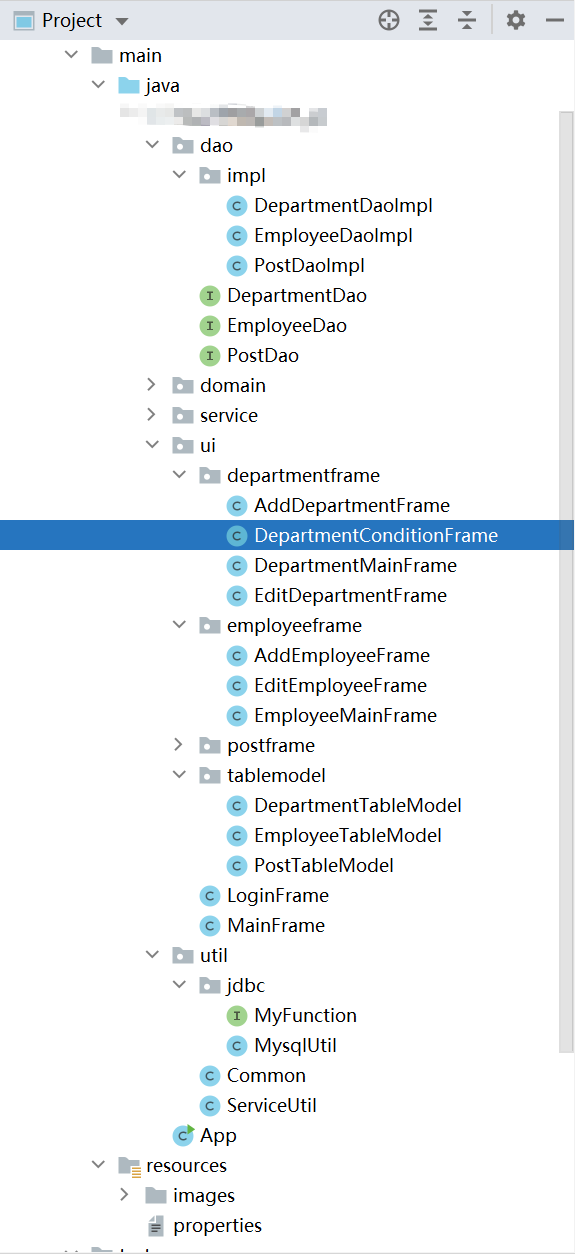

 浙公网安备 33010602011771号