

在学习ControlTemplate示例时,发现有一些template中元素名称以PART_开头,在《Windows Presentation Foundation Unleashed》中也提到了。
在WPF自带的templdate中有很多以PART_开头的元素,这些元素都是用TemplatePartAttribute标记过,表示如果用户想自定义模版,必须提供同名及同类型的元素。原因是WPF自带的控件后台逻辑会与这些元素交互,比如ProgressBar中的进度条长度,这个是动态的,由后台代码指定的,再比如ComboBox,下拉列表,这个是Popup元素构成的,我们在实现template时,也有一定包含同名的Popup元素,也就是PART_Popup。周银辉的文章写的挺好。
如果不提供同名,同类型的元素,那就需要自己处理相关的逻辑,需要额外的工作量。比如《Windows Presentation Foundation Unleashed》中实现的圆形的ProgressBar。
《Windows Presentation Foundation Unleashed》中提到的PART_打头的控件:
ProgressBar中的PART_Indicator和PART_Track,用来保证进度条能正确的显示当前进度。
<ResourceDictionary
  xmlns="http://schemas.microsoft.com/winfx/2006/xaml/presentation"
  xmlns:x="http://schemas.microsoft.com/winfx/2006/xaml" >

  <ResourceDictionary.MergedDictionaries>
    <ResourceDictionary Source="Shared.xaml" />
  </ResourceDictionary.MergedDictionaries>

  <!-- SimpleStyles: ProgressBar -->
  <!--<SnippetProgressBar>-->
    <!--Background="{StaticResource PressedBrush}"-->
    <!--Background="{StaticResource DarkBrush}"-->
    <Style x:Key="{x:Type ProgressBar}"
       TargetType="{x:Type ProgressBar}">
    <Setter Property="Template">
      <Setter.Value>
        <ControlTemplate TargetType="{x:Type ProgressBar}">
          <Grid MinHeight="14" MinWidth="200">
            <Border
              Name="PART_Track"
              CornerRadius="2"

              Background ="Blue"
              BorderBrush="{StaticResource SolidBorderBrush}"
              BorderThickness="1" />
            <Border
              Name="PART_Indicator"
              CornerRadius="2"
              Background="Red"
              BorderBrush="{StaticResource NormalBorderBrush}"
              BorderThickness="1"
              HorizontalAlignment="Left" />
          </Grid>
        </ControlTemplate>
      </Setter.Value>
    </Setter>
  </Style>
  <!--</SnippetProgressBar>-->
</ResourceDictionary>
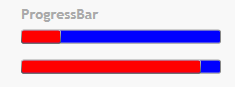
ComboBox中Popup元素名为PART_Popup,使得ComboBox的DropDownClosed事件能正常响应。为名PART_EditableTextBox的是TextBox,允许用户输入。
TextBox中必须有一个名为PART_ContentHost的元素,类型为ScrollViewer 或 AdornerDecorator。
有哪些内部定义的元素被指定了TemplatePartAtrribute呢,可以在WPF Control库中查到,比如ProgressBar:
定义如下:
[TemplatePartAttribute(Name = "PART_Track", Type = typeof(FrameworkElement))]
[TemplatePartAttribute(Name = "PART_Indicator", Type = typeof(FrameworkElement))]
public class ProgressBar : RangeBase
MSDN上的ControlTemplate示例也是很好的学习参考。
