
07_单片机_按键
1. 独立按键
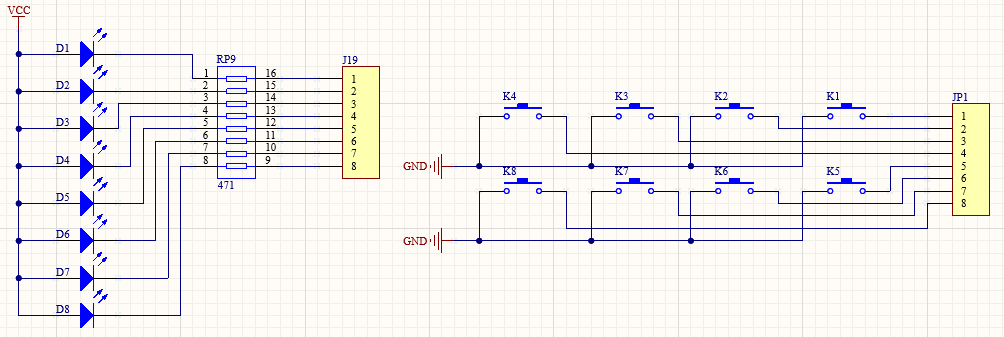
1.1. 按键 & LED:按下按钮 K1,LED1会点亮


 1 #include <REG51.H>
 2
 3
 4 sbit key1 = P1^0;
 5 sbit led1 = P0^0;
 6
 7 void main(void)
 8 {
 9     while(1)
10     {
11         if(key1 == 0)
12         {
13             led1 = 0;
14         }
15         else
16         {
17             led1 = 1;
18         }
19     }
20 }
上述代码检测单个按键按下,若是增加检测K2动作
 1 #include <REG51.H>
 2
 3
 4 sbit key1 = P1^0;
 5 sbit led1 = P0^0;
 6 sbit key2 = P1^1;
 7 sbit led2 = P0^1;
 8
 9 void main(void)
10 {
11     while(1)
12     {
13         if(key1 == 0)
14         {
15             led1 = 0;
16         }
17         else
18         {
19             led1 = 1;
20         }
21
22         if(key2 == 0)
23         {
24             led2 = 0;
25         }
26         else
27         {
28             led2 = 1;
29         }
30     }
31 }
若再增加K3,K4等,代码量就会增加,若是修改代码,会繁琐,故而需要优化;
 1 #include <REG51.H>
 2
 3
 4 void main(void)
 5 {
 6     while(1)
 7     {
 8         P0 = P1 & 0xff;
 9     }
10 }
1.2. 按键&数码管,每按下按键Key1,数码管显示数字+1
 1 #include <REG51.H>
 2
 3 typedef unsigned char u8;
 4 /*************函数声明*************/
 5 char keypress(u8 num);
 6 void delay10ms(void);
 7
 8 /*************定义****************/
 9 sbit key1 = P0^0;
10
11 u8 nums[] =
12 {0xc0, 0xf9, 0xa4, 0xb0, 0x99, 0x92, 0x82, 0xd8, 0x80};
13
14 // 主函数
15 void main(void)
16 {
17     u8 i=0;
18   P1 = nums[i];
19     while(1)
20     {
21         i = keypress(i);
22         P1 = nums[i];
23     }
24 }
25
26 // 检测按键函数
27 char keypress(u8 num)
28 {
29     if(key1 == 0)
30     {
31         num++;
32         if(num > 8)
33         {
34             num = 0;
35         }
36     }
37     return num;
38 }
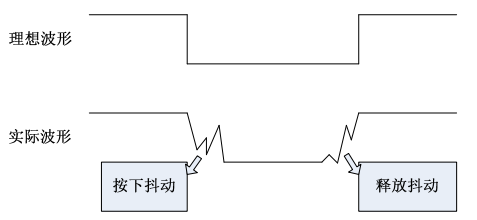
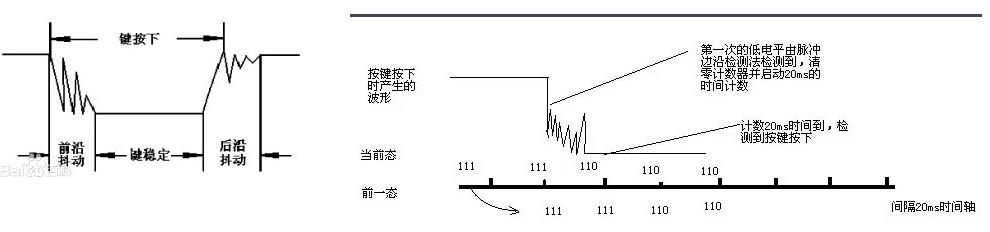
将上述代码烧录至单片机运行,发现按键按一下会出现+1,+2,+3等不稳定的现象,之所以发生这类现象,这是由于按键抖动所引发的,实际按键很难实现理想波形
解决方案:a. 硬件设计时实现消除抖动问题;b.软件实现消除抖动(如图右,按键按下后,延时20ms,再检测下按键是否按下),下述代码是通过软件实现。
 1 #include <REG51.H>
 2
 3 typedef unsigned char u8;
 4 /*************函数声明*************/
 5 char keypress(u8 num);
 6 void delay20ms(void);
 7
 8 /*************定义****************/
 9 sbit key1 = P0^0;
10
11 u8 nums[] =
12 {0xc0, 0xf9, 0xa4, 0xb0, 0x99, 0x92, 0x82, 0xd8, 0x80};
13
14 // 主函数
15 void main(void)
16 {
17     u8 i=0;
18   P1 = nums[i];
19     while(1)
20     {
21         i = keypress(i);
22         P1 = nums[i];
23     }
24 }
25
26 // 检测按键函数
27 char keypress(u8 num)
28 {
29     if(key1 == 0)
30     {
31         delay20ms();
32         if(key1 == 0)
33         {
34             num++;
35             if(num > 8)
36             {
37                 num = 0;
38             }
39         }
40     }
41     return num;
42 }
43
44 // 延时函数
45 void delay20ms(void)   //误差 0us
46 {
47     unsigned char a,b;
48     for(b=215;b>0;b--)
49         for(a=45;a>0;a--);
50 }
1.3. 按键Key1~Key8 & 数码管显示对应的数字
 1 #include <REG51.H>
 2
 3 typedef unsigned char u8;
 4 /*************函数声明*************/
 5
 6
 7 /*************定义****************/
 8 sbit key1 = P0^0;
 9
10 u8 nums[] =
11 {0xc0, 0xf9, 0xa4, 0xb0, 0x99, 0x92, 0x82, 0xd8, 0x80};
12
13 // 主函数
14 void main(void)
15 {
16     u8 j, i=0;
17   P1 = nums[i];
18     while(1)
19     {
20         for(j=0; j<8; j++)
21         {
22             if((P0 & (0x01<<j)) == 0)
23                 P1 = nums[j+1];
24         }
25     }
26 }
1.4. 完整的按键事件:按下(电平由High变Low),弹起(电平由Low变High),类似Labview按钮的机械动作第三状态:“单击时转换并保持到鼠标释放”
按钮机械动作,可以参阅Labview:https://www.cnblogs.com/ybqjymy/p/13666279.html
上述1.2中的代码,按键若是一直按下不松开,数码管数字显示一直变化。优化代码,实现Key1按下,数码管显示+1,数值不会再变化,松开Key1,数值不变化
![]() View Code1 #include <REG51.H> 2 3 typedef unsigned char u8; 4 /*************函数声明*************/ 5 char keypress(u8 num); 6 void delay20ms(void); 7 8 /*************定义****************/ 9 sbit key1 = P0^0; 10 u8 flag = 0; 11 u8 nums[] = 12 {0xc0, 0xf9, 0xa4, 0xb0, 0x99, 0x92, 0x82, 0xd8, 0x80}; 13 14 // 主函数 15 void main(void) 16 { 17 u8 i=0; 18 P1 = nums[i]; 19 while(1) 20 { 21 i = keypress(i); 22 if(flag == 1) 23 { 24 P1 = nums[i]; 25 } 26 } 27 } 28 29 // 检测按键函数 30 char keypress(u8 num) 31 { 32 if(key1 == 0) 33 { 34 delay20ms(); 35 if(key1 == 0 && flag == 0) 36 { 37 // 按键确认被按下 38 flag = 1; 39 num++; 40 if(num > 8) 41 { 42 num = 0; 43 } 44 } 45 } 46 else 47 { 48 flag = 0; 49 } 50 return num; 51 } 52 53 // 延时函数 54 void delay20ms(void) //误差 0us 55 { 56 u8 a,b; 57 for(b=215;b>0;b--) 58 for(a=45;a>0;a--); 59 }
View Code1 #include <REG51.H> 2 3 typedef unsigned char u8; 4 /*************函数声明*************/ 5 char keypress(u8 num); 6 void delay20ms(void); 7 8 /*************定义****************/ 9 sbit key1 = P0^0; 10 u8 flag = 0; 11 u8 nums[] = 12 {0xc0, 0xf9, 0xa4, 0xb0, 0x99, 0x92, 0x82, 0xd8, 0x80}; 13 14 // 主函数 15 void main(void) 16 { 17 u8 i=0; 18 P1 = nums[i]; 19 while(1) 20 { 21 i = keypress(i); 22 if(flag == 1) 23 { 24 P1 = nums[i]; 25 } 26 } 27 } 28 29 // 检测按键函数 30 char keypress(u8 num) 31 { 32 if(key1 == 0) 33 { 34 delay20ms(); 35 if(key1 == 0 && flag == 0) 36 { 37 // 按键确认被按下 38 flag = 1; 39 num++; 40 if(num > 8) 41 { 42 num = 0; 43 } 44 } 45 } 46 else 47 { 48 flag = 0; 49 } 50 return num; 51 } 52 53 // 延时函数 54 void delay20ms(void) //误差 0us 55 { 56 u8 a,b; 57 for(b=215;b>0;b--) 58 for(a=45;a>0;a--); 59 }
先留个印象

 浙公网安备 33010602011771号