

2024-11-13 uniapp自定义全局弹窗(h5端)
效果:

代码目录:
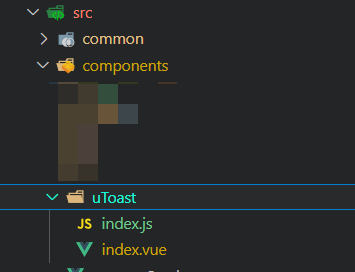
新建uToast,里面建2个文件
index.js:
import fullNameVue from './index.vue'

const FullToast = {};

FullToast.install = function (Vue, option) {
    const FullNameInstance = Vue.extend(fullNameVue);
    let name;
    const initInstance = () => {
        name = new FullNameInstance();
        let nameSpan = name.$mount().$el;
        document.body.appendChild(nameSpan);
    }
    Vue.prototype.$uToast = {
        showToast(option) {
            initInstance();
            if (typeof option === 'string') {
                name.firstName = option;
            } else if (typeof option === 'object') {
                Object.assign(name, option);
            }
            return initInstance;
        }
    };
}

export default FullToast;
index.vue:
<template>
    <div class="fix-modal">
        <div class="fix-modal-content">
            <img class="fix-modal-content-img" :src="img" alt="">
            <div class="fix-modal-content-action">
                <div class="fix-modal-content-action-title">如需帮助,请联系我们</div>
                <div class="fix-modal-content-action-btn">点击联系平台客服</div>
            </div>
        </div>
    </div>
</template>

<script>
export default {
    name: 'dialog',
    data() {
        return {
            visible: true,
            img: '../static/modal.png'
        };
    },
};
</script>

<style lang='scss' scoped>
.fix-modal {
    position: fixed;
    top: 0;
    left: 0;
    right: 0;
    bottom: 0;
    margin: auto;
    width: 100vw;
    height: 100vh;
    background-color: rgba(0, 0, 0, 0.5);
    z-index: 99999999999999;
    overflow-y: hidden;
    display: flex;
    align-items: center;
    justify-content: center;

    .fix-modal-content {
        width: 80vw;
        height: auto;
        background-color: #fff;
        border-radius: 4px;
        padding: 0 20px;

        .fix-modal-content-img {
            width: 100%;
        }

        .fix-modal-content-action {
            border: 1px solid #d5e2f5;
            border-radius: 20px;
            display: flex;
            align-items: center;
            justify-content: center;
            padding: 20px;
            flex-direction: column;
            gap: 20px;
            position: relative;
            top: -4px;

            .fix-modal-content-action-title {}

            .fix-modal-content-action-btn {
                background-color: #0067fd;
                color: #fff;
                border-radius: 50px;
                width: 100%;
                padding: 20px;
                display: flex;
                align-items: center;
                justify-content: center;
                flex-direction: column;
            }

            margin-bottom: 16px;
        }
    }
}
</style>
在main.js中引入并使用:
import uToast from '@/components/uToast/index'
Vue.use(uToast);
在vue中引用:
this.$uToast.showToast();
在js中使用:
import Vue from 'vue'
const vm = new Vue()
vm.$uToast.showToast()

 浙公网安备 33010602011771号