Windows下配置VSCode中的C语言环境
参考视频网址:https://www.bilibili.com/video/BV1Cu411y7vT/?spm_id_from=333.337.search-card.all.click&vd_source=1d648ac49599b97d15756703b195c451
ps.C/C++版本不能太新,v1.8.2版本可自动生成完整的lauch.json文件
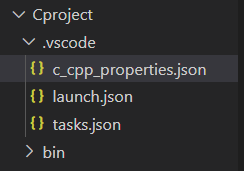
附我的.vscode文件夹下的代码文件
lauch.json文件
{
    // 使用 IntelliSense 了解相关属性。
    // 悬停以查看现有属性的描述。
    // 欲了解更多信息,请访问: https://go.microsoft.com/fwlink/?linkid=830387
    "version": "0.2.0",
    "configurations": [

        {
            "name": "gcc.exe - 生成和调试活动文件",
            "type": "cppdbg",
            "request": "launch",
            "program": "${fileDirname}\\bin\\${fileBasenameNoExtension}.exe",
            "args": [],
            "stopAtEntry": false,
            "cwd": "${fileDirname}",
            "environment": [],
            "externalConsole": true,
            "MIMode": "gdb",
            "miDebuggerPath": "D:\\RunEnvironment\\x86_64-8.1.0-release-posix-sjlj-rt_v6-rev0\\mingw64\\bin\\gdb.exe",
            "setupCommands": [
                {
                    "description": "为 gdb 启用整齐打印",
                    "text": "-enable-pretty-printing",
                    "ignoreFailures": true
                },
                {
                    "description": "将反汇编风格设置为 Intel",
                    "text": "-gdb-set disassembly-flavor intel",
                    "ignoreFailures": true
                }
            ],
            "preLaunchTask": "C/C++: gcc.exe 生成活动文件"
        }
    ]
}
tasks.json文件
{
    "tasks": [
        {
            "type": "cppbuild",
            "label": "C/C++: gcc.exe 生成活动文件",
            "command": "D:\\RunEnvironment\\x86_64-8.1.0-release-posix-sjlj-rt_v6-rev0\\mingw64\\bin\\gcc.exe",
            "args": [
                "-fdiagnostics-color=always",
                "-g",//-g参数所生成的可执行文件为Debug版本,-o2参数所生成的可执行文件为Release版本
                "${file}",
                //"${fileDirname}\\*.c",// 多文件编译,开启这一条,在目录创建一个bin文件夹,屏蔽上一条"${file}"
                "-o",
                "${fileDirname}\\bin\\${fileBasenameNoExtension}.exe",
                "-fexec-charset=GBK"
            ],
            "options": {
                "cwd": "${fileDirname}"
            },
            "problemMatcher": [
                "$gcc"
            ],
            "group": {
                "kind": "build",
                "isDefault": true
            },
            "detail": "调试器生成的任务。"
        }
    ],
    "version": "2.0.0"
}
c_cpp_properties.json
{
    "configurations": [
        {
            "name": "Win32",
            "includePath": [
                "${workspaceFolder}/**"
            ],
            "defines": [
                "_DEBUG",
                "UNICODE",
                "_UNICODE"
            ],
            "cStandard": "c17",
            "cppStandard": "c++17",
            "intelliSenseMode": "gcc-x64",
            "compilerPath": "D:\\RunEnvironment\\x86_64-8.1.0-release-posix-sjlj-rt_v6-rev0\\mingw64\\bin\\gcc.exe"
        }
    ],
    "version": 4
}
目录安排

 浙公网安备 33010602011771号