Selenium实战:IDEA 创建java项目配置selenium
一、Selenium环境配置方法1: selenium-java-3.141.59.zip
官方下载地址: http://www.seleniumhq.org/download/

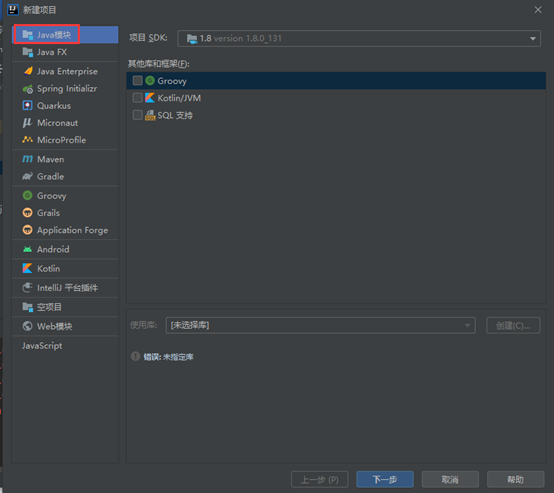
1. IDEA创建JAVA项目,直接点击 下一步 到 完成
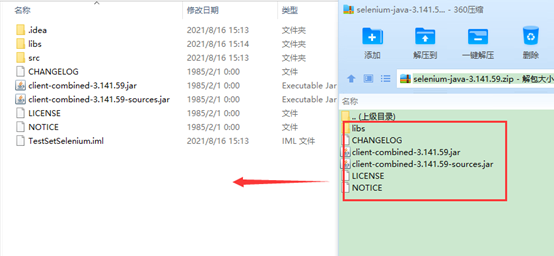
2. 解压selenium-java-3.141.59.zip文件到java项目 TestSetSelenium
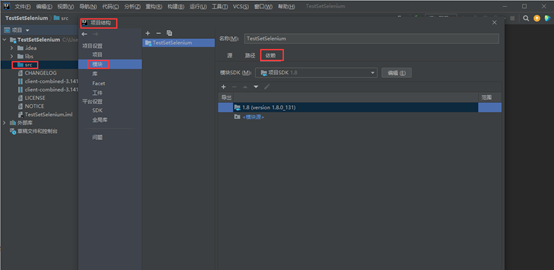
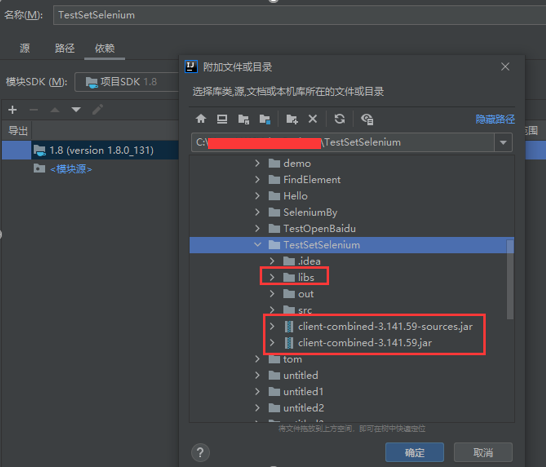
3. 双击项目的src打开项目结构,或右键-打开模块设置,选择模块-依赖:如下图
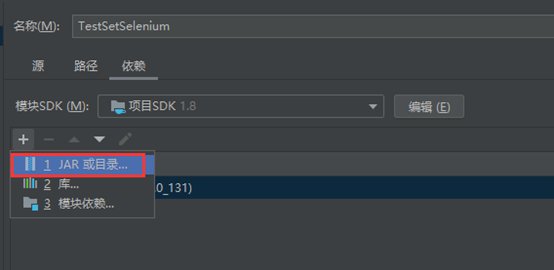
4. 依赖中点击+号,选择JAR或目录
5. 选择项目下的已解压selenium-java-3.141.59后的lib目录及两个jar,点击确定完成即可。
二、Selenium环境配置方法2: selenium-server-standalone-3.141.59.jar
官方下载地址: http://www.seleniumhq.org/download/

操作步骤同 方法1,在项目结构中添加jar即可
selenium-server-standalone 和selenium-server, selenium-java的区别
selenium1.0还是 seleniumRC的时候,需要启动selenium-server-standalone包,用来做server。

selenium RC通过server来给code和broswer建立通道,同时,该jar包 包括我们用得所有的方法。

在新版的selenium中,即selenium2.0-webdriver,不需要这个selenium-server-standalone这个包了。

WebDriver api 会直接和浏览器的native交互,现在我们用selenium-java.jar包来替代。

webdriver用于在本地执行,如果要远程自动化,就要+一个selenium server包
三、下载selenium3.0各个浏览器驱动:
Firefox浏览器驱动:https://github.com/mozilla/geckodriver/releases
Chrome浏览器驱动:https://sites.google.com/a/chromium.org/chromedriver/home
IE浏览器驱动:http://selenium-release.storage.googleapis.com/index.html
Edge浏览器驱动:https://developer.microsoft.com/en-us/microsoft-edge/tools/webdriver
Opera浏览器驱动:https://github.com/operasoftware/operachromiumdriver/releases
PhantomJS浏览器驱动:http://phantomjs.org/
四、设置浏览器驱动:
将上述下载的各个浏览器驱动放在同一个目录文件,如E:\drivers目录下;
我的电脑–>属性–>系统设置–>高级–>环境变量–>系统变量–>Path,将“E:\driver”目录添加到Path的值中;
五、运行selenium,测试各个驱动是否可以正常使用,以chrome为例:
package javaBase;
import org.openqa.selenium.WebDriver;
import org.openqa.selenium.chrome.ChromeDriver;

public class TestSetSelenium {
    public static void main(String[] args) {
        //测试谷歌浏览器
        WebDriver driver = new ChromeDriver();

        //打开百度
        driver.get("http://www.baidu.com");
        //获取标题
        String title = driver.getTitle();
        //打印标题
        System.out.printf(title);
        //关闭浏览器
        driver.close();

    }

}
如果chrome浏览器驱动没有放在浏览器对应的默认安装路径下,则会报以下错误:
Exception in thread "main" java.lang.IllegalStateException: The path to the driver executable must be set by the webdriver.chrome.driver system property; for more information, see https://github.com/SeleniumHQ/selenium/wiki/ChromeDriver. The latest version can be downloaded from http://chromedriver.storage.googleapis.com/index.html
解决方法:
方法1. 设置驱动路径,如:
\\如果未将驱动放到system32下,则需要以下一行设置驱动所在位置

System.setProperty("webdriver.chrome.driver","C:\\drivers\\chromedriver.exe");

\\如果是firefox浏览器,需要把webdriver.chrome.driver替换成webdriver.firefox.bin,后面的是对应浏览器驱动的存放路径
\\说明:可以设置环境变量替代绝对存放路径
方法2:将驱动文件放到system32下

 浙公网安备 33010602011771号