
【ASP.Net】创建API帮助文档
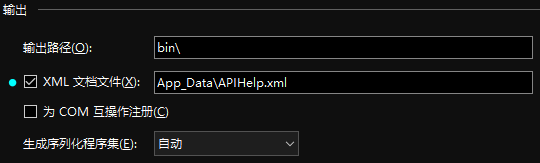
右击API项目属性 - 生成 - 勾选生成xml文档,为xml文档命名,这会为项目生成一个xml格式的说明性文档
打开项目目录,Areas - HelpPage - App_Start - HelpPageConfig.cs,在Register方法中注册xml说明文档
public static void Register( HttpConfiguration config )
{
config.SetDocumentationProvider( new XmlDocumentationProvider( HttpContext.Current.Server.MapPath( "~/App_Data/APIHelp.xml" ) ) );
}
{
config.SetDocumentationProvider( new XmlDocumentationProvider( HttpContext.Current.Server.MapPath( "~/App_Data/APIHelp.xml" ) ) );
}
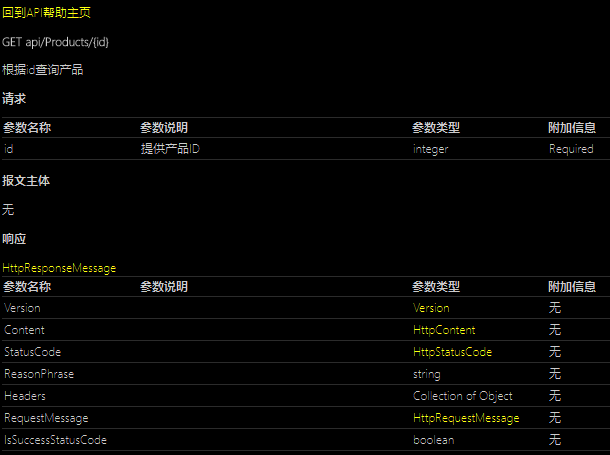
在你的Api控制器中为每一个Action操作添加注释,帮助文档页面会自动显示这些注释信息。
/// <summary>
/// 根据id查询产品
/// </summary>
/// <param name="id">提供产品ID</param>
/// <returns></returns>
public HttpResponseMessage GetProduct( int id )
{
Product item = productRepository.Get( id );
return item == null ? throw new HttpResponseException( HttpStatusCode.NotFound ) : Request.CreateResponse( HttpStatusCode.OK, JsonConvert.SerializeObject( item ) );
}
/// 根据id查询产品
/// </summary>
/// <param name="id">提供产品ID</param>
/// <returns></returns>
public HttpResponseMessage GetProduct( int id )
{
Product item = productRepository.Get( id );
return item == null ? throw new HttpResponseException( HttpStatusCode.NotFound ) : Request.CreateResponse( HttpStatusCode.OK, JsonConvert.SerializeObject( item ) );
}
打开以下项目目录的文件可以修改帮助文档页面及其详细页面的部分英文说明为中文:
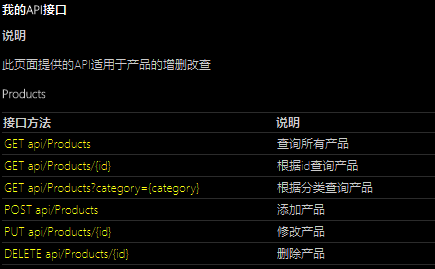
Areas - HelpPage - Views - Help - Index.cshtml,可修改帮助文档页面顶部的文字描述。
Areas - HelpPage - Views - Help - Api.cshtml,可修改帮助文档详细页面顶部的回到帮助主页的超链接。
Areas - HelpPage - Views - Help - DisplayTemplates - ApiGroup.cshtml,可修改帮助文档页面的列头为中文。
Areas - HelpPage - Views - Help - DisplayTemplates - HelpPageApiModel.cshtml,可修改帮助文档API页面的列头为中文。
Areas - HelpPage - Views - Help - DisplayTemplates - Parameters.cshtml,可修改帮助文档API详细页面的列头为中文。

 浙公网安备 33010602011771号