


SpringMVC——文件上传
文件上传表单的method必须设置为POST,并将enctype设置为multipart/form-data。一旦设置enctype为multipart/form-data,浏览器会采用二进制流的方式来处理表单数据,而对于文件上传的处理则涉及到在服务器端解析原始的HTTP响应。
SpringMVC使用Apache Commons FileUpload技术实现了一个MultipartResolver实现类:CommonsMultipartResolver。
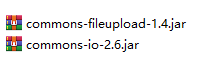
要实现文件上传,不仅需要SpringMVC的jar包,还需要commons-fileupload和commons-io两个jar包
SpringMVC会将上传文件绑定到MultipartFile对象中,MultipartFile对象中常用方法如下:
byte[] getBytes() 获取文件数据。
String getContentType() 获取文件MIME类型,如image/jpeg等
InputStream getInputStream() 获取文件流
String getName() 获取表单中文组件的名称
String getOriginalFilename() 获取上传文件的原名
long getSize() 获取文件的字节大小,单位byte
boolean isEmpty() 是否有上传的文件
void transferTo(File dest) 将上传文件保存到一个目标文件中
/FileUploadTest/WebContent/WEB-INF/content/uploadForm.jsp
<%@ page language="java" contentType="text/html; charset=UTF-8"
    pageEncoding="UTF-8"%>
<!DOCTYPE html>
<html>
<head>
<meta charset="UTF-8">
<title>文件上传</title>
</head>
<body>
<h2>文件上传</h2>
<!-- 文件上传的表单编码类型必须是"multipart/form-data" -->
<form action="upload" enctype="multipart/form-data" method="post">
  <table>
    <tr>
      <td>文件描述:</td>
      <td><input type="text" name="description"></td>
    </tr>
    <tr>
      <td>请选择文件:</td>
      <td><input type="file" name="file"></td>
    </tr>
    <tr>
      <td><input type="submit" value="上传"></td>
    </tr>
  </table>
</form>
</body>
</html>
/FileUploadTest/src/com/spring/file/controller/FileUploadController.java
package com.spring.file.controller;

import java.io.File;

import javax.servlet.http.HttpServletRequest;

import org.apache.commons.io.FileUtils;
import org.springframework.http.HttpHeaders;
import org.springframework.http.HttpStatus;
import org.springframework.http.MediaType;
import org.springframework.http.ResponseEntity;
import org.springframework.stereotype.Controller;
import org.springframework.ui.Model;
import org.springframework.web.bind.annotation.ModelAttribute;
import org.springframework.web.bind.annotation.RequestMapping;
import org.springframework.web.bind.annotation.RequestMethod;
import org.springframework.web.bind.annotation.RequestParam;
import org.springframework.web.multipart.MultipartFile;

import com.spring.file.bean.User;

@Controller
public class FileUploadController {

    @RequestMapping(value="/uploadform")
    public String uploadForm() {
        return "uploadForm";
    }
    /**
     * 上传文件
     * @param request
     * @param description
     * @param file
     * @return
     * @throws Exception
     */
    @RequestMapping(value="/upload",method=RequestMethod.POST)
    public String upload(HttpServletRequest request,
            @RequestParam("description") String description,
            @RequestParam("file") MultipartFile file) throws Exception{
        System.out.println(description);
        //如果文件不为空,写入上传路径
        if(!file.isEmpty()) {
            //上传文件路径
            String path = request.getServletContext().getRealPath("/images/");
            //上传文件名
            String filename = file.getOriginalFilename();//获取文件全名包括后缀
            File filepath = new File(path,filename);
            //判断路径是否存在,如果不存在就创建一个
            if(!filepath.getParentFile().exists()) {
                filepath.getParentFile().mkdirs();
            }
            //将文件上传保存到一个目标文件中
            file.transferTo(new File(path+File.separator+filename));//File.separator系统文件分隔符
            return "success";
        }else {
            return "error";
        }
    }

}
SpringMVC上下文中默认没有装配MultipartResolver,需要在配置文件中配置MultipartResolver
/FileUploadTest/WebContent/WEB-INF/springmvc-config.xml
<!-- 文件上传配置 -->
    <bean id="multipartResolver" class="org.springframework.web.multipart.commons.CommonsMultipartResolver">
        <!-- 上传文件大小限制,上限为10MB,单位为字节 -->
        <property name="maxUploadSize">
            <value>10485760</value>
        </property>
        <!-- 请求编码格式,必须和JSP的pageEncoding属性一致,以便正确读取表单内容,默认为ISO-8859-1 -->
        <property name="defaultEncoding">
            <value>UTF-8</value>
        </property>
    </bean>
测试结果:以360浏览器为例
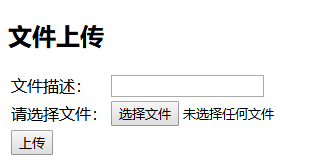
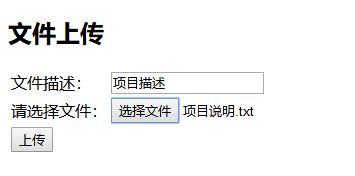
点击上传会把文件保存起来。

 浙公网安备 33010602011771号