


SpringMVC——select和option、options标签
一、select和option标签
/FormTest/src/org/fkit/controller/UserController.java
@RequestMapping(value="selectform",method=RequestMethod.GET)
    public String selectForm(Model model) {
        User user = new User();
        user.setDeptId(2);
        model.addAttribute("user", user);
        return "content/selectForm.jsp";
    }
/FormTest/WebContent/content/selectForm.jsp
<%@ page language="java" contentType="text/html; charset=UTF-8"
    pageEncoding="UTF-8"%>
    <%@ taglib prefix="form" uri="http://www.springframework.org/tags/form" %>
<!DOCTYPE html>
<html>
<head>
<meta charset="UTF-8">
<title>select</title>
</head>
<body>
<form:form modelAttribute="user" method="post" action="">
<table>
    <tr>
        <td>部门:</td>
        <td>
            <form:select path="deptId">
                <form:option value="1">开发部</form:option>
                <form:option value="2">销售部</form:option>
                <form:option value="3">人事部</form:option>
            </form:select>
        </td>
    </tr>
</table>
</form:form>
</body>
</html>
测试结果:

二、select标签
/FormTest/src/org/fkit/controller/UserController.java
@RequestMapping(value="selectform1", method=RequestMethod.GET)
    public String slectForm1(Model model) {
        User user = new User();
        user.setDeptId(2);
        model.addAttribute("user", user);
        Map<Integer,String> deptMap = new HashMap<Integer,String>();
        deptMap.put(1, "开发部");
        deptMap.put(2, "销售部");
        deptMap.put(3, "人事部");
        model.addAttribute("deptMap", deptMap);
        return "content/selectForm1.jsp";
    }
/FormTest/WebContent/content/selectForm1.jsp
<%@ page language="java" contentType="text/html; charset=UTF-8"
    pageEncoding="UTF-8"%>
    <%@ taglib prefix="form" uri="http://www.springframework.org/tags/form" %>
<!DOCTYPE html>
<html>
<head>
<meta charset="UTF-8">
<title>Insert title here</title>
</head>
<body>
<form:form modelAttribute="user" method="post" action="">
<table>
    <tr>
        <td>部门:</td>
        <td>
        <form:select path="deptId" items="${deptMap }" />
        </td>
    </tr>
</table>
</form:form>
</body>
</html>
测试结果:

三、select和options标签
/FormTest/src/org/fkit/controller/UserController.java
@RequestMapping(value="selectform2", method=RequestMethod.GET)
    public String slectForm2(Model model) {
        User user = new User();
        user.setDeptId(2);
        model.addAttribute("user", user);
        Map<Integer,String> deptMap = new HashMap<Integer,String>();
        deptMap.put(1, "开发部");
        deptMap.put(2, "销售部");
        deptMap.put(3, "人事部");
        model.addAttribute("deptMap", deptMap);
        return "content/selectForm2.jsp";
    }
/FormTest/WebContent/content/selectForm2.jsp
<%@ page language="java" contentType="text/html; charset=UTF-8"
    pageEncoding="UTF-8"%>
    <%@ taglib prefix="form" uri="http://www.springframework.org/tags/form" %>
<!DOCTYPE html>
<html>
<head>
<meta charset="UTF-8">
<title>Insert title here</title>
</head>
<body>
<form:form modelAttribute="user" method="post" action="">
<table>
    <tr>
        <td>部门:</td>
        <td>
        <form:select path="deptId">
            <form:options items="${deptMap }"/>
        </form:select>
        </td>
    </tr>
</table>
</form:form>
</body>
</html>
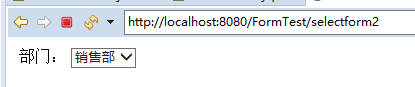
测试结果:
四、select和options标签——数据用bean对象传输
/FormTest/src/org/fkit/controller/UserController.java
@RequestMapping(value="selectform3", method=RequestMethod.GET)
    public String slectForm3(Model model) {
        User user = new User();
        user.setDeptId(2);
        model.addAttribute("user", user);
        List<Dept> deptList = new ArrayList<Dept>();
        deptList.add(new Dept(1,"开发部"));
        deptList.add(new Dept(2,"销售部"));
        deptList.add(new Dept(3,"人事部"));
        model.addAttribute("deptList", deptList);
        return "content/selectForm3.jsp";
    }
/FormTest/WebContent/content/selectForm3.jsp
<%@ page language="java" contentType="text/html; charset=UTF-8"
    pageEncoding="UTF-8"%>
    <%@ taglib prefix="form" uri="http://www.springframework.org/tags/form" %>
<!DOCTYPE html>
<html>
<head>
<meta charset="UTF-8">
<title>Insert title here</title>
</head>
<body>
<form:form modelAttribute="user" method="post" action="">
<table>
    <tr>
        <td>部门:</td>
        <td>
        <form:select path="deptId">
            <form:options items="${deptList}" itemLabel="name" itemValue="id"/>
        </form:select>
        </td>
    </tr>
</table>
</form:form>
</body>
</html>
测试结果:


 浙公网安备 33010602011771号